
GLCM图像中的黑色空间
我试图用Haralick描述的GLCM (能量、同质性等)来计算一些纹理度量。一系列的4波段(R,G,B,NIR)航空照片,我有。我已经在一个子集上尝试过了,但是我最终得到的图像大多是空白的。我目前的理解是,这与灰度缩放和levels参数有关,但我无法理解。
我的日期非常大(几GB),因此我试图通过使用RIOS模块(将图像读入为400×400×nband numpy数组,处理数据并写入输出映像)来提高效率。
我的输入场景可以找到这里 (200 MB)。
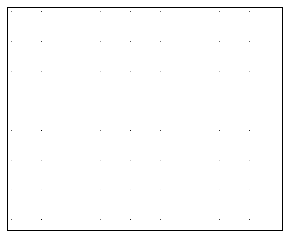
我的输出图像看起来像(这可能很难看到,因为黑色像素非常小):
我的代码是:
#Set up input and output filenames
infiles = applier.FilenameAssociations()
infiles.image1 = "infile.tif"

outfiles = applier.FilenameAssociations()
outfiles.outimage = "outfile.tif"

controls = applier.ApplierControls()
controls.progress = cuiprogress.CUIProgressBar()
# I ultimately want to use a window here
# which RIOS easily allows you to set up.
# For a 3x3 the overlap is 1, 5x5 overlap is 2 etc
#controls.setOverlap(4)

def doFilter(info, infiles, outfiles, controls=controls):
    grayImg = img_as_ubyte(color.rgb2gray(infiles.image1[3]))
    g = greycomatrix(grayImg, distances=[1], angles=[0, np.pi/4, np.pi/2, 3*np.pi/4], symmetric=True, normed=True)
    filtered = greycoprops(g, 'energy')
    # create 3d image from 2d array
    outfiles.outimage = numpy.expand_dims(filtered, axis=0)


applier.apply(doFilter, infiles, outfiles, controls=controls)显然,这里出现了一些问题,因为我的输出与我预期的不一样。我猜这与“级别”参数有关。我在这里得到了一个解释:GLCM结果中的黑线,它很好地解释了参数,但是我无法改进我的结果。
有人能向我解释一下为什么我的结果如图所示,以及我怎样才能补救它?
回答 1
Stack Overflow用户
发布于 2017-04-06 23:26:34
下面的代码从你的tif图像的NIR波段计算出与偏移量“1像素偏移”相对应的GLCM:
import numpy as np
from skimage import io
from skimage.feature import greycomatrix, greycoprops

x = io.imread('m_2909112_se_15_1_20150826.tif')
nir = x[:, :, 3]

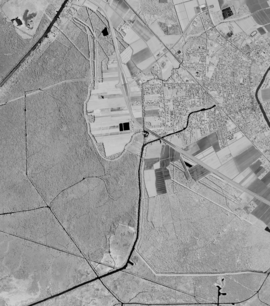
glcm = greycomatrix(nir, [1], [np.pi/2], levels=256, normed=True, symmetric=True)这就是nir的样子:
将参数normed设置为True的效果是将计算得到的GLCM除以其总和,从而使glcm的元素具有较小的值。这是一个样本:
In [48]: np.set_printoptions(precision=3)

In [49]: glcm[:5, :5, 0, 0]
Out[49]:
array([[  0.000e+00,   0.000e+00,   0.000e+00,   0.000e+00,   0.000e+00],
       [  0.000e+00,   2.725e-03,   6.940e-05,   3.725e-05,   2.426e-05],
       [  0.000e+00,   6.940e-05,   1.709e-04,   4.103e-05,   2.216e-05],
       [  0.000e+00,   3.725e-05,   4.103e-05,   4.311e-04,   4.222e-05],
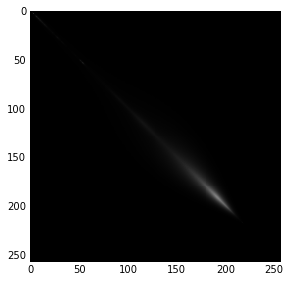
[ 0.000e+00, 2.426e-05, 2.216e-05, 4.222e-05, 5.972e-05]])要将glcm显示为图像,您需要重新设置它,例如:
from skimage.exposure import rescale_intensity
scaled = rescale_intensity(glcm[:,:,0,0])
io.imshow(scaled)
https://stackoverflow.com/questions/43266623
复制相似问题
腾讯云开发者

Copyright © 2013 - 2026 Tencent Cloud. All Rights Reserved. 腾讯云 版权所有
深圳市腾讯计算机系统有限公司 ICP备案/许可证号:粤B2-20090059  粤公网安备44030502008569号
腾讯云计算(北京)有限责任公司 京ICP证150476号 | 京ICP备11018762号