
OpenGL RGB DXT1压缩纹理mipmap上传
OpenGL RGB DXT1压缩纹理mipmap上传
提问于 2020-01-15 13:11:54
我试图上传GL_COMPRESSED_RGB_S3TC_DXT1_EXT格式mipmaped纹理级别使用PBO。该程序使用stb_resize.h和stb_dxt.h库对图像进行大小调整和压缩。
显然,图像压缩工作正常,但是上传任何mipmap级别都会产生以下结果:
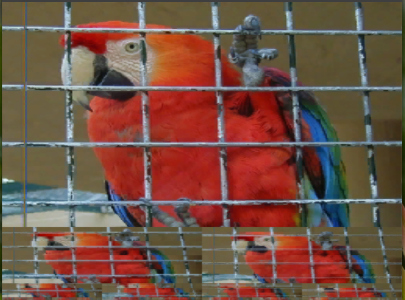
但是,如果我没有为纹理定义mipmap级别,它就会正确地呈现。而且,我不会从OpenGL中得到任何错误,因为我已经启用了GL_KHR_debug。
下面是用于上传mipmap的opengl代码,中间还有一些我自己的库代码:
// Load image:
auto img = loadImage2D("parrot.png");

// Resize the image to power-of-two
int max_mipmaps = 1;
unsigned int max_size = nextPow2(std::max(img.width, img.height));
for(int i = max_size; i > 4; i >>= 1)
    max_mipmaps++;

auto rimg = img.scaleCubic(max_size,max_size);

// Allocate PBO to source compressed mipmap levels from
handle_t pbo;
size_t pbosize = rimg.compressed_size();
glCreateBuffers(1, &pbo);
glBindBuffer(GL_PIXEL_UNPACK_BUFFER, pbo);
glBufferStorage(GL_PIXEL_UNPACK_BUFFER, pbosize, 0,
    GL_DYNAMIC_STORAGE_BIT|GL_MAP_WRITE_BIT|GL_MAP_READ_BIT|GL_MAP_PERSISTENT_BIT);
// Map the buffer
void * pbodata = (char*)glMapBufferRange(
    GL_PIXEL_UNPACK_BUFFER, 0, pbosize,
    GL_MAP_WRITE_BIT|GL_MAP_READ_BIT
    |GL_MAP_PERSISTENT_BIT
    |GL_MAP_FLUSH_EXPLICIT_BIT);

// Compress the image and write the data directly into PBO.
// compress_to() fmt returns GL_COMPRESSED_RGB_S3TC_DXT1_EXT
option_t fmt;
rimg.compress_to(pbodata, fmt);
glFlushMappedBufferRange(GL_PIXEL_UNPACK_BUFFER, 0, pbosize);

// Allocate the texture
glCreateTextures(GL_TEXTURE_2D, 1, &texture);
glBindTexture(GL_TEXTURE_2D, texture);
glTextureStorage2D(texture, max_mipmaps, fmt, rimg.width, rimg.width);
// Upload base image level.
glPixelStorei(GL_UNPACK_ALIGNMENT, 1);
glCompressedTextureSubImage2D(texture, 0, 0,0, rimg.width, rimg.height, fmt, rimg.compressed_size(), 0);
// Process and Upload mipmap levels.
unsigned int mipmapsize = max_size >> 1;
for(int i = 1; i < max_mipmaps && mipmapsize >= 4; ++i) {
    // Resize next mipmap level.
    rimg = img.scaleLinear(mipmapsize,mipmapsize);

    // Compress the image and write result to *pbodata
    rimg.compress_to(pbodata, fmt);
    glFlushMappedBufferRange(GL_PIXEL_UNPACK_BUFFER, 0, pbosize);

    // Upload mipmap image level.
    glCompressedTexSubImage2D(GL_TEXTURE_2D, i, 0,0, rimg.width, rimg.height, fmt, rimg.compressed_size(), 0);

    mipmapsize >>= 1;
}
// Discard the PBO
glUnmapNamedBuffer(pbo);
glBindBuffer(GL_PIXEL_UNPACK_BUFFER,0);
glDeleteBuffers(1, &pbo);

// Set texture params.
glTextureParameteri(texture, GL_TEXTURE_BASE_LEVEL, 0);
glTextureParameteri(texture, GL_TEXTURE_MAX_LEVEL, max_mipmaps - 1);
glTextureParameteri(texture, GL_TEXTURE_MIN_FILTER, GL_LINEAR_MIPMAP_LINEAR);
glTextureParameteri(texture, GL_TEXTURE_MAG_FILTER, GL_LINEAR)回答 1
Stack Overflow用户
回答已采纳
发布于 2020-01-15 14:20:59
执行glFlushMappedBufferRange将使而不是足以确保与GPU的适当同步。这就是这里似乎正在发生的事情:在GPU处理第一个glCompressedTexSubImage2D调用之前,在CPU上创建了整个mipmap金字塔。
作为对这个假设的快速和肮脏的测试,您可以在循环中添加一个glFinish。要正确地同步它,您可以使用GL同步对象,但是最好避免任何同步:只需使用一个足够大的PBO来保存整个mipmap金字塔数据。
页面原文内容由Stack Overflow提供。腾讯云小微IT领域专用引擎提供翻译支持
原文链接:
https://stackoverflow.com/questions/59752170
复制相关文章
相似问题
腾讯云开发者

Copyright © 2013 - 2026 Tencent Cloud. All Rights Reserved. 腾讯云 版权所有
深圳市腾讯计算机系统有限公司 ICP备案/许可证号:粤B2-20090059  粤公网安备44030502008569号
腾讯云计算(北京)有限责任公司 京ICP证150476号 | 京ICP备11018762号