
如何使用Swift在SceneKit中创建圆盘形光源
我希望创造一个光源,这将类似于太阳用SceneKit照亮地球的方式。这是一个业余天文学课程项目。因为太阳比地球大,一个全方位的SCNLight就不行了,因为它发出的光是从一个点发出的。太阳发出的光本质上是从一个很大的球体发出的,而不是一个点。
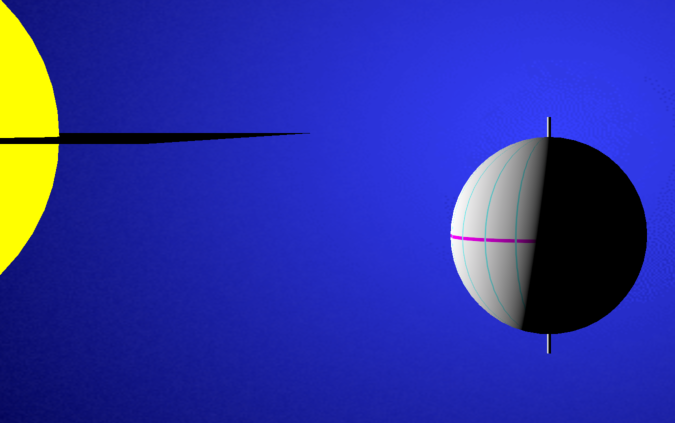
这张照片是使用全方位光源制作的,但并没有真实地显示地球的阴影区域。具体来说,北极没有照明,但它应该是(在这种情况下,我们是在夏天。
第二幅图片更真实,你可以看到北极被照亮了,就像夏天一样。
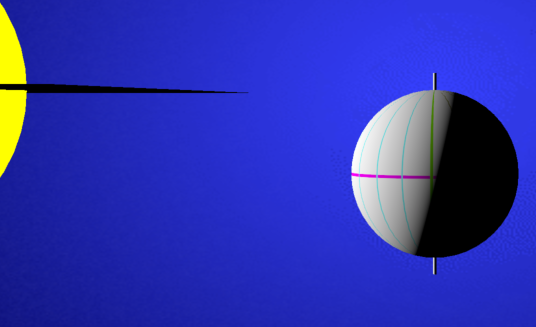
问题是,要获得第二个图像,我必须非常乏味地定位一个方向灯,以使图像正确(这是我手动完成的)。对于第一张图像,我只需将全向光定位在与太阳球体相同的位置)。由于整件事情都是动画化的,使用方向光,并且随着地球沿着轨道前进,它必须不断地重新定位,这就需要一些相当复杂的数学计算。
所以我想创建一个初始化的SCNLight,这个模型是以编程方式创建的I/O轻量对象。根据苹果的“文档”,在Swift中,SCNLight可以用来自指定模型I/O光对象的初始化器创建,我理解这是允许创建从圆盘形状的区域向四面八方照明的光源的
“文件”说明了“创造一盏灯”的下列内容:
init(mdlLight: MDLLight)它被定义为一个方便的初始化器:
我本来希望能够做到以下几点:
let lightModelObject = MDLLight()
lightModelObject.lightType = .discArea

let discShapedSceneLight = SCNLight(lightModelObject) //cannot convert value ... error.
但是最后一条语句得到了一个错误:“不能将'MDLLight‘类型的值转换为预期的参数类型'NSCoder'”错误。我也尝试过:
let discShapedSceneLight = SCNLight.init(lightModelObject)但那里也没有运气。
我完全被困住了!我觉得在Swift中使用初始化器有一些基本的东西我不理解。
如有任何意见,将不胜感激。
编辑:根据相同的文档,我还在objective中尝试了以下内容:
#import <ModelIO/MDLLight.h>
...
SCNLight *discLight = [SCNLight light];
MDLPhysicallcPlausibleLight *ppl = [MDLPhysicallyPlausibleLight lightWithSCNLight:discLight];
但请获得以下错误:“选择器‘lightWithSCNLight:’没有已知的类方法。”
编辑:感谢@EmilioPelaez解决这个问题。
我已经把完整的代码与所需的照明下面,也许它将有助于其他人。
import UIKit
import QuartzCore
import SceneKit
import SceneKit.ModelIO

class GameViewController: UIViewController {

    var scnView:SCNView!
    var scnScene:SCNScene!
    var cameraNode:SCNNode!

    override func viewDidLoad() {
        super.viewDidLoad()
        setupView()
        setupScene()
        setupCamera()
        drawSolarSystem()
    }

    func setupView() {
        scnView = self.view as! SCNView
        scnView.showsStatistics = true
        scnView.allowsCameraControl = true
        scnView.autoenablesDefaultLighting = false
    }

    func setupScene() {
        scnScene = SCNScene()
        scnView.scene = scnScene
        scnScene.background.contents = UIColor.systemBlue
    }

    func setupCamera() {
        cameraNode = SCNNode()
        cameraNode.camera = SCNCamera()
        cameraNode.position = SCNVector3(x: 0, y: 0, z: 10)
        scnScene.rootNode.addChildNode(cameraNode)
    }

    func drawSolarSystem() {
      var geometryObject:SCNGeometry

//SUN object and light source
        let sunX:Float = -3.5   ///position a little off to the left of center

        //create the material for the Sun's surface
        let sunMaterial = SCNMaterial()
        sunMaterial.emission.contents = UIColor.yellow          ///the color the material emits.
//        sunMaterial.transparency = 0.3
//        sunMaterial.diffuse.contents = UIColor.systemYellow ///the color the material reflects when lit.

        //create the Sphere and assign it the material
        geometryObject = SCNSphere(radius: 1.0)
        geometryObject.firstMaterial=sunMaterial

        //create the node and assign it the geometry (object) previously created.
        let sunNode = SCNNode(geometry: geometryObject)
        sunNode.position = SCNVector3(x:sunX, y:0, z:0)
        scnScene.rootNode.addChildNode(sunNode)

        //create the light source and position it same place as the sun
        //create an MDLAreaLight, since the "normal" SCNLight types - such as omni - are not suitable.
        //The .omni type emanates from a point, and so doesn't correctly represent the sun lighting the earth
         let lightModelObject = MDLAreaLight()
         lightModelObject.lightType = .discArea
//         lightModelObject.areaRadius = 5.01 ///This doesn't appear to affect the light.

        //create the node and assign it the MDLAreaLight
         let sunLightNode = SCNNode()
         sunLightNode.light = SCNLight(mdlLight:lightModelObject)
         sunLightNode.light?.color = UIColor .white
         sunLightNode.position = SCNVector3(x:sunX, y:0, z:0)
         scnScene.rootNode.addChildNode(sunLightNode)


        //EARTH EQUATORIAL PLANE but centered on the Sun
        let floorObject = SCNFloor()
        floorObject.reflectivity = 0
        floorObject.width = 2
        floorObject.length = 3
        let earthEquatorialPlaneNode = SCNNode(geometry: floorObject)
        earthEquatorialPlaneNode.position = SCNVector3(x:sunX, y:0, z:0)
        scnScene.rootNode.addChildNode(earthEquatorialPlaneNode)


//EARTH main node - node with 2 subnodes, one sphere and one axis
        ///a node can only have a single geometry object attached. In order to attach multiple geometries, create a (parent) node without any geometry, and then attach subnodes with one geometry each.

        //The parent node
        let earthNode = SCNNode()
        earthNode.position = SCNVector3(x: 0, y:-1.2, z:0)
        scnScene.rootNode.addChildNode(earthNode)

        //the child node for the earth axis of rotation object
        geometryObject = SCNCylinder(radius: 0.01, height: 1.2)
        let earthAxisNode = SCNNode(geometry: geometryObject)
        earthNode.addChildNode(earthAxisNode)

        //the child node for the earth sphere object
        geometryObject = SCNSphere(radius: 0.5)
        let earthSphereNode = SCNNode(geometry: geometryObject)
        earthNode.addChildNode(earthSphereNode)

        //put some meridians and an equator onto the sphere.
        let earthSphereMaterial = SCNMaterial()
        geometryObject.firstMaterial = earthSphereMaterial
        earthSphereMaterial.diffuse.contents = "coordinateGrid.png"
        earthSphereMaterial.lightingModel = .lambert

    }

    override var shouldAutorotate: Bool {
        return true
    }

    override var prefersStatusBarHidden: Bool {
        return true
    }

}回答 2
Stack Overflow用户
发布于 2020-06-16 12:02:03
如果添加import SceneKit.ModelIO,则应该能够使用当前无法工作的初始化器。
Stack Overflow用户
发布于 2020-06-17 21:46:45
请注意,MDLLightTypeDiscArea目前没有桥接到SceneKit,取而代之的是一个SCNLightTypeOmni灯(您可以验证这一点,但检查初始化程序的结果)。
https://stackoverflow.com/questions/62395798
复制相似问题
腾讯云开发者

Copyright © 2013 - 2026 Tencent Cloud. All Rights Reserved. 腾讯云 版权所有
深圳市腾讯计算机系统有限公司 ICP备案/许可证号:粤B2-20090059  粤公网安备44030502008569号
腾讯云计算(北京)有限责任公司 京ICP证150476号 | 京ICP备11018762号