Prompt工程与系统提示词

Prompt工程与系统提示词

架构师部落
发布于 2026-06-22 13:39:39
发布于 2026-06-22 13:39:39
第7篇:Prompt工程与系统提示词
设计高效的AI系统提示词
系统提示词是 AI 应用的灵魂,决定了 AI 的行为模式和响应质量。本篇将深入剖析 Claude Code 如何设计和构建高效的系统提示词系统。
1. 系统提示词架构
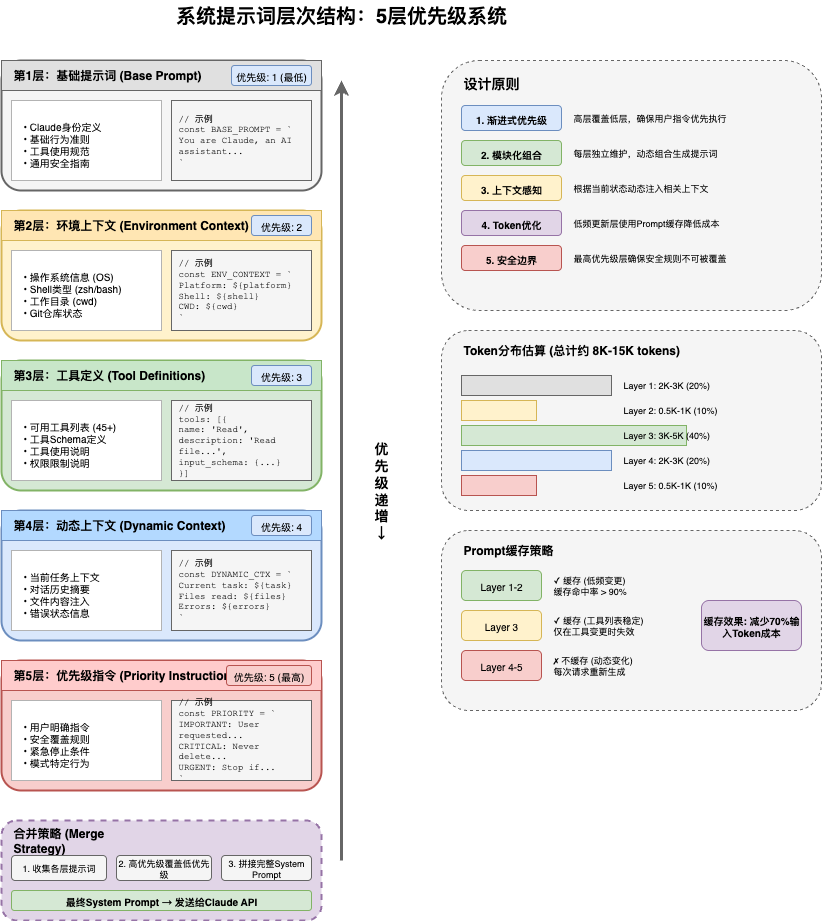
1.1 优先级系统
Claude Code 采用 5 层优先级的系统提示词架构:
// utils/systemPrompt.ts
export function buildEffectiveSystemPrompt({
  mainThreadAgentDefinition,
  toolUseContext,
  customSystemPrompt,
  defaultSystemPrompt,
  appendSystemPrompt,
  overrideSystemPrompt,
}: SystemPromptConfig): SystemPrompt {
  // 优先级1: Override (最高)
  if (overrideSystemPrompt) {
    return asSystemPrompt([overrideSystemPrompt])
  }

  // 优先级2: Coordinator (多Agent)
  if (toolUseContext.coordinatorSystemPrompt) {
    return toolUseContext.coordinatorSystemPrompt
  }

  // 优先级3: Agent Definition
  if (mainThreadAgentDefinition?.systemPrompt) {
    return mainThreadAgentDefinition.systemPrompt
  }

  // 优先级4: Custom
  if (customSystemPrompt) {
    return asSystemPrompt([customSystemPrompt, ...(appendSystemPrompt ?? [])])
  }

  // 优先级5: Default (最低)
  return asSystemPrompt([defaultSystemPrompt, ...(appendSystemPrompt ?? [])])
}
1.2 提示词组成
系统提示词结构
├── 基础身份 (Identity)
│   ├── 角色定义
│   ├── 能力描述
│   └── 工作目录信息
│
├── 工具说明 (Tools)
│   ├── 可用工具列表
│   ├── 工具描述
│   └── 使用示例
│
├── 规则约束 (Rules)
│   ├── 行为规则
│   ├── 禁止事项
│   └── 最佳实践
│
├── 环境信息 (Context)
│   ├── Git状态
│   ├── 项目结构
│   └── 依赖信息
│
└── 动态注入 (Dynamic)
    ├── 内存内容
    ├── 会话状态
    └── 用户偏好
2. 工具提示词生成
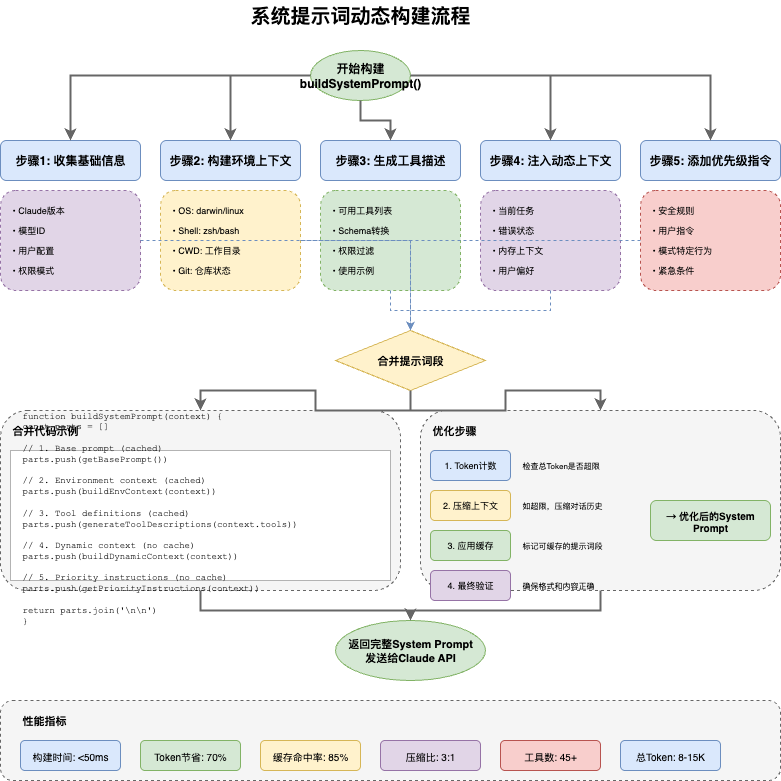
2.1 工具描述构建
// 为每个工具生成 AI 可理解的描述
async function buildToolDescription(
  tool: Tool,
  options: ToolDescriptionOptions
): Promise<string> {
  // 1. 基础信息
  let desc = `## ${tool.name}\n\n`

  // 2. 工具用途
  const purpose = await getToolPurpose(tool)
  desc += `Purpose: ${purpose}\n\n`

  // 3. 输入参数
  desc += `### Input Parameters\n`
  desc += formatSchemaAsMarkdown(tool.inputSchema)

  // 4. 使用示例
  if (options.includeExamples) {
    desc += `\n### Examples\n`
    desc += await generateExamples(tool)
  }

  // 5. 注意事项
  const notes = getToolNotes(tool)
  if (notes.length > 0) {
    desc += `\n### Notes\n`
    notes.forEach(note => desc += `- ${note}\n`)
  }

  return desc
}
2.2 Schema 格式化
// 将 Zod Schema 转换为 Markdown
function formatSchemaAsMarkdown(schema: z.ZodType): string {
  const shape = getSchemaShape(schema)

  return Object.entries(shape)
    .map(([key, field]) => {
      const type = getZodType(field)
      const required = !field.isOptional()
      const description = field.description ?? ''

      return `- \`${key}\` (${type}${required ? ', required' : ''}): ${description}`
    })
    .join('\n')
}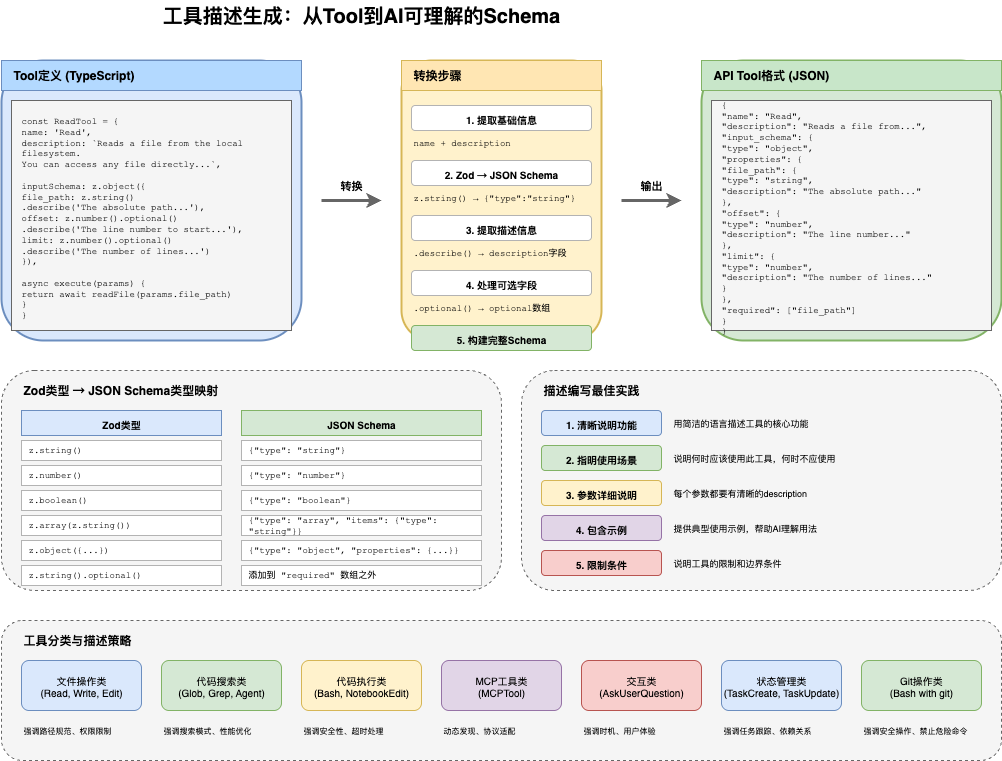
3. 动态上下文注入
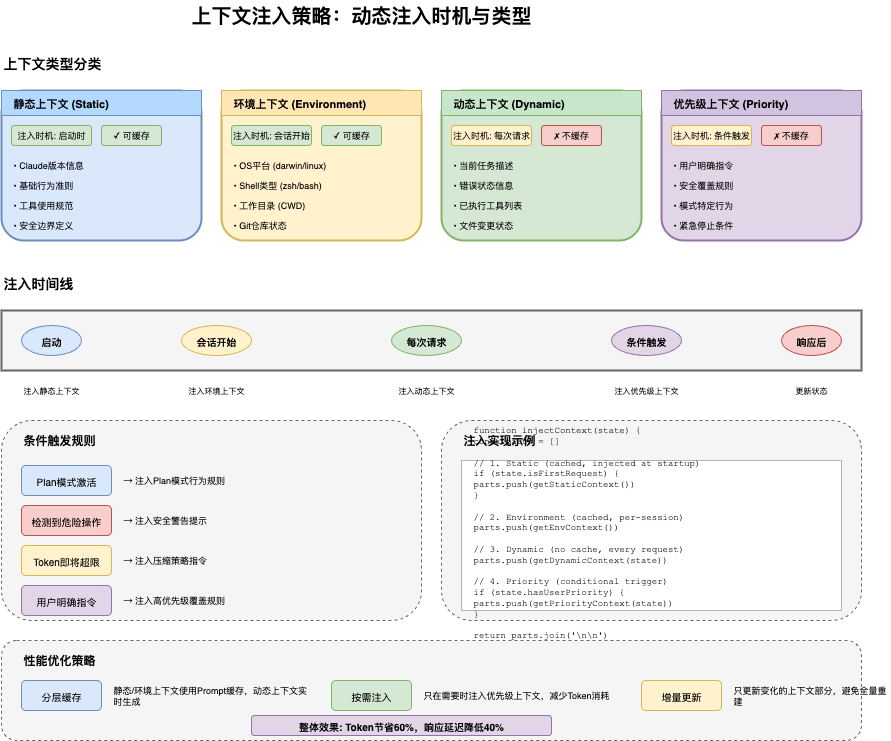
3.1 环境信息收集
// 收集当前环境信息
async function collectEnvironmentContext(): Promise<EnvironmentContext> {
  const cwd = getCwd()

  return {
    // 工作目录
    workingDirectory: cwd,

    // Git 信息
    git: {
      isRepo: await getIsGit(),
      branch: await getCurrentBranch(),
      status: await getGitStatus(),
      remoteUrl: await getRemoteUrl(),
    },

    // 项目信息
    project: {
      name: getProjectName(cwd),
      type: detectProjectType(cwd),
      dependencies: await getDependencies(cwd),
      scripts: await getPackageScripts(cwd),
    },

    // 系统信息
    system: {
      platform: process.platform,
      nodeVersion: process.version,
      shell: process.env.SHELL,
    },
  }
}
3.2 上下文格式化
// 格式化上下文为提示词
function formatContextAsPrompt(context: EnvironmentContext): string {
  return `
## Current Environment

Working Directory: ${context.workingDirectory}

${context.git.isRepo ? `
### Git Status
Branch: ${context.git.branch}
Status: ${context.git.status}
` : 'Not a git repository'}

### Project
Name: ${context.project.name}
Type: ${context.project.type}

### System
Platform: ${context.system.platform}
Node: ${context.system.nodeVersion}
`
}
4. 内存系统集成
4.1 记忆注入
// 从内存系统注入相关记忆
async function injectMemoryContext(
  query: string,
  sessionId: SessionId
): Promise<string> {
  const memories = await queryMemories(query, { limit: 5 })

  if (memories.length === 0) {
    return ''
  }

  return `
## Relevant Memories
${memories.map(m => `- ${m.content}`).join('\n')}
`
}
4.2 项目记忆
// 从 CLAUDE.md 注入项目记忆
async function injectProjectMemory(): Promise<string> {
  const claudeMd = await readClaudeMd()

  if (!claudeMd) {
    return ''
  }

  return `
## Project Documentation
${claudeMd}
`
}
5. Proactive 模式
5.1 主动模式设计
// 主动模式的提示词增强
function enhanceForProactiveMode(
  systemPrompt: SystemPrompt,
  context: ToolUseContext
): SystemPrompt {
  if (!context.isProactiveMode) {
    return systemPrompt
  }

  const proactiveInstructions = `
## Proactive Mode Instructions

You are operating in proactive mode. This means you should:

1. **Anticipate needs**: Think about what the user might want to do next
2. **Take initiative**: Don't wait for explicit instructions
3. **Stay within scope**: Focus on the current task
4. **Report progress**: Keep the user informed

### Autonomy Level
${context.autonomyLevel ?? 'medium'}

### Task Scope
${context.taskScope ?? 'general assistance'}
`

  return appendToSystemPrompt(systemPrompt, proactiveInstructions)
}
6. 最佳实践总结
6.1 提示词设计原则
原则 | 描述 |
|---|---|
清晰 | 避免歧义,使用明确的语言 |
结构化 | 使用 Markdown 组织内容 |
优先级 | 重要信息放在前面 |
动态 | 根据上下文动态调整 |
可测试 | 便于评估和迭代 |
6.2 常见陷阱
- 1. 过长提示词 - 影响响应速度
- 2. 模糊指令 - AI 行为不可预测
- 3. 静态提示词 - 不适应上下文变化
- 4. 缺乏示例 - AI 理解困难
下一篇预告
第8篇:多Agent系统与协作 - 深入理解 Claude Code 如何实现多Agent协作完成复杂任务。
本文参与 腾讯云自媒体同步曝光计划,分享自微信公众号。
原始发表:2026-04-02,如有侵权请联系 cloudcommunity@tencent.com 删除
目录
腾讯云开发者

Copyright © 2013 - 2026 Tencent Cloud. All Rights Reserved. 腾讯云 版权所有
深圳市腾讯计算机系统有限公司 ICP备案/许可证号:粤B2-20090059  粤公网安备44030502008569号
腾讯云计算(北京)有限责任公司 京ICP证150476号 | 京ICP备11018762号