基于xarray-regrid对ERA5数据进行多种插值方法绘图对比

基于xarray-regrid对ERA5数据进行多种插值方法绘图对比

用户11172986
发布于 2026-04-24 18:21:35
发布于 2026-04-24 18:21:35
基于xarray-regrid对ERA5数据进行多种插值方法绘图对比
项目概述
接着上期,顺带把xarray-regrid其他几种插值写写
基于xarray-regrid,对ERA5风速数据进行多种插值方法的网格重映射(regridding),对比不同方法(如双线性、保守插值等)的精度与适用性,并通过可视化展示插值结果的差异。
当然,xarray-regrid的插值方法中有几个不在本次内容中
不适用原因(风速插值)
1.most_common/least_common
仅用于离散分类数据(如土地类型),风速是连续变量,无"最常见值"概念。
2.stat(均值/求和等)
破坏物理一致性:风速需分解为U/V分量插值,直接统计(如均值)会丢失矢量特性。
环境设置
安装依赖
!pip install xarray_regrid
导入必要的库
import xarray as xr
import xarray_regrid
from xarray_regrid import Grid
import matplotlib.pyplot as plt
import cartopy.crs as ccrs
import cartopy.feature as cfeature
from time import time
import numpy as np
创建网格
new_grid = Grid(
    north=54,       # 北边界
    south=18,       # 南边界
    west=73,        # 西边界
    east=135,       # 东边界
    resolution_lat=0.05,  # 纬度分辨率
    resolution_lon=0.05   # 经度分辨率
)
target_ds = new_grid.create_regridding_dataset()

# 加载ERA5数据
ds = xr.open_dataset("/home/mw/input/era5sample8008/era5.nc")
# 选择一个时间点进行测试
ds = ds.isel(time=0)
lon_min, lon_max = 73, 135
lat_min, lat_max = 18, 54

ds = ds.sel(
    longitude=slice(lon_min, lon_max),
    latitude=slice(lat_max, lat_min)
# 定义所有插值方法
methods = [
    ('linear', '线性插值'),
    ('nearest', '最近邻插值'),
    ('conservative', '保守插值'),
    ('cubic', '三次插值')

]
插值与绘图
# 创建绘图
fig = plt.figure(figsize=(12, 20),dpi=200)
fig.suptitle('xarray-regrid 不同插值方法对比 (u10风速)', fontsize=16, y=0.95)

# 原始数据绘图
ax = fig.add_subplot(3, 2, 1, projection=ccrs.PlateCarree())
ds['u10'].plot(ax=ax, transform=ccrs.PlateCarree(),
              cbar_kwargs={'shrink': 0.7})
ax.set_title('原始数据 (0.25°)')
ax.coastlines()
ax.gridlines(draw_labels=True)

# 执行所有插值方法并绘图
results = {}
for i, (method, title) in enumerate(methods, start=2):
    t_start = time()


    regridded_ds = getattr(ds.regrid, method)(target_ds)

    regridded_ds = regridded_ds.compute()
    elapsed = time() - t_start

    # 存储结果
    results[method] = {
        'data': regridded_ds,
        'time': elapsed
    }

    # 绘图
    ax = fig.add_subplot(3, 2, i, projection=ccrs.PlateCarree())
    regridded_ds['u10'].plot(ax=ax, transform=ccrs.PlateCarree(),
                           cbar_kwargs={'shrink': 0.7})
    ax.set_title(f'{title} (耗时: {elapsed:.2f}s)')
    ax.coastlines()
    ax.gridlines(draw_labels=True)

plt.tight_layout()
plt.show()
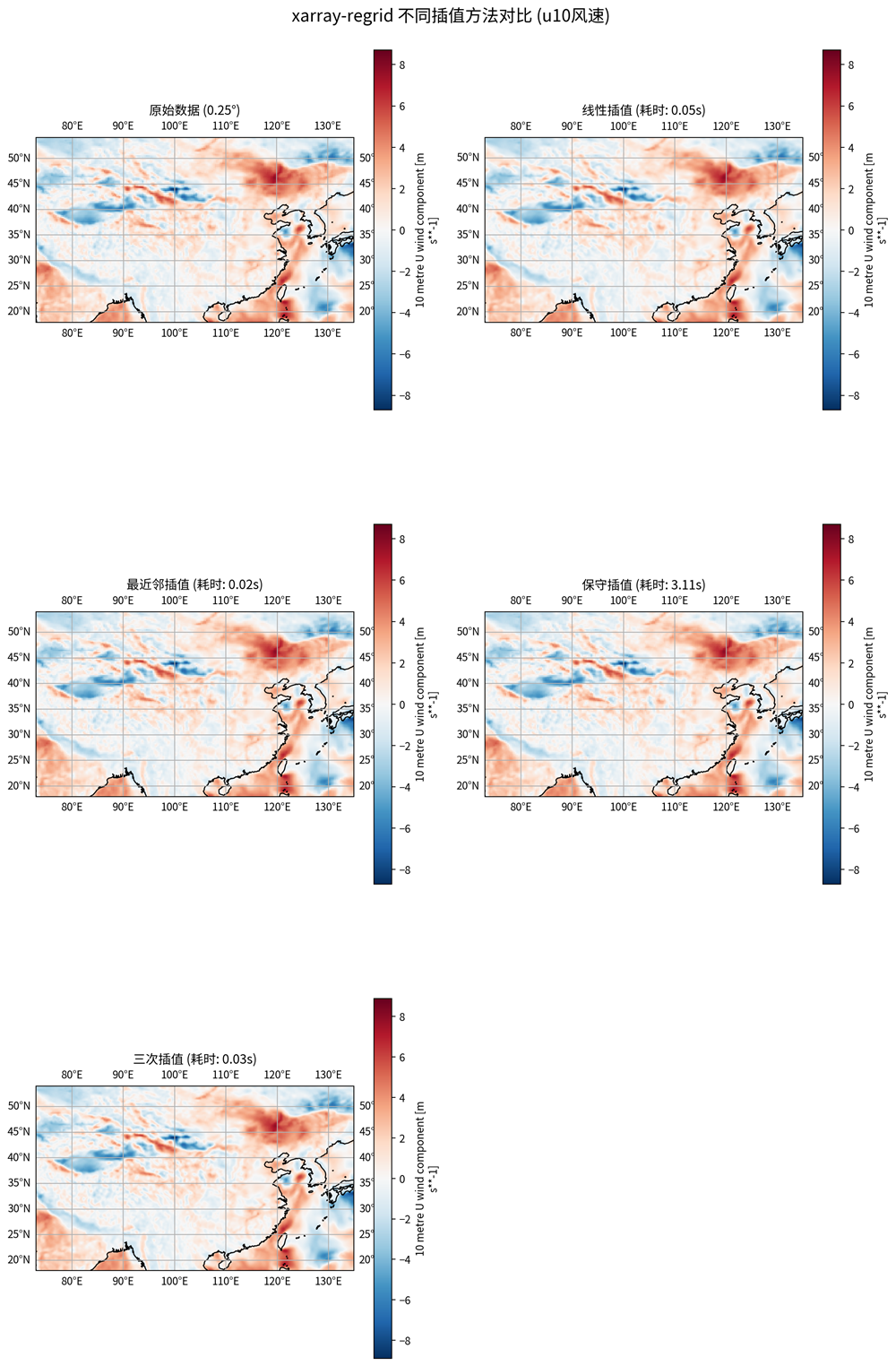
对比结果
# 输出统计信息
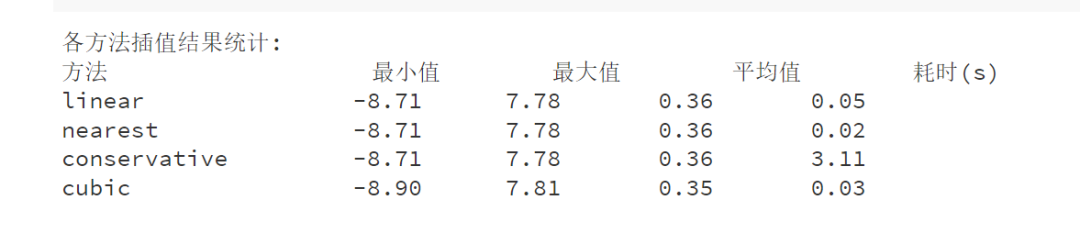
print("\n各方法插值结果统计:")
print("{:<20} {:<10} {:<10} {:<10} {:<10}".format(
    "方法", "最小值", "最大值", "平均值", "耗时(s)"))
for method, result in results.items():
    data = result['data']['u10']
    print("{:<20} {:<10.2f} {:<10.2f} {:<10.2f} {:<10.2f}".format(
        method, float(data.min()), float(data.max()),
        float(data.mean()), result['time']))
小结
从 xarray_regrid 插值结果统计来看,我们可以对 linear、nearest、conservative 和 cubic 这四种插值方法进行以下分析:
1. 插值结果对比
方法 | 最小值 | 最大值 | 平均值 | 耗时 (s) |
|---|---|---|---|---|
linear | -8.71 | 7.78 | 0.36 | 0.05 |
nearest | -8.71 | 7.78 | 0.36 | 0.02 |
conservative | -8.71 | 7.78 | 0.36 | 3.11 |
cubic | -8.90 | 7.81 | 0.35 | 0.03 |
(1)数据范围(Min/Max)
- linear、nearest、conservative 的 min/max 完全一致(-8.71 ~ 7.78),说明它们对极端值的处理方式相似。
- cubic 插值的最小值略低(-8.90),最大值略高(7.81),表明它可能对局部极值更敏感,可能会引入一些平滑或振荡。
(2)平均值(Mean)
- linear、nearest、conservative 的平均值均为 0.36,说明它们对数据的整体分布影响较小。
- cubic 的平均值略低(0.35),可能由于高阶插值引入了一定的平滑效应。
(3)计算效率(耗时)
- nearest 最快(0.02s),因为它只是简单取最近邻点,不进行复杂计算。
- linear(0.05s)和 cubic(0.03s)次之,计算量适中。
- conservative 最慢(3.11s),因为它需要确保质量守恒(常用于气候/地球科学),计算开销较大。
推荐选择
需求 | 推荐方法 | 理由 |
|---|---|---|
最快计算,不要求平滑 | nearest | 速度最快,适用于分类数据或快速预览 |
通用科学计算 | linear | 平衡速度与精度,适用于大多数连续变量 |
高平滑度需求 | cubic | 适合影像、地形等需要平滑过渡的数据 |
气候/守恒变量 | conservative | 确保物理量(如降水、能量)守恒,适用于模式数据 |
本文参与 腾讯云自媒体同步曝光计划,分享自微信公众号。
原始发表:2025-06-20,如有侵权请联系 cloudcommunity@tencent.com 删除
评论
登录后参与评论
推荐阅读
目录
腾讯云开发者

Copyright © 2013 - 2026 Tencent Cloud. All Rights Reserved. 腾讯云 版权所有
深圳市腾讯计算机系统有限公司 ICP备案/许可证号:粤B2-20090059  粤公网安备44030502008569号
腾讯云计算(北京)有限责任公司 京ICP证150476号 | 京ICP备11018762号