
用xBox控制器控制主相机(MRTK & Unity)
用xBox控制器控制主相机(MRTK & Unity)
提问于 2019-08-13 01:12:52
嗨,我们(我和我的学生)正在使用MRTK在团结,以建立简单的虚拟现实游戏。
我们正在尝试让xBox控制器移动播放器(或者用MRTK术语来说,我认为可以在摄像机周围移动场景,它的固定值为0,0,0)。
我已经设置了控制器,并使用了MRTK设置,但没有运气。
我的控制器在Windows混合现实门户中工作得很好,但当游戏加载时就会死掉。
任何有关MRTK编辑器窗口中的具体步骤/设置的帮助都是非常感谢的。
本
回答 1
Stack Overflow用户
回答已采纳
发布于 2019-08-14 23:02:22
这里有两件事需要解决:
- 如何移动玩家。答:使用
MixedRealityPlayspace.Transform.Translate - 如何响应游戏垫输入。答:您可以使用联合的Input.GetAxis来确定按下了哪些按钮/操纵杆,但是我发现使用MRTK中的控制器映射将“导航操作”映射到游戏垫和操纵杆比较容易一些,然后侦听导航事件上更改的输入。
您可以使用以下代码使用游戏垫移动MR Playspace:
using Microsoft.MixedReality.Toolkit;
using Microsoft.MixedReality.Toolkit.Input;
using Microsoft.MixedReality.Toolkit.Utilities;
using UnityEngine;

/// <summary>
/// Moves the player around the world using the gamepad, or any other input action that supports 2D axis.
///
/// We extend InputSystemGlobalHandlerListener because we always want to listen for the gamepad joystick position
/// We implement InputHandler<Vector2> interface in order to receive the 2D navigation action events.
/// </summary>
public class MRPlayspaceMover : InputSystemGlobalHandlerListener, IMixedRealityInputHandler<Vector2>
{
    public MixedRealityInputAction navigationAction;
    public float multiplier = 5f;

    private Vector3 delta = Vector3.zero;
    public void OnInputChanged(InputEventData<Vector2> eventData)
    {
        float horiz = eventData.InputData.x;
        float vert = eventData.InputData.y;
        if (eventData.MixedRealityInputAction == navigationAction)
        {
            delta = CameraCache.Main.transform.TransformDirection(new Vector3(horiz, 0, vert) * multiplier);
        }
    }

    public void Update()
    {
        if (delta.sqrMagnitude > 0.01f)
        {
            MixedRealityPlayspace.Transform.Translate(delta);
        }
    }

    protected override void RegisterHandlers()
    {
        CoreServices.InputSystem.RegisterHandler<MRPlayspaceMover>(this);
    }

    protected override void UnregisterHandlers()
    {
        CoreServices.InputSystem.UnregisterHandler<MRPlayspaceMover>(this);
    }
}
我使用以下控制器映射将dpad和拇指棒挂钩到导航操作:
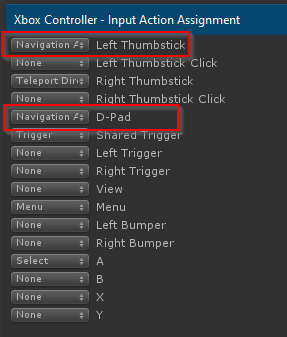
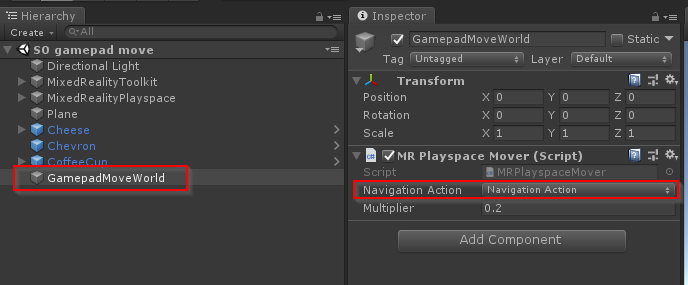
然后我创建了一个新的游戏对象,附加了MRPlayspaceMover脚本,并分配了“导航操作”字段:
页面原文内容由Stack Overflow提供。腾讯云小微IT领域专用引擎提供翻译支持
原文链接:
https://stackoverflow.com/questions/57469979
复制相关文章
相似问题
腾讯云开发者

Copyright © 2013 - 2026 Tencent Cloud. All Rights Reserved. 腾讯云 版权所有
深圳市腾讯计算机系统有限公司 ICP备案/许可证号:粤B2-20090059  粤公网安备44030502008569号
腾讯云计算(北京)有限责任公司 京ICP证150476号 | 京ICP备11018762号