
如何训练大于6GB的numpy阵列模型?
如何训练大于6GB的numpy阵列模型?
提问于 2019-07-21 02:37:54
我有几个很大的训练档案我打算训练。验证数据也是完美的,我认为没有问题,但规模很大。我说的是20GB+。由于内存错误,加载一个文件导致python崩溃。
我试过把文件写成一个,但它太大了
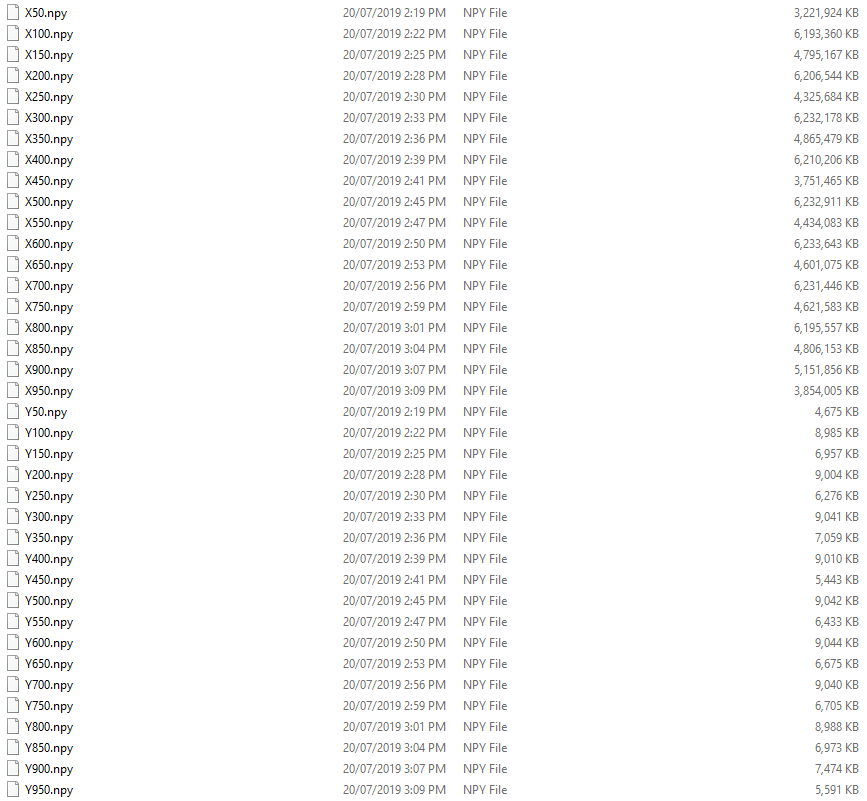
X = np.load('X150.npy')
Y = np.load('Y150.npy')
错误
~\AppData\Roaming\Python\Python37\site-packages\numpy\lib\format.py in read_array(fp, allow_pickle, pickle_kwargs)
    710         if isfileobj(fp):
    711             # We can use the fast fromfile() function.
--> 712             array = numpy.fromfile(fp, dtype=dtype, count=count)
    713         else:
    714             # This is not a real file. We have to read it the

MemoryError:
我需要一个解决方案,这样我就能训练出庞大的数据集。
回答 1
Stack Overflow用户
回答已采纳
发布于 2019-07-21 05:07:28
重要:首先,确保您的python是64位。下面的方法只支持高达2GB的32位python版本的文件。
通常,应该使用np.memmap()来使用数组而不加载到内存中。在矮胖的医生中,“内存映射文件用于访问磁盘上大文件的小段,而无需将整个文件读入内存中。”
示例用法:
x_file = "X_150.npy"

X = np.memmap(x_file, dtype='int', mode='w+', shape=(300000, 1000))但是,由于您的文件已经存储为.npy文件,我偶然发现了创建或加载内存映射的.npy文件的np.lib.format.open_memmap()。
其用法如下,与您对np.memmap()所做的操作相同:
x_file = "X_150.npy"

X = np.lib.format.open_memmap(x_file, dtype='int', mode='w+', shape=(300000, 1000))下面是第二个函数的文档(来自这个答案):
>>> print numpy.lib.format.open_memmap.__doc__

"""
Open a .npy file as a memory-mapped array.

This may be used to read an existing file or create a new one.

Parameters
----------
filename : str
    The name of the file on disk. This may not be a filelike object.
mode : str, optional
    The mode to open the file with. In addition to the standard file modes,
    'c' is also accepted to mean "copy on write". See `numpy.memmap` for
    the available mode strings.
dtype : dtype, optional
    The data type of the array if we are creating a new file in "write"
    mode.
shape : tuple of int, optional
    The shape of the array if we are creating a new file in "write"
    mode.
fortran_order : bool, optional
    Whether the array should be Fortran-contiguous (True) or
    C-contiguous (False) if we are creating a new file in "write" mode.
version : tuple of int (major, minor)
    If the mode is a "write" mode, then this is the version of the file
    format used to create the file.

Returns
-------
marray : numpy.memmap
    The memory-mapped array.

Raises
------
ValueError
    If the data or the mode is invalid.
IOError
    If the file is not found or cannot be opened correctly.

See Also
--------
numpy.memmap
"""页面原文内容由Stack Overflow提供。腾讯云小微IT领域专用引擎提供翻译支持
原文链接:
https://stackoverflow.com/questions/57129960
复制相关文章
相似问题
腾讯云开发者

Copyright © 2013 - 2026 Tencent Cloud. All Rights Reserved. 腾讯云 版权所有
深圳市腾讯计算机系统有限公司 ICP备案/许可证号:粤B2-20090059  粤公网安备44030502008569号
腾讯云计算(北京)有限责任公司 京ICP证150476号 | 京ICP备11018762号