
球面坐标系下三维纹理的GPU射线浇铸(单程)
我正在实现一种体绘制算法"GPU光线投射单道“。为此,我使用了一个浮点数组的强度值作为三维纹理(这个三维纹理描述一个规则的三维网格在球面坐标)。
下面是数组值的示例:
   75.839354473071637,
   64.083049468866022,
   65.253933716444365,
   79.992431196592577,
   84.411485976957096,
   0.0000000000000000,
   82.020319431382831,
   76.808403454586994,
   79.974774618246158,
   0.0000000000000000,
   91.127273013466336,
   84.009956557448433,
   90.221356094672814,
   87.567422484025627,
   71.940263118478072,
   0.0000000000000000,
   0.0000000000000000,
   74.487058398181944,
   ..................,
..................(这里是完整的数据:链接)
球面网格的尺寸为(r,theta,phi)=(384,15,768),这是负载纹理的输入格式:
glTexImage3D(GL_TEXTURE_3D, 0, GL_R16F, 384, 15, 768, 0, GL_RED, GL_FLOAT, dataArray)这是我想象的图像:
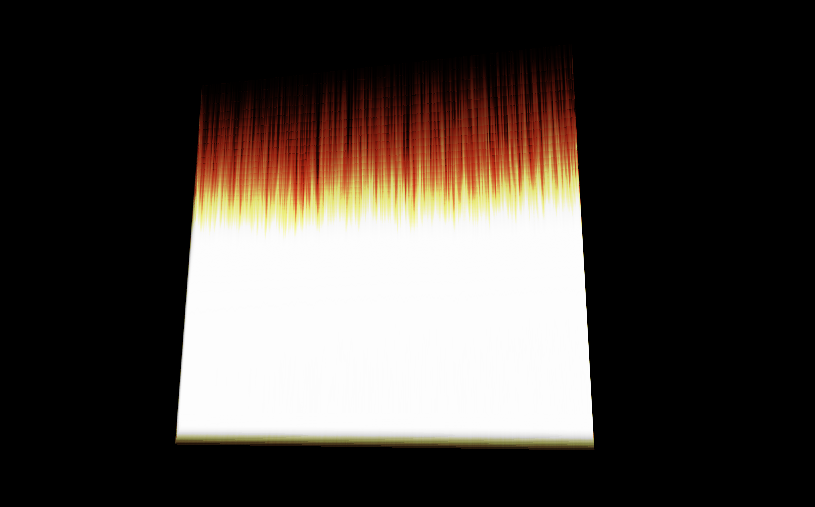
问题是可视化应该是一个磁盘,或者至少是一个类似的形式。
我认为问题在于,我没有正确地指定纹理的坐标(在球面坐标中)。
这是顶点着色代码:
  #version 330 core

layout(location = 0) in vec3 vVertex; //object space vertex position

//uniform
 uniform mat4 MVP;   //combined modelview projection matrix

 smooth out vec3 vUV; //3D texture coordinates for texture lookup in   the fragment shader

void main()
{
    //get the clipspace position
     gl_Position = MVP*vec4(vVertex.xyz,1);

    //get the 3D texture coordinates by adding (0.5,0.5,0.5) to the object space
    //vertex position. Since the unit cube is at origin (min: (-0.5,-0.5,-0.5) and max: (0.5,0.5,0.5))
    //adding (0.5,0.5,0.5) to the unit cube object space position gives us values from (0,0,0) to
    //(1,1,1)
    vUV = vVertex + vec3(0.5);
}
这是碎片人的着色代码:
  #version 330 core

layout(location = 0) out vec4 vFragColor;   //fragment shader output

smooth in vec3 vUV;             //3D texture coordinates  form vertex shader
                                 //interpolated by rasterizer

//uniforms
uniform sampler3D   volume;     //volume dataset
uniform vec3        camPos;     //camera position
uniform vec3        step_size;  //ray step size


//constants
const int MAX_SAMPLES = 300;    //total samples for each ray march step
const vec3 texMin = vec3(0);    //minimum texture access coordinate
const vec3 texMax = vec3(1);    //maximum texture access coordinate


    vec4 colour_transfer(float intensity)
{

    vec3 high = vec3(100.0, 20.0, 10.0);
   // vec3 low = vec3(0.0, 0.0, 0.0);
   float alpha = (exp(intensity) - 1.0) / (exp(1.0) - 1.0);
   return vec4(intensity * high, alpha);

}


void main()
{
//get the 3D texture coordinates for lookup into the volume dataset
vec3 dataPos = vUV;


//Getting the ray marching direction:
//get the object space position by subracting 0.5 from the
//3D texture coordinates. Then subtraact it from camera position
//and normalize to get the ray marching direction
vec3 geomDir = normalize((vUV-vec3(0.5)) - camPos);

//multiply the raymarching direction with the step size to get the
//sub-step size we need to take at each raymarching step
vec3 dirStep = geomDir * step_size;

//flag to indicate if the raymarch loop should terminate
bool stop = false;

//for all samples along the ray
for (int i = 0; i < MAX_SAMPLES; i++) {
    // advance ray by dirstep
    dataPos = dataPos + dirStep;


    stop = dot(sign(dataPos-texMin),sign(texMax-dataPos)) < 3.0;

    //if the stopping condition is true we brek out of the ray marching loop
    if (stop)
        break;
    // data fetching from the red channel of volume texture
    float sample = texture(volume, dataPos).r;

     vec4 c = colour_transfer(sample);

    vFragColor.rgb = c.a * c.rgb + (1 - c.a) * vFragColor.a * vFragColor.rgb;
    vFragColor.a = c.a + (1 - c.a) * vFragColor.a;

    //early ray termination
    //if the currently composited colour alpha is already fully saturated
    //we terminated the loop
    if( vFragColor.a>0.99)
        break;
}


}
我如何指定坐标,因为我将可视化的信息在三维纹理,在球面坐标?
更新:
顶点着色器:
#version 330 core

layout(location = 0) in vec3 vVertex; //object space vertex position

//uniform
uniform mat4 MVP;   //combined modelview projection matrix

smooth out vec3 vUV; //3D texture coordinates for texture lookup in the             fragment shader


void main()
{
    //get the clipspace position
    gl_Position = MVP*vec4(vVertex.xyz,1);

     //get the 3D texture coordinates by adding (0.5,0.5,0.5) to the object     space
    //vertex position. Since the unit cube is at origin (min: (-0.5,-   0.5,-0.5) and max: (0.5,0.5,0.5))
    //adding (0.5,0.5,0.5) to the unit cube object space position gives    us values from (0,0,0) to
//(1,1,1)
vUV = vVertex + vec3(0.5);
}
和碎片着色器:
#version 330 core
#define Pi 3.1415926535897932384626433832795

layout(location = 0) out vec4 vFragColor;   //fragment shader output

smooth in vec3 vUV;             //3D texture coordinates form vertex shader
                            //interpolated by rasterizer

//uniforms
uniform sampler3D   volume;     //volume dataset
uniform vec3        camPos;     //camera position
uniform vec3        step_size;  //ray step size


//constants
const int MAX_SAMPLES = 200;    //total samples for each ray march step
const vec3 texMin = vec3(0);    //minimum texture access coordinate
const vec3 texMax = vec3(1);    //maximum texture access coordinate

// transfer function that asigned a color and alpha from sample    intensity
vec4 colour_transfer(float intensity)
{

    vec3 high = vec3(100.0, 20.0, 10.0);
    // vec3 low = vec3(0.0, 0.0, 0.0);
    float alpha = (exp(intensity) - 1.0) / (exp(1.0) - 1.0);

    return vec4(intensity * high, alpha);

}


// this function transform vector in spherical coordinates from cartesian
vec3 cart2Sphe(vec3 cart){
    vec3 sphe;
    sphe.x = sqrt(cart.x*cart.x+cart.y*cart.y+cart.z*cart.z);
    sphe.z = atan(cart.y/cart.x);
    sphe.y = atan(sqrt(cart.x*cart.x+cart.y*cart.y)/cart.z);
    return sphe;
}


void main()
{
    //get the 3D texture coordinates for lookup into the volume dataset
    vec3 dataPos = vUV;


    //Getting the ray marching direction:
    //get the object space position by subracting 0.5 from the
    //3D texture coordinates. Then subtraact it from camera position
    //and normalize to get the ray marching direction
    vec3 vec=(vUV-vec3(0.5));
    vec3 spheVec=cart2Sphe(vec); // transform position to spherical
    vec3 sphePos=cart2Sphe(camPos); //transform camPos to spherical
    vec3 geomDir= normalize(spheVec-sphePos); // ray direction


    //multiply the raymarching direction with the step size to get the
    //sub-step size we need to take at each raymarching step
    vec3 dirStep = geomDir * step_size ;
    //flag to indicate if the raymarch loop should terminate

    //for all samples along the ray
    for (int i = 0; i < MAX_SAMPLES; i++) {
        // advance ray by dirstep
        dataPos = dataPos + dirStep;


        float sample;

        convert texture coordinates
        vec3 spPos;
        spPos.x=dataPos.x/384;
        spPos.y=(dataPos.y+(Pi/2))/Pi;
        spPos.z=dataPos.z/(2*Pi);

        // get value from texture
         sample = texture(volume,dataPos).r;
         vec4 c = colour_transfer(sample)


        // alpha blending  function
         vFragColor.rgb = c.a * c.rgb + (1 - c.a) * vFragColor.a *      vFragColor.rgb;
        vFragColor.a = c.a + (1 - c.a) * vFragColor.a;


        if( vFragColor.a>1.0)
        break;
    }

    // vFragColor.rgba = texture(volume,dataPos);
}
以下是生成边界立方体的点:
 glm::vec3 vertices[8] = {glm::vec3(-0.5f, -0.5f, -0.5f),
                                                 glm::vec3(0.5f, -0.5f,   -0.5f),
                                                 glm::vec3(0.5f, 0.5f, -0.5f),
                                                 glm::vec3(-0.5f, 0.5f, -0.5f),
                                                 glm::vec3(-0.5f, -0.5f, 0.5f),
                                                 glm::vec3(0.5f, -0.5f, 0.5f),
                                                 glm::vec3(0.5f, 0.5f, 0.5f),
                                                 glm::vec3(-0.5f, 0.5f, 0.5f)};


    //unit cube indices
    GLushort cubeIndices[36] = {0, 5, 4,
                                                        5, 0, 1,
                                                        3, 7, 6,
                                                        3, 6, 2,
                                                        7, 4, 6,
                                                        6, 4, 5,
                                                        2, 1, 3,
                                                        3, 1, 0,
                                                        3, 0, 7,
                                                        7, 0, 4,
                                                        6, 5, 2,
                                                        2, 5, 1};
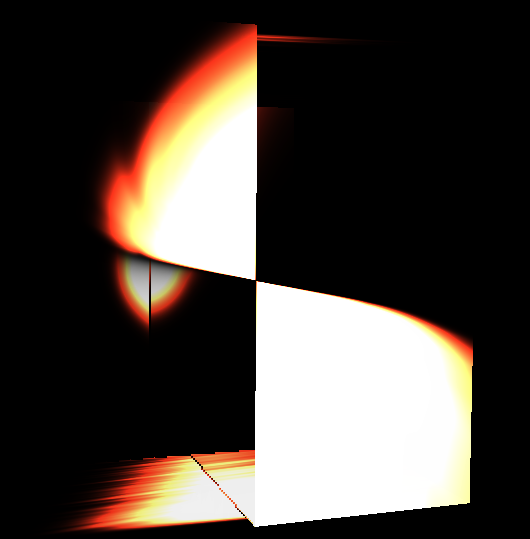
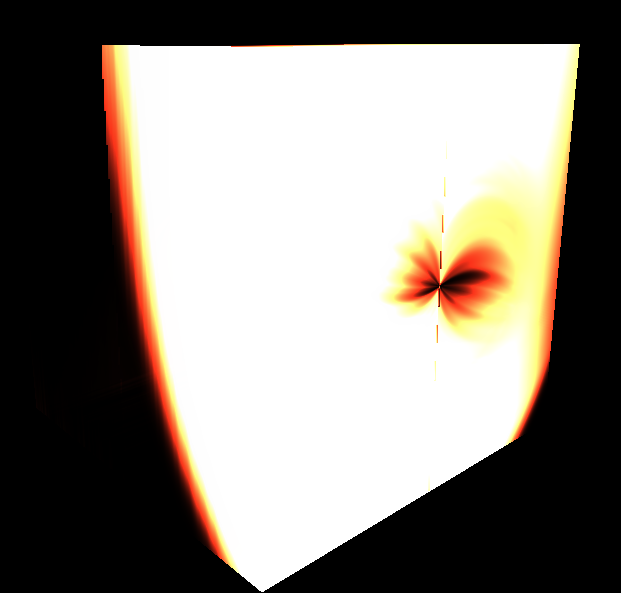
这是它生成的可视化:
回答 1
Stack Overflow用户
发布于 2019-04-08 07:39:26
我不知道你是怎么表现的。有许多技术和配置可以实现它们。我通常是使用一个单一的单一四角渲染覆盖屏幕/视图,而几何/场景是作为纹理传递。因为你有你的物体在一个三维纹理,那么我认为你应该走这条路。这就是它的实现方法(假设透视图、均匀的球形体素网格作为三维纹理):
- CPU侧码
只需渲染覆盖场景/视图的单个
QUAD。为了使这更简单和精确,我建议您使用您的球体局部坐标系的相机矩阵,这是传递给着色(它将大大简化光线/球交叉计算)。 - 顶点
在这里,您应该转换/计算每个顶点的光线位置和方向,并将其传递给片段,以便对屏幕/视图上的每个像素进行插值。
因此,相机的位置(焦点)和视图方向(通常是Z轴的透视OpenGL)来描述。光线从摄像机局部坐标中的焦点
(0,0,0)投射到znear平面(x,y,-znear)中,也是在摄像机局部坐标中。其中,x,y是像素屏幕位置,如果屏幕/视图不是正方形,则应用纵横比校正。 所以你只需要把这两个点转换成球面局部坐标(仍然是笛卡尔的)。 光线方向只是两点的相减. - 片段
首先,归一化射线方向从顶点(由于插值,它将不是单位向量)。在此之后,只需测试球面体素网格从外到内的每个半径的射线/球体交点,所以测试球从
rmax到rmax/n,其中rmax是你的三维纹理可以拥有的最大半径,n是对应于半径r的轴的3D分辨率。 在每次命中时,将笛卡尔交叉口位置转换为球面坐标。将它们转换为纹理坐标s,t,p并获取Voxel强度并将其应用于颜色(如何取决于您呈现的内容和方法)。 因此,如果您的纹理坐标是(r,theta,phi),假设phi是经度,角度被标准化为<-Pi,Pi>和<0,2*Pi>,而rmax是三维纹理的最大半径,那么: S= r/rmax t= (theta+(Pi/2))/Pi p= phi/(2*PI) 如果你的球体是不透明的,那就在第一次击中时停止,不要用空的Voxel强度。否则,更新射线启动位置,并再次执行整个子弹,直到射线离开现场,BBOX或没有发生交叉发生。 你也可以加入Snell定律(加上反射折射),在物体边界撞击时分裂光线.
下面是使用此技术的一些相关的QA,或者拥有有助于您实现这一目标的有效信息:
- GLSL大气散射 --这几乎和你应该做的一样。
- 交叉口的射线与椭球相交精度的提高数学
- 弯曲的冰霜玻璃阴影?亚表面散射
- 二维纹理中的GLSL三维网格回射线跟踪反射与几何折射
- 三维纹理中的GLSL三维体回射线跟踪三维笛卡儿体积
Edit1示例(在输入的三维纹理最终发布之后)
所以,当我把所有的东西放在上面(以及在评论中)时,我想到了这个。
CPU端代码:
//---------------------------------------------------------------------------
//--- GLSL Raytrace system ver: 1.000 ---------------------------------------
//---------------------------------------------------------------------------
#ifndef _raytrace_spherical_volume_h
#define _raytrace_spherical_volume_h
//---------------------------------------------------------------------------
class SphericalVolume3D
    {
public:
    bool _init;         // has been initiated ?
    GLuint txrvol;      // SphericalVolume3D texture at GPU side
    int xs,ys,zs;

    float eye[16];      // direct camera matrix
    float aspect,focal_length;

    SphericalVolume3D()    { _init=false; txrvol=-1; xs=0; ys=0; zs=0; aspect=1.0; focal_length=1.0; }
    SphericalVolume3D(SphericalVolume3D& a)   { *this=a; }
    ~SphericalVolume3D()   { gl_exit(); }
    SphericalVolume3D* operator = (const SphericalVolume3D *a) { *this=*a; return this; }
    //SphericalVolume3D* operator = (const SphericalVolume3D &a) { ...copy... return this; }

    // init/exit
    void gl_init();
    void gl_exit();

    // render
    void glsl_draw(GLint prog_id);
    };
//---------------------------------------------------------------------------
void SphericalVolume3D::gl_init()
    {
    if (_init) return; _init=true;
    // load 3D texture from file into CPU side memory
    int hnd,siz; BYTE *dat;
    hnd=FileOpen("Texture3D_F32.dat",fmOpenRead);
    siz=FileSeek(hnd,0,2);
        FileSeek(hnd,0,0);
    dat=new BYTE[siz];
        FileRead(hnd,dat,siz);
        FileClose(hnd);
    if (0)
        {
        int i,n=siz/sizeof(GLfloat);
        GLfloat *p=(GLfloat*)dat;
        for (i=0;i<n;i++) p[i]=100.5;
        }

    // copy it to GPU as 3D texture
//  glClampColorARB(GL_CLAMP_VERTEX_COLOR_ARB, GL_FALSE);
//  glClampColorARB(GL_CLAMP_READ_COLOR_ARB, GL_FALSE);
//  glClampColorARB(GL_CLAMP_FRAGMENT_COLOR_ARB, GL_FALSE);
    glGenTextures(1,&txrvol);
    glEnable(GL_TEXTURE_3D);
    glBindTexture(GL_TEXTURE_3D,txrvol);
    glPixelStorei(GL_UNPACK_ALIGNMENT, 4);
    glTexParameteri(GL_TEXTURE_3D, GL_TEXTURE_WRAP_S,GL_CLAMP_TO_EDGE);
    glTexParameteri(GL_TEXTURE_3D, GL_TEXTURE_WRAP_T,GL_CLAMP_TO_EDGE);
    glTexParameteri(GL_TEXTURE_3D, GL_TEXTURE_WRAP_R,GL_CLAMP_TO_EDGE);
    glTexParameteri(GL_TEXTURE_3D, GL_TEXTURE_MAG_FILTER,GL_NEAREST);
    glTexParameteri(GL_TEXTURE_3D, GL_TEXTURE_MIN_FILTER,GL_NEAREST);
    glTexEnvf(GL_TEXTURE_ENV, GL_TEXTURE_ENV_MODE,GL_MODULATE);
    xs=384;
    ys= 15;
    zs=768;
    glTexImage3D(GL_TEXTURE_3D, 0, GL_R16F, xs,ys,zs, 0, GL_RED, GL_FLOAT, dat);
    glBindTexture(GL_TEXTURE_3D,0);
    glDisable(GL_TEXTURE_3D);
    delete[] dat;
    }
//---------------------------------------------------------------------------
void SphericalVolume3D::gl_exit()
    {
    if (!_init) return; _init=false;
    glDeleteTextures(1,&txrvol);
    }
//---------------------------------------------------------------------------
void SphericalVolume3D::glsl_draw(GLint prog_id)
    {
    GLint ix;
    const int txru_vol=0;
    glUseProgram(prog_id);
    // uniforms
    ix=glGetUniformLocation(prog_id,"zoom"        ); glUniform1f(ix,1.0);
    ix=glGetUniformLocation(prog_id,"aspect"      ); glUniform1f(ix,aspect);
    ix=glGetUniformLocation(prog_id,"focal_length"); glUniform1f(ix,focal_length);
    ix=glGetUniformLocation(prog_id,"vol_xs"      ); glUniform1i(ix,xs);
    ix=glGetUniformLocation(prog_id,"vol_ys"      ); glUniform1i(ix,ys);
    ix=glGetUniformLocation(prog_id,"vol_zs"      ); glUniform1i(ix,zs);
    ix=glGetUniformLocation(prog_id,"vol_txr"     ); glUniform1i(ix,txru_vol);
    ix=glGetUniformLocation(prog_id,"tm_eye"      ); glUniformMatrix4fv(ix,1,false,eye);

    glActiveTexture(GL_TEXTURE0+txru_vol);
    glEnable(GL_TEXTURE_3D);
    glBindTexture(GL_TEXTURE_3D,txrvol);

    // this should be a VAO/VBO
    glColor4f(1.0,1.0,1.0,1.0);
    glBegin(GL_QUADS);
    glVertex2f(-1.0,-1.0);
    glVertex2f(-1.0,+1.0);
    glVertex2f(+1.0,+1.0);
    glVertex2f(+1.0,-1.0);
    glEnd();

    glActiveTexture(GL_TEXTURE0+txru_vol);
    glBindTexture(GL_TEXTURE_3D,0);
    glDisable(GL_TEXTURE_3D);
    glUseProgram(0);
    }
//---------------------------------------------------------------------------
#endif
//---------------------------------------------------------------------------调用init在应用程序启动时,GL已经进入,退出之前,应用程序退出,而GL仍然有效,并绘制时,需要.代码基于C++/VCL到您的环境(文件访问、字符串等)我还使用了三维纹理的二进制形式,因为加载85 85MByte文件有点太多,我的口味。
顶点:
//------------------------------------------------------------------
#version 420 core
//------------------------------------------------------------------
uniform float aspect;
uniform float focal_length;
uniform float zoom;
uniform mat4x4 tm_eye;
layout(location=0) in vec2 pos;

out smooth vec3 ray_pos;    // ray start position
out smooth vec3 ray_dir;    // ray start direction
//------------------------------------------------------------------
void main(void)
    {
    vec4 p;
    // perspective projection
    p=tm_eye*vec4(pos.x/(zoom*aspect),pos.y/zoom,0.0,1.0);
    ray_pos=p.xyz;
    p-=tm_eye*vec4(0.0,0.0,-focal_length,1.0);
    ray_dir=normalize(p.xyz);
    gl_Position=vec4(pos,0.0,1.0);
    }
//------------------------------------------------------------------
它或多或少是来自体积射线追踪器链接的一个副本。
片段:
//------------------------------------------------------------------
#version 420 core
//------------------------------------------------------------------
// Ray tracer ver: 1.000
//------------------------------------------------------------------
in smooth vec3      ray_pos;    // ray start position
in smooth vec3      ray_dir;    // ray start direction
uniform int         vol_xs,     // texture resolution
                    vol_ys,
                    vol_zs;
uniform sampler3D   vol_txr;    // scene mesh data texture
out layout(location=0) vec4 frag_col;
//---------------------------------------------------------------------------
// compute length of ray(p0,dp) to intersection with ellipsoid((0,0,0),r) -> view_depth_l0,1
// where r.x is elipsoid rx^-2, r.y = ry^-2 and r.z=rz^-2
float view_depth_l0=-1.0,view_depth_l1=-1.0;
bool _view_depth(vec3 _p0,vec3 _dp,vec3 _r)
    {
    double a,b,c,d,l0,l1;
    dvec3 p0,dp,r;
    p0=dvec3(_p0);
    dp=dvec3(_dp);
    r =dvec3(_r );
    view_depth_l0=-1.0;
    view_depth_l1=-1.0;
    a=(dp.x*dp.x*r.x)
     +(dp.y*dp.y*r.y)
     +(dp.z*dp.z*r.z); a*=2.0;
    b=(p0.x*dp.x*r.x)
     +(p0.y*dp.y*r.y)
     +(p0.z*dp.z*r.z); b*=2.0;
    c=(p0.x*p0.x*r.x)
     +(p0.y*p0.y*r.y)
     +(p0.z*p0.z*r.z)-1.0;
    d=((b*b)-(2.0*a*c));
    if (d<0.0) return false;
    d=sqrt(d);
    l0=(-b+d)/a;
    l1=(-b-d)/a;
    if (abs(l0)>abs(l1)) { a=l0; l0=l1; l1=a; }
    if (l0<0.0)          { a=l0; l0=l1; l1=a; }
    if (l0<0.0) return false;
    view_depth_l0=float(l0);
    view_depth_l1=float(l1);
    return true;
    }
//---------------------------------------------------------------------------
const float pi =3.1415926535897932384626433832795;
const float pi2=6.2831853071795864769252867665590;
float atanxy(float x,float y) // atan2 return < 0 , 2.0*M_PI >
        {
        int sx,sy;
        float a;
        const float _zero=1.0e-30;
        sx=0; if (x<-_zero) sx=-1; if (x>+_zero) sx=+1;
        sy=0; if (y<-_zero) sy=-1; if (y>+_zero) sy=+1;
        if ((sy==0)&&(sx==0)) return 0;
        if ((sx==0)&&(sy> 0)) return 0.5*pi;
        if ((sx==0)&&(sy< 0)) return 1.5*pi;
        if ((sy==0)&&(sx> 0)) return 0;
        if ((sy==0)&&(sx< 0)) return pi;
        a=y/x; if (a<0) a=-a;
        a=atan(a);
        if ((x>0)&&(y>0)) a=a;
        if ((x<0)&&(y>0)) a=pi-a;
        if ((x<0)&&(y<0)) a=pi+a;
        if ((x>0)&&(y<0)) a=pi2-a;
        return a;
        }
//---------------------------------------------------------------------------
void main(void)
    {
    float a,b,r,_rr,c;
    const float dr=1.0/float(vol_ys);       // r step
    const float saturation=1000.0;          // color saturation voxel value
    vec3  rr,p=ray_pos,dp=normalize(ray_dir);
    for (c=0.0,r=1.0;r>1e-10;r-=dr)         // check all radiuses inwards
        {
        _rr=1.0/(r*r); rr=vec3(_rr,_rr,_rr);
        if (_view_depth(p,dp,rr))           // if ray hits sphere
            {
            p+=view_depth_l0*dp;            // shift ray start position to the hit
            a=atanxy(p.x,p.y);              // comvert to spherical a,b,r
            b=asin(p.z/r);
            if (a<0.0) a+=pi2;              // correct ranges...
            b+=0.5*pi;
            a/=pi2;
            b/=pi;
            // here do your stuff
            c=texture(vol_txr,vec3(b,r,a)).r;// fetch voxel
            if (c>saturation){ c=saturation; break; }
            break;
            }
        }
    c/=saturation;

    frag_col=vec4(c,c,c,1.0);
    }
//---------------------------------------------------------------------------
这是对体积射线追踪器链接的轻微修改。
注意,我假设纹理内的轴是:
latitude,r,longitude由分辨率(经度应该是纬度的双分辨率)所暗示的,所以如果它不匹配您的数据,只需重新排序轴的碎片.我不知道Voxel细胞的值是什么意思,所以我把它们相加,就像最终颜色的强度/密度一样,一旦达到饱和和,就会停止光线跟踪,相反,你应该用你想要的计算材料。
这里预览:
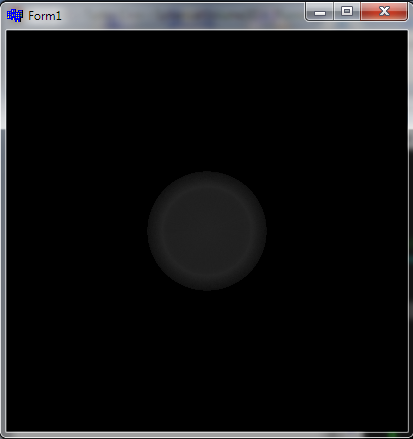
我用这个相机矩阵eye来做它:
// globals
SphericalVolume3D vol;
// init (GL must be already working)
vol.gl_init();

// render
glClear(GL_COLOR_BUFFER_BIT | GL_DEPTH_BUFFER_BIT);
glDisable(GL_CULL_FACE);

glMatrixMode(GL_MODELVIEW);
glLoadIdentity();
glTranslatef(0.0,0.0,-2.5);
glGetFloatv(GL_MODELVIEW_MATRIX,vol.eye);
vol.glsl_draw(prog_id);

glFlush();
SwapBuffers(hdc);

// exit (GL must be still working)
vol.gl_init();
射线/球体命中工作正常,球坐标系中的命中位置也是正常工作的,所以只剩下轴序和颜色算法了。
https://stackoverflow.com/questions/55528378
复制相似问题
腾讯云开发者

Copyright © 2013 - 2026 Tencent Cloud. All Rights Reserved. 腾讯云 版权所有
深圳市腾讯计算机系统有限公司 ICP备案/许可证号:粤B2-20090059  粤公网安备44030502008569号
腾讯云计算(北京)有限责任公司 京ICP证150476号 | 京ICP备11018762号