
我想要一个阴影在地板上为我的所有对象在SWIFT / Scenekit
我正在处理一个ARKit项目。
在斯威夫特中,我将物体添加到场景中。我想对这些物体做的是在它们下面显示一个阴影,以使它们更加真实。我试过一些东西,但都没有用。我在这里解释。
请理解我对斯威夫特还不熟悉。我在SWIFT中以编程方式创建对象。我想我可以通过在所有物体下创建一个无形的平面,并在场景上方放一盏灯来做到这一点。我从Xcode中了解到,通过取消“写到颜色”值--红、绿、蓝和阿尔法--我可以在场景编辑器的隐形平面上投下阴影。我在上面放了个点灯,它起作用了。现在我想通过编程来完成这个任务。
我迅速地创造了光和平面,如下所示。我不再用点了,因为现场太大了。这就是为什么我创造了一个非常大的飞机。我把它们加到光的周围和方向上。环境,所以它看起来不黑在侧面和方向,所以阴影是显示的。这不是。物体看上去很奇怪,而且没有阴影。
let worldGroundPlaneGeometry = SCNPlane(width: 1000, height: 1000)
    worldGroundPlaneGeometry.firstMaterial?.colorBufferWriteMask = SCNColorMask(rawValue: 0)
    let worldGroundPlane = SCNNode()

    worldGroundPlane.geometry = worldGroundPlaneGeometry
    worldGroundPlane.position = worldPosition
    worldGroundPlane.castsShadow = true
    worldGroundPlane.eulerAngles = SCNVector3(Float.pi / 2, 0, 0)
    self.addChildNode(worldGroundPlane)

    // Create a ambient light
    let ambientLight = SCNNode()
    ambientLight.light = SCNLight()
    ambientLight.light?.color = UIColor.white
    ambientLight.light?.type = SCNLight.LightType.ambient
    ambientLight.position = SCNVector3(x: 0,y: 5,z: 0)

    // Create a directional light node with shadow
    let directionalNode = SCNNode()
    directionalNode.light = SCNLight()
    directionalNode.light?.type = SCNLight.LightType.directional
    directionalNode.light?.color = UIColor.white
    directionalNode.light?.castsShadow = true
    directionalNode.light?.automaticallyAdjustsShadowProjection = true
    directionalNode.light?.shadowSampleCount = 64
    directionalNode.light?.shadowMode = .deferred
    directionalNode.light?.shadowMapSize = CGSize(width: 2048, height: 2048)
    directionalNode.light?.shadowColor = UIColor.black.withAlphaComponent(0.75)
    directionalNode.position = SCNVector3(x: 0,y: 5,z: 0)

    // Add the lights to the container
    self.addChildNode(ambientLight)
    self.addChildNode(directionalNode)
整个场景都是这样的:
如果我在应用程序中的手机上渲染它,物体和阴影看起来是一样的。
我希望你能帮助我找到一个解决方案,以实现上述目标。
我希望你能帮我!谢谢
编辑:
下面提供的解决方案不是解决方案。现在我的场景看上去还没有影子:
守则:
let worldGroundPlaneGeometry = SCNPlane(width: 1000, height: 1000)
    let worldGroundPlane = SCNNode()
    worldGroundPlane.geometry?.firstMaterial?.lightingModel = .constant
    worldGroundPlane.geometry?.firstMaterial?.writesToDepthBuffer = true
    worldGroundPlane.geometry?.firstMaterial?.colorBufferWriteMask = []
    worldGroundPlane.geometry = worldGroundPlaneGeometry
    worldGroundPlane.position = worldPosition
    worldGroundPlane.castsShadow = true
    worldGroundPlane.eulerAngles = SCNVector3(Float.pi / 2, 0, 0)
    self.addChildNode(worldGroundPlane)

    // Create a ambient light
    let ambientLight = SCNNode()
    ambientLight.light = SCNLight()
    ambientLight.light?.shadowMode = .deferred
    ambientLight.light?.color = UIColor.white
    ambientLight.light?.type = SCNLight.LightType.ambient
    ambientLight.position = SCNVector3(x: 0,y: 5,z: 0)

    // Create a directional light node with shadow
    let directionalNode = SCNNode()
    directionalNode.light = SCNLight()
    directionalNode.light?.type = SCNLight.LightType.directional
    directionalNode.light?.color = UIColor.white
    directionalNode.light?.castsShadow = true
    directionalNode.light?.automaticallyAdjustsShadowProjection = true
    directionalNode.light?.shadowSampleCount = 64
    directionalNode.light?.shadowMode = .deferred
    directionalNode.light?.shadowMapSize = CGSize(width: 2048, height: 2048)
    directionalNode.light?.shadowColor = UIColor.black.withAlphaComponent(0.75)
    directionalNode.position = SCNVector3(x: 0,y: 5,z: 0)

    // Add the lights to the container
    self.addChildNode(ambientLight)
self.addChildNode(directionalNode)回答 2
Stack Overflow用户
发布于 2018-01-10 12:27:07
我在玩你的照明装置,发现周围的灯光让它看起来很疲惫.&阴影似乎太暗了。
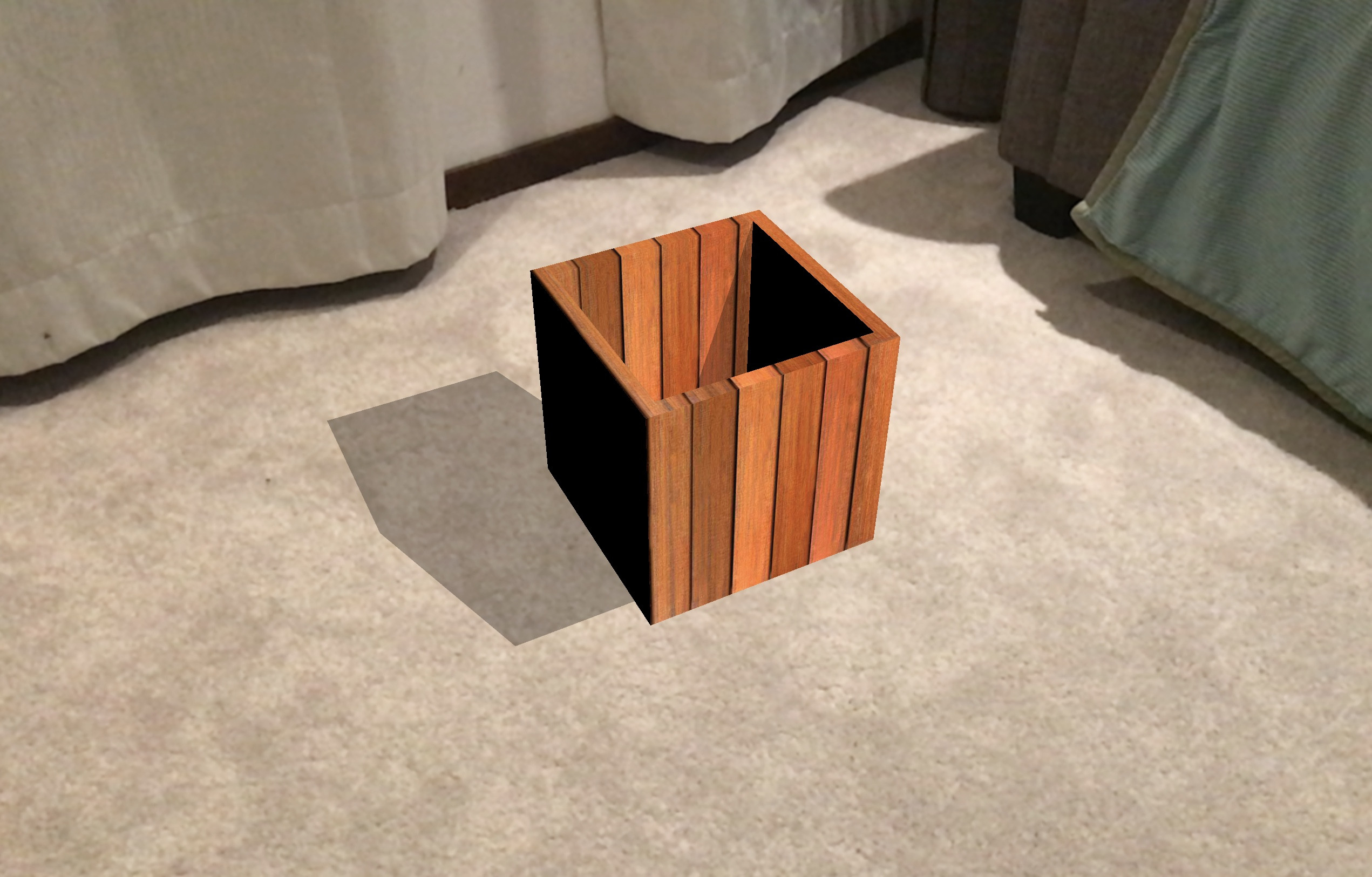
Anwway我调整了您的灯光设置配置如下。我一起去掉了周围的光线,并在对象节点(木材盒)上添加了一个约束。我也用一个方向光来控制灯光强度。
        let directionalNode = SCNNode()
        let constraint = SCNLookAtConstraint(target:node)
        directionalNode.light = SCNLight()
        directionalNode.light?.type = .directional
        directionalNode.light?.color = UIColor.white
        directionalNode.light?.castsShadow = true
        directionalNode.light?.intensity = 2000
        directionalNode.light?.shadowRadius = 16
        directionalNode.light?.shadowMode = .deferred
        directionalNode.eulerAngles = SCNVector3(Float.pi/2,0,0)
        directionalNode.light?.shadowColor = UIColor(red: 0, green: 0, blue: 0, alpha: 0.3)
        directionalNode.position = SCNVector3((node?.position.x)! + 10,(node?.position.y)! + 30,(node?.position.z)!+30)
        directionalNode.constraints = [constraint]
        // Add the lights to the container
self.sceneView.scene.rootNode.addChildNode(directionalNode)Stack Overflow用户
发布于 2018-01-10 10:53:39
问题是我实际上并没有使用这些材料。工作守则:
 let worldGroundPlaneGeometry = SCNFloor()
    let worldGroundPlane = SCNNode()
    let worldGroundMaterial = SCNMaterial()
    worldGroundMaterial.lightingModel = .constant
    worldGroundMaterial.writesToDepthBuffer = true
    worldGroundMaterial.colorBufferWriteMask = []
    worldGroundMaterial.isDoubleSided = true
    worldGroundPlaneGeometry.materials = [worldGroundMaterial]

    worldGroundPlane.geometry = worldGroundPlaneGeometry
    self.addChildNode(worldGroundPlane)

    // Create a ambient light
    let ambientLight = SCNNode()
    ambientLight.light = SCNLight()
    ambientLight.light?.shadowMode = .deferred
    ambientLight.light?.color = UIColor.white
    ambientLight.light?.type = SCNLight.LightType.ambient
    ambientLight.position = SCNVector3(x: 0,y: 5,z: 0)

    // Create a directional light node with shadow
    let directionalNode = SCNNode()
    directionalNode.light = SCNLight()
    directionalNode.light?.type = SCNLight.LightType.directional
    directionalNode.light?.color = UIColor.white
    directionalNode.light?.castsShadow = true
    directionalNode.light?.automaticallyAdjustsShadowProjection = true
    directionalNode.light?.shadowSampleCount = 64
    directionalNode.light?.shadowRadius = 16
    directionalNode.light?.shadowMode = .deferred
    directionalNode.light?.shadowMapSize = CGSize(width: 2048, height: 2048)
    directionalNode.light?.shadowColor = UIColor.black.withAlphaComponent(0.75)
    directionalNode.position = SCNVector3(x: 0,y: 5,z: 0)
    directionalNode.eulerAngles = SCNVector3(-Float.pi / 2, 0, 0)

    // Add the lights to the container

    self.addChildNode(ambientLight)
self.addChildNode(directionalNode)https://stackoverflow.com/questions/48183385
复制相似问题
腾讯云开发者

Copyright © 2013 - 2026 Tencent Cloud. All Rights Reserved. 腾讯云 版权所有
深圳市腾讯计算机系统有限公司 ICP备案/许可证号:粤B2-20090059  粤公网安备44030502008569号
腾讯云计算(北京)有限责任公司 京ICP证150476号 | 京ICP备11018762号