
SceneKit - SCNText对心不正确
SceneKit - SCNText对心不正确
提问于 2017-07-18 13:56:03
我试图使文本字符串(SCNText)适合于下面代码中的一个框(SCNBox)。框的大小看起来是正确的,但文本不在框的右中心。有什么办法吗?谢谢
let geoText = SCNText(string: "Hello", extrusionDepth: 1.0)
geoText.font = UIFont (name: "Arial", size: 8)
geoText.firstMaterial!.diffuse.contents = UIColor.red
let textNode = SCNNode(geometry: geoText)

let (minVec, maxVec) = textNode.boundingBox
scnScene.rootNode.addChildNode(textNode)

let w = CGFloat(maxVec.x - minVec.x)
let h = CGFloat(maxVec.y - minVec.y)
let d = CGFloat(maxVec.z - minVec.z)

let geoBox = SCNBox(width: w, height: h, length: d, chamferRadius: 0)
geoBox.firstMaterial!.diffuse.contents = UIColor.green.withAlphaComponent(0.5)
scnScene.rootNode.addChildNode(boxNode)
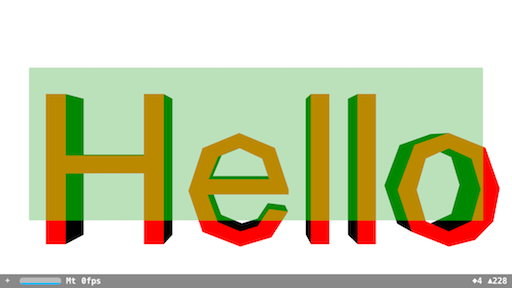
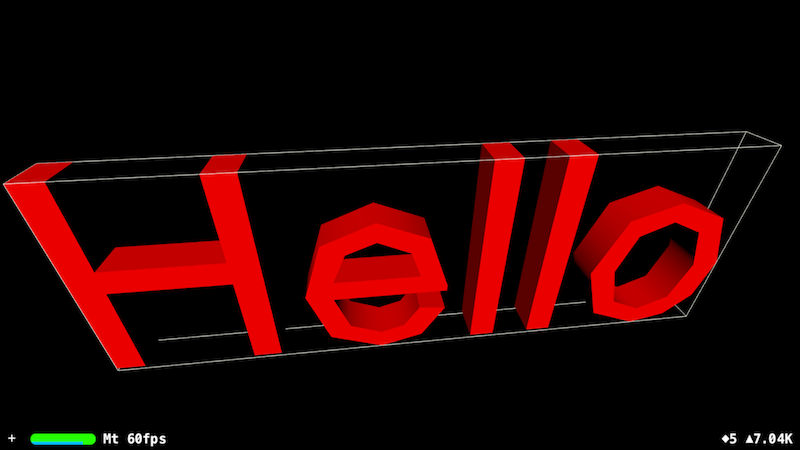
编辑:我添加了一个新的字符串映像(没有SCNBox节点)和debugOptions showBoundingBoxes来查看它的边界框
解决方案1:
根据vdugnist的答案,我为任何想要测试的人创建了一个操场代码:
import UIKit
import SceneKit
import PlaygroundSupport

var sceneView = SCNView(frame: CGRect(x: 0, y: 0, width: 600, height: 600))
var scene = SCNScene()
sceneView.scene = scene
PlaygroundPage.current.liveView = sceneView

let geoText = SCNText(string: "Hello", extrusionDepth: 1.0)
geoText.font = UIFont (name: "Arial", size: 12)
geoText.firstMaterial!.diffuse.contents = UIColor.red
let textNode = SCNNode(geometry: geoText)

let (minVec, maxVec) = textNode.boundingBox
textNode.position = SCNVector3(x: (minVec.x - maxVec.x) / 2, y: minVec.y - maxVec.y, z: 0)
textNode.pivot = SCNMatrix4MakeTranslation((maxVec.x - minVec.x) / 2, 0, 0)
scene.rootNode.addChildNode(textNode)

let w = CGFloat(maxVec.x - minVec.x)
let h = CGFloat(maxVec.y - minVec.y)
let d = CGFloat(maxVec.z - minVec.z)

let geoBox = SCNBox(width: w, height: h, length: d, chamferRadius: 0)
geoBox.firstMaterial!.diffuse.contents =   UIColor.green.withAlphaComponent(0.5)
let boxNode = SCNNode(geometry: geoBox)
boxNode.position = SCNVector3Make((maxVec.x - minVec.x) / 2 + minVec.x, (maxVec.y - minVec.y) / 2 + minVec.y, 0);
textNode.addChildNode(boxNode)
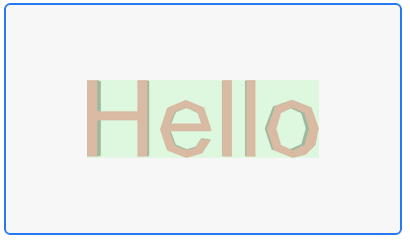
解决方案2:
我需要将文本移动到零位置(0,0,0),而不是移动文本和周围框,因此我继续从解决方案1中更改文本的枢轴。
import UIKit
import SceneKit
import PlaygroundSupport


var sceneView = SCNView(frame: CGRect(x: 0, y: 0, width: 600, height: 600))
var scene = SCNScene()
sceneView.scene = scene
PlaygroundPage.current.liveView = sceneView


let geoText = SCNText(string: "Hello", extrusionDepth: 1.0)
geoText.font = UIFont (name: "Arial", size: 12)
geoText.firstMaterial!.diffuse.contents = UIColor.red
let textNode = SCNNode(geometry: geoText)

let (minVec, maxVec) = textNode.boundingBox
textNode.pivot = SCNMatrix4MakeTranslation((maxVec.x - minVec.x) / 2 + minVec.x, (maxVec.y - minVec.y) / 2 + minVec.y, 0)
scene.rootNode.addChildNode(textNode)

let w = CGFloat(maxVec.x - minVec.x)
let h = CGFloat(maxVec.y - minVec.y)
let d = CGFloat(maxVec.z - minVec.z)

let geoBox = SCNBox(width: w, height: h, length: d, chamferRadius: 0)
geoBox.firstMaterial!.diffuse.contents = UIColor.green.withAlphaComponent(0.6)
let boxNode = SCNNode(geometry: geoBox)
scene.rootNode.addChildNode(boxNode)回答 4
Stack Overflow用户
回答已采纳
发布于 2017-09-03 12:23:18
SCNText与其他几何学的不同之处在于SCNText原点位于左下角。在其他几何学中,它是底部的中心。
要修复父节点中的文本位置,可以将它的透视点x设置为宽度的一半:
SCNVector3 min, max;
[textNode getBoundingBoxMin:&min max:&max];
textNode.pivot = SCNMatrix4MakeTranslation((max.x - min.x) / 2, 0, 0);
要修复子节点的位置,您应该将它们的位置设置为宽度的一半加上分钟:
SCNVector3 min, max;
[textNode getBoundingBoxMin:&min max:&max];
subnode.position = SCNVector3Make((max.x - min.x) / 2 + min.x, (max.y - min.y) / 2 + min.y, 0);Stack Overflow用户
发布于 2018-04-16 14:59:02
Swift:正确的父节点中的中心文本节点
let (min, max) = textNode.boundingBox

let dx = min.x + 0.5 * (max.x - min.x)
let dy = min.y + 0.5 * (max.y - min.y)
let dz = min.z + 0.5 * (max.z - min.z)
textNode.pivot = SCNMatrix4MakeTranslation(dx, dy, dz)

let textNodeParent = SCNNode()
textNodeParent.addChildNode(textNode)Stack Overflow用户
发布于 2017-07-18 15:27:47
要找到包围框的中心,需要在除以2之前添加(而不是减去) min和max。
textNode.position = SCNVector3(x: (minVec.x + maxVec.x) / 2, y: minVec.y + maxVec.y, z: 0)页面原文内容由Stack Overflow提供。腾讯云小微IT领域专用引擎提供翻译支持
原文链接:
https://stackoverflow.com/questions/45168896
复制相关文章
相似问题
腾讯云开发者

Copyright © 2013 - 2026 Tencent Cloud. All Rights Reserved. 腾讯云 版权所有
深圳市腾讯计算机系统有限公司 ICP备案/许可证号:粤B2-20090059  粤公网安备44030502008569号
腾讯云计算(北京)有限责任公司 京ICP证150476号 | 京ICP备11018762号