
使用CGPoint (IOS)用2 CGPoint绘制光线
使用CGPoint (IOS)用2 CGPoint绘制光线
提问于 2016-02-18 05:13:44
UIBezierPath *myPath = [[UIBezierPath bezierPath];
[myPath moveToPoint: firstPoint];
[myPath addLineToPoint: secondPoint];
myPath.lineWidth = 10;
[[UIColor yellowColor]setStroke];
[myPath stroke];
当我运行这段代码时,它会自然地绘制一个段(从1点到另一点)。我正在设法画一条射线。我的意思是从"firstPoint“到"secondPoint”直到屏幕的末尾。我不介意光线点是否会永远持续下去(我猜)。
这里会是什么样子。
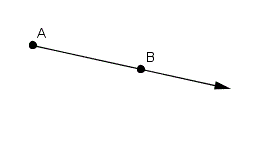
谢谢。
(如果需要,屏幕大小为736x414像素)
回答 2
Stack Overflow用户
回答已采纳
发布于 2016-02-18 05:56:46
您可以使用公式m= (y2-y1)/(x2-x1)使用这两个点计算直线的斜率。然后通过设置x和根据斜率计算y来计算第三个点。请确保检查是否除以0。
y3 =m (x3-x2) + y2
将x3作为屏幕宽度,在您的情况下为414。y1是firstPoint.y,x2是第二点,依此类推。
样本代码
CGPoint firstPoint = CGPointMake(50, 150);
CGPoint secondPoint = CGPointMake(100, 250);
CGPoint screenMax = CGPointMake(414,736);
CGPoint lastPoint = CGPointZero;
CGFloat slope = 1.0;
if (secondPoint.x != firstPoint.x) {
    slope = (secondPoint.y - firstPoint.y) / (secondPoint.x - firstPoint.x);
    lastPoint = CGPointMake(screenMax.x, slope * (screenMax.x-secondPoint.x)+secondPoint.y);
} else {
    slope = 0;
    lastPoint.x = secondPoint.x;
    lastPoint.y = screenMax.y;
}
UIBezierPath *myPath = [UIBezierPath bezierPath];
[myPath moveToPoint: firstPoint];
[myPath addLineToPoint: secondPoint];
myPath.lineWidth = 10;
[[UIColor yellowColor]setStroke];
[myPath stroke];

//this is the extension from the second point to the end of the screen
[myPath addLineToPoint: lastPoint];
[myPath stroke];Stack Overflow用户
发布于 2016-02-18 06:10:02
从第二个点减去第一个点,得到射线的方向矢量:
CGPoint direction = CGPointMake(secondPoint.x - firstPoint.x, secondPoint.y - firstPoint.y);计算方向向量的大小:
CGFloat magnitude = hypot(direction.x, direction.y);使用震级来缩放方向矢量,使其长度足够大;比如说4000点:
if (magnitude == 0) {
    magnitude = 1;
}
CGFloat factor = 4000 / magnitude;
direction.x *= factor;
direction.y *= factor;
将缩放的方向向量添加到第一个点,以便沿光线得到一个很远的点:
CGPoint farPoint = CGPointMake(firstPoint.x + direction.x, firstPoint.y + direction.y);使用第一点和远点绘制光线:
UIBezierPath *myPath = [[UIBezierPath bezierPath];
[myPath moveToPoint:firstPoint];
[myPath addLineToPoint:farPoint];
myPath.lineWidth = 10;
[[UIColor yellowColor] setStroke];
[myPath stroke];页面原文内容由Stack Overflow提供。腾讯云小微IT领域专用引擎提供翻译支持
原文链接:
https://stackoverflow.com/questions/35473345
复制相关文章
相似问题
腾讯云开发者

Copyright © 2013 - 2026 Tencent Cloud. All Rights Reserved. 腾讯云 版权所有
深圳市腾讯计算机系统有限公司 ICP备案/许可证号:粤B2-20090059  粤公网安备44030502008569号
腾讯云计算(北京)有限责任公司 京ICP证150476号 | 京ICP备11018762号