
NSAttributedString不适用于SCNText
我想在SceneKit场景中显示一些文本,其中字符有不同的颜色。SCNText文档指出:
当您从属性化字符串创建文本几何时,SceneKit根据字符串中的属性对文本进行样式设置,而SCNText对象的属性确定没有样式属性的字符串部分的默认样式。
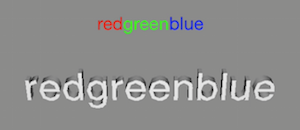
我试过了,但没用。SCNText似乎忽略了字符串的属性。我检查了我的NSAttributedString的内容是否正确,并将其添加到UILabel中,它按预期显示。
为什么3D文本没有着色?
下面是一个小测试应用程序(来自单一视图应用程序模板)和一个屏幕快照:
#import "ViewController.h"

#import <SceneKit/SceneKit.h>

@interface ViewController ()

@end

@implementation ViewController

- (void) viewDidLoad
{
    [super viewDidLoad];

    NSAttributedString* str = [ViewController makeSomeText];

    [self addSceneViewWithText: str];
    [self addLabelWithText: str];
}

+ (NSMutableAttributedString*) makeSomeText
{
    NSDictionary* redAttr   = @{NSForegroundColorAttributeName : [UIColor redColor]};
    NSDictionary* greenAttr = @{NSForegroundColorAttributeName : [UIColor greenColor]};
    NSDictionary* blueAttr  = @{NSForegroundColorAttributeName : [UIColor blueColor]};

    NSAttributedString* redStr   = [[NSAttributedString alloc] initWithString: @"red"   attributes: redAttr];
    NSAttributedString* greenStr = [[NSAttributedString alloc] initWithString: @"green" attributes: greenAttr];
    NSAttributedString* blueStr  = [[NSAttributedString alloc] initWithString: @"blue"  attributes: blueAttr];

    NSMutableAttributedString* str = [[NSMutableAttributedString alloc] init];
    [str appendAttributedString: redStr];
    [str appendAttributedString: greenStr];
    [str appendAttributedString: blueStr];

    return str;
}

- (void) addSceneViewWithText: (NSAttributedString*) string
{
    SCNView* view = [[SCNView alloc] initWithFrame: self.view.bounds];
    view.scene = [SCNScene scene];
    view.backgroundColor = [UIColor grayColor];
    view.autoenablesDefaultLighting = true;
    view.allowsCameraControl = true;
    SCNNode* root = view.scene.rootNode;
    [self.view addSubview: view];

    SCNNode* cameraNode = [SCNNode node];
    cameraNode.camera = [SCNCamera camera];
    cameraNode.camera.automaticallyAdjustsZRange = true;
    [root addChildNode: cameraNode];

    SCNText* text = [SCNText textWithString: string extrusionDepth: 3];
    // text.firstMaterial.diffuse.contents = [UIColor yellowColor];
    SCNNode* textNode = [SCNNode nodeWithGeometry: text];
    textNode.rotation = SCNVector4Make (1, 0, 0, 0.5f);
    [root addChildNode: textNode];

    SCNVector3 text_center;
    float dummy;
    [text getBoundingSphereCenter: &text_center radius: &dummy];
    textNode.position = SCNVector3Make (-text_center.x, -text_center.y, -150);
}

- (void) addLabelWithText: (NSAttributedString*) string
{
    CGRect bounds = self.view.bounds;
    UILabel* label = [[UILabel alloc] initWithFrame: CGRectMake (0, 50, bounds.size.width, 50)];
    label.attributedText = string;
    label.textAlignment = NSTextAlignmentCenter;
    [self.view addSubview: label];
}

- (void) didReceiveMemoryWarning
{
    [super didReceiveMemoryWarning];
}

@end回答 1
Stack Overflow用户
发布于 2015-09-16 15:13:33
直接回答你的问题:“为什么3D文本没有颜色?”
颜色可能不被认为是“风格”的一部分,因为他们在文档中使用这个词。这也可能是一个错误的词,因为它是一种文字质量的描述,在它使用的每一个地方都会弯曲和扭曲。
很可能他们想说的是体重,对齐,下划线,打孔,打滑和领先……这种性质的东西是由SceneKit解释的。但只有尝试和错误才能确定什么起作用,什么不起作用。
苹果应该提供一张表格,列出SceneKit认可和使用的文本的属性/质量。
我可以在核心文本和NSAttributedString文档中找到“样式”的唯一用法,这表明这些框架考虑将每一段的这类质量分组,这在考虑SceneKit文本时也没有多大帮助。
编辑:关于3D和材料的更多内容,以防万一这对你来说是新闻:
在3D说话中的“材料”创造了色彩的印象,对光线的反应,反射和物体上的其他品质,在3D中,需要被创造和应用。它几乎没有在2D思维中说“让objectABC变成红色”那么简单。
一个单一的文本对象(在3D中,而不是在Cocoa中如何看待这些东西)可能无法自动地使用SceneKit中的不同材料和/或材料in来生成。材料ID是将不同的材料应用于单个对象的不同部分的方式,比如3ds Max,大多数人在这里创建几何学和材料。
不幸的是,SceneKit没有遵循这个约定,而是使用“元素”作为几何对象的一部分,每个元素都是一个索引的一部分,该索引对应于提供该几何学的任何材料。
你可以在这里读到更多关于这一点的信息:
编号/doc/uid/doc 40012000-CLSCHSCN几何学-SW15 15
因此,要想得到你想要的东西,你可能需要制作3个文本对象,并给每个对象一个你想要的颜色的独特材料,或者把3个单词的对象分解成3个元素,然后有趣地猜测如何在每个元素上找到正确的素材。
编辑:忽略以上段落的最后部分。你需要制作3个文本对象才能得到你想要的样子。场景工具包中的元素分布特征保留在文本对象上,因此不能将文本在单词级别分解为不同的元素。
从医生那里:
文本几何学可以包含一个、三个或五个几何元素:
- 如果它的extrusionDepth属性为0.0,则文本几何学有一个元素对应于它的一个可见边。
- 如果其挤压深度大于零,且其chamferRadius特性为0.0,则文本几何学有三个元素,分别对应于其前、后和挤压边。
- 如果挤压深度和倒角半径都大于零,则文本几何有五个元素,对应于它的前、后、挤压边、前倒角和后倒角。
https://stackoverflow.com/questions/32610914
复制相似问题
腾讯云开发者

Copyright © 2013 - 2026 Tencent Cloud. All Rights Reserved. 腾讯云 版权所有
深圳市腾讯计算机系统有限公司 ICP备案/许可证号:粤B2-20090059  粤公网安备44030502008569号
腾讯云计算(北京)有限责任公司 京ICP证150476号 | 京ICP备11018762号