
光线追踪中的折射?
我又在做射线追踪器了。我增加了反射和多线程支持。目前我正在努力增加折射,但它只有一半的工作。
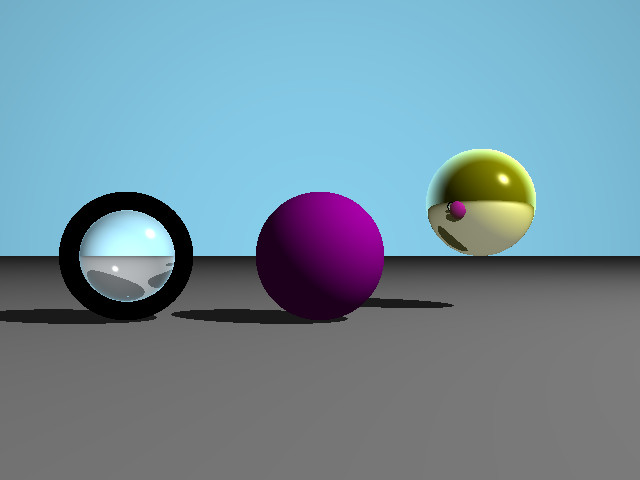
如你所见,有一个中心球(没有镜面高光),一个反射球(向右)和一个折射球(左)。我对倒影很满意,看起来真的很好。对于折射,它的类working...the光是折射和所有的阴影球是可见的球体(折射指数1.4),但有一个外部的黑色环。
编辑:很明显,当我增加球体的折射率时,黑色的环变大了,所以球变小了。相反,当折射率降低时,球变大,黑色环smaller...until变大,折射率设为1,环完全消失。IOR = 1.9
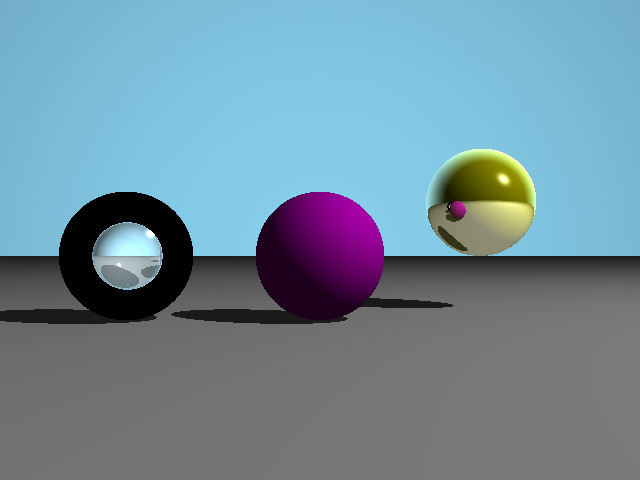
IOR = 1.1
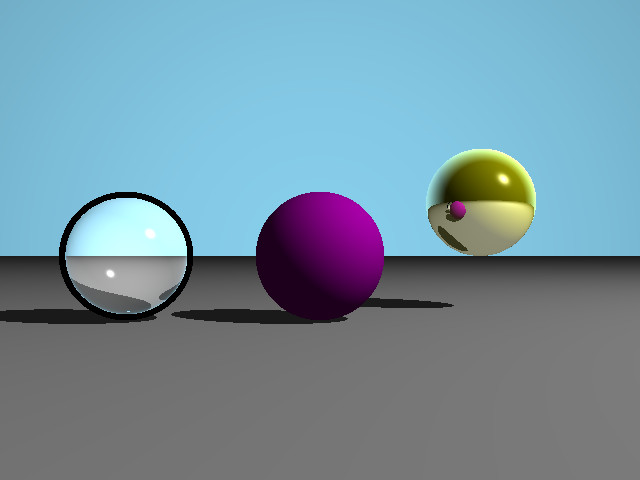
IOR = 1.00001
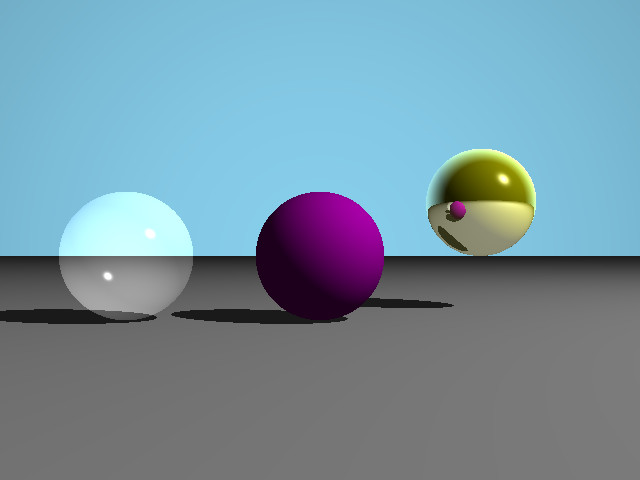
有趣的是,在IOR =1时,球体失去了透明度,变成了白色。
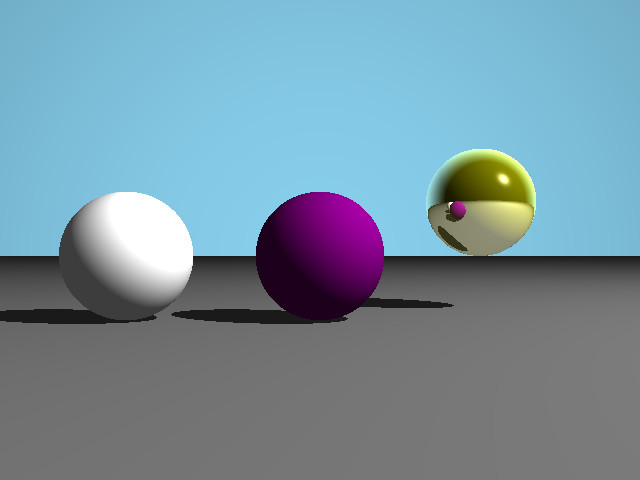
我想我涉及的是全面的内部反思,而不是这里的问题。
现在代码:我用operator |表示点积,所以(vec|vec)是点积,operator ~是反转向量。这些对象,包括韧带和球体都存储在Object **objects;中。雷迹函数
Colour raytrace(const Ray &r, const int &depth)
{
    //first find the nearest intersection of a ray with an object
    Colour finalColour = skyBlue *(r.getDirection()|Vector(0,0,-1)) * SKY_FACTOR;
    double t, t_min = INFINITY;
    int index_nearObj = -1;
    for(int i = 0; i < objSize; i++)
    {
        if(!dynamic_cast<Light *>(objects[i]))//skip light src
        {
            t = objects[i]->findParam(r);
            if(t > 0 && t < t_min)
            {
                t_min = t;
                index_nearObj = i;
            }
        }
    }
    //no intersection
    if(index_nearObj < 0)
        return finalColour;

    Vector intersect = r.getOrigin() + r.getDirection()*t_min;
    Vector normal = objects[index_nearObj]->NormalAtIntersect(intersect);
    Colour objectColor = objects[index_nearObj]->getColor();
    Ray rRefl, rRefr; //reflected and refracted Ray
    Colour refl = finalColour, refr = finalColour; //reflected and refracted colours
    double reflectance = 0, transmittance = 0;

    if(objects[index_nearObj]->isReflective() && depth < MAX_TRACE_DEPTH)
    {
        //handle reflection
        rRefl = objects[index_nearObj]->calcReflectingRay(r, intersect, normal);
        refl = raytrace(rRefl, depth + 1);
        reflectance = 1;
    }

    if(objects[index_nearObj]->isRefractive() && depth < MAX_TRACE_DEPTH)
    {
        //handle transmission
        rRefr = objects[index_nearObj]->calcRefractingRay(r, intersect, normal, reflectance, transmittance);
        refr = raytrace(rRefr, depth + 1);
    }

    Ray rShadow; //shadow ray
    bool shadowed;
    double t_light = -1;

    Colour localColour;
    Vector tmpv;

    //get material properties
    double ka = 0.2; //ambient coefficient
    double kd; //diffuse coefficient
    double ks; //specular coefficient

    Colour ambient = ka * objectColor; //ambient component
    Colour diffuse, specular;
    double brightness;
    localColour = ambient;
    //look if the object is in shadow or light
    //do this by casting a ray from the obj and
    // check if there is an intersection with another obj
    for(int i = 0; i < objSize; i++)
    {
        if(dynamic_cast<Light *>(objects[i])) //if object is a light
        {
            //for each light
            shadowed = false;
            //create Ray to light
            tmpv = objects[i]->getPosition() - intersect;
            rShadow = Ray(intersect  + (!tmpv) * BIAS, tmpv);
            t_light = objects[i]->findParam(rShadow);

            if(t_light < 0) //no imtersect, which is quite impossible
                continue;

            //then we check if that Ray intersects one object that is not a light
            for(int j = 0; j < objSize; j++)
            {
                    if(!dynamic_cast<Light *>(objects[j]) && j != index_nearObj)//if obj is not a light
                    {
                        t = objects[j]->findParam(rShadow);
                        //if it is smaller we know the light is behind the object
                        //--> shadowed by this light
                        if (t >= 0 && t < t_light)
                        {
                            // Set the flag and stop the cycle
                            shadowed = true;
                            break;
                        }
                    }
            }

            if(!shadowed)
            {
                rRefl = objects[index_nearObj]->calcReflectingRay(rShadow, intersect, normal);
                //reflected ray from ligh src, for ks
                kd = maximum(0.0, (normal|rShadow.getDirection()));
                if(objects[index_nearObj]->getShiny() <= 0)
                    ks = 0;
                else
                    ks = pow(maximum(0.0, (r.getDirection()|rRefl.getDirection())), objects[index_nearObj]->getShiny());
                diffuse = kd * objectColor;// * objects[i]->getColour();
                specular = ks * objects[i]->getColor();
                brightness = 1 /(1 + t_light * DISTANCE_DEPENDENCY_LIGHT);
                localColour += brightness * (diffuse + specular);
            }
        }
    }
    finalColour = localColour + (transmittance * refr + reflectance * refl);
    return finalColour;
}
现在计算折射射线的函数,我用了几个不同的站点作为资源,每一个都有相似的算法。到目前为止这是我能做的最好的了。可能只是我没看到的一个小细节..。
Ray Sphere::calcRefractingRay(const Ray &r, const Vector &intersection,Vector &normal, double & refl, double &trans)const
{
    double n1, n2, n;
    double cosI = (r.getDirection()|normal);
    if(cosI > 0.0)
    {
        n1 = 1.0;
        n2 = getRefrIndex();
        normal = ~normal;//invert
    }
    else
    {
        n1 = getRefrIndex();
        n2 = 1.0;
        cosI = -cosI;
    }
    n = n1/n2;
    double sinT2 = n*n * (1.0 - cosI * cosI);
    double cosT = sqrt(1.0 - sinT2);
    //fresnel equations
    double rn = (n1 * cosI - n2 * cosT)/(n1 * cosI + n2 * cosT);
    double rt = (n2 * cosI - n1 * cosT)/(n2 * cosI + n2 * cosT);
    rn *= rn;
    rt *= rt;
    refl = (rn + rt)*0.5;
    trans = 1.0 - refl;
    if(n == 1.0)
        return r;
    if(cosT*cosT < 0.0)//tot inner refl
    {
        refl = 1;
        trans = 0;
        return calcReflectingRay(r, intersection, normal);
    }
    Vector dir = n * r.getDirection() + (n * cosI - cosT)*normal;
    return Ray(intersection + dir * BIAS, dir);
}
编辑:我还更改了折射指数around.From
    if(cosI > 0.0)
    {
        n1 = 1.0;
        n2 = getRefrIndex();
        normal = ~normal;
    }
    else
    {
        n1 = getRefrIndex();
        n2 = 1.0;
        cosI = -cosI;
    }
至
if(cosI > 0.0)
{
    n1 = getRefrIndex();
    n2 = 1.0;
    normal = ~normal;
}
else
{
    n1 = 1.0;
    n2 = getRefrIndex();
    cosI = -cosI;
}
然后,我得到了这个,几乎相同(仍然颠倒)的折射指数为1!
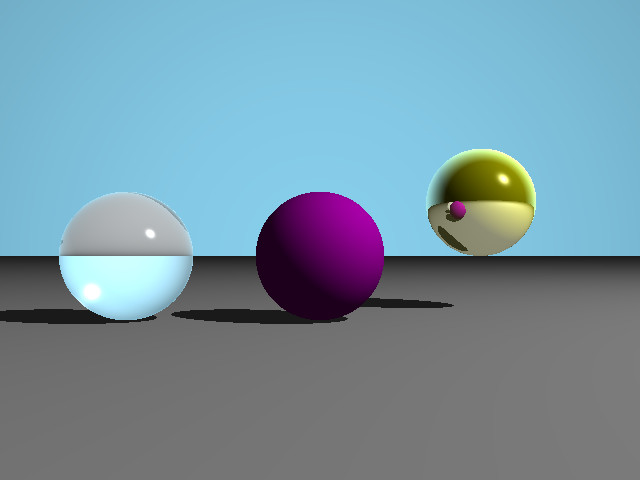
以及反射计算:
Ray Sphere::calcReflectingRay(const Ray &r, const Vector &intersection, const Vector &normal)const
{
    Vector rdir = r.getDirection();
    Vector dir = rdir - 2 * (rdir|normal) * normal;
    return Ray(intersection + dir*BIAS, dir);
    //the Ray constructor automatically normalizes directions
}
所以我的问题是:我如何修复外部的黑圈?哪个版本是正确的?
)我们非常感谢:)
这是在Linux上使用g++ 4.8.2编译的。
回答 2
Stack Overflow用户
发布于 2014-09-28 23:15:54
警告:以下是猜测,而非确定。我必须更详细地查看代码,以确定发生了什么以及原因。
尽管如此,在我看来,你的原始代码基本上是在模拟凹面透镜,而不是凸透镜。
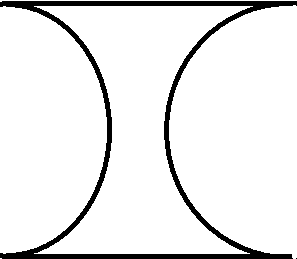
凸透镜基本上是放大镜,它将相对较小区域的光线聚焦在平面上:
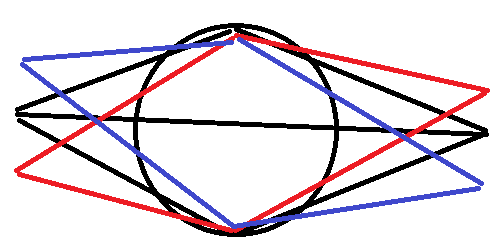
这也说明了为什么校正后的代码会显示颠倒的图像。来自一侧顶部的光线被投射到另一边的底部(反之亦然)。
回到凹透镜上:凹面透镜是一种缩小镜头,从镜头前面显示出大角度的图像:
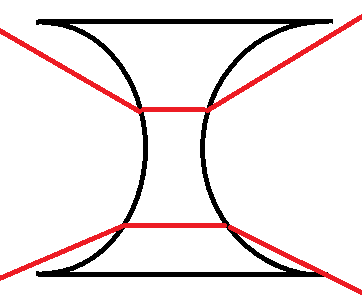
如果你看一下右下角,它显示了我怀疑的问题:尤其是在高折射率的情况下,试图进入镜头的光线与镜头本身的边缘相交。对于所有的角度更宽,你通常会看到一个黑色的环,因为镜头的前缘是一个阴影,以防止光线进入。
增加折射率增加了黑色光环的宽度,因为光线弯曲得更多,因此边缘的较大部分与透镜的外部边缘相交。
如果你关心他们如何避免像广角相机镜头这样的镜头,通常的方法是使用半月板镜头,至少对前面的元素是这样的:
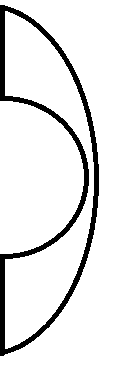
这不是灵丹妙药,但至少可以防止入射光线与前透镜元素的外缘相交。取决于镜头需要覆盖多宽的角度,它通常会比这个更不激进(在某些情况下,它会是一个钢琴凹的),但你会得到一般的想法。
最后警告:当然,所有这些都是手工绘制的,只是为了给出一般的想法,而不是(例如)反映任何特定透镜的设计,一个具有任何特定折射率的元素,等等。
Stack Overflow用户
发布于 2020-04-02 00:37:13
我在做射线追踪器的时候也偶然发现了这个问题。@ about灯泡关于将射线方向矢量规范化的评论为我解决了这个问题。
首先,在编辑之前保留计算折射指数的代码。换句话说,你应该在你的渲染中看到那些黑色的戒指。
然后,在计算calcRefractingRay的cosI函数中,使用normalize(r.getDirection())和normal的点乘积。目前,您使用的是r.getDirection()和normal的点积。
其次,在计算折射射线方向dir时,用normalize(r.getDirection())代替r.getDirection()。同样,您目前正在计算中使用r.getDirection()。
此外,检查全部内部反射的方式也存在问题。在实际计算平方根(1.0 - sinT2)之前,您应该检查()的平方根是非负的。
希望这能帮上忙!
https://stackoverflow.com/questions/26087106
复制相似问题
腾讯云开发者

Copyright © 2013 - 2026 Tencent Cloud. All Rights Reserved. 腾讯云 版权所有
深圳市腾讯计算机系统有限公司 ICP备案/许可证号:粤B2-20090059  粤公网安备44030502008569号
腾讯云计算(北京)有限责任公司 京ICP证150476号 | 京ICP备11018762号