
带有ImageView和Executor框架的laggy列表视图
我有一个带有自定义项的ListView,如下所示:
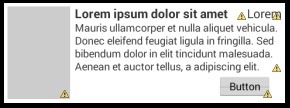
灰色正方形是一个ImageView。填充ListView的数据来自以游标形式的数据库。但是图像不是直接存储在数据库中,而是在SDCard中,数据库只保存对它们的字符串引用。
在开始时,我从的bindView()回调方法中将图像解码为位图:
 Bitmap bmp = BitmapFactory.decodeFile(imageLocation);
 holder.imageHolder.setImageBitmap(bmp);
但ListView滚动非常滞后。因此,我阅读了Executor框架并实现了它,用以下代码替换了前面的代码:
 ImageView imageView = holder.imageHolder;
 asyncImageLoader.DisplayImage(imageLocation, imageView);
并创建AsyncImageLoader类。它在其构造函数中创建一个线程池,最多有5个工作线程来处理发送到工作队列的Runnable。然后,当我从自定义的DisplayImage()方法调用CursorAdapter时,它会检查位置字符串是否包含一个url。如果是这样,就会将一个ImageLoader运行程序发送到线程池的工作队列中。如果该位置包含"N/A",则默认图像设置为ImageView。
当可用的工作线程处理ImageLoader运行时,SDCard中的图像被解码为位图,ImageDisplayer Runnable被发送到主线程的消息队列中,以显示UI中的图像:
public class AsyncImageLoader {

ExecutorService executorService;
Handler handler = new Handler();

public AsyncImageLoader() {
    this.executorService = Executors.newFixedThreadPool(5);
}

public void DisplayImage(String location, ImageView imageView) {
    if(!location.matches("N/A")) {
        queueImageDecoding(location, imageView);
    } else {
        imageView.setImageDrawable(imageView.getContext().getResources().getDrawable(R.drawable.not_available));
    }
}

private void queueImageDecoding(String location, ImageView imageView) {
    executorService.execute(new ImageLoader(location, imageView));
}

class ImageLoader implements Runnable {

    private String location;
    private ImageView imageView;

    public ImageLoader(String location, ImageView imageView) {
        this.location = location;
        this.imageView = imageView;
    }

    @Override
    public void run() {
        Bitmap bmp = BitmapFactory.decodeFile(location);
        handler.post(new ImageDisplayer(bmp, imageView));
    }

}

class ImageDisplayer implements Runnable {

    private Bitmap bitmap;
    private ImageView imageView;

    public ImageDisplayer(Bitmap bitmap, ImageView imageView) {
        this.bitmap =  bitmap;
        this.imageView = imageView;
    }

    @Override
    public void run() {
        if(bitmap != null) {
            imageView.setImageBitmap(bitmap);
        }
    }

}

}
问题是我还在滚动滞后。如果我去掉了ImageLoader.run()方法中的代码,滚动就是完美的。该代码不是应该在工作线程中处理吗?我在这里错过了什么?
更新
由于滚动发生时会重用ListView中的视图,因此从工作线程返回的位图在单个ImageView中被设置了几次。因此,可能的解决办法是:
- 以避免在ListView项已被重用时设置旧位图。
- 或者更好的是取消任务。
我正在使用未来对象取消任务。它存储在自定义CursorAdapter中标记到项目视图的持有人中:
public class MyCustomAdapter extends CursorAdapter {

...
public AsyncImageLoader asyncImageLoader;

private static class ViewHolder {
    ImageView imageHolder;
    TextView text1Holder;
    TextView text2Holder;
    TextView text3Holder;
    Button buttonHolder;
    Future<?> futureHolder;
}

public MyCustomAdapter(Context context, Cursor c, int flags) {
    ...
    this.asyncImageLoader = new AsyncImageLoader();
}

@Override
public View newView(Context context, Cursor cursor, ViewGroup parent) {
    ...
    return view;
}

@Override
public void bindView(View view, Context context, Cursor cursor) {

    ViewHolder holder = (ViewHolder)view.getTag();

    String location = ...;
    ImageView imageView = holder.imageHolder;
    if(holder.futureHolder == null) {
        holder.futureHolder = asyncImageLoader.DisplayImage(location, imageView);
    } else {
        if(!holder.futureHolder.isDone())
            holder.futureHolder.cancel(true);
        holder.futureHolder = asyncImageLoader.DisplayImage(location, imageView);
    }
    ...
}

}
每次重用项目视图时,我都会检查持有者的未来对象isDone()。如果不是,我用Future.cancel(true)取消任务。但现在的问题是,任务完成得太快,不能取消。如果我让工作线程进入睡眠状态,假设是1秒,那么任务持续的时间足够长,可以被取消,并且ListView滚动更好。但我得等1秒才能看到图像,我不想那样做。
public class AsyncImageLoader {
    ....
    public Future<?> DisplayImage(String location, ImageView imageView) {
        if(!location.matches("N/A")) {
            return executorService.submit(new ImageLoader(location, imageView));
        } else {
            imageView.setImageDrawable(imageView.getContext().getResources().getDrawable(R.drawable.not_available));
            return null;
        }
    }

    class ImageLoader implements Runnable {

        private String location;
        private ImageView imageView;

        public ImageLoader(String location, ImageView imageView) {
            this.location = location;
            this.imageView = imageView;
        }

        @Override
        public void run() {
            boolean interrupted = false;
            try {
                if(!Thread.currentThread().isInterrupted()) {
                    Thread.sleep(1000);
                    Bitmap bmp = BitmapFactory.decodeFile(location);
                    handler.post(new ImageDisplayer(bmp, imageView));
                }
            } catch (InterruptedException consumed) {
                interrupted = true;
            } finally {
                if(interrupted)
                    Thread.currentThread().interrupt();
            }
        }

    }
    ...
}
第二个解决方案是让任务完成,但防止在ListView项已经被重用时设置旧的位图。但我不知道该怎么做。有什么建议吗?
回答 1
Stack Overflow用户
发布于 2014-04-16 18:34:27
好的,最初我从Web获取图像,并将它们存储在SDCard中。从我下载的示例中,我相信服务返回了所有维度相同的图像。不对!其中一些比预期的要大,并且在ImageView设置的时候造成了滞后。我只需要把它们缩小。将缩放的位图版本加载到内存中
https://stackoverflow.com/questions/23050212
复制相似问题
腾讯云开发者

Copyright © 2013 - 2026 Tencent Cloud. All Rights Reserved. 腾讯云 版权所有
深圳市腾讯计算机系统有限公司 ICP备案/许可证号:粤B2-20090059  粤公网安备44030502008569号
腾讯云计算(北京)有限责任公司 京ICP证150476号 | 京ICP备11018762号