
派克柯里森检测
派克柯里森检测
提问于 2013-01-22 00:30:57
我的问题:
在我的游戏中,我想添加一些功能,如双跳,墙跳,等等。
然而,我的碰撞检测遇到了一个问题,我似乎无法纠正它。
问题是,当我的角色与地面相撞时,它就会发生碰撞。
然而,下一个滴答,它不再是登记碰撞,即使我在地面上。
这造成了问题的检测,如果我已经与墙壁碰撞,或如果我目前正在与地面碰撞等。
这就造成了更多的问题,因为当它没有检测到碰撞时,我的y-速度会不断降低。
所以,我的球员有一个恒定的y-速度,而不是地面上的0。
示例:
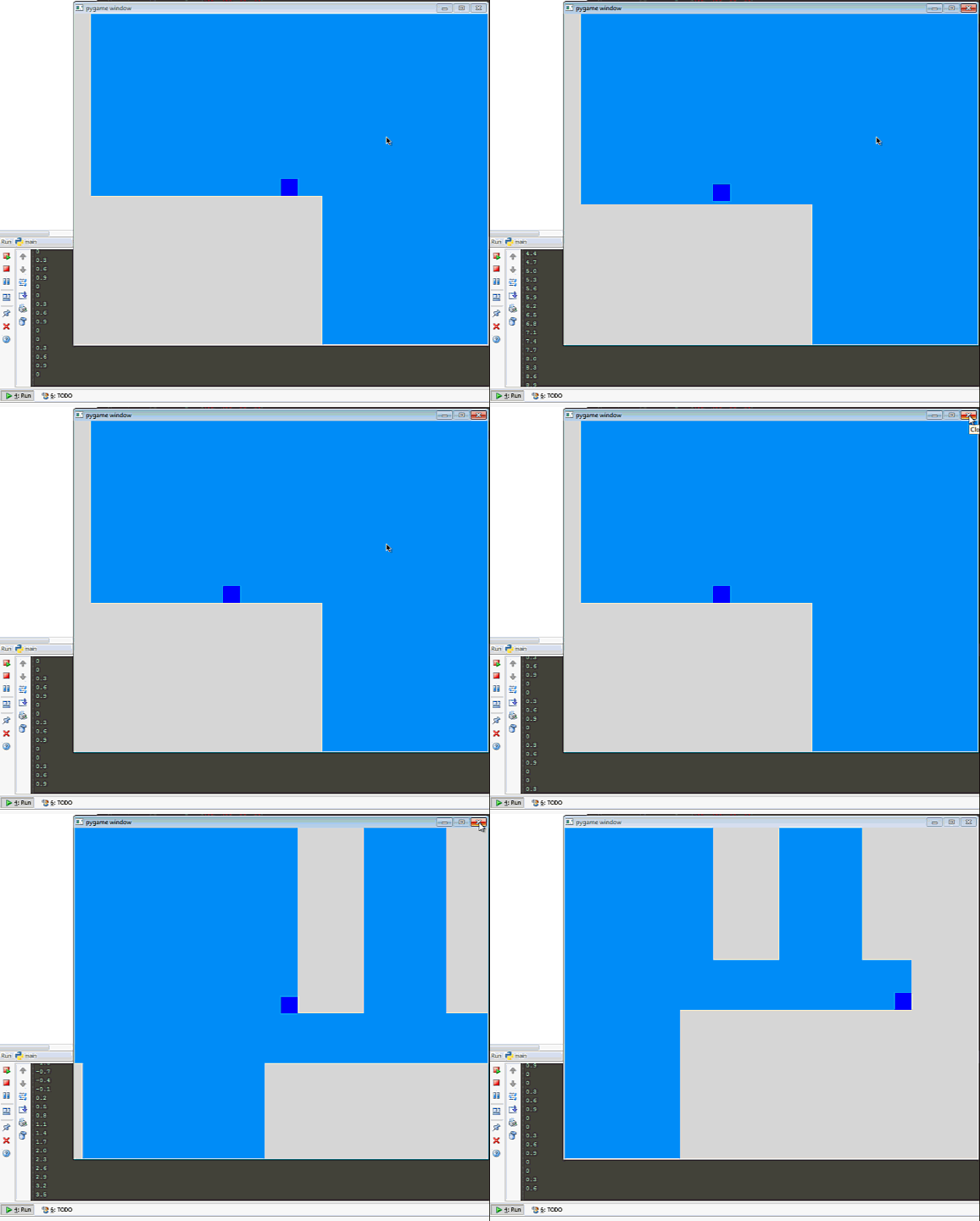
正如你在左手角所看到的,我的y-速度通过这样的数字弹跳:
0
0
0.3
0.6
0.9
然后重新开始。
我真正需要的是,当我在地面上的时候,这个值要一直保持为0,而代码需要识别我在地面上。
但事实并非如此,我也搞不懂为什么,有人能帮忙吗?
代码:
import pygame
from pygame import *

WIN_WIDTH = 800
WIN_HEIGHT = 640
HALF_WIDTH = int(WIN_WIDTH / 2)
HALF_HEIGHT = int(WIN_HEIGHT / 2)

DISPLAY = (WIN_WIDTH, WIN_HEIGHT)
DEPTH = 32
FLAGS = 0
CAMERA_SLACK = 30

def main():
    pygame.init()
    screen = pygame.display.set_mode(DISPLAY, FLAGS, DEPTH)
    #pygame.display.set_caption("Use arrows to move!")
    timer = pygame.time.Clock()

    up = down = left = right = space = False
    bg = Surface((32,32))
    bg.convert()
    bg.fill(Color("#0094FF"))
    entities = pygame.sprite.Group()
    player = Player(32, 32)
    platforms = []
    plants = []

    space_num = 0

    x = 0
    y = 0
    level = [
        "PPPPPPPPPPPPPPPPPPPPPPPPPPPPPPPPPPPPPPPPPPPP",
        "P                                          P",
        "P                                          P",
        "P                                          P",
        "P                                          P",
        "P                                          P",
        "P                                          P",
        "P                                          P",
        "P                                          P",
        "P                                          P",
        "P                                          P",
        "P                                          P",
        "P                                          P",
        "P                                          P",
        "P                                          P",
        "P                                          P",
        "P                           PPPP     PPPPPPP",
        "P                           PPPP     PPPPPPP",
        "P                           PPPP     PPPPPPP",
        "P                           PPPP     PPPPPPP",
        "P                           PPPP     PPPPPPP",
        "P                           PPPP     PPPPPPP",
        "P                           PPPP     PPPPPPP",
        "P                           PPPP     PPPPPPP",
        "P                           PPPP     PPPPPPP",
        "P                           PPPP     PPPPPPP",
        "P                           PPPP     PPPPPPP",
        "P                           PPPP     PPPPPPP",
        "P                           PPPP     PPPPPPP",
        "P                           PPPP     PPPPPPP",
        "P                           PPPP     PPPPPPP",
        "P                           PPPP     PPPPPPP",
        "P                           PPPP     PPPPPPP",
        "P                           PPPP     PPPPPPP",
        "P                           PPPP     PPPPPPP",
        "P                                       PPPP",
        "P                                       PPPP",
        "P                                       PPPP",
        "PPPPPPPPPPPPPPP           PPPPPPPPPPPPPPPPPP",
        "PPPPPPPPPPPPPPP           PPPPPPPPPPPPPPPPPP",
        "PPPPPPPPPPPPPPP           PPPPPPPPPPPPPPPPPP",
        "PPPPPPPPPPPPPPP           PPPPPPPPPPPPPPPPPP",
        "PPPPPPPPPPPPPPP           PPPPPPPPPPPPPPPPPP",
        "PPPPPPPPPPPPPPP           PPPPPPPPPPPPPPPPPP",
        "PPPPPPPPPPPPPPP           PPPPPPPPPPPPPPPPPP",
        "PPPPPPPPPPPPPPP           PPPPPPPPPPPPPPPPPP",
        "PPPPPPPPPPPPPPP           PPPPPPPPPPPPPPPPPP",
        "PPPPPPPPPPPPPPP           PPPPPPPPPPPPPPPPPP",
        "PPPPPPPPPPPPPPP           PPPPPPPPPPPPPPPPPP",
        "PPPPPPPPPPPPPPP           PPPPPPPPPPPPPPPPPP",]
    # build the level
    for row in level:
        for col in row:
            if col == "P":
                p = Platform(x, y)
                platforms.append(p)
                entities.add(p)
            if col == "E":
                e = ExitBlock(x, y)
                platforms.append(e)
                entities.add(e)
            if col == "p":
                p = Plant(x, y)
                plants.append(p)
                entities.add(p)
            x += 32
        y += 32
        x = 0

    total_level_width = len(level[0]) * 32
    total_level_height = len(level) * 32
    camera = Camera(complex_camera, total_level_width, total_level_height)
    entities.add(player)

    while 1:
        timer.tick(60)

        for e in pygame.event.get():
            if e.type == QUIT: raise SystemExit, "QUIT"
            if e.type == KEYDOWN and e.key == K_ESCAPE:
                raise SystemExit, "ESCAPE"
            if e.type == KEYDOWN and e.key == K_UP:
                up = True
            if e.type == KEYDOWN and e.key == K_DOWN:
                down = True
            if e.type == KEYDOWN and e.key == K_LEFT:
                left = True
            if e.type == KEYDOWN and e.key == K_RIGHT:
                right = True
            if e.type == KEYDOWN and e.key == K_SPACE:
                if space_num < 6:
                    space = True
                    space_num += 1

            if e.type == KEYUP and e.key == K_UP:
                up = False
            if e.type == KEYUP and e.key == K_DOWN:
                down = False
            if e.type == KEYUP and e.key == K_LEFT:
                left = False
            if e.type == KEYUP and e.key == K_RIGHT:
                right = False
            if e.type == KEYUP and e.key == K_SPACE:
                space = False

        # draw background
        for y in range(20):
            for x in range(25):
                screen.blit(bg, (x * 32, y * 32))

        camera.update(player)

        # update player, draw everything else
        player.update(up, down, left, right, platforms, space)
        for e in entities:
            screen.blit(e.image, camera.apply(e))
        pygame.display.update()

class Camera(object):
    def __init__(self, camera_func, width, height):
        self.camera_func = camera_func
        self.state = Rect(0, 0, width, height)

    def apply(self, target):
        return target.rect.move(self.state.topleft)

    def update(self, target):
        self.state = self.camera_func(self.state, target.rect)

#def simple_camera(camera, target_rect):
#    l, t, _, _ = target_rect
#    _, _, w, h = camera
#    return Rect(-l+HALF_WIDTH, -t+HALF_HEIGHT, w, h)

def complex_camera(camera, target_rect):
    l, t, _, _ = target_rect
    _, _, w, h = camera
    l, t, _, _ = -l + HALF_WIDTH, -t+HALF_HEIGHT, w, h

    l = min(0, l)                           # stop scrolling left
    l = max(-(camera.width-WIN_WIDTH), l)   # stop scrolling right
    t = max(-(camera.height-WIN_HEIGHT), t) # stop scrolling bottom

    return Rect(l, t, w, h)

class Entity(pygame.sprite.Sprite):
    def __init__(self):
        pygame.sprite.Sprite.__init__(self)

class Player(Entity):
    def __init__(self, x, y):
        Entity.__init__(self)
        self.xvel = 0
        self.yvel = 0
        self.onGround = False
        self.image = Surface((32,32))
        self.image.fill(Color("#0000FF"))
        self.image.convert()
        self.rect = Rect(400, 400, 32, 32)

    def update(self, up, down, left, right, platforms, space):
        if space:
            if not self.onGround:
                self.yvel = -12
            if self.onGround:
                self.yvel = 0
        else:
            if up:
                if self.onGround: self.yvel -= 10 # only jump if on the ground
            if down:
                pass
            if left:
                self.xvel = -8
            if right:
                self.xvel = 8
            if not self.onGround:
                self.yvel += 0.3 # only accelerate with gravity if in the air
                if self.yvel > 40: self.yvel = 40 # max falling speed
            if not(left or right):
                self.xvel = 0

            self.rect.left += self.xvel # increment in x direction
            self.collide(self.xvel, 0, platforms) # do x-axis collisions
            self.rect.top += self.yvel # increment in y direction
            self.onGround = False; # assuming we're in the air
            self.collide(0, self.yvel, platforms) # do y-axis collisions

    def collide(self, xvel, yvel, platforms):
        for p in platforms:
            if pygame.sprite.collide_rect(self, p):
                if isinstance(p, ExitBlock):
                    pygame.event.post(pygame.event.Event(QUIT))
                if xvel > 0: self.rect.right = p.rect.left
                if xvel < 0: self.rect.left = p.rect.right
                if yvel > 0:
                    self.rect.bottom = p.rect.top
                    self.onGround = True
                    self.yvel = 0
                if yvel < 0: self.rect.top = p.rect.bottom


class Platform(Entity):
    def __init__(self, x, y):
        Entity.__init__(self)
        self.image = Surface((32, 32))
        self.image.convert()
        self.image.fill(Color("#DDDDDD"))
        self.rect = Rect(x, y, 32, 32)

    def update(self):
        pass

class ExitBlock(Platform):
    def __init__(self, x, y):
        Platform.__init__(self, x, y)
        self.image = pygame.image.load("bush.png")

class Decoration(Entity):
    def __init__(self):
        pygame.sprite.Sprite.__init__(self)

class Plant(Decoration):
    def __init__(self, x, y):
        Entity.__init__(self)
        self.image = Surface((64, 64))
        self.image.convert()
        #self.image = pygame.image.load("bush.png")
        self.rect = Rect(x, y, 64, 64)


if __name__ == "__main__":
main()回答 1
Stack Overflow用户
发布于 2013-01-22 00:37:13
看起来,每当空间不被控制时,更新代码就会将您设置为处于空中的:
def update(self, up, down, left, right, platforms, space):
    if space:
    else:
        self.onGround = False; # assuming we're in the air
        self.collide(0, self.yvel, platforms) # do y-axis collisions
也许,如果角色没有移动一个像素来重叠平台,那么游戏的碰撞代码就不会检测到碰撞,而是确切地显示在平台上吗?在这种情况下,您将经历一个着陆循环,将yvel设置为0。好了,我们坠落,0.3,下降,0.6,下降,0.9,下降.好的,我们移动了一个像素,我们重叠了,我们着陆了,将yvel设置为0。在开始的时候重复。
页面原文内容由Stack Overflow提供。腾讯云小微IT领域专用引擎提供翻译支持
原文链接:
https://stackoverflow.com/questions/14449651
复制相关文章
相似问题
腾讯云开发者

Copyright © 2013 - 2026 Tencent Cloud. All Rights Reserved. 腾讯云 版权所有
深圳市腾讯计算机系统有限公司 ICP备案/许可证号:粤B2-20090059  粤公网安备44030502008569号
腾讯云计算(北京)有限责任公司 京ICP证150476号 | 京ICP备11018762号