
透明Qt-小部件和Ogre
我们一直在研究使用透明的小部件作为食人魔的覆盖。尽管默认情况下,Qwidgets是透明的,但是将它们覆盖在Ogre小部件上是不同的,并且出现了一个黑色屏幕。在食人魔论坛(http://www.ogre3d.org/forums/viewtopic.php?f=2&t=42733)上,我发现了以下内容:
“好的,为了理清我的想法,我将总结一下我发现的将Ogre和Qt结合在一起的各种方法:
- 使用Qt创建一个窗口(不一定是QGLWidget),并使用‘externalWindowHandle’标志将其窗口句柄传递给Ogre。然后,食人魔创建一个上下文,并对此负全部责任。这基本上是我做的第一个演示。它的优点是它应该同时支持OpenGL和Direct3D,并且可以跨所有平台工作。最大的缺点是Qt小部件只能覆盖(而不是集成),因此不能获得很好的透明性。
- 一种类似于(1)的方法,但有一个不同之处,即从Ogre显式地读取帧缓冲区并用作小部件背景。这将再次适用于所有呈现系统和平台,现在Qt可以从透明性执行适当的组合。然而,对于需要读取每一个帧并将其复制到Qt,这是非常缓慢的。但这可能是一种很好的“退路”方式。我还没试着去实现它。
- 这是我们在这条主线中真正考虑的‘适当’方法。它涉及到Ogre和Qt都拥有OpenGL上下文,并且都呈现在同一个小部件中。此小部件被设置为QGraphicsView/QGraphicsScene的背景,其他小部件可以被过度加载,具有适当的转换效果。它只与OpenGL一起工作,并且(理论上)跨平台。有两个变体:
- Allow Ogre to create it’s own OpenGL context (passing the flag ‘externalGLControl’) and then retieve the context once createRenderWindow() has finished. Under windows there are the wglGetCurrentDC() and wglGetCurrentContext() for this – other platforms should have something similar.
- Have Qt create a context on Ogre’s behalf and pass that to Ogre using the ‘externalGLContext’ flag. In this case Ogre basically does nothing except render into the context it it provided with – all the control is with Qt. I haven’t quite got this to work yet as I was having crashes in both Qt and Ogre."
方法1是我们对项目遵循的方法,如上所述,我们在透明度方面遇到了同样的问题。方法3是可能的,但我们将限制在openGL上。该代码可获得论坛链接的第3页。
我们还找到了一个演示视频,但是我找不到它是如何实现的,但是它看起来真的很酷:3xfFuwGOQ
回答 3
Stack Overflow用户
发布于 2012-12-19 09:41:27
*这是那个视频的代码(3xfFuwGOQ)。(需要Qt5) http://qt.gitorious.org/qt-labs/qmlogre
还有Cutexture (需要Qt4) https://github.com/advancingu/Cutexture http://i56.tinypic.com/b6xb83.jpg

下面是一个Qt4 Ogre示例。(需要Qt4) http://zester.googlecode.com/files/QtCreatorOgre2.zip*
Stack Overflow用户
发布于 2013-04-05 22:54:10
现在您可以在更新的QmlOgre示例https://github.com/advancingu/QmlOgre中找到第三种方法的第二个变体的实现,最初的示例在这里有一些问题。
希望这在你提出问题几个月后还能帮上忙。
Stack Overflow用户
发布于 2022-04-07 16:32:38
我找不到选项2和3的示例实现,所以我将在这里共享我的实现。我已经在Windows10上用QT5.4.0 x86和OGRE 1.10.0 x86测试了下面的实现。
免责声明:,这是示例代码。我不建议你:
- 实现头文件中的所有内容;
- 使用拥有原始指针-使用智能指针。
直接OpenGL后端
备选案文3.2的可能实施如下:
// OgreGLWidget.h
#pragma once
#include "Scene.h"
#include "OgreSceneManager.h"
#include "OgreRenderSystem.h"
#include "OgreRenderWindow.h"
#include "OgreRoot.h"
#include <QtWidgets/QOpenGLWidget>
#include <algorithm>
#include <cstdint>
class OgreGLWidget final
: public QOpenGLWidget
{
Q_OBJECT
public:
explicit OgreGLWidget(QWidget* parent = nullptr)
:
QOpenGLWidget(parent),
Root_("plugins" OGRE_BUILD_SUFFIX ".cfg", "ogre.cfg")
{ }
~OgreGLWidget() override
{
this->Scene_.clear();
if (this->SceneManager_)
this->Root_.destroySceneManager(this->SceneManager_);
if (this->RenderWindow_)
this->RenderWindow_->destroy();
}
protected:
void initializeGL() override
{
QOpenGLWidget::initializeGL();
if (auto* glRenderSystem = this->getGlRenderSystem())
{
this->Root_.setRenderSystem(glRenderSystem);
auto* renderWindow = this->Root_.initialise(false);
assert(renderWindow == nullptr && "The render window must be created afterwards");
}
else
{
throw std::runtime_error("Cannot find GL render system");
}
Ogre::NameValuePairList params;
params["externalGLControl"] = "true";
params["hidden"] = "true";
// Pass the current OpenGL context to OGRE
// - either like this
params["currentGLContext"] = "true";
// - or like this
//if (auto const* openGLContext = QOpenGLContext::currentContext())
//{
// auto const nativeHandle = openGLContext->nativeHandle();
// if (!nativeHandle.isNull() && nativeHandle.canConvert<QWGLNativeContext>())
// {
// auto nativeContext = nativeHandle.value<QWGLNativeContext>();
// auto nativeRenderingContextHandle = nativeContext.context();
// params["externalGLContext"] = Ogre::StringConverter::toString(reinterpret_cast<unsigned long>(nativeRenderingContextHandle));
// qDebug("OpenGLContext: nativeHandle=%p, windowHandle=%p", nativeRenderingContextHandle, nativeContext.window());
// }
//}
// Setup scene
this->RenderWindow_ = this->Root_.createRenderWindow("", this->width(), this->height(), false, ¶ms);
this->SceneManager_ = this->Root_.createSceneManager(Ogre::SceneType::ST_GENERIC);
this->SceneManager_->setAmbientLight(Ogre::ColourValue::White);
this->Scene_ = Scene(*this->SceneManager_, *this->RenderWindow_);
}
void paintGL() override
{
QOpenGLWidget::paintGL();
this->Root_.renderOneFrame();
// Queue another update to call paintGL again.
// Not ideal as it will render even if the scene hasn't changed.
this->update();
}
void resizeGL(int width, int height) override
{
QOpenGLWidget::resizeGL(width, height);
this->RenderWindow_->resize(width, height);
}
private:
Ogre::Root Root_;
Ogre::RenderWindow* RenderWindow_{ nullptr };
Ogre::SceneManager* SceneManager_{ nullptr };
Scene Scene_{};
Ogre::RenderSystem* getGlRenderSystem()
{
static Ogre::String const render_system_name{ "OpenGL Rendering Subsystem" };
auto const& renderSystems = this->Root_.getAvailableRenderers();
auto const lastRenderSystem = std::cend(renderSystems);
auto const glRenderSystemIt = std::find_if(std::cbegin(renderSystems), lastRenderSystem,
[](Ogre::RenderSystem const* renderSystem) { return renderSystem->getName() == render_system_name; });
return (glRenderSystemIt == lastRenderSystem) ? nullptr : *glRenderSystemIt;
}
};下面是正在运行的应用程序的屏幕快照:
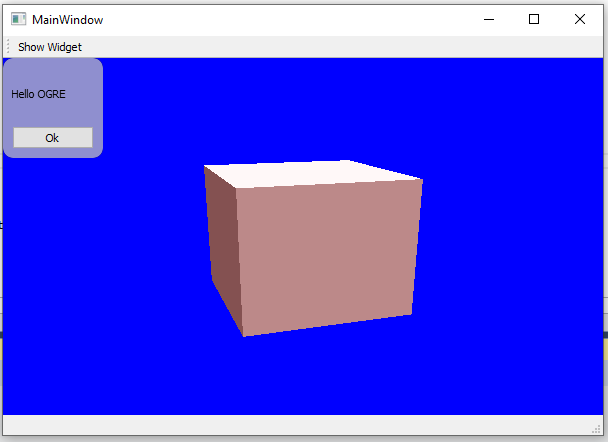
缓冲D3D9/OpenGL后端
备选案文2的可能实施如下:
// OgreWidget.h
#pragma once
#include "Scene.h"
#include "OgreRoot.h"
#include "OgreRenderWindow.h"
#include "OgreSceneManager.h"
#include <QtGui/qevent.h>
#include <QtGui/QPainter>
#include <QtWidgets/QWidget>
#include <cstdint>
class OgreWidget final
: public QWidget
{
Q_OBJECT
public:
explicit OgreWidget(QWidget *parent = nullptr)
:
QWidget(parent),
Root_("plugins" OGRE_BUILD_SUFFIX ".cfg", "ogre.cfg")
{
//static Ogre::String const render_system_name{ "OpenGL Rendering Subsystem" };
static Ogre::String const render_system_name{ "Direct3D9 Rendering Subsystem" };
if (auto* renderSystem = this->getRenderSystem(render_system_name))
{
this->Root_.setRenderSystem(renderSystem);
auto* renderWindow = this->Root_.initialise(false);
assert(renderWindow == nullptr && "The render window must be created afterwards");
}
else
{
throw std::runtime_error("Cannot find render system: " + render_system_name);
}
Ogre::NameValuePairList params;
params["hidden"] = "true";
this->RenderWindow_ = this->Root_.createRenderWindow("", this->width(), this->height(), false, ¶ms);
this->SceneManager_ = this->Root_.createSceneManager(Ogre::SceneType::ST_GENERIC);
this->SceneManager_->setAmbientLight(Ogre::ColourValue::White);
this->Scene_ = Scene(*this->SceneManager_, *this->RenderWindow_);
}
~OgreWidget() override
{
this->Scene_.clear();
if (this->SceneManager_)
this->Root_.destroySceneManager(this->SceneManager_);
if (this->RenderWindow_)
this->RenderWindow_->destroy();
}
protected:
void paintEvent(QPaintEvent* evt) override
{
this->Root_.renderOneFrame();
this->RenderWindow_->update();
{
static auto const memory_category = Ogre::MemoryCategory::MEMCATEGORY_RENDERSYS;
static auto const pixel_format = Ogre::PixelFormat::PF_A8R8G8B8;
auto const width = this->RenderWindow_->getWidth();
auto const height = this->RenderWindow_->getHeight();
auto const bytesPerPixel = Ogre::PixelUtil::getNumElemBytes(pixel_format);
auto const byteCount = width * height * bytesPerPixel;
auto* data = OGRE_ALLOC_T(std::uint8_t, byteCount, memory_category);
Ogre::PixelBox pixelBox(width, height, 1, pixel_format, data);
this->RenderWindow_->copyContentsToMemory(pixelBox, pixelBox);
static auto const image_format = QImage::Format::Format_ARGB32;
QImage const background(data, width, height, image_format);
QPainter painter(this);
painter.drawImage(QPointF{ 0., 0. }, background, background.rect(), Qt::ImageConversionFlag::NoFormatConversion);
OGRE_FREE(data, memory_category);
}
QWidget::paintEvent(evt);
// Queue another update to call paintEvent again.
// Not ideal as it will render even if the scene hasn't changed.
this->update();
}
void resizeEvent(QResizeEvent* evt) override
{
auto const& size = evt->size();
auto const width = size.width();
auto const height = size.height();
this->RenderWindow_->resize(width, height);
QWidget::resizeEvent(evt);
}
private:
Ogre::Root Root_;
Ogre::RenderWindow* RenderWindow_{ nullptr };
Ogre::SceneManager* SceneManager_{ nullptr };
Scene Scene_;
Ogre::RenderSystem* getRenderSystem(Ogre::String const& renderSystemName)
{
auto const& renderSystems = this->Root_.getAvailableRenderers();
auto const lastRenderSystem = std::cend(renderSystems);
auto const renderSystemIt = std::find_if(std::cbegin(renderSystems), lastRenderSystem,
[&](Ogre::RenderSystem const* renderSystem) { return renderSystem->getName() == renderSystemName; });
return (renderSystemIt == lastRenderSystem) ? nullptr : *renderSystemIt;
}
};下面是正在运行的应用程序的屏幕快照:
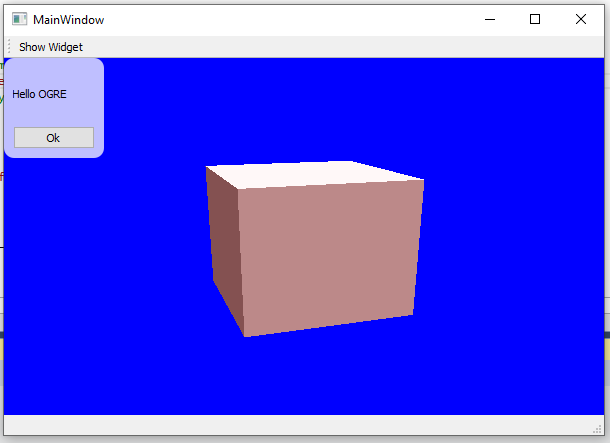
性能
这种方法比OpenGL方法慢得多。在我的机器上,当应用程序最大化时,一个框架在大约:
- ~14 the (缓冲的) OpenGL后端;
- ~11 the (缓冲的) D3D9后端;
- ~2ms与OpenGL后端;
问题
由于某些原因,当使用缓冲的OpenGL后端时,多维数据集具有不同的颜色:
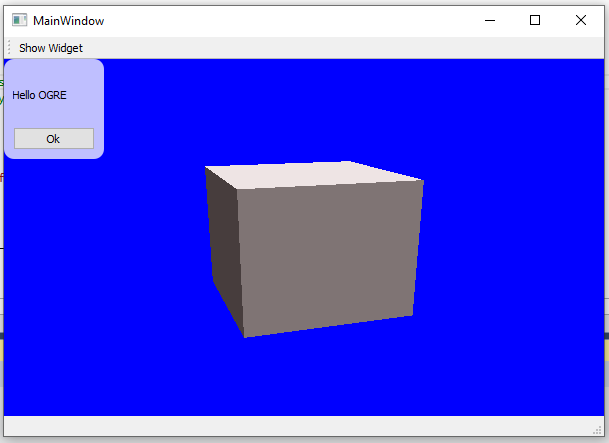
我没有费心去调查它:如果OpenGL可用,您很可能希望用类OgreGLWidget呈现场景。
样板码
我将食人魔场景作为centralWidget的子小部件嵌入到我的MainWindow实例中:
// MainWindow.h
#pragma once

#include "OgreGLWidget.h"
#include "OgreWidget.h"

#include <QtWidgets/QLabel>
#include <QtWidgets/QLayout>
#include <QtWidgets/QMainWindow>
#include <QtWidgets/QPushButton>

#include "ui_MainWindow.h"

class MainWindow final
    : public QMainWindow
{
    Q_OBJECT

public:
    explicit MainWindow(QWidget* parent = nullptr)
        : QMainWindow(parent)
    {
        this->Ui_.setupUi(this);

        auto* gridLayout = new QGridLayout(this->Ui_.centralWidget);
        gridLayout->setSpacing(6);
        gridLayout->setContentsMargins(0, 0, 0, 0);

        // Uncomment based on whether you want to use OpenGL or D3D9 as backend.
        this->OgreWidget_ = new OgreGLWidget(this->Ui_.centralWidget);
        //this->OgreWidget_ = new OgreWidget(this->Ui_.centralWidget);
        gridLayout->addWidget(this->OgreWidget_);

        // Show an overlay widget when "Show Widget" is pressed.
        auto* action = new QAction("Show Widget", this);
        QObject::connect(action, &QAction::triggered, this, &MainWindow::showWidgetSlot);
        this->Ui_.mainToolBar->addAction(action);
    }

    ~MainWindow() override = default;

private slots:

    void showWidgetSlot()
    {
        auto* w = new QWidget(this->OgreWidget_);
        w->setAttribute(Qt::WidgetAttribute::WA_DeleteOnClose);
        w->setAttribute(Qt::WidgetAttribute::WA_NoMousePropagation);
        w->setStyleSheet(".QWidget { background-color: rgba(255,255,255,75%); border-radius: 10px; }");

        auto layout = new QVBoxLayout(w);
        layout->addWidget(new QLabel(this->tr("Hello OGRE"), w));

        auto* b = new QPushButton(this->tr("Ok"), w);
        layout->addWidget(b);

        QObject::connect(b, &QPushButton::clicked, w, &QWidget::close);

        w->resize(100, 100);
        w->show();
    }

private:
    Ui::MainWindowClass Ui_;
    QWidget* OgreWidget_{ nullptr };
};类Scene负责设置我的场景,实现如下:
// Scene.h
#pragma once

#include "OgreCamera.h"
#include "OgreEntity.h"
#include "OgreMaterialManager.h"
#include "OgrePass.h"
#include "OgreRenderTarget.h"
#include "OgreSceneManager.h"
#include "OgreSceneNode.h"
#include "OgreTechnique.h"
#include "OgreViewport.h"

struct Scene
{
    explicit Scene() = default;
    explicit Scene(Ogre::SceneManager& sceneManager_, Ogre::RenderTarget& renderTarget_)
        : sceneManager(&sceneManager_)
    {
        auto cubeMaterial = Ogre::MaterialManager::getSingleton().create("cubeMaterial", Ogre::ResourceGroupManager::DEFAULT_RESOURCE_GROUP_NAME);
        if (auto* technique = cubeMaterial->getTechnique(0))
        {
            if (auto* pass = technique->getPass(0))
            {
                pass->setLightingEnabled(true);
                pass->setAmbient(Ogre::ColourValue{ 0.3f, 0.1f, 0.1f, 1 });
            }
        }

        this->entity = sceneManager_.createEntity(Ogre::SceneManager::PrefabType::PT_CUBE);
        this->entity->setMaterial(cubeMaterial);
        sceneManager_.getRootSceneNode()->attachObject(this->entity);

        this->camera = sceneManager_.createCamera("camera");
        this->camera->setPosition(-100, 100, 300);
        this->camera->lookAt(0, 0, 0);
        this->camera->setNearClipDistance(5);

        this->light = sceneManager_.createLight("light");
        this->light->setType(Ogre::Light::LightTypes::LT_DIRECTIONAL);
        this->light->setDirection(0.25, -1, -0.5);

        this->viewport = renderTarget_.addViewport(this->camera);
        this->viewport->setBackgroundColour(Ogre::ColourValue::Blue);
    }

    Scene(Scene const&) = delete;
    Scene(Scene&& other)
    {
        this->swap(other);
    }

    Scene& operator=(Scene const&) = delete;
    Scene& operator=(Scene&& other)
    {
        this->swap(other);
        return *this;
    }

    void swap(Scene& other)
    {
        using std::swap;

        swap(this->sceneManager, other.sceneManager);
        swap(this->viewport, other.viewport);
        swap(this->entity, other.entity);
        swap(this->camera, other.camera);
        swap(this->light, other.light);
    }

    void clear()
    {
        if (this->light)
        {
            this->sceneManager->destroyLight(this->light);
            this->light = nullptr;
        }

        if (this->camera)
        {
            this->sceneManager->destroyCamera(this->camera);
            this->camera = nullptr;
        }

        if (this->entity)
        {
            this->sceneManager->destroyEntity(this->entity);
            this->entity = nullptr;
        }

        this->sceneManager = nullptr;
    }

    ~Scene()
    {
        this->clear();
    }

    // -- Non-owning
    Ogre::SceneManager* sceneManager{ nullptr };
    Ogre::Viewport* viewport{ nullptr };

    // -- Owning
    Ogre::Entity* entity{ nullptr };
    Ogre::Camera* camera{ nullptr };
    Ogre::Light* light{ nullptr };
};https://stackoverflow.com/questions/13339963
复制相似问题
腾讯云开发者

Copyright © 2013 - 2026 Tencent Cloud. All Rights Reserved. 腾讯云 版权所有
深圳市腾讯计算机系统有限公司 ICP备案/许可证号:粤B2-20090059  粤公网安备44030502008569号
腾讯云计算(北京)有限责任公司 京ICP证150476号 | 京ICP备11018762号