
如何模拟数学中多点电荷(球轴承)之间的排斥?
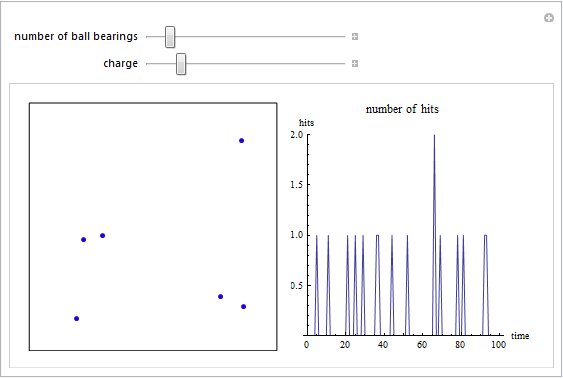
我正试图用Mathematica编写一个程序来模拟带电滚珠轴承在充电时展开的方式(它们互相排斥)。到目前为止,我的程序阻止了滚珠轴承离开屏幕,并计算了它们击中盒子侧面的次数。到目前为止,我让球轴承在盒子周围随机移动,但我需要知道如何让它们互相排斥。
到目前为止,这是我的代码:
Manipulate[
 (*If the number of points has been reduced, discard  points*)
 If[ballcount < Length[contents],
   contents = Take[contents, ballcount]];

 (*If the number of points has been increased, generate some random points*)
 If[ballcount > Length[contents],
  contents =
   Join[contents,
    Table[{RandomReal[{-size, size}, {2}], {Cos[#], Sin[#]} &[
       RandomReal[{0, 2 \[Pi]}]]}, {ballcount - Length[contents]}]]];

 Grid[{{Graphics[{PointSize[0.02],

  (*Draw the container*)
  Line[size {{-1, -1}, {1, -1}, {1, 1}, {-1, 1}, {-1, -1}}],
  Blend[{Blue, Red}, charge/0.3],
  Point[

   (*Start the main dynamic actions*)
   Dynamic[

    (*Reset the collision counter*)
    collision = 0;

    (*Check for mouse interaction and add points if there has been one*)
    Refresh[
     If[pt =!= lastpt, If[ballcount =!= 50, ballcount++];
      AppendTo[
       contents, {pt, {Cos[#], Sin[#]} &[
         RandomReal[{0, 2 \[Pi]}]]}]; lastpt = pt],
     TrackedSymbols -> {pt}];

    (*Update the position of the points using their velocity values*)
    contents = Map[{#[[1]] + #[[2]] charge, #[[2]]} &, contents];

    (*Check for and fix points that have exceeded the box in Y
      direction, incrementing the collision counter for each one*)
    contents = Map[
      If[Abs[#[[1, 2]]] > size,
        collision++; {{#[[1, 1]],
          2 size Sign[#[[1, 2]]] - #[[1, 2]]}, {1, -1} #[[
           2]]}, #] &,
      contents];


    (*Check for and fix points that have exceeded the box in X
      direction, incrementing the collision counter for each one*)
    contents = Map[
      If[Abs[#[[1, 1]]] > size,
        collision++; {{2 size Sign[#[[1, 1]]] - #[[1, 1]], #[[1,
           2]]}, {-1, 1} #[[2]]}, #] &,
      contents];

    hits = Take[PadLeft[Append[hits, collision/size], 200], 200];
    Map[First, contents]]]},
 PlotRange -> {{-1.01, 1.01}, {-1.01, 1.01}},
 ImageSize -> {250, 250}],

(*Show the hits*)
Dynamic@Show
  [
   ListPlot
   [
   Take[MovingAverage[hits, smooth], -100
    ]
   ,
   Joined -> True, ImageSize -> {250, 250}, AspectRatio -> 1,
   PlotLabel -> "number of hits", AxesLabel -> {"time", "hits"},
   PlotRange -> {0, Max[Max[hits], 1]}], Graphics[]
  ]
}}
  ]
 ,
 {{pt, {0, 1}}, {-1, -1}, {1, 1}, Locator, Appearance -> None},
 {{ballcount, 5, "number of ball bearings"}, 1, 50, 1},
 {{charge, 0.05, "charge"}, 0.002, 0.3},
 {smooth, 1, ControlType -> None, Appearance -> None},
 {size, 1, ControlType -> None, Appearance -> None},
 {hits, {{}}, ControlType -> None},
 {contents, {{}}, ControlType -> None},
 {lastpt, {{0, 0}}, ControlType -> None}
 ]
回答 2
Stack Overflow用户
发布于 2011-12-30 09:13:28
您所需要的模拟是一个“碰撞检测算法”。这些算法的应用领域非常广泛,因为它和电脑游戏(Pong)一样古老,不可能在这里给出一个完整的答案。
你的模拟现在是非常基本的,因为你推进你的带电球的每一步,这使他们“跳跃”从位置到位置。如果运动和等速和零加速度一样简单,你就知道运动的精确方程,只需把时间放入方程中,就可以计算出所有的位置。当一个球从墙上反弹时,它得到了一个新的方程式。
有了这个,你可以预测,两个球什么时候会碰撞。你只需解两个球,它们是否同时有相同的位置。这被称为先验检测。当你像现在这样进行你的模拟时,你必须在每一个时间步子上检查,两个球是否如此接近,它们可能发生碰撞。
问题是,你的模拟速度不是无限高,你的球越快,你的模拟中的跳跃就越大。这并不是不可能的,两个球跳过对方,你就会错过一次碰撞。
考虑到这一点,您可以从阅读该主题的维基百科文章开始,以获得一个概述。接下来,你可以读一些关于它的科学文章,或者看看裂缝是如何做到的。例如,花栗鼠物理发动机是一个令人惊叹的二维物理引擎。为了确保这类东西能够正常工作,我确信他们必须在碰撞检测中考虑很多问题。
Stack Overflow用户
发布于 2011-12-30 16:16:28
我不能做检测部分,因为这是一个项目本身。但是现在看来交互速度更快了,你几乎没有什么不需要的动力。(如果您始终看到单元格的一侧一直处于繁忙状态,这总是意味着动态在不应该处于的位置上是繁忙的)。
我还添加了“停止/开始”按钮。我无法理解你所做的每一件事,但足以改变我所做的一切。您还在使用AppendTo everything。您应该尝试在手之前分配内容,并使用Part[]访问它,这样会更快,因为您似乎知道允许的最大点数?
我更喜欢扩展代码,这有助于我更好地理解逻辑。
下面是屏幕截图,更新后的版本代码如下。希望你能更快找到它。
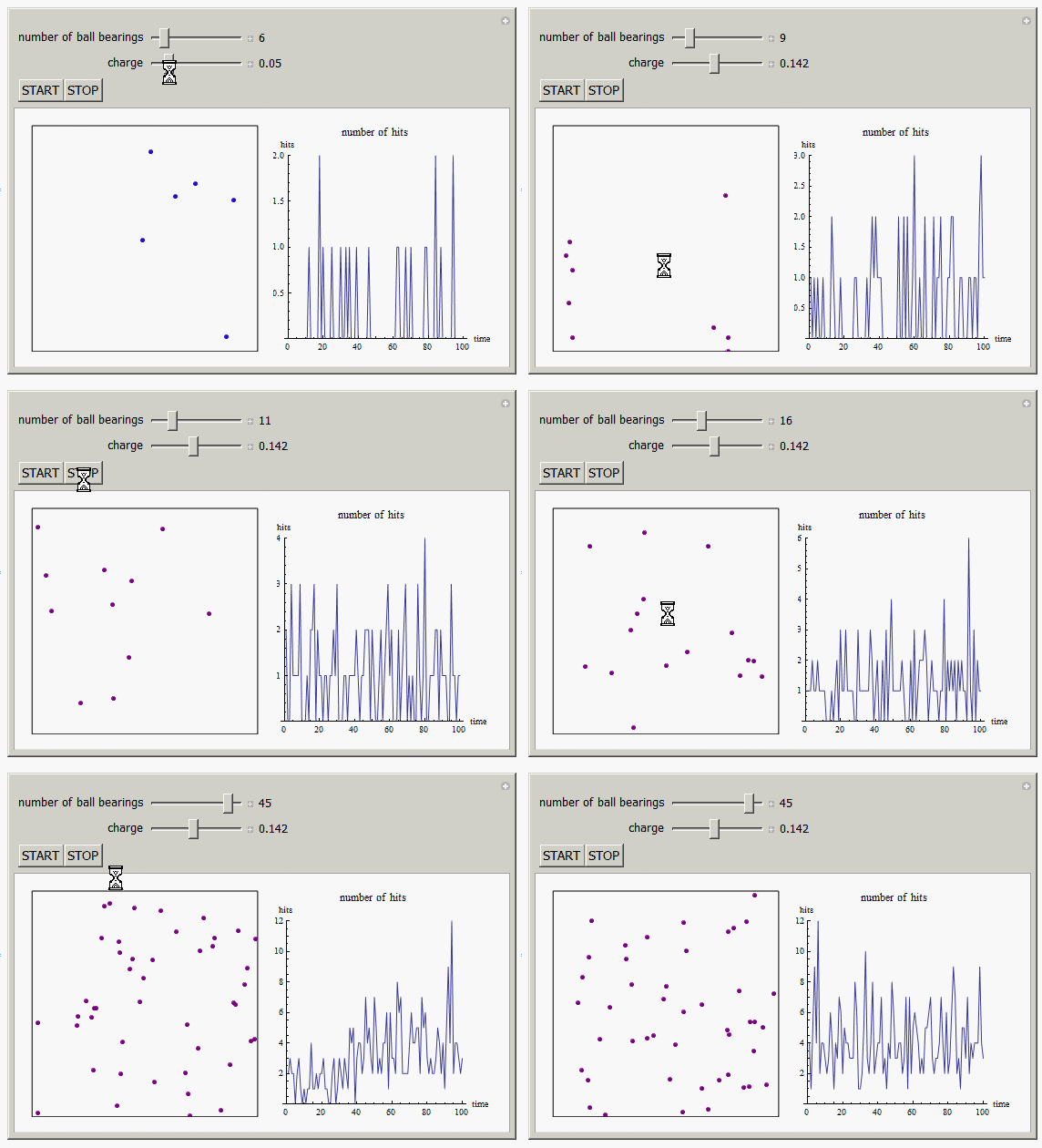
请参阅下面的代码,更新(1)。
更新(1)
(*updated version 12/30/11 9:40 AM*)
Manipulate[(*If the number of points has been reduced,discard points*)
\


 Module[{tbl, rand, npt, ballsToAdd},

  If[running,
   (
    tick += $MachineEpsilon;
    If[ballcount < Length[contents],
     contents = Take[contents, ballcount]];

    (*If the number of points has been increased,
    generate some random points*)

    If[ballcount > Length[contents],
     (
      ballsToAdd = ballcount - Length[contents];
      tbl =
       Table[{RandomReal[{-size, size}, {2}], {Cos[#], Sin[#]} &[
          RandomReal[{0, 2 \[Pi]}]]}, {ballsToAdd}];
      contents = Join[contents, tbl]
      )
     ];

    image = Grid[{
       {LocatorPane[Dynamic[pt], Graphics[{

           PointSize[0.02],(*Draw the container*)
           Line[size {{-1, -1}, {1, -1}, {1, 1}, {-1, 1}, {-1, -1}}],
           Blend[{Blue, Red}, charge/0.3],

           Point[(*Start the main dynamic actions*)

            (*Reset the collision counter*)
            collision = 0;

            (*Check for mouse interaction and add points if there has \
been one*)
            If[EuclideanDistance[pt, lastpt] > 0.001, (*adjust*)
             (
              If[ballcount < MAXPOINTS,
               ballcount++
               ];

              rand = RandomReal[{0, 2 \[Pi]}];
              npt = {Cos[rand], Sin[rand]};
              AppendTo[contents, {pt, npt}  ];
              lastpt = pt
              )
             ];

            (*Update the position of the points using their velocity \
values*)

            contents =
             Map[{#[[1]] + #[[2]] charge, #[[2]]} &, contents];

            (*Check for and fix points that have exceeded the box in \
Y direction,incrementing the collision counter for each one*)

            contents = Map[
              If[Abs[#[[1, 2]]] > size,
                (
                 collision++;
                 {{#[[1, 1]],
                   2 size Sign[#[[1, 2]]] - #[[1, 2]]}, {1, -1} #[[2]]}
                 ),
                (
                 #
                 )
                ] &, contents
              ];

            (*Check for and fix points that have exceeded the box in \
X direction,
            incrementing the collision counter for each one*)


            contents =
             Map[If[Abs[#[[1, 1]]] > size,
                collision++; {{2 size Sign[#[[1, 1]]] - #[[1, 1]], #[[
                   1, 2]]}, {-1, 1} #[[2]]}, #] &, contents
              ];


            hits = Take[PadLeft[Append[hits, collision/size], 200],
              200];
            Map[First, contents]
            ]
           },
          PlotRange -> {{-1.01, 1.01}, {-1.01, 1.01}},
          ImageSize -> {250, 250}
          ], Appearance -> None
         ],(*Show the hits*)

        Show[ListPlot[Take[MovingAverage[hits, smooth], -100],
          Joined -> True, ImageSize -> {250, 250}, AspectRatio -> 1,
          PlotLabel -> "number of hits", AxesLabel -> {"time", "hits"},
          PlotRange -> {0, Max[Max[hits], 1]}
          ]
         ]
        }
       }
      ]
    )
   ];

  image
  ],

 {{MAXPOINTS, 50}, None},
 {pt, {{0, 1}}, None},
 {{ballcount, 5, "number of ball bearings"}, 1, MAXPOINTS, 1,
  Appearance -> "Labeled", ImageSize -> Small},
 {{charge, 0.05, "charge"}, 0.002, 0.3, Appearance -> "Labeled",
  ImageSize -> Small},
 Row[{Button["START", {running = True; tick += $MachineEpsilon}],
   Button["STOP", running = False]}],
 {{tick, 0}, None},
 {smooth, 1, None},
 {size, 1, None},
 {hits, {{}}, None},
 {{contents, {}}, None},
 {lastpt, {{0, 0}}, None},
 {{collision, 0}, None},
 {image, None},
 {{running, True}, None},
 TrackedSymbols ->     { tick},
 ContinuousAction -> False,
 SynchronousUpdating -> True

]https://stackoverflow.com/questions/8675637
复制相似问题
腾讯云开发者

Copyright © 2013 - 2026 Tencent Cloud. All Rights Reserved. 腾讯云 版权所有
深圳市腾讯计算机系统有限公司 ICP备案/许可证号:粤B2-20090059  粤公网安备44030502008569号
腾讯云计算(北京)有限责任公司 京ICP证150476号 | 京ICP备11018762号