
使用MRTK交互时设置螺旋运动
我正试图用最小/最大的时间来实现螺旋运动:
- 正旋转>负
- 旋转>正变换
无论是正的还是负的旋转都是通过MRTK手交互提供的脚本来完成的,所以这不是我的问题。我(认为)我在与逻辑作斗争。
博士:我想用统一、MRTK和虚拟的手去搞点东西。
回答 1
Stack Overflow用户
发布于 2020-04-21 15:43:04
经过几天的绞尽脑汁,我终于解决了我的问题。老实说,我自己可能不会成功,因为一个逻辑问题(这种情况经常是这样的,不是吗?)
初始设置
在我的例子中,需要交互的gameObject是一个螺丝钉。当正旋转发生时,我希望它执行正平移,反之亦然。在这个gameObject上附加了一些组件:
- a对撞机(网格、盒、胶囊)
- a刚体
- a PointerHandler.cs (MRTK)
- a ObjectManipulator.cs (MRTK)
>H19a NearInteractionGrabbable.cs (MRTK)H 210H 111H 212F 213
刚体、PointerHandler.cs、ObjectManipulator.cs和TwistingRotation.cs配置可以在这里找到:
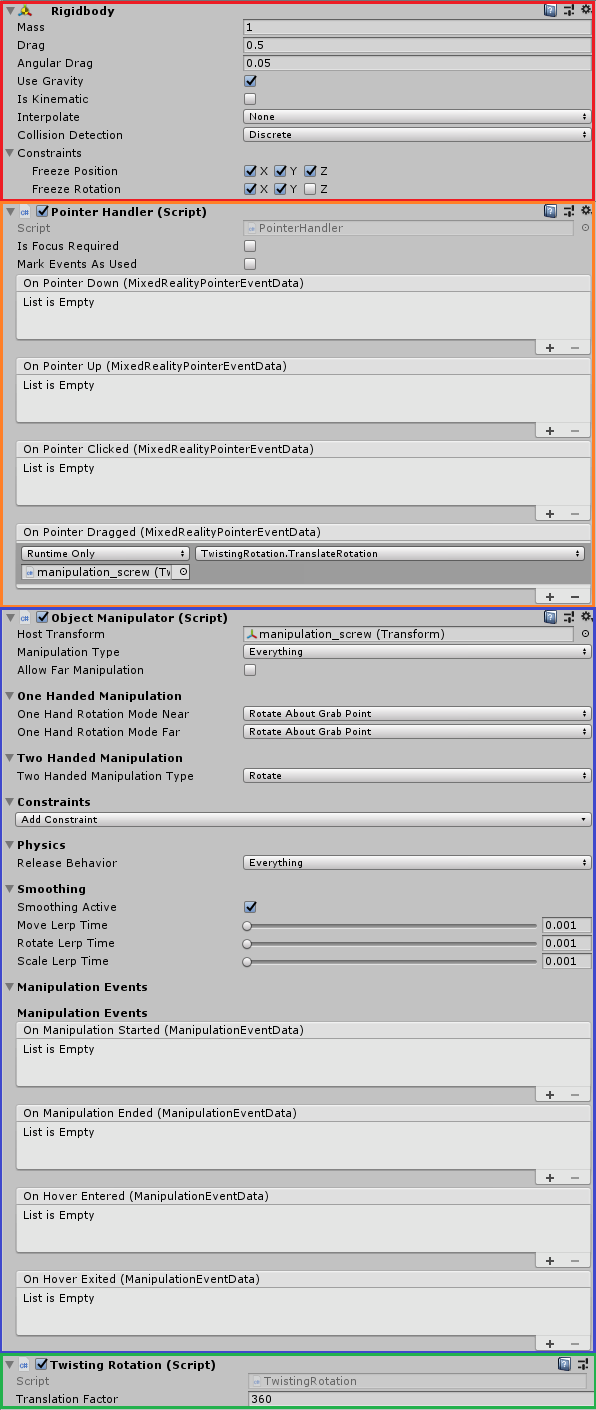
魔术出现与PointerHandler.cs,使我们能够检测何时发生近互动与螺丝钉,thx OnPointerDragged事件。
TwistingRotation.cs
using System;
using System.Collections;
using System.Collections.Generic;
using UnityEngine;

/// <summary>
/// Translation of the object while rotating it when grabbed using the MRTK.ObjectManipulator
/// Boundaries and axis restrictions ongoing
/// </summary>

public class TwistingRotation : MonoBehaviour
{
    /*******CACHE REFERENCE*******/
    private Transform _myTransform;

    [SerializeField] private float translationFactor = 90f;

    private Vector3 _minPosition;
    private Vector3 _maxPosition;
    private Vector3 _previousVector;
    private Rigidbody _rb;


    private void Start()
    {
        // Cache reference
        _myTransform = gameObject.transform;
        _rb = gameObject.GetComponent<Rigidbody>();

        // Reference for the previous rotation vector
        _previousVector = _myTransform.up;
        // Default position is the maximum transform.position (unscrewed)
        _maxPosition = _myTransform.position;
        // Minimum position is default transform.position + 1unit in local space direction
        _minPosition = _maxPosition + Vector3.forward;
    }

    /// <summary>
    /// Move the object according to the rotation angle value
    /// A positive rotation leads to a positive translation, and vice-versa
    /// </summary>
    public void TranslateRotation()
    {
        // Retrieve the angle on a defined local axis when the rotation occur
        var currentVector = _myTransform.up;
        // Compute the angle between the previous and the current vector on a defined local axis
        // Difference between the previous rotation vector, and the actual, on a global axis
        var angle = Vector3.SignedAngle(_previousVector, currentVector, Vector3.forward);

        // Move object proportional to its rotation
        var translation = Vector3.forward * (angle / translationFactor);
        _myTransform.Translate(translation, Space.Self);

        // Get the GO current position
        var currentPosition = _myTransform.position;
        // Clamp for each axis between _minPosition and _maxPosition (the default spawn position)
        // Doing a Mathf.Min/Max inside the Mathf.Clamp to insure that the min and max values are correct
        var x = Mathf.Clamp(currentPosition.x, Mathf.Min(_minPosition.x, _maxPosition.x), Mathf.Max(_minPosition.x, _maxPosition.x));
        var y = Mathf.Clamp(currentPosition.y, Mathf.Min(_minPosition.y, _maxPosition.y), Mathf.Max(_minPosition.y, _maxPosition.y));
        var z = Mathf.Clamp(currentPosition.z, Mathf.Min(_minPosition.z, _maxPosition.z), Mathf.Max(_minPosition.z, _maxPosition.z));

        // Compute the new position while taking the boundaries into consideration
        var newPosition = new Vector3(x, y, z);
        _myTransform.position = newPosition;

        // Save position for the next frame
        _previousVector = currentVector;
    }
}
发生什么事了?
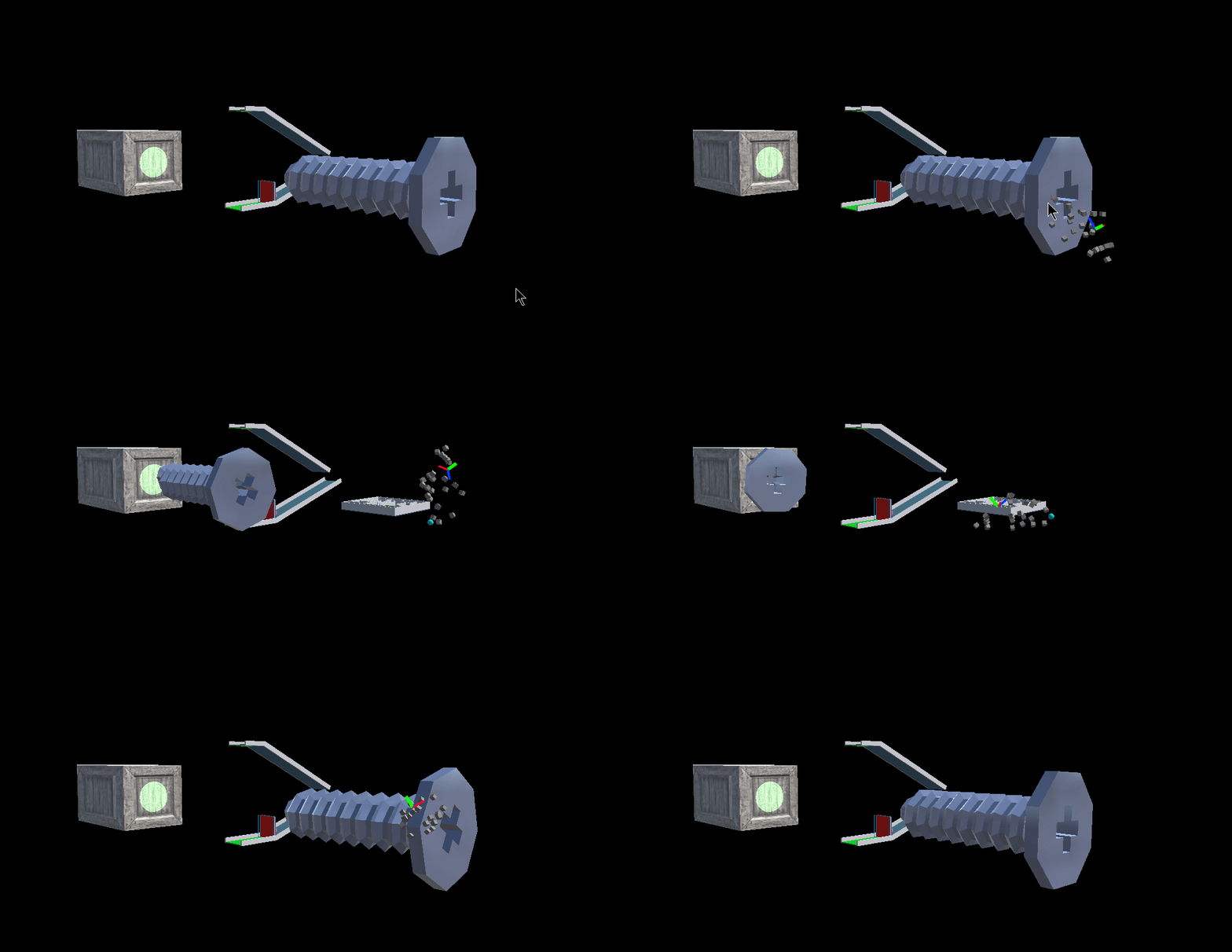
很简单:在旋转的时候,螺丝钉正在转换超过一个单位(单位)。旋转的值取决于translationFactor变量的值。在我的例子中,值是360,所以在1(单位)单位平移上完全旋转。
结果
它远不是完美的,很可能是"meh“,但是嘿,它正在起作用(不像预期的那样,但仍然是这样),它允许我继续前进,我做了我的报告。
https://stackoverflow.com/questions/60985814
复制相似问题
腾讯云开发者

Copyright © 2013 - 2026 Tencent Cloud. All Rights Reserved. 腾讯云 版权所有
深圳市腾讯计算机系统有限公司 ICP备案/许可证号:粤B2-20090059  粤公网安备44030502008569号
腾讯云计算(北京)有限责任公司 京ICP证150476号 | 京ICP备11018762号