
如何在Scenekit中切换对象加载?
我想使用iOS SceneKit加载对象。
以及如何卸载加载的对象并重新加载另一个对象?
我通过引用代码下面成功地加载了对象。
func sceneSetup() {

    if let filePath = Bundle.main.path(forResource: "Smiley", ofType: "scn") {
        let referenceURL = URL(fileURLWithPath: filePath)

        self.contentNode = SCNReferenceNode(url: referenceURL)
        self.contentNode?.load()
        self.head.morpher?.unifiesNormals = true // ensures the normals are not morphed but are recomputed after morphing the vertex instead. Otherwise the node has a low poly look.
        self.scene.rootNode.addChildNode(self.contentNode!)
    }
    self.faceView.autoenablesDefaultLighting = true

    // set the scene to the view
    self.faceView.scene = self.scene

    // allows the user to manipulate the camera
    self.faceView.allowsCameraControl = false

    // configure the view
    self.faceView.backgroundColor = .clear
}
但我不知道如何加载和切换多个对象。
我将testScene.scn添加到项目中,并按下面的方式添加代码,但只加载了第一个指定的对象。
var charaSelect = "Smiley"

//tapEvent(ViewDidLoad)
    let tapGesture = UITapGestureRecognizer(target: self, action: #selector(FaceGeoViewController.tapped(_:)))
    tapGesture.delegate = self
    self.view.addGestureRecognizer(tapGesture)

//tap
 @objc func tapped(_ sender: UITapGestureRecognizer)
 {
    self.charaSelect = "testScene"
 }

func sceneSetup() {

    if let filePath = Bundle.main.path(forResource: self.charaSelect, ofType: "scn") {
        let referenceURL = URL(fileURLWithPath: filePath)

        self.contentNode = SCNReferenceNode(url: referenceURL)
        self.contentNode?.load()
        self.head.morpher?.unifiesNormals = true // ensures the normals are not morphed but are recomputed after morphing the vertex instead. Otherwise the node has a low poly look.
        self.scene.rootNode.addChildNode(self.contentNode!)
    }
    self.faceView.autoenablesDefaultLighting = true

    // set the scene to the view
    self.faceView.scene = self.scene

    // allows the user to manipulate the camera
    self.faceView.allowsCameraControl = false

    // configure the view
    self.faceView.backgroundColor = .clear
}
我该怎么办?
回答 1
Stack Overflow用户
发布于 2020-04-13 08:35:27
我将在这里解释这个概念,但是如果你可能需要把这些事情看作一个完整的项目,欢迎你参考我从2019年的“苹果教育”( 使用Swift开发应用程序 by Apple,2019年)一本书中所遵循的使用Swift开发应用程序,特别是第3A章末尾的指南项目。
下面您可以看到示例屏幕截图。在该应用程序中,您可以通过触摸SceneView上的空位置或当您的触摸与另一个对象(平面)碰撞时添加元素。此外,还有一个对象删除的逻辑。
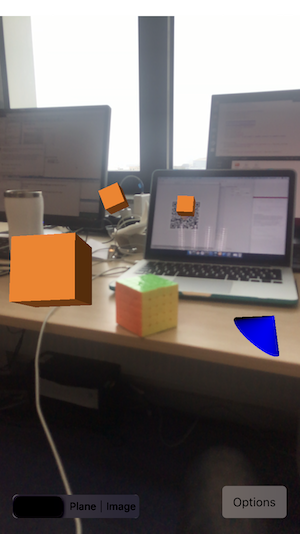
因此,基本上,从场景中删除节点的一种方法是在ViewController中使用一个特殊的数组var placedNodes = [SCNNode]()来跟踪它们。这样,您就可以从所有节点清除视图(例如,通过创建Button Action“清除”)
你可能从苹果开发人员那里学到的另一个很好的补充是,它没有使用点击手势识别器,但通过覆盖touchesBegan/touchesMoved,可以让您在触摸手势方面具有更大的灵活性,特别是您可以通过调用touch.location(in: sceneView)在SceneView中获得它的位置。
因此,touchesBegan/touchesMoved允许您定位用户所访问的位置。这可用于在SceneView上添加/移除对象。
希望这会有帮助!
https://stackoverflow.com/questions/61182734
复制相似问题
腾讯云开发者

Copyright © 2013 - 2026 Tencent Cloud. All Rights Reserved. 腾讯云 版权所有
深圳市腾讯计算机系统有限公司 ICP备案/许可证号:粤B2-20090059  粤公网安备44030502008569号
腾讯云计算(北京)有限责任公司 京ICP证150476号 | 京ICP备11018762号