
方形UICollisionBehavior中圆subViews的parentViews检测
我有一个正方形的containerView,里面有一个roundImageView。containerView被添加到UIDynamicAnimator中。当containerViews的角互相碰撞时,我需要它们从roundImageView上反弹出来,就像这个question一样。在customContainerView i override collisionBoundsType ... return .ellipse内部,碰撞仍然发生在正方形,而不是圆圈,视图相互重叠。
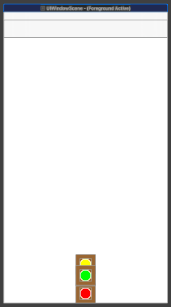
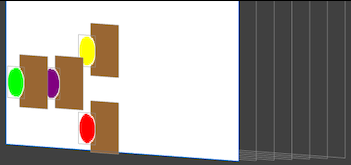
customView:
class CustomContainerView: UIView {

    override public var collisionBoundsType: UIDynamicItemCollisionBoundsType {
        return .ellipse
    }
}
代码:
var arr = [CustomContainerView]()

var animator: UIDynamicAnimator!
var gravity: UIGravityBehavior!
var collider: UICollisionBehavior!
var bouncingBehavior  : UIDynamicItemBehavior!

override func viewDidLoad() {
    super.viewDidLoad()

    addSubViews()

    addAnimatorAndBehaviors()
}

func addAnimatorAndBehaviors() {

    animator = UIDynamicAnimator(referenceView: self.view)

    gravity = UIGravityBehavior(items: arr)
    animator.addBehavior(gravity)

    collider = UICollisionBehavior(items: arr)
    collider.translatesReferenceBoundsIntoBoundary = true
    animator.addBehavior(collider)

    bouncingBehavior = UIDynamicItemBehavior(items: arr)
    bouncingBehavior.elasticity = 0.05
    animator.addBehavior(bouncingBehavior)
}

func addSubViews() {

    let redView = createContainerView(with: .red)
    let blueView = createContainerView(with: .blue)
    let yellowView = createContainerView(with: .yellow)
    let purpleView = createContainerView(with: .purple)
    let greenView = createContainerView(with: .green)

    view.addSubview(redView)
    view.addSubview(blueView)
    view.addSubview(yellowView)
    view.addSubview(purpleView)
    view.addSubview(greenView)

    arr = [redView, blueView, yellowView, purpleView, greenView]
}

func createContainerView(with color: UIColor) -> UIView {

    let containerView = CustomContainerView()
    containerView.backgroundColor = .brown

    let size = CGSize(width: 50, height: 50)

    containerView.frame.size = size
    containerView.center = view.center

    let roundImageView = UIImageView()
    roundImageView.translatesAutoresizingMaskIntoConstraints = false
    roundImageView.backgroundColor = color

    containerView.addSubview(roundImageView)

    roundImageView.topAnchor.constraint(equalTo: containerView.topAnchor, constant: 10).isActive = true
    roundImageView.leadingAnchor.constraint(equalTo: containerView.leadingAnchor, constant: 10).isActive = true
    roundImageView.trailingAnchor.constraint(equalTo: containerView.trailingAnchor, constant: -10).isActive = true
    roundImageView.bottomAnchor.constraint(equalTo: containerView.bottomAnchor, constant: -10).isActive = true

    roundImageView.layer.masksToBounds = true
    roundImageView.layoutIfNeeded()
    roundImageView.layer.cornerRadius = roundImageView.frame.height / 2

    roundImageView.layer.borderWidth = 1
    roundImageView.layer.borderColor = UIColor.white.cgColor

    return containerView
}回答 1
Stack Overflow用户
发布于 2021-04-09 15:05:19
看起来,当视图精确地放在另一个视图上时,碰撞行为不喜欢.ellipse类型。
运行几次代码会得到不同的结果(正如预期的那样)..。有时,所有5个视图都以一个完整的垂直堆栈结束,另一些视图则以重叠结束,而另一些时候(等待了几秒钟后)视图会以几个可见的视图结束,而其他视图的way则位于视图底部--我已经看到它们的y位置超过了4万。
我对你的代码做了一些修改看看发生了什么..。
我添加了更多的视图,并为每个视图提供了一个显示椭圆边界的形状层。
然后,我没有以相同的位置开始,而是创建了几个“行”,如下所示:
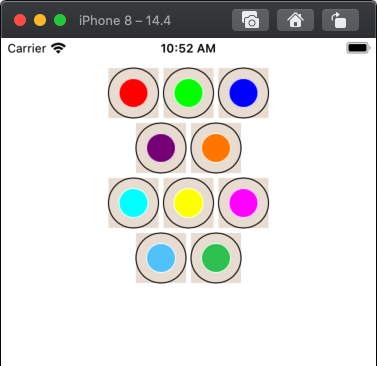
然后,在每次点击时,我重置原始位置,在椭圆和矩形之间切换,然后再次调用addAnimatorAndBehaviors()。
下面是示例.ellipse运行时的外观:
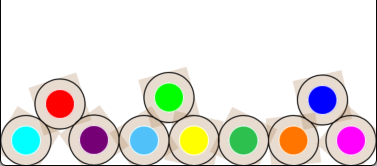
在示例.rectangle上运行:
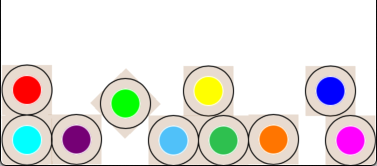
正如我们所看到的,.ellipse边界正在被使用。
下面是我经常使用的代码:
class CustomContainerView: UIView {
    var useEllipse: Bool = false

    override public var collisionBoundsType: UIDynamicItemCollisionBoundsType {
        return useEllipse ? .ellipse : .rectangle
    }
}

class ViewController: UIViewController {

    var arr = [CustomContainerView]()

    var animator: UIDynamicAnimator!
    var gravity: UIGravityBehavior!
    var collider: UICollisionBehavior!
    var bouncingBehavior  : UIDynamicItemBehavior!

    let infoLabel = UILabel()

    override func viewDidLoad() {
        super.viewDidLoad()

        addSubViews()

        // add info label
        infoLabel.translatesAutoresizingMaskIntoConstraints = false
        view.addSubview(infoLabel)
        infoLabel.centerXAnchor.constraint(equalTo: view.centerXAnchor).isActive = true
        infoLabel.centerYAnchor.constraint(equalTo: view.centerYAnchor).isActive = true

        // add a tap recognizer to start the Animator Behaviors
        let t = UITapGestureRecognizer(target: self, action: #selector(gotTap(_:)))
        view.addGestureRecognizer(t)
    }

    override func viewDidAppear(_ animated: Bool) {
        super.viewDidAppear(animated)
        positionViews()
    }

    func positionViews() -> Void {
        // let's make rows of the views,
        //  instead of starting with them all on top of each other
        // we'll do 3-views over 2-views

        let w = arr[0].frame.width * 1.1
        let h = arr[0].frame.height * 1.1

        var x: CGFloat = 0
        var y: CGFloat = 0

        var idx: Int = 0

        y = h

        while idx < arr.count {
            x = view.center.x - w
            for _ in 1...3 {
                if idx < arr.count {
                    arr[idx].center = CGPoint(x: x, y: y)
                }
                x += w
                idx += 1
            }
            y += h
            x = view.center.x - w * 0.5
            for _ in 1...2 {
                if idx < arr.count {
                    arr[idx].center = CGPoint(x: x, y: y)
                }
                x += w
                idx += 1
            }
            y += h
        }

    }

    @objc func gotTap(_ g: UIGestureRecognizer) -> Void {
        positionViews()
        arr.forEach { v in
            v.useEllipse.toggle()
        }
        infoLabel.text = arr[0].useEllipse ? "Ellipse" : "Rectangle"
        addAnimatorAndBehaviors()
    }

    func addAnimatorAndBehaviors() {

        animator = UIDynamicAnimator(referenceView: self.view)

        gravity = UIGravityBehavior(items: arr)
        animator.addBehavior(gravity)

        collider = UICollisionBehavior(items: arr)
        collider.translatesReferenceBoundsIntoBoundary = true
        animator.addBehavior(collider)

        bouncingBehavior = UIDynamicItemBehavior(items: arr)
        bouncingBehavior.elasticity = 0.05
        animator.addBehavior(bouncingBehavior)
    }

    func addSubViews() {

        let clrs: [UIColor] = [
            .red, .green, .blue,
            .purple, .orange,
            .cyan, .yellow, .magenta,
            .systemTeal, .systemGreen,
        ]

        clrs.forEach { c in
            let v = createContainerView(with: c)
            view.addSubview(v)
            arr.append(v)
        }

    }

    func createContainerView(with color: UIColor) -> CustomContainerView {

        let containerView = CustomContainerView()
        containerView.backgroundColor = UIColor.brown.withAlphaComponent(0.2)

        let size = CGSize(width: 50, height: 50)

        containerView.frame.size = size

        view.addSubview(containerView)

        let roundImageView = UIImageView()
        roundImageView.translatesAutoresizingMaskIntoConstraints = false
        roundImageView.backgroundColor = color

        containerView.addSubview(roundImageView)

        roundImageView.topAnchor.constraint(equalTo: containerView.topAnchor, constant: 10).isActive = true
        roundImageView.leadingAnchor.constraint(equalTo: containerView.leadingAnchor, constant: 10).isActive = true
        roundImageView.trailingAnchor.constraint(equalTo: containerView.trailingAnchor, constant: -10).isActive = true
        roundImageView.bottomAnchor.constraint(equalTo: containerView.bottomAnchor, constant: -10).isActive = true

        roundImageView.layer.masksToBounds = true
        roundImageView.layoutIfNeeded()
        roundImageView.layer.cornerRadius = roundImageView.frame.height / 2

        roundImageView.layer.borderWidth = 1
        roundImageView.layer.borderColor = UIColor.white.cgColor

        // let's add a CAShapeLayer to show the ellipse bounds
        let c = CAShapeLayer()
        c.fillColor = UIColor.clear.cgColor
        c.lineWidth = 1
        c.strokeColor = UIColor.black.cgColor
        c.path = UIBezierPath(ovalIn: CGRect(origin: .zero, size: size)).cgPath
        containerView.layer.addSublayer(c)

        return containerView
    }

}
编辑
将positionViews()中的positionViews()循环改为.点击以多次重置并运行动画,并查看当所有视图以相同的帧开始时会发生什么:
        while idx < arr.count {
            x = view.center.x - w
            arr[idx].center = CGPoint(x: x, y: y)
            idx += 1
}然后,使用这个while循环,在这个循环中,我们在相同的x位置开始视图,但是为每个视图增加y位置(仅用0.1点):
        while idx < arr.count {
            x = view.center.x - w
            // increment the y position for each view -- just a tad
            y += 0.1
            arr[idx].center = CGPoint(x: x, y: y)
            idx += 1
        }
另一个编辑
值得注意的是,椭圆碰撞界是圆形 (1:1比值),这也会影响事物。
如果我们稍微改变视图帧的大小,我们就会得到非常不同的结果。
试一试:
let size = CGSize(width: 50.1, height: 50)以完全相同的中心点开始:
while idx < arr.count {
    x = view.center.x - w
    arr[idx].center = CGPoint(x: x, y: y)
    idx += 1
}
你就会看到景色立刻散开。
再编辑一次--帮助可视化这些差异
下面是另一个例子--这一次,我对视图进行了编号,并设置了一个“每隔1/10秒钟”定时器,以更新每个视图当前中心的标签。
还添加了分段控件,以选择collisionBoundsType,并将视图完全覆盖在彼此之上或稍微偏移它们:
class CustomContainerView: UIView {
    var useEllipse: Bool = false
    override public var collisionBoundsType: UIDynamicItemCollisionBoundsType {
        return useEllipse ? .ellipse : .rectangle
    }
}

// extension to left-pad a string up-to length
extension RangeReplaceableCollection where Self: StringProtocol {
    func paddingToLeft(upTo length: Int, using element: Element = " ") -> SubSequence {
        return repeatElement(element, count: Swift.max(0, length-count)) + suffix(Swift.max(count, count-length))
    }
}

class CollisionVC: UIViewController {

    var arr = [CustomContainerView]()

    var animator: UIDynamicAnimator!
    var gravity: UIGravityBehavior!
    var collider: UICollisionBehavior!
    var bouncingBehavior: UIDynamicItemBehavior!

    let infoLabel = UILabel()

    // add segmented controls for collisionBoundsType and "Spread Layout"
    let seg1 = UISegmentedControl(items: ["Ellipse", "Rectangle"])
    let seg2 = UISegmentedControl(items: ["Overlaid", "Offset"])

    override func viewDidLoad() {
        super.viewDidLoad()

        addSubViews()

        [seg1, seg2, infoLabel].forEach { v in
            v.translatesAutoresizingMaskIntoConstraints = false
            view.addSubview(v)
        }

        infoLabel.numberOfLines = 0
        infoLabel.font = .monospacedSystemFont(ofSize: 14.0, weight: .light)

        let g = view.safeAreaLayoutGuide
        NSLayoutConstraint.activate([
            seg1.topAnchor.constraint(equalTo: g.topAnchor, constant: 4.0),
            seg1.leadingAnchor.constraint(equalTo: g.leadingAnchor, constant: 8.0),

            seg2.topAnchor.constraint(equalTo: g.topAnchor, constant: 4.0),
            seg2.trailingAnchor.constraint(equalTo: g.trailingAnchor, constant: -8.0),

            infoLabel.topAnchor.constraint(equalTo: g.topAnchor, constant: 40.0),
            infoLabel.leadingAnchor.constraint(equalTo: g.leadingAnchor, constant: 20.0),
            infoLabel.trailingAnchor.constraint(equalTo: g.trailingAnchor, constant: -20.0),
        ])

        seg1.selectedSegmentIndex = 0
        seg2.selectedSegmentIndex = 0

        // add a tap recognizer to start the Animator Behaviors
        let t = UITapGestureRecognizer(target: self, action: #selector(gotTap(_:)))
        view.addGestureRecognizer(t)

        // run a Timer... every 1/10th second we'll fill the infoLabel with
        //  collisionBoundsType and a list of center points
        //  for all subviews
        Timer.scheduledTimer(withTimeInterval: 0.1, repeats: true) { timer in
            if self.animator != nil {
                var s = ""
                for i in 0..<self.arr.count {
                    let c = self.arr[i].center
                    let xs = String(format: "%0.2f", c.x)
                    let ys = String(format: "%0.2f", c.y)
                    s += "\n\(i) - x: \(String(xs.paddingToLeft(upTo: 7))) y: \(String(ys.paddingToLeft(upTo: 9)))"
                }
                s += "\nAnimator is running: " + (self.animator.isRunning ? "Yes" : "No")
                self.infoLabel.text = s
            }
        }

    }

    override func viewDidAppear(_ animated: Bool) {
        super.viewDidAppear(animated)
        positionViews()
    }

    func positionViews() -> Void {

        var x: CGFloat = 0.0
        var y: CGFloat = 0.0
        arr.forEach { v in
            v.center = CGPoint(x: view.center.x + x, y: view.safeAreaInsets.top + 100.0 + y)

            // if seg2 == Overlaid, position all views exactly on top of each other
            // else, Offset the x,y center of each one by 0.1 pts
            //  Offsetting them allows the animator to use
            //  "valid" collision adjustments on start
            if seg2.selectedSegmentIndex == 1 {
                x += 0.1
                y += 0.1
            }

            // set collisionBoundsType
            v.useEllipse = seg1.selectedSegmentIndex == 0
        }

    }

    @objc func gotTap(_ g: UIGestureRecognizer) -> Void {
        positionViews()
        addAnimatorAndBehaviors()
    }

    func addAnimatorAndBehaviors() {
        animator = UIDynamicAnimator(referenceView: self.view)

        gravity = UIGravityBehavior(items: arr)
        animator.addBehavior(gravity)

        collider = UICollisionBehavior(items: arr)
        collider.translatesReferenceBoundsIntoBoundary = true
        animator.addBehavior(collider)

        bouncingBehavior = UIDynamicItemBehavior(items: arr)
        bouncingBehavior.elasticity = 0.05
        animator.addBehavior(bouncingBehavior)
    }

    func addSubViews() {

        let clrs: [UIColor] = [
            .red, .green, UIColor(red: 1.0, green: 0.85, blue: 0.55, alpha: 1.0),
            UIColor(red: 1.0, green: 0.5, blue: 1.0, alpha: 1.0), .orange,
            .cyan, .yellow, .magenta,
            .systemTeal, .systemGreen,
        ]

        for (c, i) in zip(clrs, (0..<clrs.count)) {
            let v = createContainerView(with: c, number: i)
            view.addSubview(v)
            arr.append(v)
        }

    }

    func createContainerView(with color: UIColor, number: Int) -> CustomContainerView {

        let containerView = CustomContainerView()
        containerView.backgroundColor = UIColor.brown.withAlphaComponent(0.2)

        let size = CGSize(width: 50, height: 50)

        containerView.frame.size = size

        view.addSubview(containerView)

        let roundLabel = UILabel()
        roundLabel.translatesAutoresizingMaskIntoConstraints = false
        roundLabel.backgroundColor = color
        roundLabel.text = "\(number)"
        roundLabel.textAlignment = .center

        containerView.addSubview(roundLabel)

        roundLabel.topAnchor.constraint(equalTo: containerView.topAnchor, constant: 10).isActive = true
        roundLabel.leadingAnchor.constraint(equalTo: containerView.leadingAnchor, constant: 10).isActive = true
        roundLabel.trailingAnchor.constraint(equalTo: containerView.trailingAnchor, constant: -10).isActive = true
        roundLabel.bottomAnchor.constraint(equalTo: containerView.bottomAnchor, constant: -10).isActive = true

        roundLabel.layer.masksToBounds = true
        roundLabel.layoutIfNeeded()
        roundLabel.layer.cornerRadius = roundLabel.frame.height / 2

        roundLabel.layer.borderWidth = 1
        roundLabel.layer.borderColor = UIColor.white.cgColor

        // let's add a CAShapeLayer to show the ellipse bounds
        let c = CAShapeLayer()
        c.fillColor = UIColor.clear.cgColor
        c.lineWidth = 1
        c.strokeColor = UIColor.black.cgColor
        c.path = UIBezierPath(ovalIn: CGRect(origin: .zero, size: size)).cgPath
        containerView.layer.addSublayer(c)

        return containerView
    }

}值得注意的是:当collisionBoundsType == .ellipse和视图完全在一起开始时,碰撞算法可能(而且通常确实)会将两个视图从底部推开,这使它们超出了参考系统的界限。在这一点上,算法继续试图碰撞这些视图,将它们进一步推向Y轴。
下面是让它运行几秒钟后的输出:
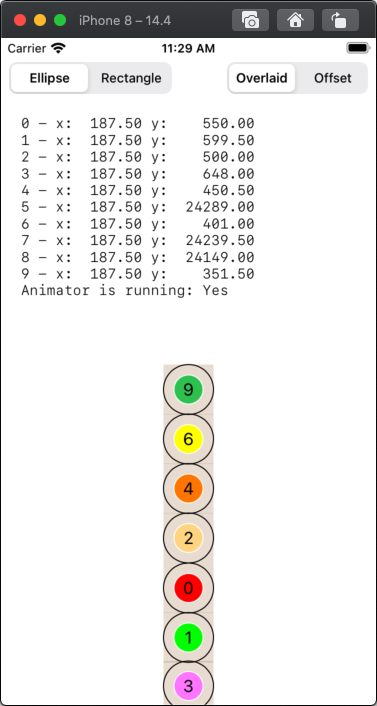
视图5、7和8是超出界限的way,动画师仍在运行。这些视图将继续被进一步推下去,大概直到我们得到一个无效的点崩溃(我还没有让它运行足够长的时间来找出)。
另外,由于动画师最终对那些不允许的视图进行了如此多的处理,其余视图上的冲突检测就会受到影响。
https://stackoverflow.com/questions/67015196
复制相似问题
腾讯云开发者

Copyright © 2013 - 2026 Tencent Cloud. All Rights Reserved. 腾讯云 版权所有
深圳市腾讯计算机系统有限公司 ICP备案/许可证号:粤B2-20090059  粤公网安备44030502008569号
腾讯云计算(北京)有限责任公司 京ICP证150476号 | 京ICP备11018762号