
没有找到'turtlebot3_gazebo‘包,搜索:['/opt/ros/foxy']
没有找到'turtlebot3_gazebo‘包,搜索:['/opt/ros/foxy']
提问于 2022-11-01 23:09:23
我完成了快速启动指南 for Foxy。一切都很顺利。
我在WSL2 Windows 11上使用Ubuntu20.04。
$ lsb_release -a
No LSB modules are available.
Distributor ID: Ubuntu
Description:    Ubuntu 20.04.5 LTS
Release:        20.04
Codename: focal$ printenv ROS_DISTRO
foxy$ gazebo -version
Gazebo multi-robot simulator, version 11.11.0
Copyright (C) 2012 Open Source Robotics Foundation.
Released under the Apache 2 License.
http://gazebosim.org
Gazebo multi-robot simulator, version 11.11.0
Copyright (C) 2012 Open Source Robotics Foundation.
Released under the Apache 2 License.
http://gazebosim.org但是,当尝试运行模拟时
$ export TURTLEBOT3_MODEL=burger
$ ros2 launch turtlebot3_gazebo empty_world.launch.py
它的消息失败了
Package 'turtlebot3_gazebo' not found: "package 'turtlebot3_gazebo' not found, searching: ['/opt/ros/foxy']"怎么修呢?我在Reddit上找到了一个类似的线程,但没有多大帮助。
回答 1
Stack Overflow用户
回答已采纳
发布于 2022-11-04 04:48:35
正如@Bilal在评论中指出的,我通过运行
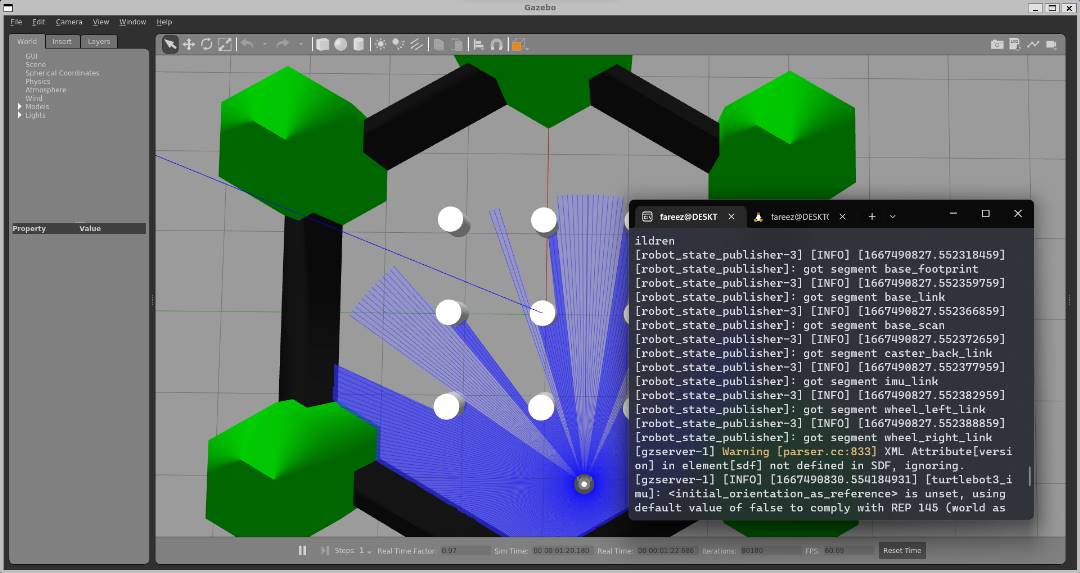
sudo apt-install ros-foxy-turtlebot3-gazebo然后,运行模拟:
set env export TURTLEBOT3_MODEL=burger
run ros2 launch turtlebot3_gazebo turtlebot3_world.launch.py
结果:
页面原文内容由Stack Overflow提供。腾讯云小微IT领域专用引擎提供翻译支持
原文链接:
https://stackoverflow.com/questions/74282723
复制相关文章
相似问题
腾讯云开发者

Copyright © 2013 - 2026 Tencent Cloud. All Rights Reserved. 腾讯云 版权所有
深圳市腾讯计算机系统有限公司 ICP备案/许可证号:粤B2-20090059  粤公网安备44030502008569号
腾讯云计算(北京)有限责任公司 京ICP证150476号 | 京ICP备11018762号