
如何在不发生渲染崩溃的情况下使用Qt3D绘制许多线条?
如何在不发生渲染崩溃的情况下使用Qt3D绘制许多线条?
提问于 2022-08-25 09:49:30
我想为我编写的C++/Qt5.15.2程序在3D中实现一个GCode查看器。
一个GCode文件包含3D打印机打印3D模型的说明(移动到哪里,挤出多少材料,打印哪一层,等等)。在解析了GCode文件之后,我得到了一个代表喷嘴位移的线条列表,并希望在3D中显示这个基本的线条列表。如https://gcode.ws/中的示例所示
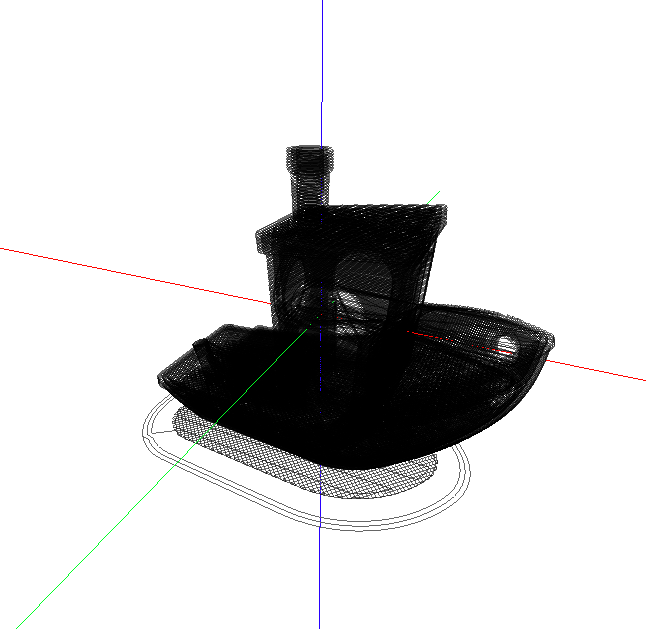
我开始使用Qt中的Qt3D和OpenGL示例,试图绘制许多线条(在本例中是10.000,但有些GCode有超过100万行),但是在创建场景并试图显示窗口之后,程序就崩溃了。你怎么在Qt3D或openGL中画很多对象而不让程序崩溃呢?
我从这个例子开始,从场景中删除示例元素,并使用这条线中的drawLine函数绘制我的线条。请问我做错什么了?我的代码是:
#include <QGuiApplication>

#include <Qt3DCore/QEntity>
#include <Qt3DRender/QCamera>
#include <Qt3DRender/QCameraLens>
#include <Qt3DCore/QTransform>
#include <Qt3DCore/QAspectEngine>

#include <Qt3DInput/QInputAspect>

#include <Qt3DRender/QRenderAspect>
#include <Qt3DExtras/QForwardRenderer>
#include <Qt3DExtras/QPhongMaterial>
#include <Qt3DExtras/QCylinderMesh>
#include <Qt3DExtras/QSphereMesh>
#include <Qt3DExtras/QTorusMesh>

#include <QPropertyAnimation>

#include "qt3dwindow.h"


#include <Qt3DCore/QEntity>
#include <Qt3DCore/QTransform>
#include <Qt3DExtras/QPhongMaterial>
#include <Qt3DRender/QAttribute>
#include <Qt3DRender/QBuffer>
#include <Qt3DRender/QGeometry>

#include <QElapsedTimer>


void drawLine(const QVector3D& start, const QVector3D& end, const QColor& color, Qt3DCore::QEntity *_rootEntity)
{
    auto *geometry = new Qt3DRender::QGeometry(_rootEntity);

    // position vertices (start and end)
    QByteArray bufferBytes;
    bufferBytes.resize(3 * 2 * sizeof(float)); // start.x, start.y, start.end + end.x, end.y, end.z
    float *positions = reinterpret_cast<float*>(bufferBytes.data());
    *positions++ = start.x();
    *positions++ = start.y();
    *positions++ = start.z();
    *positions++ = end.x();
    *positions++ = end.y();
    *positions++ = end.z();

    auto *buf = new Qt3DRender::QBuffer(geometry);
    buf->setData(bufferBytes);

    auto *positionAttribute = new Qt3DRender::QAttribute(geometry);
    positionAttribute->setName(Qt3DRender::QAttribute::defaultPositionAttributeName());
    positionAttribute->setVertexBaseType(Qt3DRender::QAttribute::Float);
    positionAttribute->setVertexSize(3);
    positionAttribute->setAttributeType(Qt3DRender::QAttribute::VertexAttribute);
    positionAttribute->setBuffer(buf);
    positionAttribute->setByteStride(3 * sizeof(float));
    positionAttribute->setCount(2);
    geometry->addAttribute(positionAttribute); // We add the vertices in the geometry

    // connectivity between vertices
    QByteArray indexBytes;
    indexBytes.resize(2 * sizeof(unsigned int)); // start to end
    unsigned int *indices = reinterpret_cast<unsigned int*>(indexBytes.data());
    *indices++ = 0;
    *indices++ = 1;

    auto *indexBuffer = new Qt3DRender::QBuffer(geometry);
    indexBuffer->setData(indexBytes);

    auto *indexAttribute = new Qt3DRender::QAttribute(geometry);
    indexAttribute->setVertexBaseType(Qt3DRender::QAttribute::UnsignedInt);
    indexAttribute->setAttributeType(Qt3DRender::QAttribute::IndexAttribute);
    indexAttribute->setBuffer(indexBuffer);
    indexAttribute->setCount(2);
    geometry->addAttribute(indexAttribute); // We add the indices linking the points in the geometry

    // mesh
    auto *line = new Qt3DRender::QGeometryRenderer(_rootEntity);
    line->setGeometry(geometry);
    line->setPrimitiveType(Qt3DRender::QGeometryRenderer::Lines);
    auto *material = new Qt3DExtras::QPhongMaterial(_rootEntity);
    material->setAmbient(color);

    // entity
    auto *lineEntity = new Qt3DCore::QEntity(_rootEntity);
    lineEntity->addComponent(line);
    lineEntity->addComponent(material);
}


int main(int argc, char* argv[])
{
    QGuiApplication app(argc, argv);
    Qt3DExtras::Qt3DWindow view;

    Qt3DCore::QEntity *scene = new Qt3DCore::QEntity;

    // Camera
    Qt3DRender::QCamera *camera = view.camera();
    camera->lens()->setPerspectiveProjection(45.0f, 16.0f/9.0f, 0.1f, 1000.0f);
    camera->setPosition(QVector3D(0, 0, 2.0f));
    camera->setViewCenter(QVector3D(0, 0, 0));

    QColor red(255,0,0);

    QElapsedTimer elapsed;
    elapsed.start();
    double i=0;
    while( i < 1000){
        qDebug() << i << elapsed.elapsed();
        drawLine(QVector3D(0,0,-i/10.0),QVector3D(1,0,-i/10.0),red,scene);
        drawLine(QVector3D(1,0,-i/10.0),QVector3D(1,1,-i/10.0),red,scene);
        drawLine(QVector3D(1,1,-i/10.0),QVector3D(0,1,-i/10.0),red,scene);
        drawLine(QVector3D(0,1,-i/10.0),QVector3D(0,0,-i/10.0),red,scene);
        i+=0.1;
    }

    // For camera controls (commented to publish less code)
    /*Qt3DExtras::QOrbitCameraController *camController = new Qt3DExtras::QOrbitCameraController(scene);
    camController->setLinearSpeed( 50.0f );
    camController->setLookSpeed( 180.0f );
    camController->setCamera(camera);*/

    view.setRootEntity(scene);
    view.show();

    return app.exec();
}
如果有用,下面是调试堆栈:
1   __memmove_avx_unaligned_erms                                                                                      memmove-vec-unaligned-erms.S 369 0x7ffff6276828
2   ??                                                                                                                                                 0x7fffdb31a2cb
3   ??                                                                                                                                                 0x7fffdb307d68
4   ??                                                                                                                                                 0x7fffdb317c46
5   ??                                                                                                                                                 0x7fffda6ac0ad
6   ??                                                                                                                                                 0x7fffda6acd23
7   ??                                                                                                                                                 0x7fffda6ae2ee
8   ??                                                                                                                                                 0x7fffda6ae91d
9   ??                                                                                                                                                 0x7fffda6ce86e
10  ??                                                                                                                                                 0x7fffda6f4167
11  ??                                                                                                                                                 0x7fffda953428
12  ??                                                                                                                                                 0x7fffda820a05
13  ??                                                                                                                                                 0x7fffda820df8
14  ??                                                                                                                                                 0x7fffda820f55
15  ??                                                                                                                                                 0x7fffda9486f8
16  Qt3DRender::Render::OpenGL::Renderer::submitRenderViews(QVector<Qt3DRender::Render::OpenGL::RenderView *> const&)                                  0x7fffe8045819
17  Qt3DRender::Render::OpenGL::Renderer::doRender(bool)                                                                                               0x7fffe8046b83
18  Qt3DRender::Render::OpenGL::Renderer::render()                                                                                                     0x7fffe803ae79
19  Qt3DRender::Render::RenderThread::run()                                                                                                            0x7ffff7939c3e
20  QThreadPrivate::start(void *)                                                                                                                      0x7ffff65adb35
... <More> 回答 1
Stack Overflow用户
回答已采纳
发布于 2022-08-25 15:07:19
我建议使用drawLineStrip函数来加快绘图速度。同一材料的顶点和索引被放置在一个单顶点/索引缓冲器中。重要的是设置setRestartIndexValue和setPrimitiveRestartEnabled属性的GeometryRenderer。其内容如下:
void drawLineStrip(const QVector<QVector3D>& vertices, const QVector<unsigned int>& indices, const QColor& color, Qt3DCore::QEntity* _rootEntity)
{
    auto geometry = new Qt3DRender::QGeometry(_rootEntity);

    // position vertices (start and end)
    QByteArray bufferBytes;
    bufferBytes.resize(3 * vertices.size() * sizeof(float)); // start.x, start.y, start.end + end.x, end.y, end.z
    auto positions = reinterpret_cast<float*>(bufferBytes.data());
    for (int n = vertices.size(), i = 0; i < n; ++i)
    {
        *positions++ = vertices[i].x();
        *positions++ = vertices[i].y();
        *positions++ = vertices[i].z();
    }

    auto buf = new Qt3DRender::QBuffer(geometry);
    buf->setData(bufferBytes);

    auto positionAttribute = new Qt3DRender::QAttribute(geometry);
    positionAttribute->setName(Qt3DRender::QAttribute::defaultPositionAttributeName());
    positionAttribute->setVertexBaseType(Qt3DRender::QAttribute::Float);
    positionAttribute->setVertexSize(3);
    positionAttribute->setAttributeType(Qt3DRender::QAttribute::VertexAttribute);
    positionAttribute->setBuffer(buf);
    positionAttribute->setByteStride(3 * sizeof(float));
    positionAttribute->setCount(vertices.size());
    geometry->addAttribute(positionAttribute); // We add the vertices in the geometry

    // connectivity between vertices
    QByteArray indexBytes;
    indexBytes.resize(indices.size() * sizeof(unsigned int)); // start to end
    memcpy(indexBytes.data(), indices.data(), indices.size() * sizeof(unsigned int));

    auto indexBuffer = new Qt3DRender::QBuffer(geometry);
    indexBuffer->setData(indexBytes);

    auto indexAttribute = new Qt3DRender::QAttribute(geometry);
    indexAttribute->setVertexBaseType(Qt3DRender::QAttribute::UnsignedInt);
    indexAttribute->setAttributeType(Qt3DRender::QAttribute::IndexAttribute);
    indexAttribute->setVertexSize(1);
    indexAttribute->setBuffer(indexBuffer);
    indexAttribute->setByteStride(1 * sizeof(unsigned int));
    indexAttribute->setCount(indices.size());
    geometry->addAttribute(indexAttribute); // We add the indices linking the points in the geometry

    // mesh
    auto line = new Qt3DRender::QGeometryRenderer(_rootEntity);
    line->setGeometry(geometry);
    line->setRestartIndexValue(-1);
    line->setPrimitiveRestartEnabled(true);
    line->setPrimitiveType(Qt3DRender::QGeometryRenderer::LineStrip);
    auto material = new Qt3DExtras::QPhongMaterial(_rootEntity);
    material->setAmbient(color);

    // entity
    auto lineEntity = new Qt3DCore::QEntity(_rootEntity);
    lineEntity->addComponent(line);
    lineEntity->addComponent(material);
}
在您的程序中,您可以这样使用它:
QVector<QVector3D> vertices;
vertices.resize((ceil(1000. / 0.1) + 1) * 5);
QVector<unsigned int> indices;
indices.resize((ceil(1000. / 0.1) + 1) * 6);
double i = 0;
int k = 0;
while (i < 1000) {
    int vIdx = 5 * k;
    vertices[vIdx + 0] = QVector3D(0, 0, -i / 10.0);
    vertices[vIdx + 1] = QVector3D(1, 0, -i / 10.0);
    vertices[vIdx + 2] = QVector3D(1, 1, -i / 10.0);
    vertices[vIdx + 3] = QVector3D(0, 1, -i / 10.0);
    vertices[vIdx + 4] = QVector3D(0, 0, -i / 10.0);
    int idx = 6 * k;
    indices[idx + 0] = vIdx + 0;
    indices[idx + 1] = vIdx + 1;
    indices[idx + 2] = vIdx + 2;
    indices[idx + 3] = vIdx + 3;
    indices[idx + 4] = vIdx + 4;
    indices[idx + 5] = -1;
    i += 0.1;
    ++k;
}
drawLineStrip(vertices, indices, red, scene);页面原文内容由Stack Overflow提供。腾讯云小微IT领域专用引擎提供翻译支持
原文链接:
https://stackoverflow.com/questions/73485430
复制相关文章
相似问题
腾讯云开发者

Copyright © 2013 - 2026 Tencent Cloud. All Rights Reserved. 腾讯云 版权所有
深圳市腾讯计算机系统有限公司 ICP备案/许可证号:粤B2-20090059  粤公网安备44030502008569号
腾讯云计算(北京)有限责任公司 京ICP证150476号 | 京ICP备11018762号