
glBufferSubData多次调用重写第一个数据
glBufferSubData多次调用重写第一个数据
提问于 2022-08-19 10:57:12
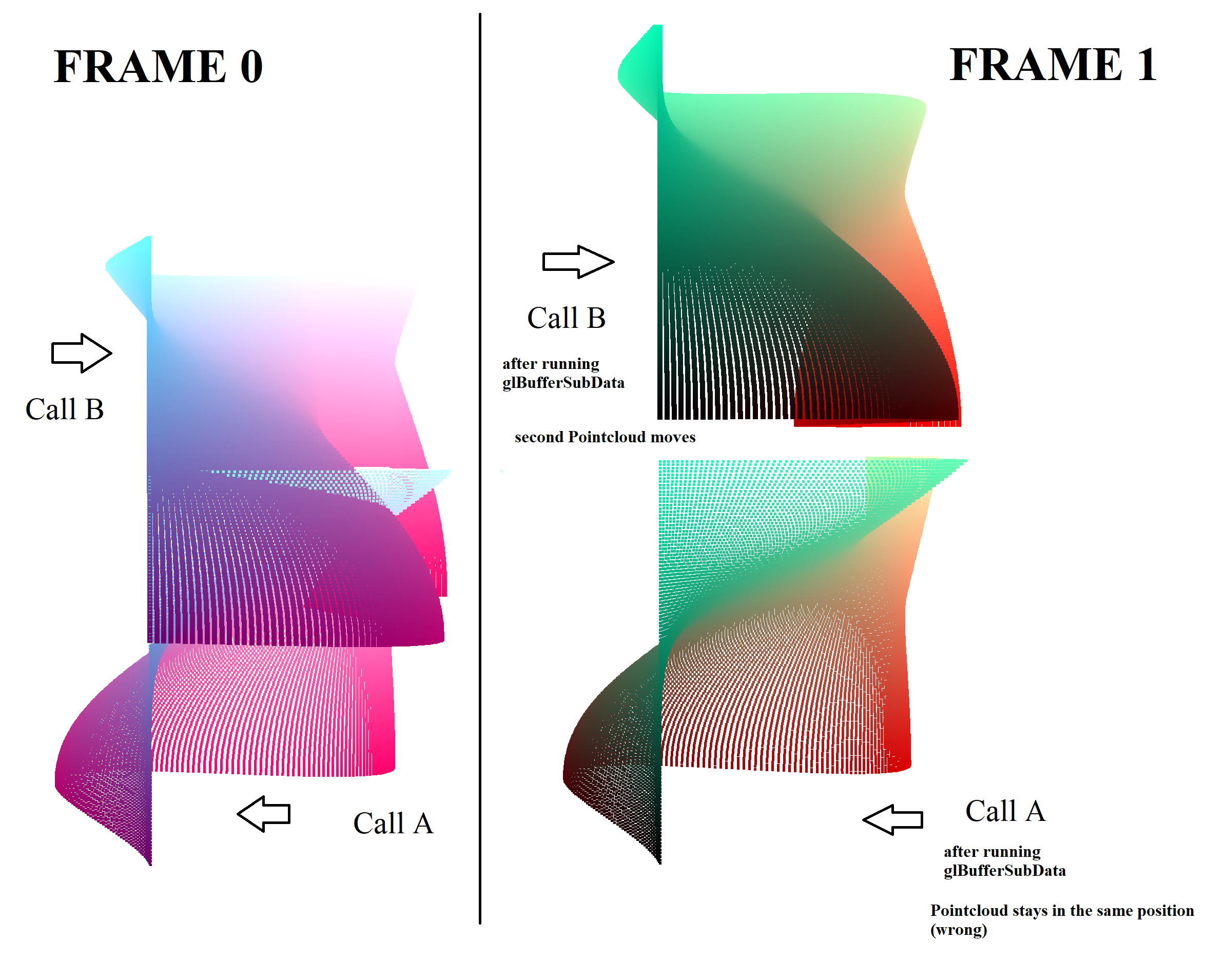
我使用glBufferSubData来改变顶点的位置。当我调用下面的代码一次时,一切都很好。如果我运行整个代码两次以添加两个点云,则顶点位置只会针对最后一个几何图形进行更新。
请只查看类的以下方法,因为代码的其余部分只是初始化云的构造函数:
void opengl_init()
void opengl_draw()
我认为绕到vao缓冲器是有问题的。
问:我如何才能正确地更新顶点位置glBufferSubData,以便两个点云都移动?
class pointcloud {
    public:
        int id = 0;
        std::vector<vertex> vertices;
        std::vector<unsigned int> indices;//pairs
        unsigned int vao, vbo, ibo;

        //individual polylines
        pointcloud(const std::vector<float>& coord, const std::vector<float>& colors)//, std::vector<Texture> textures
        {
            vertices.reserve(coord.size());
            indices.reserve((coord.size() - 1) * 2);

            for (int i = 0; i < coord.size(); i += 3) {
                vertex vertex;
                vertex.position = glm::vec3(coord[i + 0], coord[i + 1], coord[i + 2]);
                vertex.color = glm::vec3(colors[i + 0], colors[i + 1], colors[i + 2]);
                vertices.emplace_back(vertex);
            }
            for (int i = 0; i < (coord.size() / 3) - 1; i++) {
                indices.emplace_back(i + 0);
                indices.emplace_back(i + 1);
            }

            // now that we have all the required data, set the vertex buffers and its attribute pointers.
            //setup_polyline();
        }

        //merged polylines
        pointcloud(const std::vector<std::vector<float>>& coord, const std::vector<std::vector<float>>& colors)//, std::vector<Texture> textures
        {
            //reserve memory
            int v_count = 0;
            int i_count = 0;
            for (int i = 0; i < coord.size(); i++) {
                v_count += coord[i].size();
                i_count += coord[i].size() - 1;
            }

            vertices.reserve(v_count);
            indices.reserve(i_count);

            //fill vertics and indices lists

            for (int i = 0; i < coord.size(); i++) {
                for (int j = 0; j < coord[i].size(); j += 3) {
                    vertex vertex;
                    vertex.position = glm::vec3(coord[i][j + 0], coord[i][j + 1], coord[i][j + 2]);
                    vertex.color = glm::vec3(colors[i][j + 0], colors[i][j + 1], colors[i][j + 2]);
                    vertices.emplace_back(vertex);
                }
            }

            v_count = 0;
            for (int i = 0; i < coord.size(); i++) {
                for (int j = 0; j < (coord[i].size() / 3) - 1; j++) {
                    //std::cout << v_count + j + 0 << " " << v_count + j + 1 << std::endl;
                    indices.emplace_back(v_count + j + 0);
                    indices.emplace_back(v_count + j + 1);
                }
                v_count += (coord[i].size() / 3);
            }

            //std::cout << vertices.size() << std::endl;

            // now that we have all the required data, set the vertex buffers and its attribute pointers.
            //setup_polyline();
        }

        //// initializes all the buffer objects/arrays

        void opengl_init(bool draw_dynamic = true, int _id = 0)
        {
            id = _id + 1;

            /////////////////////////////////////////////////////////////////////////////////////////////////////////////////////////////////////////////
            // init vertex-array and vertex-array-buffer
            /////////////////////////////////////////////////////////////////////////////////////////////////////////////////////////////////////////////
            //vertex array
            glGenVertexArrays(1, &vao);
            glBindVertexArray(vao);

            //bind vertex-array-buffer to the vertex-array
            glGenBuffers(1, &vbo);
            glBindBuffer(GL_ARRAY_BUFFER, vbo);

            /////////////////////////////////////////////////////////////////////////////////////////////////////////////////////////////////////////////
            //declare array with data or empty array depending how data will be displayed
            /////////////////////////////////////////////////////////////////////////////////////////////////////////////////////////////////////////////
            auto type = !draw_dynamic ? GL_STATIC_DRAW : GL_STREAM_DRAW;
            glBufferData(GL_ARRAY_BUFFER, vertices.size() * sizeof(vertex), &vertices[0], type); // target | size | data (poinnting to first element e.g. glm::value_ptr(vertices[0])) | usage

            /////////////////////////////////////////////////////////////////////////////////////////////////////////////////////////////////////////////
            // set attributes that corresponds to layout id in the vertex shader
            /////////////////////////////////////////////////////////////////////////////////////////////////////////////////////////////////////////////

            // vertex Positions
            glEnableVertexAttribArray(0);
            glVertexAttribPointer(0, 3, GL_FLOAT, GL_FALSE, sizeof(vertex), (void*)0);
            // vertex normals
            glEnableVertexAttribArray(1);
            glVertexAttribPointer(1, 3, GL_FLOAT, GL_FALSE, sizeof(vertex), (void*)offsetof(vertex, color));

            /////////////////////////////////////////////////////////////////////////////////////////////////////////////////////////////////////////////
            //bind buffers vao | vbo | ibo
            /////////////////////////////////////////////////////////////////////////////////////////////////////////////////////////////////////////////
            //glBindVertexArray(0);
        }

        // render the mesh
        void opengl_draw(opengl_shaders::shader& shader, bool draw_dynamic = true)
        {
            //update
            //https://learnopengl.com/Advanced-OpenGL/Advanced-Data
            if (draw_dynamic) {
                for (auto& v : vertices)
                    v.position.y += 0.001;
                glBufferSubData(GL_ARRAY_BUFFER, 0, vertices.size() * sizeof(vertex), &vertices[0]);
            }

            //draw
            glBindVertexArray(vao);
            glDrawArrays(GL_POINTS, 0, vertices.size());
            //glBindVertexArray(0);
        }

        void opengl_clear(opengl_shaders::shader& shader) {
            glDeleteVertexArrays(1, &vao);
            glDeleteBuffers(1, &vbo);
            shader.delete_shader();
        }
};回答 1
Stack Overflow用户
回答已采纳
发布于 2022-08-19 11:04:27
glBufferSubData更新当前绑定到指定目标的缓冲区对象的数据存储的子集。必须绑定缓冲区才能修改其数据:
glBindBuffer(GL_ARRAY_BUFFER, vbo);
glBufferSubData(GL_ARRAY_BUFFER, 0, vertices.size() * sizeof(vertex), &vertices[0]);GL_ARRAY_BUFFER绑定是一个全局状态。此绑定将一直保持到更改为止。至于您的代码,它适用于1点云,但如果有超过1点云和顶点缓冲区,则不能工作。
页面原文内容由Stack Overflow提供。腾讯云小微IT领域专用引擎提供翻译支持
原文链接:
https://stackoverflow.com/questions/73415705
复制相关文章
相似问题
腾讯云开发者

Copyright © 2013 - 2026 Tencent Cloud. All Rights Reserved. 腾讯云 版权所有
深圳市腾讯计算机系统有限公司 ICP备案/许可证号:粤B2-20090059  粤公网安备44030502008569号
腾讯云计算(北京)有限责任公司 京ICP证150476号 | 京ICP备11018762号