
如何在python海龟模块中输出10圈而不是9圈?
如何在python海龟模块中输出10圈而不是9圈?
提问于 2022-07-02 13:05:31
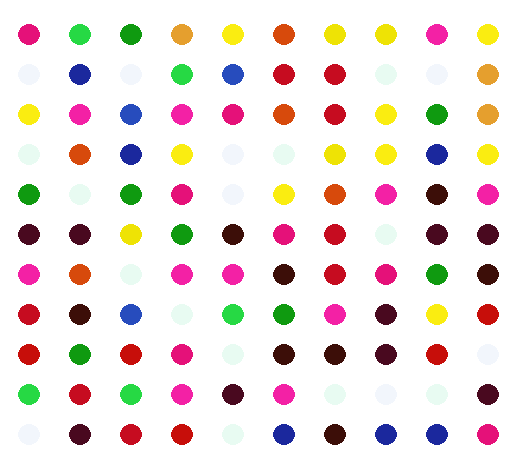
我想弄清楚为什么我的画没有达到预期的最终结果。正如您所看到的,第一行是打印10个圆圈,但是下面的行只打印9。看看我的代码和附加的图像。
from turtle import Turtle, Screen
import turtle
import random

colours = [(232, 251, 242), (198, 12, 32), (250, 237, 17), (39, 76, 189),
           (38, 217, 68), (238, 227, 5), (229, 159, 46), (27, 40, 157), (215, 74, 12), (15, 154, 16),
           (199, 14, 10), (242, 246, 252), (243, 33, 165), (229, 17, 121), (73, 9, 31), (60, 14, 8)]

turtle.colormode(255)

dot = Turtle()
dot.color(255,255,255) # Hide turtle trail
dot.setposition(-270, -350) # Starting position
dot.pensize(21)
dot.shape("circle")
dot.speed(60)

ypos = dot.ycor() # Y coordinates

for cycle in range(1, 11): # Cycles nested forloop 10 times

    for num in range(1, 11): # Create 10 circles
        dot.showturtle()
        dot.color(random.choice(colours))
        dot.forward(1)
        dot.penup()
        dot.forward(50)
        dot.pendown()

    dot.penup()
    dot.sety((ypos + 40*cycle)) # moves turtle up one row with each iteration
    dot.setx(-270) # Sets the turtle to starting X coordinate with each iteration

dot.hideturtle()

screen = Screen()
screen.exitonclick()
回答 2
Stack Overflow用户
回答已采纳
发布于 2022-07-02 13:12:16
在第一次为循环运行“创建10个圆圈”时,钢笔已经关闭。所以10个圆圈都画出来了。但是下一次发生时(第二行),笔是向上的-这是在“移动上一行”行。所以第一个圆圈不会被画出来。因此,您只需确保在将海龟设置为新的x,y坐标后调用dot.pendown()就可以绘制它。
for cycle in range(1, 11): # Cycles nested forloop 10 times

    for num in range(1, 11): # Create 10 circles
        dot.showturtle()
        dot.color(random.choice(colours))
        dot.forward(1)
        dot.penup()
        dot.forward(50)
        dot.pendown()

    dot.penup()
    dot.sety((ypos + 40*cycle)) # moves turtle up one row with each iteration
    dot.setx(-270) # Sets the turtle to starting X coordinate with each iteration
dot.pendown() # <<<<<<<<<--------- New additionStack Overflow用户
发布于 2022-07-02 13:10:57
您需要将嵌套for循环之后的最后一个代码块更改到它的顶部:
from turtle import Turtle, Screen
import turtle
import random

colours = [(232, 251, 242), (198, 12, 32), (250, 237, 17), (39, 76, 189),
           (38, 217, 68), (238, 227, 5), (229, 159, 46), (27, 40, 157), (215, 74, 12), (15, 154, 16),
           (199, 14, 10), (242, 246, 252), (243, 33, 165), (229, 17, 121), (73, 9, 31), (60, 14, 8)]

turtle.colormode(255)

dot = Turtle()
dot.color(255, 255, 255)  # Hide turtle trail
dot.setposition(-270, -350)  # Starting position
dot.pensize(21)
dot.shape("circle")
dot.speed(60)

xpos = dot.xcor()  # X coordinates
ypos = dot.ycor()  # Y coordinates

for cycle in range(11):
    dot.penup()
    dot.sety((ypos + 40 * cycle))
    dot.setx(-320)
    for num in range(11):
        dot.showturtle()
        dot.color(random.choice(colours))
        dot.forward(1)
        dot.penup()
        dot.forward(50)
        dot.pendown()


dot.hideturtle()

screen = Screen()
screen.exitonclick()
这是您将得到的最终结果:
页面原文内容由Stack Overflow提供。腾讯云小微IT领域专用引擎提供翻译支持
原文链接:
https://stackoverflow.com/questions/72839268
复制相关文章
相似问题
腾讯云开发者

Copyright © 2013 - 2026 Tencent Cloud. All Rights Reserved. 腾讯云 版权所有
深圳市腾讯计算机系统有限公司 ICP备案/许可证号:粤B2-20090059  粤公网安备44030502008569号
腾讯云计算(北京)有限责任公司 京ICP证150476号 | 京ICP备11018762号