
图像拼接块
图像拼接块
提问于 2022-04-04 12:23:14
嗨,我有一批图像,我需要将它划分为不重叠的补丁,并通过softmax函数发送每个补丁,然后重建原始图像。我可以按以下方式进行修补:
@tf.function
def grid_img(img,patch_size=(256, 256), padding="VALID"):
    p_height, p_width = patch_size
    batch_size, height, width, n_filters = img.shape
    p = tf.image.extract_patches(images=img,
                       sizes=[1,p_height, p_width, 1],
                       strides=[1,p_height, p_width, 1],
                       rates=[1, 1, 1, 1],
                       padding=padding)
    new_shape = list(p.shape[1:-1])+[p_height, p_width, n_filters]
    p = tf.keras.layers.Reshape(new_shape)(p)
    return p
但我不知道如何分批重建原始图像。简单的整形到原来的批次是行不通的。数据不会按正确的方式排列。我很感谢你的帮助。谢谢
回答 2
Stack Overflow用户
回答已采纳
发布于 2022-04-04 12:39:19
IIUC,您应该能够简单地使用tf.reshape从几批修补程序中重建原始图像:
import tensorflow as tf

samples = 5
images = tf.random.normal((samples, 256, 256, 3))

@tf.function
def grid(images):
  img_shape = tf.shape(images)
  batch_size, height, width, n_filters = img_shape[0], img_shape[1], img_shape[2], img_shape[3]

  patches = tf.image.extract_patches(images=images,
                                      sizes=[1, 32, 32, 1],
                                      strides=[1, 32, 32, 1],
                                      rates=[1, 1, 1, 1],
                                      padding='VALID')
  return tf.reshape(tf.nn.softmax(patches), (batch_size, height, width, n_filters))

patches = grid(images)
print(patches.shape)
# (5, 256, 256, 3)更新1:如果您想要按照正确的顺序重建图像,可以计算tf.image.extract_patches的梯度,如下面的代码片段所示。下面是一个示例:
import tensorflow as tf
import matplotlib.pyplot as plt
import pathlib

@tf.function
def grid(images):
  img_shape = tf.shape(images)
  patches = tf.image.extract_patches(images=images,
                                      sizes=[1, 64, 64, 1],
                                      strides=[1, 64, 64, 1],
                                      rates=[1, 1, 1, 1],
                                      padding='VALID')
  return patches

@tf.function
def extract_patches_inverse(shape, patches):
    _x = tf.zeros(shape)
    _y = grid(_x)
    grad = tf.gradients(_y, _x)[0]
    return tf.gradients(_y, _x, grad_ys=patches)[0] / grad


dataset_url = "https://storage.googleapis.com/download.tensorflow.org/example_images/flower_photos.tgz"
data_dir = tf.keras.utils.get_file('flower_photos', origin=dataset_url, untar=True)
data_dir = pathlib.Path(data_dir)
batch_size = 32

train_ds = tf.keras.utils.image_dataset_from_directory(
  data_dir,
  seed=123,
  image_size=(512, 512),
  batch_size = batch_size,
  shuffle= False)

images, _ = next(iter(train_ds.skip(1).take(2)))
patches = grid(images)

shape = (batch_size, 512, 512, 3)
images_reconstructed = extract_patches_inverse(shape, patches)

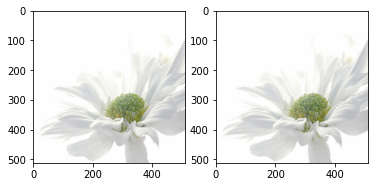
plt.figure()
f, axarr = plt.subplots(1,2)
axarr[0].imshow(images[0]/ 255)
axarr[1].imshow(images_reconstructed[0] / 255)
Stack Overflow用户
发布于 2022-04-04 16:21:19
围绕着这个问题,我想到的一项肮脏的工作就是在转化后跟踪细胞的位置。不像@孤独一起回答那么优雅,但还是有助于分享。
import numpy as np
import tensorflow as tf

@tf.function
def grid(images, grid_size=(32, 32)):
    grid_height, grid_width = grid_size
    patches = tf.image.extract_patches(images=images,
                                      sizes=[1, grid_height, grid_width, 1],
                                      strides=[1, grid_height, grid_width, 1],
                                      rates=[1, 1, 1, 1],
                                      padding='VALID')
    return patches

batch_size, height, width, n_filters = shape = (5, 256, 256, 1)
indices = tf.range(batch_size * height * width * n_filters)
images = tf.reshape(indices, (batch_size, height, width, n_filters ))

patches = grid(images)
transfered_indices = tf.reshape(patches, shape=[-1])
tracked_indices = tf.argsort(transfered_indices) # Indices after transformation, Save this


images = tf.random.normal(shape)

patches = grid(images)

flatten_patches = tf.reshape(patches, shape=[-1])

reconstructed = tf.reshape(tf.gather(flatten_patches, tracked_indices), shape)

np.alltrue(reconstructed==images) # True页面原文内容由Stack Overflow提供。腾讯云小微IT领域专用引擎提供翻译支持
原文链接:
https://stackoverflow.com/questions/71737199
复制相关文章
相似问题
腾讯云开发者

Copyright © 2013 - 2026 Tencent Cloud. All Rights Reserved. 腾讯云 版权所有
深圳市腾讯计算机系统有限公司 ICP备案/许可证号:粤B2-20090059  粤公网安备44030502008569号
腾讯云计算(北京)有限责任公司 京ICP证150476号 | 京ICP备11018762号