
WebGL2:如何通过着色器在TEXTURE_3D上渲染
WebGL2:如何通过着色器在TEXTURE_3D上渲染
提问于 2022-04-01 16:48:47
我读过WebGL2给我们的获取三维纹理。我试图用它来执行GPU端的计算,然后将输出存储在64x64x64的三维纹理中。呈现流是
compute shader -> render to 3dTexture -> read shader -> render to screen
这是我的简单计算着色器,纹理的RGB通道应该对应于XYZ片段坐标。
#version 300 es
precision mediump sampler3D;
precision highp float;
layout(location = 0) out highp vec4 pc_fragColor;

void main() {
    vec3 color = vec3(gl_FragCoord.x / 64.0, gl_FragCoord.y / 64.0, gl_FragDepth);
    pc_fragColor.rgb = color;
    pc_fragColor.a = 1.0;
}
然而,这似乎只是渲染到一个单一的“切片”的三维纺织品,其中的深度为0.0。其后从1至63 px的所有深度仍为黑色:
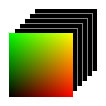
我在下面创建了一个演示来演示这个问题。
var renderer, target3d, camera;
const SIDE = 64;
var computeMaterial, computeMesh;
var readDataMaterial, readDataMesh,
    read3dTargetMaterial, read3dTargetMesh;
var textField = document.querySelector("#textField");

function init() {
    // Three.js boilerplate
    renderer = new THREE.WebGLRenderer({antialias: true});
    renderer.setSize(window.innerWidth, window.innerHeight);
    renderer.setClearColor(new THREE.Color(0x000000), 1.0);
    document.body.appendChild(renderer.domElement);
    camera = new THREE.Camera();

    // Create volume material to render to 3dTexture
    computeMaterial = new THREE.RawShaderMaterial({
        vertexShader: SIMPLE_VERTEX,
        fragmentShader: COMPUTE_FRAGMENT,
        uniforms: {
            uZCoord: { value: 0.0 },
        },
        depthTest: false,
    });
    computeMaterial.type = "VolumeShader";
    computeMesh = new THREE.Mesh(new THREE.PlaneGeometry(2, 2), computeMaterial);

    // Left material, reads Data3DTexture
    readDataMaterial = new THREE.RawShaderMaterial({
        vertexShader: SIMPLE_VERTEX,
        fragmentShader: READ_FRAGMENT,
        uniforms: {
            uZCoord: { value: 0.0 },
            tDiffuse: { value: create3dDataTexture() }
        },
        depthTest: false
    });
    readDataMaterial.type = "DebugShader";
    readDataMesh = new THREE.Mesh(new THREE.PlaneGeometry(2, 2), readDataMaterial);

    // Right material, reads 3DRenderTarget texture
    target3d = new THREE.WebGL3DRenderTarget(SIDE, SIDE, SIDE);
    target3d.depthBuffer = false;

    read3dTargetMaterial = readDataMaterial.clone();
    read3dTargetMaterial.uniforms.tDiffuse.value = target3d.texture;
    read3dTargetMesh = new THREE.Mesh(new THREE.PlaneGeometry(2, 2), read3dTargetMaterial);
}

// Creates 3D texture with RGB gradient along the XYZ axes
function create3dDataTexture() {
    const d = new Uint8Array( SIDE * SIDE * SIDE * 4 );
    window.dat = d;
    let i4 = 0;

    for ( let z = 0; z < SIDE; z ++ ) {
        for ( let y = 0; y < SIDE; y ++ ) {
            for ( let x = 0; x < SIDE; x ++ ) {
                d[i4 + 0] = (x / SIDE) * 255;
                d[i4 + 1] = (y / SIDE) * 255;
                d[i4 + 2] = (z / SIDE) * 255;
                d[i4 + 3] = 1.0;
                i4 += 4;
            }
        }
    }

    const texture = new THREE.Data3DTexture( d, SIDE, SIDE, SIDE );
    texture.format = THREE.RGBAFormat;
    texture.minFilter = THREE.NearestFilter;
    texture.magFilter = THREE.NearestFilter;
    texture.unpackAlignment = 1;
    texture.needsUpdate = true;

    return texture;
}

function onResize() {
    renderer.setSize(window.innerWidth, window.innerHeight);
}

function animate(t) {
    // Render volume shader to target3d buffer
    renderer.setRenderTarget(target3d);
    renderer.render(computeMesh, camera);

    // Update z texture coordinate along sine wave
    renderer.autoClear = false;
    const sinZCoord = Math.sin(t / 1000);
    readDataMaterial.uniforms.uZCoord.value = sinZCoord;
    read3dTargetMaterial.uniforms.uZCoord.value = sinZCoord;
    textField.innerText = sinZCoord.toFixed(4);

    // Render data3D texture to screen
    renderer.setViewport(0, window.innerHeight - SIDE*4, SIDE * 4, SIDE * 4);
    renderer.setRenderTarget(null);
    renderer.render(readDataMesh, camera);

    // Render 3dRenderTarget texture to screen
    renderer.setViewport(SIDE * 4, window.innerHeight - SIDE*4, SIDE * 4, SIDE * 4);
    renderer.setRenderTarget(null);
    renderer.render(read3dTargetMesh, camera);

    renderer.autoClear = true;
    requestAnimationFrame(animate);
}

init();
window.addEventListener("resize", onResize);
requestAnimationFrame(animate);html, body {
width: 100%;
height: 100%;
margin: 0;
overflow: hidden;
}
#title {
position: absolute;
top: 0;
left: 0;
color: white;
font-family: sans-serif;
}
h3 {
margin: 2px;
}<div id="title">
<h3>texDepth</h3><h3 id="textField"></h3>
</div>
<script src="https://threejs.org/build/three.js"></script>
<script>
/////////////////////////////////////////////////////////////////////////////////////
// Compute frag shader
// It should output an RGB gradient in the XYZ axes to the 3DRenderTarget
// But gl_FragCoord.z is always 0.5 and gl_FragDepth is always 0.0
const COMPUTE_FRAGMENT = `#version 300 es
precision mediump sampler3D;
precision highp float;
precision highp int;
layout(location = 0) out highp vec4 pc_fragColor;
void main() {
vec3 color = vec3(gl_FragCoord.x / 64.0, gl_FragCoord.y / 64.0, gl_FragDepth);
pc_fragColor.rgb = color;
pc_fragColor.a = 1.0;
}`;
/////////////////////////////////////////////////////////////////////////////////////
// Reader frag shader
// Samples the 3D texture along uv.x, uv.y, and uniform Z coordinate
const READ_FRAGMENT = `#version 300 es
precision mediump sampler3D;
precision highp float;
precision highp int;
layout(location = 0) out highp vec4 pc_fragColor;
in vec2 vUv;
uniform sampler3D tDiffuse;
uniform float uZCoord;
void main() {
vec3 UV3 = vec3(vUv.x, vUv.y, uZCoord);
vec3 diffuse = texture(tDiffuse, UV3).rgb;
pc_fragColor.rgb = diffuse;
pc_fragColor.a = 1.0;
}
`;
/////////////////////////////////////////////////////////////////////////////////////
// Simple vertex shader,
// renders a full-screen quad with UVs without any transformations
const SIMPLE_VERTEX = `#version 300 es
precision highp float;
precision highp int;
in vec2 uv;
in vec3 position;
out vec2 vUv;
void main() {
vUv = uv;
gl_Position = vec4(position, 1.0);
}`;
/////////////////////////////////////////////////////////////////////////////////////
</script>
- 在左边,我正在取样我通过JavaScript创建的一个JavaScript。蓝色通道平稳过渡,因为我上下移动的深度轴,如预期。
- 在右边,我正在采样在上面显示的框架着色器中呈现的WebGL3DRenderTarget纹理。如您所见,只有当深度坐标为0.0时,它才会呈现到纹理。其他的“切片”都是黑色的。
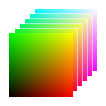
如何将计算结果呈现给所有64深度切片?我在这个演示中使用Three.js,但我可以使用任何其他库,比如TWGL或vanilla WebGL来实现相同的结果。
回答 1
Stack Overflow用户
回答已采纳
发布于 2022-04-05 22:42:29
它看起来没有文档化,但是您可以使用setRenderTarget的第二个参数来设置要呈现的3d渲染目标的“层”。以下是要做的修改:
- 当呈现到呈现目标时,为每个层执行新的呈现:
for ( let i = 0; i < SIDE; i ++ ) {

  // set the uZCoord color value for the shader
  computeMesh.material.uniforms.uZCoord.value = i / (SIDE - 1);

  // Set the 3d target "layer" to render into before rendering
  renderer.setRenderTarget(target3d, i);
  renderer.render(computeMesh, camera);

} - 在计算片段着色器中使用"uZCoord“统一:
    uniform float uZCoord;
    void main() {
        vec3 color = vec3(gl_FragCoord.x / 64.0, gl_FragCoord.y / 64.0, uZCoord);
        pc_fragColor.rgb = color;
        pc_fragColor.a = 1.0;
    }
除此之外,我不相信有一种方法可以在一次抽签调用中呈现出目标的全部3d卷。这个three.js示例展示了如何做到这一点,但也显示了如何使用呈现目标数组:
var renderer, target3d, camera;
const SIDE = 64;
var computeMaterial, computeMesh;
var readDataMaterial, readDataMesh,
    read3dTargetMaterial, read3dTargetMesh;
var textField = document.querySelector("#textField");

function init() {
    // Three.js boilerplate
    renderer = new THREE.WebGLRenderer({antialias: true});
    renderer.setSize(window.innerWidth, window.innerHeight);
    renderer.setClearColor(new THREE.Color(0x000000), 1.0);
    document.body.appendChild(renderer.domElement);
    camera = new THREE.Camera();

    // Create volume material to render to 3dTexture
    computeMaterial = new THREE.RawShaderMaterial({
        vertexShader: SIMPLE_VERTEX,
        fragmentShader: COMPUTE_FRAGMENT,
        uniforms: {
            uZCoord: { value: 0.0 },
        },
        depthTest: false,
    });
    computeMaterial.type = "VolumeShader";
    computeMesh = new THREE.Mesh(new THREE.PlaneGeometry(2, 2), computeMaterial);

    // Left material, reads Data3DTexture
    readDataMaterial = new THREE.RawShaderMaterial({
        vertexShader: SIMPLE_VERTEX,
        fragmentShader: READ_FRAGMENT,
        uniforms: {
            uZCoord: { value: 0.0 },
            tDiffuse: { value: create3dDataTexture() }
        },
        depthTest: false
    });
    readDataMaterial.type = "DebugShader";
    readDataMesh = new THREE.Mesh(new THREE.PlaneGeometry(2, 2), readDataMaterial);

    // Right material, reads 3DRenderTarget texture
    target3d = new THREE.WebGL3DRenderTarget(SIDE, SIDE, SIDE);
    target3d.depthBuffer = false;

    read3dTargetMaterial = readDataMaterial.clone();
    read3dTargetMaterial.uniforms.tDiffuse.value = target3d.texture;
    read3dTargetMesh = new THREE.Mesh(new THREE.PlaneGeometry(2, 2), read3dTargetMaterial);
}

// Creates 3D texture with RGB gradient along the XYZ axes
function create3dDataTexture() {
    const d = new Uint8Array( SIDE * SIDE * SIDE * 4 );
    window.dat = d;
    let i4 = 0;

    for ( let z = 0; z < SIDE; z ++ ) {
        for ( let y = 0; y < SIDE; y ++ ) {
            for ( let x = 0; x < SIDE; x ++ ) {
                d[i4 + 0] = (x / SIDE) * 255;
                d[i4 + 1] = (y / SIDE) * 255;
                d[i4 + 2] = (z / SIDE) * 255;
                d[i4 + 3] = 1.0;
                i4 += 4;
            }
        }
    }

    const texture = new THREE.Data3DTexture( d, SIDE, SIDE, SIDE );
    texture.format = THREE.RGBAFormat;
    texture.minFilter = THREE.NearestFilter;
    texture.magFilter = THREE.NearestFilter;
    texture.unpackAlignment = 1;
    texture.needsUpdate = true;

    return texture;
}

function onResize() {
    renderer.setSize(window.innerWidth, window.innerHeight);
}

function animate(t) {
    for ( let i = 0; i < SIDE; i ++ ) {

      // Render volume shader to target3d buffer
      computeMesh.material.uniforms.uZCoord.value = i / ( SIDE - 1 );
      renderer.setRenderTarget(target3d, i);
      renderer.render(computeMesh, camera);

    }

    // Update z texture coordinate along sine wave
    renderer.autoClear = false;
    const sinZCoord = Math.sin(t / 1000);
    readDataMaterial.uniforms.uZCoord.value = sinZCoord;
    read3dTargetMaterial.uniforms.uZCoord.value = sinZCoord;
    textField.innerText = sinZCoord.toFixed(4);

    // Render data3D texture to screen
    renderer.setViewport(0, window.innerHeight - SIDE*4, SIDE * 4, SIDE * 4);
    renderer.setRenderTarget(null);
    renderer.render(readDataMesh, camera);

    // Render 3dRenderTarget texture to screen
    renderer.setViewport(SIDE * 4, window.innerHeight - SIDE*4, SIDE * 4, SIDE * 4);
    renderer.setRenderTarget(null);
    renderer.render(read3dTargetMesh, camera);

    renderer.autoClear = true;
    requestAnimationFrame(animate);
}

init();
window.addEventListener("resize", onResize);
requestAnimationFrame(animate);html, body {
width: 100%;
height: 100%;
margin: 0;
overflow: hidden;
}
#title {
position: absolute;
top: 0;
left: 0;
color: white;
font-family: sans-serif;
}
h3 {
margin: 2px;
}<div id="title">
<h3>texDepth</h3><h3 id="textField"></h3>
</div>
<script src="https://threejs.org/build/three.js"></script>
<script>
/////////////////////////////////////////////////////////////////////////////////////
// Compute frag shader
// It should output an RGB gradient in the XYZ axes to the 3DRenderTarget
// But gl_FragCoord.z is always 0.5 and gl_FragDepth is always 0.0
const COMPUTE_FRAGMENT = `#version 300 es
precision mediump sampler3D;
precision highp float;
precision highp int;
layout(location = 0) out highp vec4 pc_fragColor;
uniform float uZCoord;
void main() {
vec3 color = vec3(gl_FragCoord.x / 64.0, gl_FragCoord.y / 64.0, uZCoord);
pc_fragColor.rgb = color;
pc_fragColor.a = 1.0;
}`;
/////////////////////////////////////////////////////////////////////////////////////
// Reader frag shader
// Samples the 3D texture along uv.x, uv.y, and uniform Z coordinate
const READ_FRAGMENT = `#version 300 es
precision mediump sampler3D;
precision highp float;
precision highp int;
layout(location = 0) out highp vec4 pc_fragColor;
in vec2 vUv;
uniform sampler3D tDiffuse;
uniform float uZCoord;
void main() {
vec3 UV3 = vec3(vUv.x, vUv.y, uZCoord);
vec3 diffuse = texture(tDiffuse, UV3).rgb;
pc_fragColor.rgb = diffuse;
pc_fragColor.a = 1.0;
}
`;
/////////////////////////////////////////////////////////////////////////////////////
// Simple vertex shader,
// renders a full-screen quad with UVs without any transformations
const SIMPLE_VERTEX = `#version 300 es
precision highp float;
precision highp int;
in vec2 uv;
in vec3 position;
out vec2 vUv;
void main() {
vUv = uv;
gl_Position = vec4(position, 1.0);
}`;
/////////////////////////////////////////////////////////////////////////////////////
</script>
页面原文内容由Stack Overflow提供。腾讯云小微IT领域专用引擎提供翻译支持
原文链接:
https://stackoverflow.com/questions/71710336
复制相关文章
相似问题
腾讯云开发者

Copyright © 2013 - 2026 Tencent Cloud. All Rights Reserved. 腾讯云 版权所有
深圳市腾讯计算机系统有限公司 ICP备案/许可证号:粤B2-20090059  粤公网安备44030502008569号
腾讯云计算(北京)有限责任公司 京ICP证150476号 | 京ICP备11018762号