
用关键点特征匹配+单形对齐文档(Aadhaar)
嗨,我正在尝试创建一个OCR,在那里,模型应该能够读取上传的文档。然而,很多时候,上传的文档是倾斜的或倾斜的。我计划根据模板来调整和/或调整文档的大小。
为了实现这一点,我打算使用特征映射和同形。但是,每当我计算我的关键点和描述符(使用ORB),并尝试使用Brute匹配来匹配它们时,所有的特性似乎都不匹配。这是我到目前为止使用的代码及其结果。如果我错过了某件事或以某种不正确的方式做了,有人能给我指明正确的方向吗?
def straighten_image(ORIG_IMG, IMG2):
    # read both the images:
    orig_image = cv2.imread(ORIG_IMG)
    img_input = cv2.imread(IMG2)

    orig_gray_scale = cv2.cvtColor(orig_image, cv2.COLOR_BGR2GRAY)
    gray_scale_img = cv2.cvtColor(img_input, cv2.COLOR_BGR2GRAY)

    #Detect ORB features and compute descriptors
    MAX_NUM_FEATURES = 100
    orb = cv2.ORB_create(MAX_NUM_FEATURES)
    keypoints1, descriptors1 = orb.detectAndCompute(orig_gray_scale, None)
    keypoints2, descriptors2= orb.detectAndCompute(gray_scale_img, None)

    #display image with keypoints
    orig_wid_decriptors = cv2.drawKeypoints(orig_gray_scale, keypoints1, outImage = np.array([]), color= (255, 0, 0), flags= cv2.DRAW_MATCHES_FLAGS_DRAW_RICH_KEYPOINTS)
    inp_wid_decriptors = cv2.drawKeypoints(img_input, keypoints2, outImage = np.array([]), color= (255, 0, 0), flags= cv2.DRAW_MATCHES_FLAGS_DRAW_RICH_KEYPOINTS)

    #Match features

    matcher = cv2.DescriptorMatcher_create(cv2.DESCRIPTOR_MATCHER_BRUTEFORCE_HAMMING)
    matches = matcher.match(descriptors1, descriptors2, None)

    print(type(matches))

    #sort matches
#     matches.sort(key=lambda x: x.distance, reverse=False)


    #Remove not-so-good matches
    numGoodMatches = int(len(matches)*0.1)
    matches = matches[:numGoodMatches]

    #Draw Top matches
    im_matches = cv2.drawMatches(orig_gray_scale, keypoints1, gray_scale_img, keypoints2, matches, None)

    cv2.imshow("", im_matches)
    cv2.waitKey(0)

    #Homography
    points1 = np.zeros((len(matches), 2), dtype = np.float32)
    points2 = np.zeros((len(matches), 2), dtype = np.float32)

    for i, match in enumerate(matches):
        points1[i, :] = keypoints1[match.queryIdx].pt
        points2[i, :] = keypoints2[match.trainIdx].pt

    #Find homography:
    h, mask = cv2.findHomography(points2, points1, cv2.RANSAC)

    #Warp image
    # Use homography to warp image
    height, width = orig_gray_scale.shape
    inp_reg = cv2.warpPerspective(gray_scale_img, h, (width, height), borderValue = 255)

    return inp_reg


import cv2
import matplotlib.pyplot as plt
import numpy as np
template = "template_aadhaar.jpg"
test = "test.jpeg"

str_img = straighten_image(template, test)

cv2.imshow("", str_img)
cv2.waitKey(0)
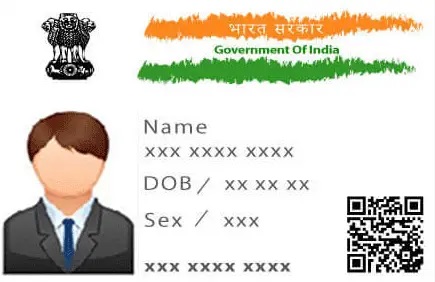
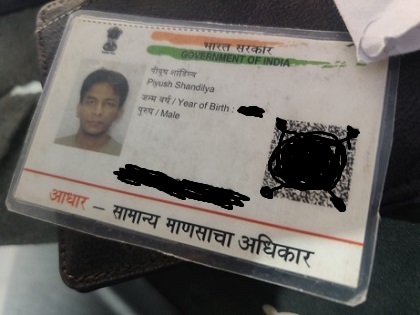
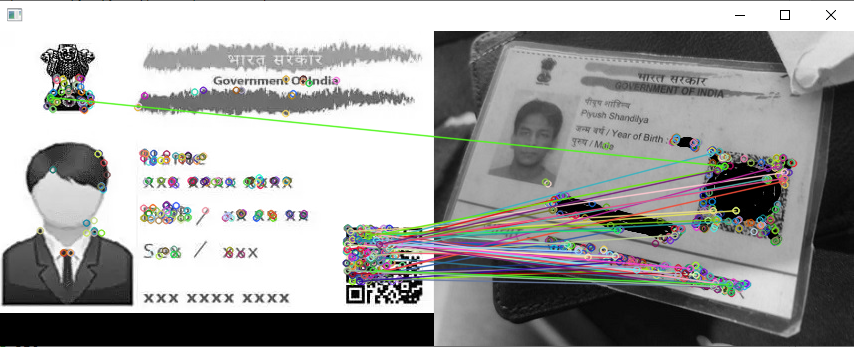
编辑:如果我使用我自己的身份证(完全直的)作为模板,并试图对齐相同的ID卡是倾斜的,它匹配的特点,并重新对齐倾斜的图像。然而,我需要模型能够重新对齐任何其他基于模板的身份证。任何ID,我的意思是,细节可能是不同的,但位置和字体将完全相同。
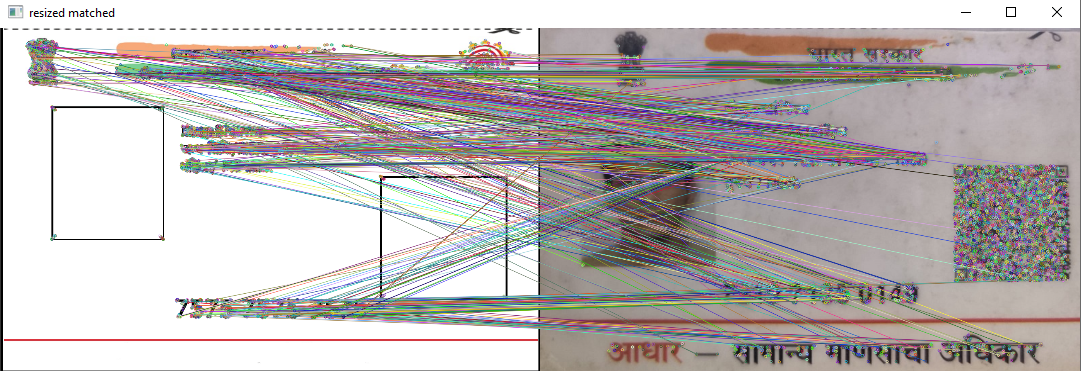
EDIT#2:正如@Olli所建议的,我尝试使用一个模板,其中只包含所有Aadhaar卡相同的特性。图片附呈。但是,特征匹配仍然有些任意性。
回答 1
Stack Overflow用户
发布于 2022-03-18 09:16:48
特征映射试图检测图像上最重要的特征,并试图匹配它们。只有在功能确实相同的情况下,这才有效。如果功能相似但不同,就会失败。
如果您有一些始终相同的功能(例如左上角的徽标),您可以尝试创建一个模板,其中只有这些特性,并且在所有其他区域都是空白的,即删除人员和名称以及QR代码和.
但是,由于有更多的差异(“印度政府在绿色区域内的形象和上面,.)比相似,.”,我会尝试找出旋转的基础上的角和/或边缘的形状。例如:
将grayscale
- perform
- 转换为 canny边缘detection
- detect角,例如使用cv2.goodFeaturesToTrack。如果有些角是隐藏的,尝试使用Hough线instead.
- undistort
查找边沿
如果一些图像在不失真后旋转90度、180度或270度,你可以使用一个过滤器找到橙色和绿色的区域并旋转,使这个区域再次位于顶部。
https://stackoverflow.com/questions/71517293
复制相似问题
腾讯云开发者

Copyright © 2013 - 2026 Tencent Cloud. All Rights Reserved. 腾讯云 版权所有
深圳市腾讯计算机系统有限公司 ICP备案/许可证号:粤B2-20090059  粤公网安备44030502008569号
腾讯云计算(北京)有限责任公司 京ICP证150476号 | 京ICP备11018762号