
我能使SCNBox具有可触性和交互性吗?
我正在尝试用SCNBox在SwiftUI中创建一个旋转立方体,在这个立方体中你可以点击盒子的每一边,一个不同的弹出屏幕/视图显示文本等等。我有旋转的SCNBox立方体,但是我如何使它具有可触性和交互性,以及如何使它重定向到另一个视图?
这就是我目前如何尝试将盒子场景插入到一个SwiftUI视图中,然后该视图将进入一个退出应用程序的视图层次结构。
import SwiftUI
import SceneKit

class BoxNode: SCNNode {

    override init() {
        super.init()
        self.geometry = SCNBox(width: 1, height: 1, length: 1, chamferRadius: 0.0)

        self.geometry?.firstMaterial?.shininess = 50

        let action = SCNAction.rotate(by: 360 * CGFloat(Double.pi / 180), around: SCNVector3(x:0, y:1, z:0), duration: 8)

        let repeatAction = SCNAction.repeatForever(action)

        self.runAction(repeatAction)

    }

    required init?(coder: NSCoder) {
        fatalError("init(coder:) has not been implemented")
    }
}

struct BoxScene: View {
        var scene = SCNScene(named: "MyScene")

        var cameraNode: SCNNode? {
                scene?.rootNode.childNode(withName: "camera", recursively: false)
        }

        var boxNode: SCNNode? {
                scene?.rootNode.addChildNode(BoxNode())
        }

        var body: some View {
                SceneView(
                        scene: scene,
                        pointOfView: cameraNode,
                        options: []
                )
        }
}
但是,这段代码没有编译--它的意思是“表达式的类型是不明确的,下面一行没有更多的上下文:
var boxNode: SCNNode? {
                scene?.rootNode.addChildNode(BoxNode())
}回答 1
Stack Overflow用户
发布于 2022-01-02 20:46:36
下面是一个使用SCNBox可能有帮助的例子。
BoxNode是一个自定义SCNNode,它使用SCNBox作为其几何学。每一面都被设置成不同的颜色,以便很容易看到,如果您想要显示更详细的内容,可以使用UIImages。在使用SceneKit、UIKit和SwiftUI时,请确保在需要时导入它们。
class BoxNode: SCNNode {

    override init() {
        let length: CGFloat = 5
        let box = SCNBox(width: length, height: length, length: length, chamferRadius: 0)

        box.materials = [UIColor.red, .yellow, .green, .blue, .purple, .brown].map {
            let material = SCNMaterial()
            material.diffuse.contents = $0
            material.isDoubleSided = true
            material.transparencyMode = .aOne
            return material
        }

        super.init()

        self.geometry = box
        self.name = "boxNode"
    }

    required init?(coder: NSCoder) {
        fatalError("init(coder:) has not been implemented")
    }
}然后在自定义SCNScene中使用这一点,它将BoxNode添加为根节点,并设置旋转动画并将多维数据集枢轴化。
class GameScene: SCNScene {

    override init() {
        super.init()

        let cubeNode = BoxNode()
        self.rootNode.addChildNode(cubeNode)

        let xAngle = SCNMatrix4MakeRotation(.pi / 3.8, 1, 0, 0)
        let zAngle = SCNMatrix4MakeRotation(-.pi / 4, 0, 0, 1)
        cubeNode.pivot = SCNMatrix4Mult(SCNMatrix4Mult(xAngle, zAngle), cubeNode.transform)

        // Rotate the cube
        let animation = CAKeyframeAnimation(keyPath: "rotation")
        animation.values = [SCNVector4(1, 1, 0.3, 0 * .pi),
                            SCNVector4(1, 1, 0.3, 1 * .pi),
                            SCNVector4(1, 1, 0.3, 2 * .pi)]
        animation.duration = 5
        animation.repeatCount = HUGE
        cubeNode.addAnimation(animation, forKey: "rotation")
    }

    required init?(coder aDecoder: NSCoder) {
        fatalError("init(coder:) has not been implemented")
    }
}然后将GameScene设置在SCNView中的UIViewController中。SCNView被固定在ViewController的边缘,我们覆盖touchesBegan,这样我们就可以与SceneView交互。我还创建了一个变量sideTapped,因为这将允许您注入一个回调,这样您就可以知道您的多维数据集上哪一边已经被点击了。
class GameSceneViewController: UIViewController {

    private let sceneView: SCNView = .init(frame: .zero)
    private let scene = GameScene()

    var sideTapped: ((Int) -> Void)?

    override func viewDidLoad() {
        super.viewDidLoad()

        sceneView.translatesAutoresizingMaskIntoConstraints = false
        view.addSubview(sceneView)

        NSLayoutConstraint.activate([
            sceneView.topAnchor.constraint(equalTo: view.safeAreaLayoutGuide.topAnchor),
            sceneView.leadingAnchor.constraint(equalTo: view.safeAreaLayoutGuide.leadingAnchor),
            sceneView.trailingAnchor.constraint(equalTo: view.safeAreaLayoutGuide.trailingAnchor),
            sceneView.bottomAnchor.constraint(equalTo: view.safeAreaLayoutGuide.bottomAnchor),
        ])
        sceneView.scene = scene
    }

    override func touchesBegan(_ touches: Set<UITouch>, with event: UIEvent?) {
        guard let touchPoint = touches.first?.location(in: sceneView) else { return }
        guard let hitTestResult = sceneView.hitTest(touchPoint, options: nil).first else { return }
        guard hitTestResult.node is BoxNode else { return }

        sideTapped?(hitTestResult.geometryIndex)
    }
}当我们在SwiftUI中使用这个时,我们需要一个UIViewControllerRepresentable。这里,我们将sideTapped函数传递给GameSceneViewController。
struct GSViewControllerRepresentable: UIViewControllerRepresentable {

    let sideTapped: ((Int) -> Void)?

    func makeUIViewController(context: Context) -> GameSceneViewController {
        let vc = GameSceneViewController()
        vc.sideTapped = sideTapped
        return vc
    }

    func updateUIViewController(_ uiViewController: GameSceneViewController, context: Context) {

    }
}现在,我们可以将其添加到SwiftUI视图中。
struct ContentView: View {

    var body: some View {
        GSViewControllerRepresentable { side in
            print(side)
            // Perform additional logic here
        }
        .frame(width: 200, height: 200)
    }
}
最终结果应该如下所示:
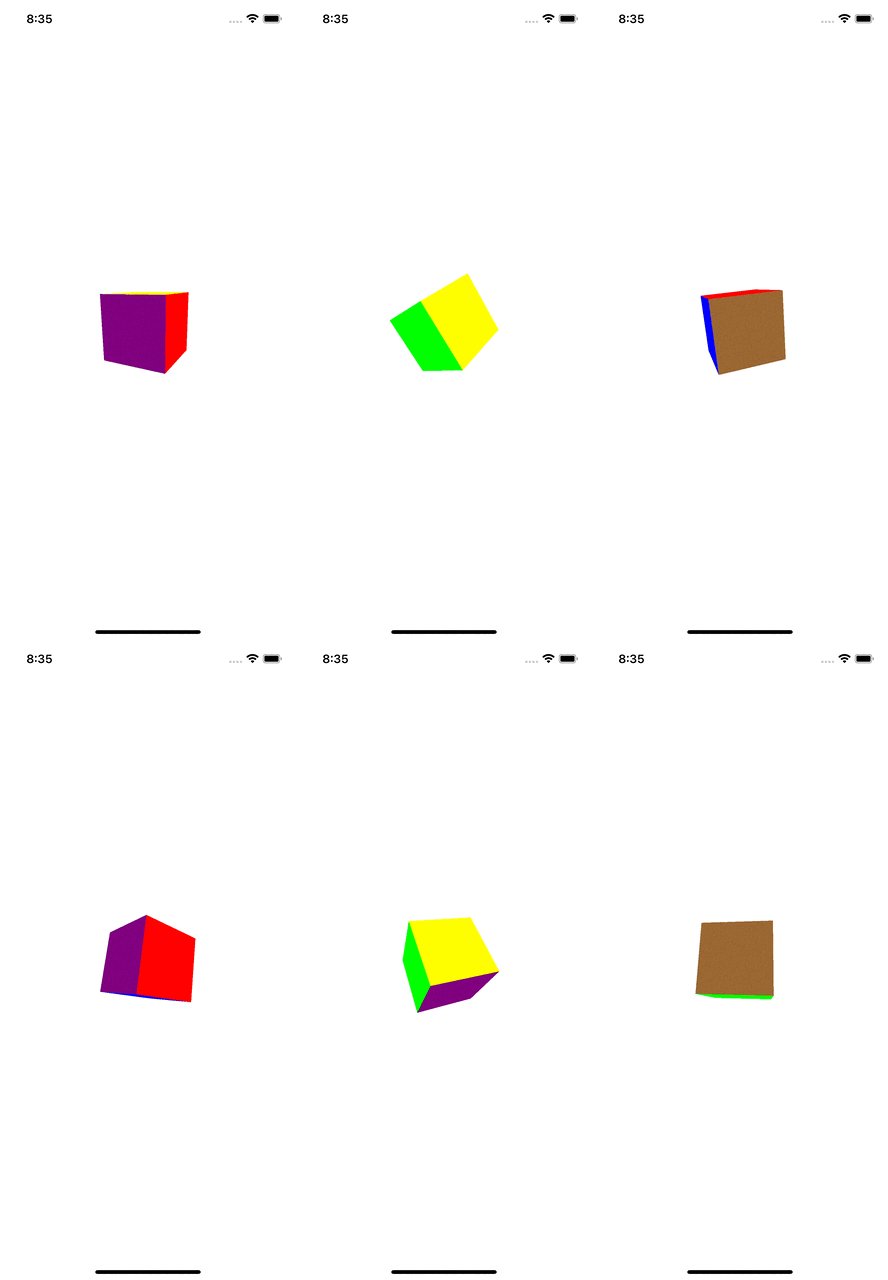
敲击立方体的一侧会打印一个从0到5的数字,代表你点击的那一面。根据所使用的材料,数字应与材料的指数相对应,因此在这种情况下:
- 0是红色
- 1是黄色
- 2是绿色
- 3是蓝色
<代码>H 1374是紫色<代码>H 238<代码>H 1395是棕色<代码>H 240<代码>F 241
这应该会给你一些东西,你应该能够关闭你的导航。
我不是SceneKit方面的专家,但我在周末玩过它,并且做了你想要的事情。希望这给你一个想法,有很多方法来实现你想要做的事情,这是一种可能性。
如果你想要滑动立方体来改变脸,而不仅仅是让它自己旋转,你可能想看看这个answer。
https://stackoverflow.com/questions/70545002
复制相似问题
腾讯云开发者

Copyright © 2013 - 2026 Tencent Cloud. All Rights Reserved. 腾讯云 版权所有
深圳市腾讯计算机系统有限公司 ICP备案/许可证号:粤B2-20090059  粤公网安备44030502008569号
腾讯云计算(北京)有限责任公司 京ICP证150476号 | 京ICP备11018762号