LangChain 调用 MCP 实战:从 @tool 到标准化工具协议

LangChain 调用 MCP 实战:从 @tool 到标准化工具协议

烟雨平生
发布于 2026-05-09 14:24:04
发布于 2026-05-09 14:24:04
大家都知道LangChain通过@tool 定义FunctionCall,那如何调用MCP服务呢?。本文基于真实可运行的 demo,把 这个点一次讲透。
什么是MCP?
MCP(Model Context Protocol)是Anthropic 在 2024 年搞出来的通信协议,就像给 AI 装了个 USB-C 口。
它的作用很简单:让 AI 能「standardized 地连接」各种外部工具——查数据库、读文件、调 API。以前每个工具(Function Calling)都要写一堆适配代码,现在有了 MCP,一次对接,到处能用。
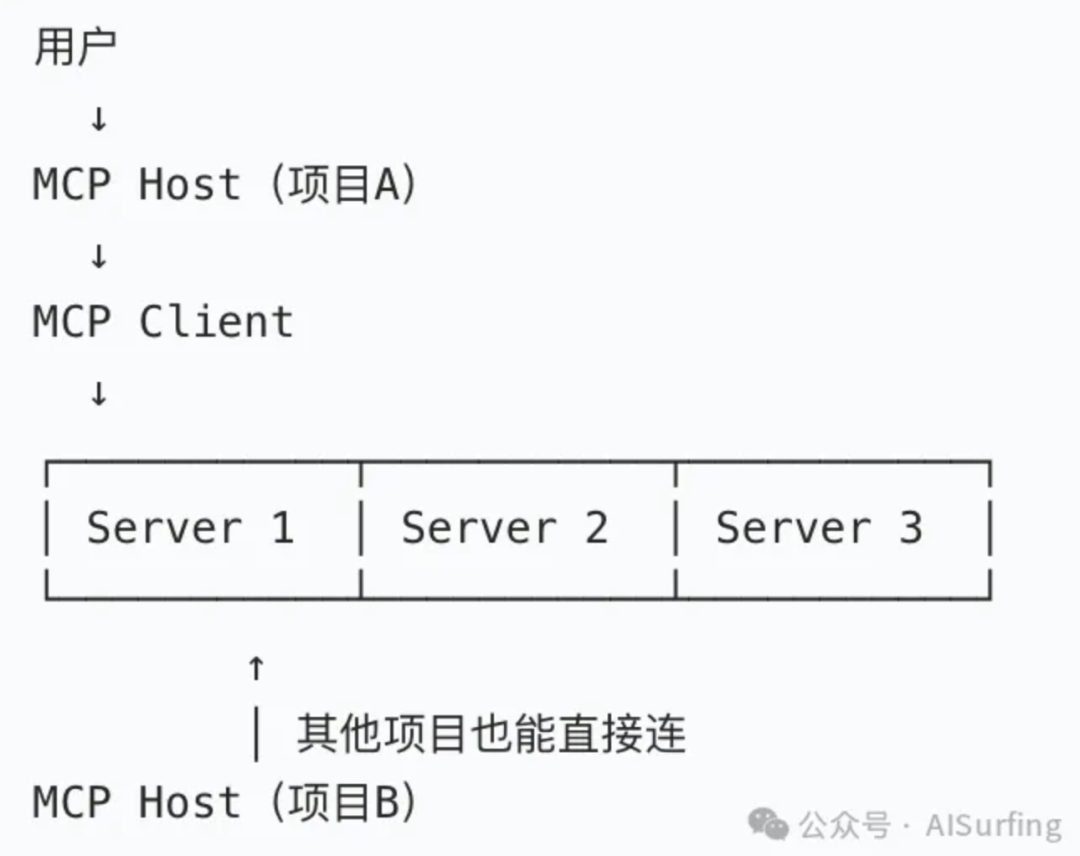
一句话:MCP = USB-C 接口(标准化连接器), 解决的是“能不能连”的问题,是底层基础设施。
再把这两个容易混淆的概念啰嗦两句:
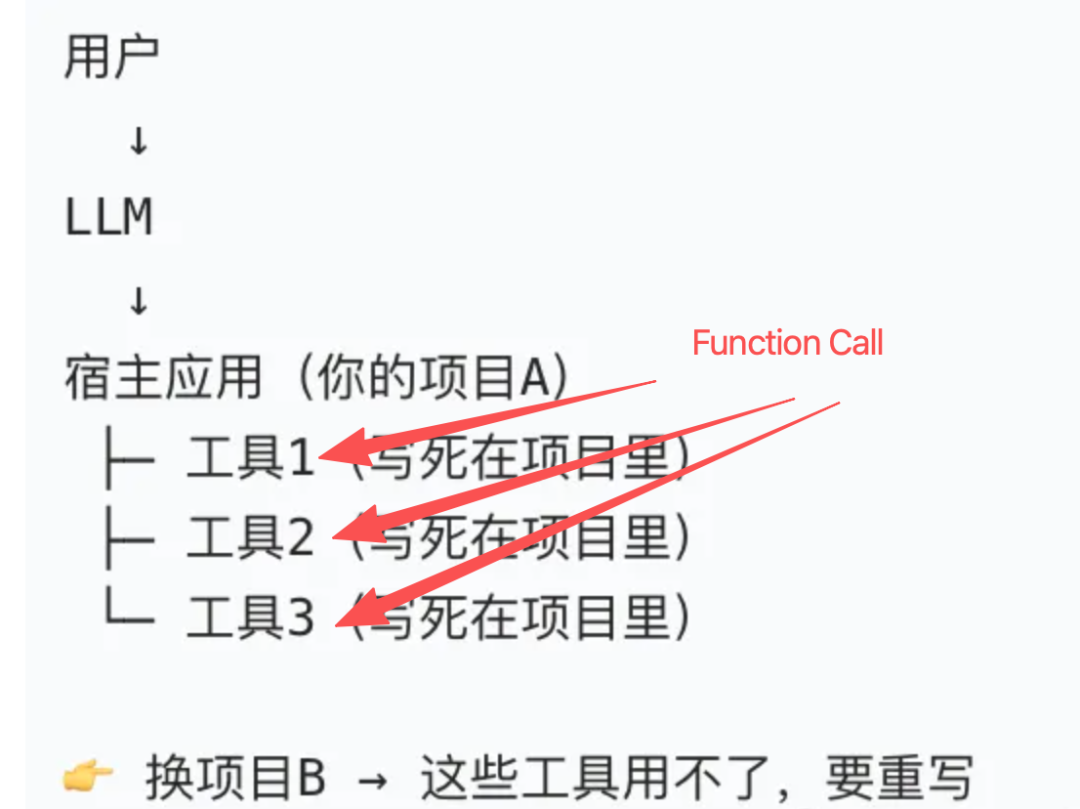
MCP与Function Calling不是替代关系,而是互补关系 Function Calling:解决单个模型如何调用自己的API MCP:解决如何标准化工具接口,让多个Agent共享多个工具; 完整流程: 1. MCP Client注册工具(从MCP Server获取工具定义) 2. MCP Client将工具定义转换为模型的tools参数 3. 模型通过Function Calling选择工具 4. MCP Client执行工具(通过MCP Server) 5. MCP Client将工具结果返回给模型 唐成,公众号:AISurfing一文讲清:LLM、CoT、Function Calling、MCP、Skills、Agent、Agent OS
与Function Calling的纠葛讲清楚了,我们继续聊MCP的架构。
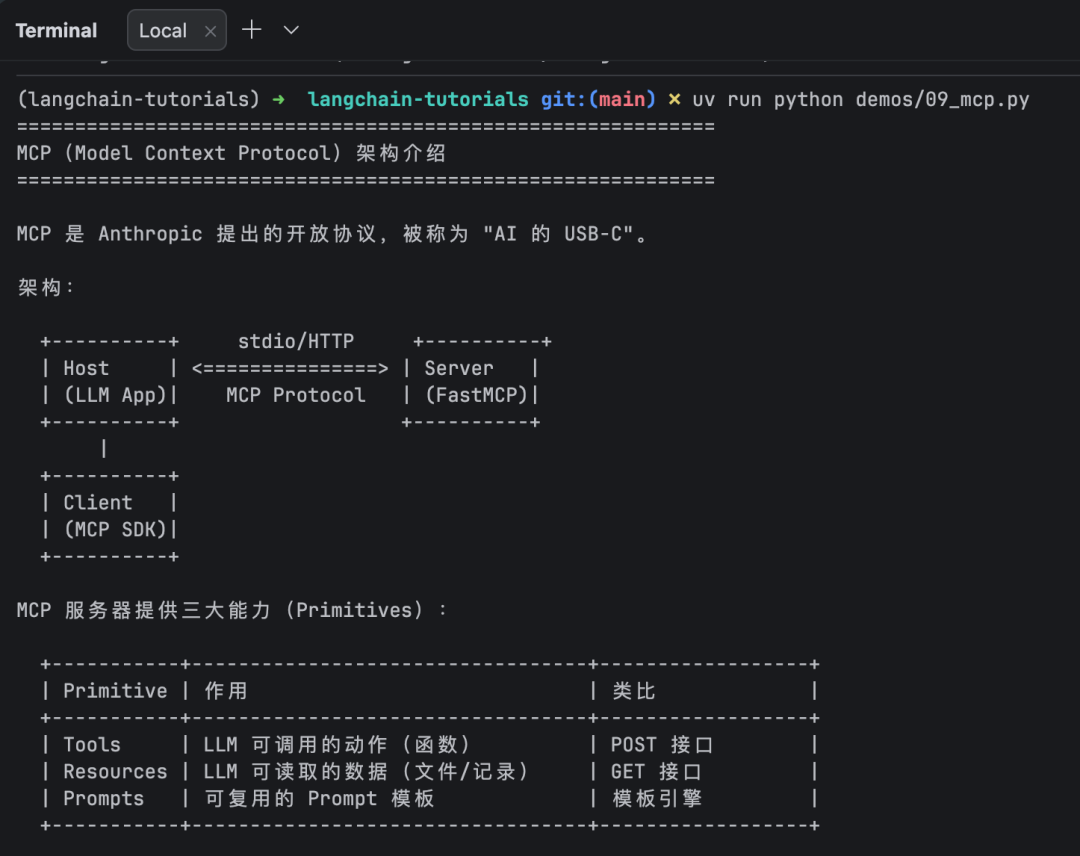
MCP架构只有三个角色
Host (你的 LLM 应用)
  └─ Client (MCP SDK,管理连接)
       └─ Server (FastMCP,提供能力)
Host 通过 Client 连接 Server,协议层是 JSON-RPC 2.0,传输层支持 stdio(本地进程)和 HTTP(远程服务)。
Server 提供三种能力,不是只有工具
Primitive | 作用 | 类比 |
|---|---|---|
Tools | LLM 可调用的动作 | POST 接口 |
Resources | LLM 可读取的只读数据 | GET 接口 |
Prompts | 可复用的 Prompt 模板 | 模板引擎 |
大多数教程只讲 Tools,但 Resources 和 Prompts 同样是 MCP 协议的一等公民。后面实战会逐一演示。
为什么需要 MCP?
这个上面有提到,咱们再总结一下:MCP标准化了Function Calling接口,让多个Agent共享多个工具,解决"Function Calling爆炸"的问题。
譬如这个场景:10个Agent,20个工具
- Function Calling方式:10×20=200个集成点。爆炸
- MCP方式:10个MCP Client + 20个MCP Server。解耦,架构优雅
@tool | MCP | |
|---|---|---|
生命周期 | 随应用启动销毁 | 独立进程,按需启停 |
复用性 | 只能在当前应用用 | 任何 MCP 客户端都能用(Claude Desktop、Cursor、你的 App) |
组合能力 | 所有工具写在一个文件里 | 多个 Server 的工具自动聚合 |
数据能力 | 无 | Resources 提供结构化数据 |
Prompt 能力 | 无 | Prompts 提供可复用模板 |
部署 | 随应用一起 | 可独立部署、独立升级、独立扩容 |
什么时候该用 MCP:
- 工具需要被多个应用/客户端共享
- 不同团队各自维护自己的工具集
- 工具需要独立部署升级,不想动主应用
- 需要提供给 Claude Desktop、Cursor 等 MCP 原生客户端使用
什么时候用 @tool 就够了:
- 快速原型,一两个工具
- 工具逻辑简单,和业务紧耦合
- 不需要跨应用复用
How:从写 Server 到跑 Agent
第一步:写一个 MCP Server
用 FastMCP,和写 @tool 几乎一样。区别只是装饰器换了:
# mcp_math_server.py
from mcp.server.fastmcp import FastMCP

mcp = FastMCP("Math")

@mcp.tool()
def add(a: int, b: int) -> int:
    """Add two numbers"""
    return a + b

@mcp.tool()
def multiply(a: int, b: int) -> int:
    """Multiply two numbers"""
    return a * b

if __name__ == "__main__":
    mcp.run(transport="stdio")
关键点:
- 装饰器从
@tool变成@mcp.tool() - 函数签名、docstring、类型标注的写法完全一样——MCP 自动从类型标注生成 JSON Schema
mcp.run(transport="stdio")启动服务器,等待客户端连接
第二步:Client 连接 Server,加载工具
from langchain_mcp_adapters.client import MultiServerMCPClient

client = MultiServerMCPClient({
    "math": {
        "command": "python",
        "args": ["mcp_math_server.py"],
        "transport": "stdio",  # 本地进程通信
    }
})

tools = await client.get_tools() #返回LangChain BaseTool列表
get_tools() 返回的就是标准的 LangChain 工具,和 @tool 产出的对象类型一样。这意味着——MCP 工具可以直接用于 bind_tools、LCEL chain、LangGraph Agent,无需任何适配。
第三步:多服务器组合——MCP 的核心价值
同一个 Client 连接两个 Server,工具自动聚合:
client = MultiServerMCPClient({
    "math": {
        "command": "python",
        "args": ["mcp_math_server.py"],
        "transport": "stdio",
    },
    "weather": {
        "command": "python",
        "args": ["mcp_weather_server.py"],
        "transport": "stdio",
    }
})

tools = await client.get_tools()
# 返回 [add, multiply, get_weather] — 来自两个服务器的工具无缝合并
然后丢给 Agent:
from langchain.agents import create_agent

agent = create_agent(llm, tools)
response = await agent.ainvoke({
    "messages": "北京天气如何?帮我算一下 (3+5)*12"
})
Agent 执行过程(真实输出):
-> 调用工具: get_weather({'city': '北京'})
-> 调用工具: add({'a': 3, 'b': 5})        # 3+5=8
-> 调用工具: multiply({'a': 8, 'b': 12})   # 8*12=96
Agent 自动识别问题涉及两个域(天气 + 数学),从两个 Server 中选择合适的工具。你不需要写任何路由逻辑。
第四步:Resources 和 Prompts——不止是工具
Tools 是"动作",Resources 是"数据",Prompts 是"模板"。一个完整的 MCP Server 通常三种都提供。
Weather Server 示例:
# Tool:LLM 执行查询
@mcp.tool()
async def get_weather(city: str) -> str:
    """Get current weather for a city"""
    return WEATHER_DATA.get(city, f"{city}:暂无数据")

# Resource:LLM 获取只读上下文
@mcp.resource("weather://cities")
def get_supported_cities() -> str:
    """List supported cities"""
    return "北京、上海、广州、深圳"

# Prompt:可复用的分析模板
@mcp.prompt()
def weather_report(city: str) -> list[dict]:
    """Weather analysis prompt"""
    return [{"role": "user", "content": f"分析{city}天气并给出出行建议"}]
Client 端读取:
# 读取 Resource — 获取服务器提供的数据
resources = await client.get_resources("weather")
# -> weather://cities: "北京、上海、广州、深圳"

# 加载 Prompt — 获取预定义的模板消息
messages = await client.get_prompt("weather", "weather_report",arguments={"city": "北京"})
# -> [HumanMessage("分析北京天气并给出出行建议")]
实际场景中:
- Resources 适合暴露配置、字典数据、文档索引等只读信息
- Prompts 适合预置分析框架、报告模板,让 LLM 按固定套路输出
- 两者都由 Server 端维护,Client 无需硬编码
传输层:stdio vs HTTP
stdio | HTTP (streamable_http) | |
|---|---|---|
适用场景 | 本地开发、桌面应用 | 生产环境、远程部署 |
连接方式 | 启动子进程 | URL 连接 |
认证 | 无 | 支持 headers(Bearer Token 等) |
多客户端 | 不支持 | 支持 |
配置 | "command": "python", "args": [...] | "url": "http://...", "transport": "streamable_http" |
经验法则:开发阶段用 stdio(零配置),上线切 HTTP。
经典实践
1. 工具描述是第一生产力
LLM 选工具完全依赖描述。描述不清 = 工具白写。
好的描述:
@mcp.tool()
def get_weather(city: str) -> str:
    """Get current weather for a city""" #说清:做什么、输入什么、返回什么
坏的描述:
@mcp.tool()
def weather(data):     # 参数名模糊、无类型、描述为空
    """handle weather"""
2. 一个 Server 一个领域
不要把所有工具塞进一个 Server。按领域拆分:
math_server.py— 数学计算weather_server.py— 天气查询db_server.py— 数据库操作
Client 可以同时连接多个 Server,工具自动聚合。领域拆分让各团队独立迭代。
3. 用 create_react_agent 替代手动 bind_tools
手动方式需要你自己处理 tool_calls、执行工具、拼 ToolMessage:
# 手动方式 — 繁琐
response = llm_with_tools.invoke(query)
if response.tool_calls:
    for tc in response.tool_calls:
        result = tool.invoke(tc["args"])
        # ... 拼消息、再调 LLM ...
Agent 方式 — 一行搞定:
agent = create_agent(llm, tools)
response = await agent.ainvoke({"messages": query})
Agent 自动完成:选择工具 → 调用 → 获取结果 → 判断是否需要继续 → 生成最终回答。
4. LangChain 工具也能变成 MCP Server
已有 @tool 不想重写?to_fastmcp 一行转换:
from langchain_mcp_adapters.tools import to_fastmcp

@tool
def search_database(query: str) -> str:
    """Search database"""
    ...

server = FastMCP("Database", tools=[to_fastmcp(search_database)])
server.run(transport="stdio")   # 现在 Claude Desktop 也能调用你的工具
常见的坑
坑 1:工具描述模糊,LLM 不会调用
docstring 要用英文(MCP 协议的 schema 默认走英文描述),且要写清三要素:做什么、输入什么、返回什么。中文描述在 MCP 协议下会导致 LLM 理解偏差。
坑 2:Server 文件路径错误
stdio 传输需要指定 Server 文件的绝对路径。相对路径在不同工作目录下会找不到文件:
# 正确:用 __file__ 计算绝对路径
SERVER_PATH = os.path.join(os.path.dirname(os.path.abspath(__file__)), "mcp_math_server.py")
坑 3:async 函数混用同步调用
MCP 工具的 ainvoke 是异步方法,在 async def 内必须 await:
# 错误
result = tool.ainvoke({"a": 1, "b": 2})    # 返回 coroutine,不是结果

# 正确
result = await tool.ainvoke({"a": 1, "b": 2})
坑 4:Server 打 print 干扰协议
stdio 传输下,Server 的 stdout 被用作 MCP 协议通信通道。如果在 Server 代码里写 print() 调试,会破坏 JSON-RPC 消息,导致连接断开。调试用 logging 写文件。
坑 5:忘记 await client.get_tools()
get_tools() 是协程,不加 await 拿到的是 coroutine 对象而非工具列表。不会报错,但后续遍历时行为诡异。
技术栈一览
组件 | 作用 |
|---|---|
mcp | MCP 协议 Python SDK,提供 FastMCP |
langchain-mcp-adapters | LangChain 的 MCP 适配层 |
langgraph | 提供 create_react_agent |
FastMCP | 用装饰器快速定义 MCP Server |
MultiServerMCPClient | 连接多个 MCP Server,统一加载工具 |
安装:
pip install langchain-mcp-adapters mcp langgraph一句话总结
@tool 是定义函数,MCP 是部署服务。 函数只能本地调用,服务可以被任何客户端发现和复用。当你需要跨应用、跨团队、跨客户端共享工具能力时,MCP 是标准答案。
完整可运行代码:https://github.com/helloworldtang/langchain-tutorials — demos/09_mcp.py + demos/mcp_math_server.py + demos/mcp_weather_server.py
本文参与 腾讯云自媒体同步曝光计划,分享自微信公众号。
原始发表:2026-04-28,如有侵权请联系 cloudcommunity@tencent.com 删除
评论
登录后参与评论
推荐阅读
目录
腾讯云开发者

Copyright © 2013 - 2026 Tencent Cloud. All Rights Reserved. 腾讯云 版权所有
深圳市腾讯计算机系统有限公司 ICP备案/许可证号:粤B2-20090059  粤公网安备44030502008569号
腾讯云计算(北京)有限责任公司 京ICP证150476号 | 京ICP备11018762号