openclaw 安装

openclaw 安装

golangLeetcode
发布于 2026-03-18 18:45:17
发布于 2026-03-18 18:45:17
据说openclaw的安装方法价值800,所以尝试了下。首先打开github链接https://github.com/openclaw/openclaw 或者官方文档https://docs.openclaw.ai/help 我们直接根据文档提示来安装。
% pnpm add -g openclaw@latest尝试测试是否安装成功
% openclaw --version
openclaw: Node.js v22.12+ is required (current: v20.19.0).
If you use nvm, run:
  nvm install 22
  nvm use 22
  nvm alias default 22
需要升级下node的版本
% nvm ls-remote
        v0.1.14
        v0.1.15
        v0.1.16
        v0.1.17

        v24.14.0   (Latest LTS: Krypton)

        v25.7.0
        v25.8.0
尝试安装最新版本发现报错
dyld[48376]: Symbol not found: (__ZNSt3__122__libcpp_verbose_abortEPKcz)改为v24.14.0
 %   nvm install 24.14.0
Downloading and installing node v24.14.0...
Downloading https://nodejs.org/dist/v24.14.0/node-v24.14.0-darwin-x64.tar.xz...
######################################################################################################### 100.0%
Computing checksum with sha256sum
Checksums matched!

Now using node v24.14.0 (npm v11.9.0)
% nvm use  24.14.0
Now using node v24.14.0 (npm v11.9.0)
 % nvm alias default  v24.14.0
default -> v24.14.0
测试openclaw
 % openclaw --version
2026.3.2
然后开始向导安装
 % openclaw onboard --install-daemon

🦞 OpenClaw 2026.3.2 (85377a2) — No $999 stand required.

▄▄▄▄▄▄▄▄▄▄▄▄▄▄▄▄▄▄▄▄▄▄▄▄▄▄▄▄▄▄▄▄▄▄▄▄▄▄▄▄▄▄▄▄▄▄▄▄▄▄▄▄
██░▄▄▄░██░▄▄░██░▄▄▄██░▀██░██░▄▄▀██░████░▄▄▀██░███░██
██░███░██░▀▀░██░▄▄▄██░█░█░██░█████░████░▀▀░██░█░█░██
██░▀▀▀░██░█████░▀▀▀██░██▄░██░▀▀▄██░▀▀░█░██░██▄▀▄▀▄██
▀▀▀▀▀▀▀▀▀▀▀▀▀▀▀▀▀▀▀▀▀▀▀▀▀▀▀▀▀▀▀▀▀▀▀▀▀▀▀▀▀▀▀▀▀▀▀▀▀▀▀▀
                  🦞 OPENCLAW 🦞

┌  OpenClaw onboarding
│
◇  Security ─────────────────────────────────────────────────────────────────────────────────╮
│                                                                                            │
│  Security warning — please read.                                                           │
│                                                                                            │
│  OpenClaw is a hobby project and still in beta. Expect sharp edges.                        │
│  By default, OpenClaw is a personal agent: one trusted operator boundary.                  │
│  This bot can read files and run actions if tools are enabled.                             │
│  A bad prompt can trick it into doing unsafe things.                                       │
│                                                                                            │
│  OpenClaw is not a hostile multi-tenant boundary by default.                               │
│  If multiple users can message one tool-enabled agent, they share that delegated tool      │
│  authority.                                                                                │
│                                                                                            │
│  If you’re not comfortable with security hardening and access control, don’t run           │
│  OpenClaw.                                                                                 │
│  Ask someone experienced to help before enabling tools or exposing it to the internet.     │
│                                                                                            │
│  Recommended baseline:                                                                     │
│  - Pairing/allowlists + mention gating.                                                    │
│  - Multi-user/shared inbox: split trust boundaries (separate gateway/credentials, ideally  │
│    separate OS users/hosts).                                                               │
│  - Sandbox + least-privilege tools.                                                        │
│  - Shared inboxes: isolate DM sessions (`session.dmScope: per-channel-peer`) and keep      │
│    tool access minimal.                                                                    │
│  - Keep secrets out of the agent’s reachable filesystem.                                   │
│  - Use the strongest available model for any bot with tools or untrusted inboxes.          │
│                                                                                            │
│  Run regularly:                                                                            │
│  openclaw security audit --deep                                                            │
│  openclaw security audit --fix                                                             │
│                                                                                            │
│  Must read: https://docs.openclaw.ai/gateway/security                                      │
│                                                                                            │
├────────────────────────────────────────────────────────────────────────────────────────────╯
│
◆  I understand this is personal-by-default and shared/multi-user use requires lock-down. Continue?
│ ● Yes / ○ No◆ Onboarding mode
│ ● QuickStart (Configure details later via openclaw configure.)
│ ○ Manual
└◆ Model/auth provider
│ ...
│ ○ LiteLLM
│ ○ Cloudflare AI Gateway
│ ○ Custom Provider
│ ● Skip for now
└
◆  Filter models by provider
│  ● All providers
│  ○ amazon-bedrock
│  ○ anthropic
│  ○ azure-openai-responses
│  ...
└
◆  Default model
│  ● Keep current (default: anthropic/claude-opus-4-6)
│  ○ Enter model manually
│  ○ amazon-bedrock/anthropic.claude-3-haiku-20240307-v1:0
│  ○ amazon-bedrock/anthropic.claude-3-5-haiku-20241022-v1:0
│  ...
└
◆  Select channel (QuickStart)
│  ...
│  ○ iMessage (imsg)
│  ● Feishu/Lark (飞书) (plugin · install)
│  ○ Nostr (NIP-04 DMs)
│  ...
└
◇  Select channel (QuickStart)
│  Feishu/Lark (飞书)
│
◆  Install Feishu plugin?
│  ● Download from npm (@openclaw/feishu)
│  ○ Skip for now
└
◆  How do you want to provide this App Secret?
│  ● Enter App Secret (Stores the credential directly in OpenClaw config)
│  ○ Use external secret provider
└
打开飞书开放平台https://open.feishu.cn/app
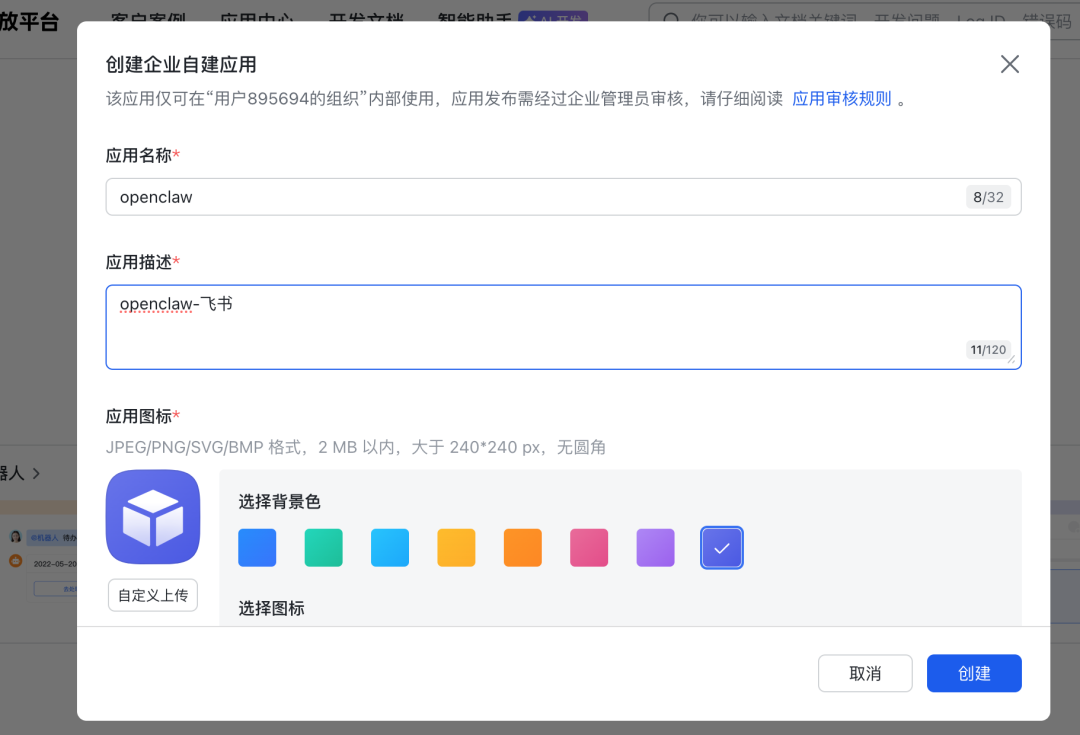
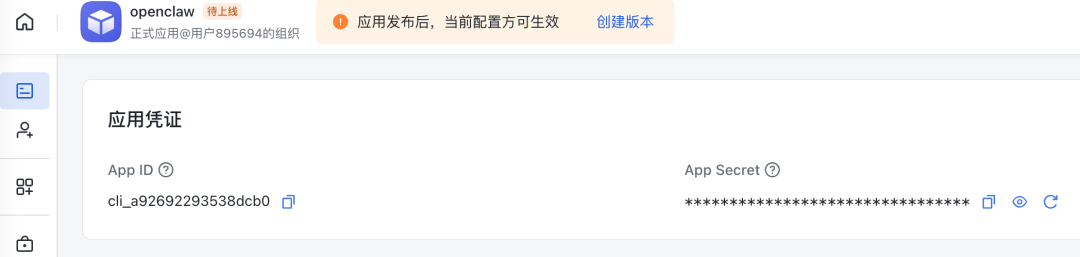
然后继续
◇  Enter Feishu App Secret
│  KwwIQvaxxxxxxxx
│
◇  Enter Feishu App ID
│ cli_a92692293538dcb0[info]: [ 'client ready' ]
│
◇ Feishu connection test ────────────────────────────╮
│ │
│ Connection failed: API error: app do not have bot │
│ │
├─────────────────────────────────────────────────────╯
│
◇ Feishu connection mode
│ WebSocket (default)
│
◇ Which Feishu domain?
│ Feishu (feishu.cn) - China
│
◇ Group chat policy
│ Open - respond in all groups (requires mention)
[info]: [ 'client ready' ]
│
◇ Selected channels ──────────────────────────────────────────╮
│ │
│ Feishu — 飞书/Lark enterprise messaging. Docs: │
│ feishu │
│ │
├──────────────────────────────────────────────────────────────╯
Config warnings:◆ Configure skills now? (recommended)
│ ● Yes / ○ No
└
◇  Skills status ─────────────╮
│                             │
│  Eligible: 9                │
│  Missing requirements: 46   │
│  Unsupported on this OS: 0  │
│  Blocked by allowlist: 0    │
│                             │
├─────────────────────────────╯
│
◇  Configure skills now? (recommended)
│  Yes
│
◇  Install missing skill dependencies
│  Skip for now
│
◇  Set GOOGLE_PLACES_API_KEY for goplaces?
│  No
│
◇  Set GEMINI_API_KEY for nano-banana-pro?
│  No
│
◇  Set NOTION_API_KEY for notion?
│  No
│
◇  Set OPENAI_API_KEY for openai-image-gen?
│  No
│
◇  Set OPENAI_API_KEY for openai-whisper-api?
│  No
│
◇  Set ELEVENLABS_API_KEY for sag?
│  No
│
◇  Hooks ──────────────────────────────────────────────────────────────────╮
│                                                                          │
│  Hooks let you automate actions when agent commands are issued.          │
│  Example: Save session context to memory when you issue /new or /reset.  │
│                                                                          │
│  Learn more: https://docs.openclaw.ai/automation/hooks                   │
│                                                                          │
├──────────────────────────────────────────────────────────────────────────╯
│
◆  Enable hooks?
│  ◼ Skip for now
│  ◻ 🚀 boot-md
│  ◻ 📎 bootstrap-extra-files
│  ◻ 📝 command-logger
│  ◻ 💾 session-memory
└
选完以后继续
◒  Installing Gateway service…..
Installed LaunchAgent: /Users/xiazemin/Library/LaunchAgents/ai.openclaw.gateway.plist
Logs: /Users/xiazemin/.openclaw/logs/gateway.log
◇  Gateway service installed.
Config warnings:\n- plugins.entries.feishu: plugin feishu: duplicate plugin id detected; later plugin may be overridden (/Users/xiazemin/.opencl◇
Health check failed: gateway closed (1006 abnormal closure (no close frame)): no close reason
Gateway target: ws://127.0.0.1:18789
Source: local loopback
Config: /Users/xiazemin/.openclaw/openclaw.json
Bind: loopback
│
◇ Health check help ────────────────────────────────╮
│ │
│ Docs: │
│ https://docs.openclaw.ai/gateway/health │
│ https://docs.openclaw.ai/gateway/troubleshooting │
│ │
├────────────────────────────────────────────────────╯
│
◇ Optional apps ────────────────────────╮
│ │
│ Add nodes for extra features: │
│ - macOS app (system + notifications) │
│ - iOS app (camera/canvas) │
│ - Android app (camera/canvas) │
│ │
├────────────────────────────────────────╯
│
◇ Control UI ───────────────────────────────────────────────────────────────────────────────╮
│ │
│ Web UI: http://127.0.0.1:18789/ │
│ Web UI (with token): │
│ http://127.0.0.1:18789/#token=95f9f010a8e6c7f95c89610539baa46b57fb456c0572aafd │
│ Gateway WS: ws://127.0.0.1:18789 │
│ Gateway: not detected (gateway closed (1006 abnormal closure (no close frame)): no close │
│ reason) │
│ Docs: https://docs.openclaw.ai/web/control-ui │
│ │
├────────────────────────────────────────────────────────────────────────────────────────────╯
│
◇ Workspace backup ────────────────────────────────────────╮
│ │
│ Back up your agent workspace. │
│ Docs: https://docs.openclaw.ai/concepts/agent-workspace │
│ │
├───────────────────────────────────────────────────────────╯
│
◇ Security ──────────────────────────────────────────────────────╮
│ │
│ Running agents on your computer is risky — harden your setup: │
│ https://docs.openclaw.ai/security │
│ │
├─────────────────────────────────────────────────────────────────╯
│
◇ Shell completion ───────────────────────────────────────────────────────╮
│ │
│ Shell completion installed. Restart your shell or run: source ~/.zshrc │
│ │
├──────────────────────────────────────────────────────────────────────────╯
│
◇ Dashboard ready ────────────────────────────────────────────────────────────────╮
│ │
│ Dashboard link (with token): │
│ http://127.0.0.1:18789/#token=95f9f010a8e6c7f95c89610539baa46b57fb456c0572aafd │
│ Opened in your browser. Keep that tab to control OpenClaw. │
│ │
├──────────────────────────────────────────────────────────────────────────────────╯
│
◇ Web search (optional) ─────────────────────────────────────────────────────────────────╮
│ │
│ If you want your agent to be able to search the web, you’ll need an API key. │
│ │
│ OpenClaw uses Brave Search for the `web_search` tool. Without a Brave Search API key, │
│ web search won’t work. │
│ │
│ Set it up interactively: │
│ - Run: openclaw configure --section web │
│ - Enable web_search and paste your Brave Search API key │
│ │
│ Alternative: set BRAVE_API_KEY in the Gateway environment (no config changes). │
│ Docs: https://docs.openclaw.ai/tools/web │
│ │
├─────────────────────────────────────────────────────────────────────────────────────────╯
│
◇ What now ─────────────────────────────────────────────────────────────╮
│ │
│ What now: https://openclaw.ai/showcase ("What People Are Building"). │
│ │
├────────────────────────────────────────────────────────────────────────╯
│
└ Onboarding complete. Dashboard opened; keep that tab to control OpenClaw.安装成功后会浏览器自动打开http://127.0.0.1:18789/chat?session=main
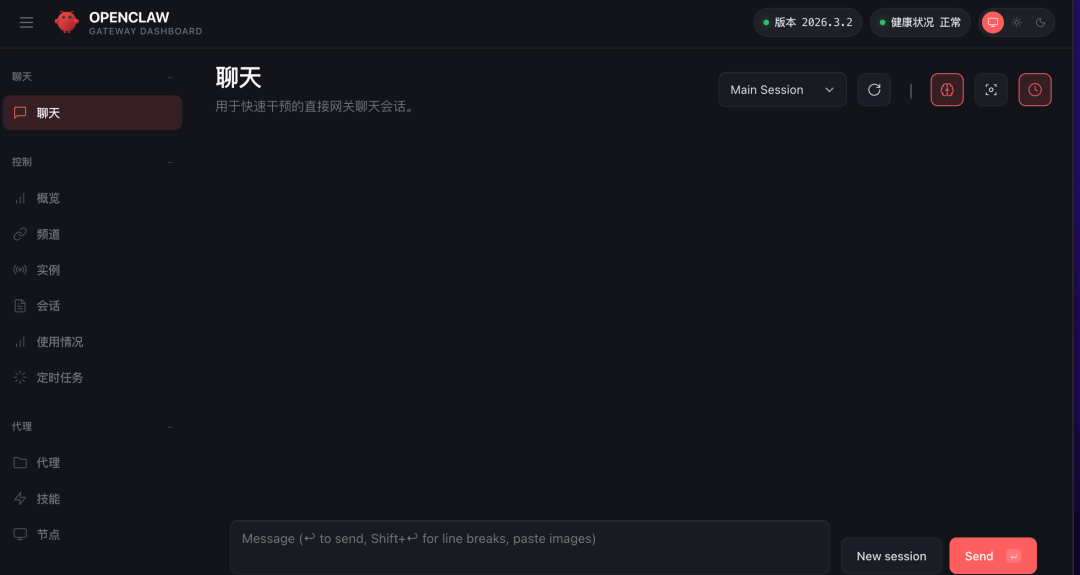
点击 代理可以看到所有的 agent tools 和skills ,
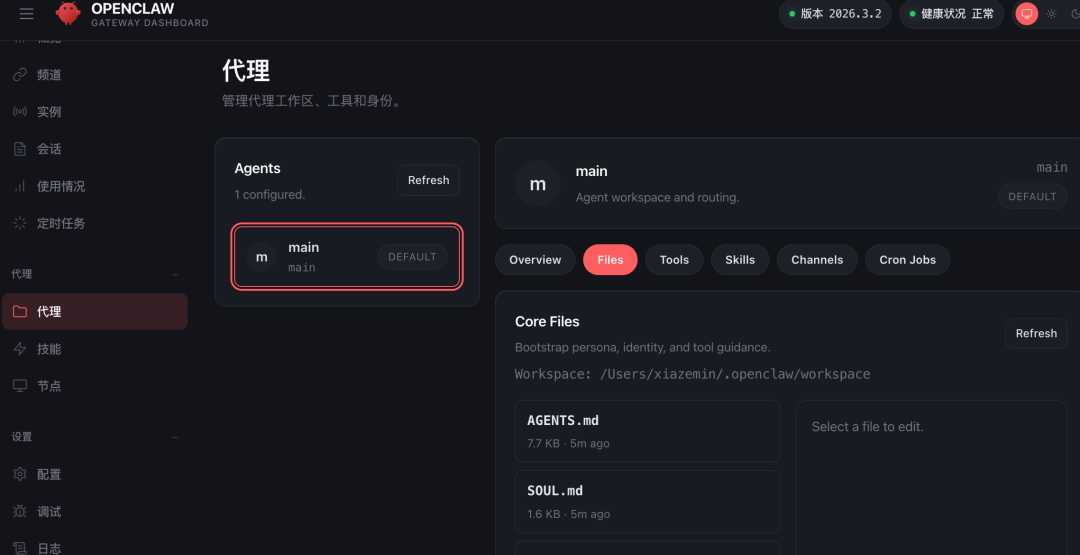
用起来整体感觉和claude code差不多。总之完全按照提示操作即可
本文参与 腾讯云自媒体同步曝光计划,分享自微信公众号。
原始发表:2026-03-07,如有侵权请联系 cloudcommunity@tencent.com 删除
本文分享自 golang算法架构leetcode技术php 微信公众号,前往查看
如有侵权,请联系 cloudcommunity@tencent.com 删除。
本文参与 腾讯云自媒体同步曝光计划 ,欢迎热爱写作的你一起参与!
评论
登录后参与评论
推荐阅读
腾讯云开发者

Copyright © 2013 - 2026 Tencent Cloud. All Rights Reserved. 腾讯云 版权所有
深圳市腾讯计算机系统有限公司 ICP备案/许可证号:粤B2-20090059  粤公网安备44030502008569号
腾讯云计算(北京)有限责任公司 京ICP证150476号 | 京ICP备11018762号