eino源码分析

eino源码分析

golangLeetcode
发布于 2026-03-18 18:38:55
发布于 2026-03-18 18:38:55
有读者看完langchain-go的分析后在评论区提议分析下eino的源码。这里就简单分析下它。
eino是字节开源的langchain-go平替,同时也支持了adk协议。和langchain-go最大的不同是大量使用了范型替换了any类型的数据,这样对于graph/chain的编排更加友好,在编译阶段就能发现类型不匹配的问题,无需到运行时去断言。并且提供了周边的工具,整体支持比较友好。下面是它的整体架构。
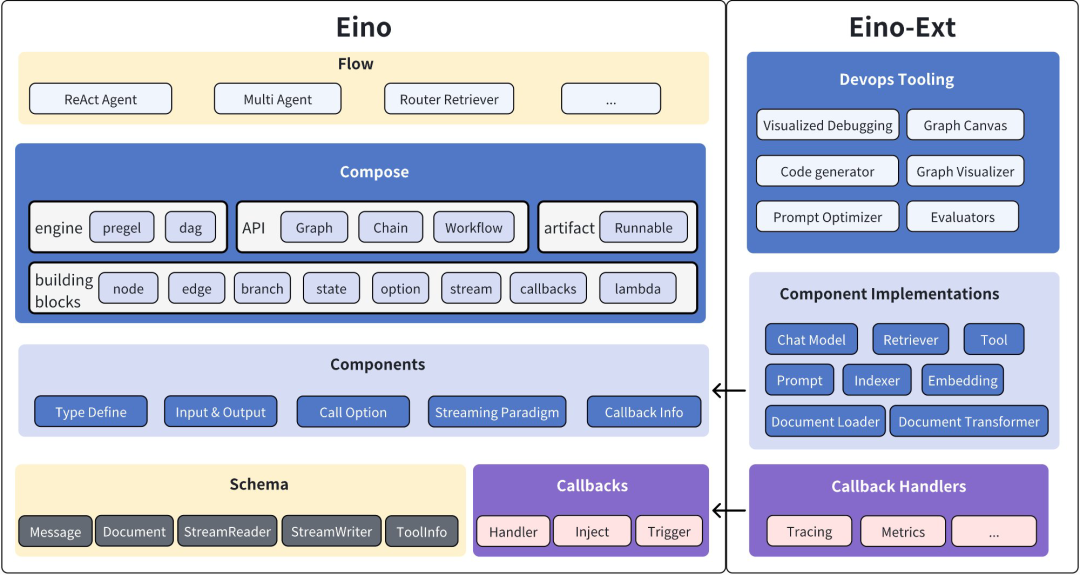
我们首先还是从最简单的chat开始,它使用起来和langchain-go一样,支持openai协议,并且在组件里封装了业界常用的llm接口。如果熟悉langchain-go,可以无缝切换。
package main
import (
    "context"
    "fmt"
    "github.com/cloudwego/eino/schema"
    "github.com/cloudwego/eino-ext/components/model/openai"
)
func main() {
    ctx := context.Background()
    model, err := openai.NewChatModel(ctx, &openai.ChatModelConfig{
        APIKey:  "your llm token",
        Model:   "model name",
        BaseURL: "model base url",
    })
    if err != nil {
        fmt.Println(err)
    }
    message, _ := model.Generate(ctx, []*schema.Message{
        schema.SystemMessage("you are a helpful assistant."),
        schema.UserMessage("what does the future AI App look like?")},
    )
    fmt.Println(message)
}
接着我们看一个复杂点的graph的实现
package main
import (
    "context"
    "fmt"
    "reflect"

        "github.com/cloudwego/eino-ext/components/model/openai"
    "github.com/cloudwego/eino/compose"
    "github.com/cloudwego/eino/schema"
)
type newGraphOptions struct {
    Messages  []*schema.Message
    stateType reflect.Type
    withState func(ctx context.Context) any
}
const (
    MaxStep = 3
)
func main() {
    ctx := context.Background()
    model, err := openai.NewChatModel(ctx, &openai.ChatModelConfig{
        APIKey:  "your llm token",
        Model:   "model name",
        BaseURL: "model base url",
    })
    if err != nil {
        fmt.Println(err)
    }
    // 创建包含 state 的 Graph,用户存储请求维度的 Message 上下文
    graph := compose.NewGraph[[]*schema.Message, *schema.Message](
        compose.WithGenLocalState(func(ctx context.Context) *newGraphOptions {
            return &newGraphOptions{Messages: make([]*schema.Message, 0, MaxStep+1)}
        }))
    // 将一个轮次中的上下文和响应,存储到 Graph 的临时状态中
    modelPreHandle := func(ctx context.Context, input []*schema.Message, state *newGraphOptions) ([]*schema.Message, error) {
        state.Messages = append(state.Messages, input...)
        return state.Messages, nil
    }
    nodeKeyModel := "node_key_model"
    _ = graph.AddChatModelNode(nodeKeyModel, chatModel, compose.WithStatePreHandler(modelPreHandle))
    _ = graph.AddEdge(compose.START, nodeKeyModel)
    nodeKeyTools := "node_key_tools"
    toolsNode := &compose.ToolsNode{}
    _ = graph.AddToolsNode(nodeKeyTools, toolsNode)
    // chatModel 的输出可能是多个 Message 的流
    // 这个 StreamGraphBranch 根据流的首个包即可完成判断,降低延迟
    modelPostBranch := compose.NewStreamGraphBranch(
        func(_ context.Context, sr *schema.StreamReader[*schema.Message]) (endNode string, err error) {
            defer sr.Close()
            if msg, err := sr.Recv(); err != nil {
                return "", err
            } else if len(msg.ToolCalls) == 0 {
                return compose.END, nil
            }
            return nodeKeyTools, nil
        }, map[string]bool{nodeKeyTools: true, compose.END: true})
    _ = graph.AddBranch(nodeKeyModel, modelPostBranch)
    // toolsNode 执行结果反馈给 chatModel
    _ = graph.AddEdge(nodeKeyTools, nodeKeyModel)
    // 编译 Graph:类型检查、callback 注入、自动流式转换、生成执行器
    agent, err := graph.Compile(ctx, compose.WithMaxRunSteps(MaxStep))
    if err != nil {
        fmt.Println(err)
    }
    // 启动 Agent
    fmt.Println(agent.Invoke(ctx, []*schema.Message{
        {
            Role:    schema.User,
            Content: "你好,请问有什么可以帮助您?",
        },
    }))
}
使用mcp
/*
 * Copyright 2025 CloudWeGo Authors
 *
 * Licensed under the Apache License, Version 2.0 (the "License");
 * you may not use this file except in compliance with the License.
 * You may obtain a copy of the License at
 *
 *     http://www.apache.org/licenses/LICENSE-2.0
 *
 * Unless required by applicable law or agreed to in writing, software
 * distributed under the License is distributed on an "AS IS" BASIS,
 * WITHOUT WARRANTIES OR CONDITIONS OF ANY KIND, either express or implied.
 * See the License for the specific language governing permissions and
 * limitations under the License.
 */
package main
import (
    "context"
    "fmt"
    "log"
    "time"
    "github.com/cloudwego/eino/components/prompt"
    "github.com/mark3labs/mcp-go/client"
    "github.com/mark3labs/mcp-go/mcp"
    "github.com/mark3labs/mcp-go/server"
    mcpp "github.com/cloudwego/eino-ext/components/prompt/mcp"
)
func main() {
    startMCPServer()
    time.Sleep(1 * time.Second)
    ctx := context.Background()
    mcpPrompt := getMCPPrompt(ctx)
    result, err := mcpPrompt.Format(ctx, map[string]interface{}{"persona": "Describe the content of the image"})
    if err != nil {
        log.Fatal(err)
    }
    fmt.Println(result)
}
func getMCPPrompt(ctx context.Context) prompt.ChatTemplate {
    cli, err := client.NewSSEMCPClient("http://127.0.01:12345/sse")
    if err != nil {
        log.Fatal(err)
    }
    err = cli.Start(ctx)
    if err != nil {
        log.Fatal(err)
    }
    initRequest := mcp.InitializeRequest{}
    initRequest.Params.ProtocolVersion = mcp.LATEST_PROTOCOL_VERSION
    initRequest.Params.ClientInfo = mcp.Implementation{
        Name:    "example-client",
        Version: "1.0.0",
    }
    _, err = cli.Initialize(ctx, initRequest)
    if err != nil {
        log.Fatal(err)
    }
    p, err := mcpp.NewPromptTemplate(ctx, &mcpp.Config{Cli: cli, Name: "test"})
    if err != nil {
        log.Fatal(err)
    }
    return p
}
func startMCPServer() {
    svr := server.NewMCPServer("demo", mcp.LATEST_PROTOCOL_VERSION, server.WithPromptCapabilities(false))
    svr.AddPrompt(mcp.Prompt{
        Name: "test",
    }, func(ctx context.Context, request mcp.GetPromptRequest) (*mcp.GetPromptResult, error) {
        return &mcp.GetPromptResult{
            Messages: []mcp.PromptMessage{
                mcp.NewPromptMessage(mcp.RoleUser, mcp.NewTextContent(request.Params.Arguments["persona"])),
                mcp.NewPromptMessage(mcp.RoleUser, mcp.NewImageContent("https://upload.wikimedia.org/wikipedia/commons/3/3a/Cat03.jpg", "image/jpeg")),
                mcp.NewPromptMessage(mcp.RoleUser, mcp.NewEmbeddedResource(mcp.TextResourceContents{
                    URI:      "https://upload.wikimedia.org/wikipedia/commons/3/3a/Cat03.jpg",
                    MIMEType: "image/jpeg",
                    Text:     "resource",
                })),
            },
        }, nil
    })
    go func() {
        defer func() {
            e := recover()
            if e != nil {
                fmt.Println(e)
            }
        }()
        err := server.NewSSEServer(svr, server.WithBaseURL("http://127.0.01:12345")).Start("127.0.01:12345")
        if err != nil {
            log.Fatal(err)
        }
    }()
}
整体用下来体验和langchain-go几乎没有区别。下一讲,我们探索下官方提供的编排插件的用法。
本文参与 腾讯云自媒体同步曝光计划,分享自微信公众号。
原始发表:2025-12-14,如有侵权请联系 cloudcommunity@tencent.com 删除
本文分享自 golang算法架构leetcode技术php 微信公众号,前往查看
如有侵权,请联系 cloudcommunity@tencent.com 删除。
本文参与 腾讯云自媒体同步曝光计划 ,欢迎热爱写作的你一起参与!
评论
登录后参与评论
推荐阅读
腾讯云开发者

Copyright © 2013 - 2026 Tencent Cloud. All Rights Reserved. 腾讯云 版权所有
深圳市腾讯计算机系统有限公司 ICP备案/许可证号:粤B2-20090059  粤公网安备44030502008569号
腾讯云计算(北京)有限责任公司 京ICP证150476号 | 京ICP备11018762号