大模型应用:循序渐进掌握CLIP:领悟训练推理过程的进阶特性.17
原创
大模型应用:循序渐进掌握CLIP:领悟训练推理过程的进阶特性.17
原创
未闻花名
发布于 2026-02-14 08:51:40
发布于 2026-02-14 08:51:40
一、前言
今天我们继续展开CLIP 模型的精细度解析,遵循 “理论铺垫→基础实践→进阶深化”的过程,初次接触的建议先看看基础篇《CLIP 模型全维度解析:理解理论基础强化基础范例.16》,先建立 CLIP 的核心认知,再逐步拆解高阶应用的底层逻辑,遵循 “是什么→为什么→怎么用→怎么用好“的学习逻辑。
二、核心回顾
1. CLIP 是什么
1.1 核心定义
CLIP,全称Contrastive Language-Image Pre-training,是由OpenAI 2021年发布的跨模态预训练模型,核心是让模型学会图像和文本的语义对应关系,比如看到猫的图片,能对应到 “a photo of a cat” 这个文本;看到 “一辆红色的车”,能匹配到对应的图片。
1.2 3个核心概念
跨模态学习
- 通俗解释:让图像和文本在同一个 “语义空间” 里可比
- 类比:把中文和英文翻译成同一种语言,才能互相理解
对比学习
- 通俗解释:训练时拉近相似的图文对,推开不相似的
- 类比:认识猫时,记住猫的样子和“猫”这个词的关联,同时区分猫和狗的不同
零样本学习
- 通俗解释:没见过某类别的标注数据,也能识别该类别
- 类比:没见过“熊猫”的标注,但知道“熊猫”的文字描述,就能认出熊猫图片
1.3 工作流程
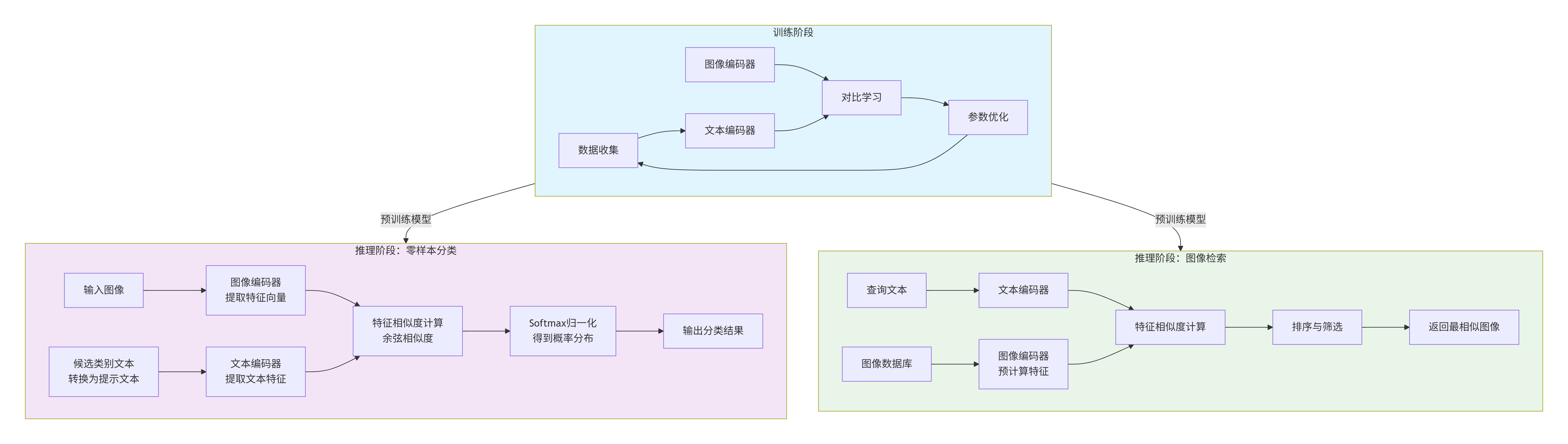
流程说明:
一、训练阶段(A)
- 1. 数据收集(A1):收集大量的图像-文本对。CLIP使用了从互联网收集的4亿个图像-文本对。
- 2. 文本编码器(A2):使用Transformer模型将文本转换为特征向量。在训练时,文本编码器学习从文本中提取有意义的特征。
- 3. 图像编码器(A3):使用Vision Transformer(ViT)或ResNet等模型将图像转换为特征向量。图像编码器学习从图像中提取有意义的特征。
- 4. 对比学习(A4):通过对比学习的方式,使得对应的图像和文本特征在向量空间中靠近,而不对应的则远离。具体来说,对于每个批次,计算图像特征和文本特征之间的余弦相似度,然后通过交叉熵损失函数来最大化正确匹配的相似度,最小化错误匹配的相似度。
- 5. 参数优化(A5):通过反向传播和优化器(如Adam)更新图像编码器和文本编码器的参数,以最小化对比损失。
二、推理阶段:零样本分类(B)
- 1. 输入图像(B1):输入待分类的图像。
- 2. 图像编码器(B2):使用训练好的图像编码器提取图像的特征向量。
- 3. 候选类别文本转换为提示文本(B3):将每个类别名称(例如“狗”、“猫”)转换为提示文本(例如“一张狗的照片”、“一张猫的照片”)。提示模板可以是“a photo of a {label}”。
- 4. 文本编码器(B4):使用训练好的文本编码器提取每个提示文本的特征向量。
- 5. 特征相似度计算(B5):计算图像特征向量与每个文本特征向量之间的余弦相似度。
- 6. Softmax归一化(B6):将相似度分数通过softmax函数转换为概率分布。
- 7. 输出分类结果(B7):选择概率最高的类别作为预测结果。
三、推理阶段:图像检索(C)
- 1. 查询文本(C1):输入描述性的查询文本(例如“一只在草地上的狗”)。
- 2. 文本编码器(C2):使用训练好的文本编码器提取查询文本的特征向量。
- 3. 图像数据库(C3):已有图像数据库,其中包含多个图像。
- 4. 图像编码器(C4):预先使用训练好的图像编码器提取数据库中所有图像的特征向量,并存储起来。
- 5. 特征相似度计算(C5):计算查询文本的特征向量与数据库中每个图像特征向量的余弦相似度。
- 6. 排序与筛选(C6):根据相似度分数对图像进行排序,并选择相似度最高的图像。
- 7. 返回最相似图像(C7):返回与查询文本最相似的图像。
整个流程中,训练阶段得到的预训练模型(图像编码器和文本编码器)被用于两个推理阶段。训练阶段通过对比学习使图像和文本在同一个特征空间中对齐,从而使得在推理阶段可以通过计算特征向量的相似度来进行零样本分类或图像检索。
核心总结:
- 预训练阶段:用海量无标注图文对(如网页图片 + 标题)训练模型,让模型学会 “图像特征” 和 “文本特征” 的语义对齐;
- 推理阶段:把新任务的类别转换成文本提示(如 “a photo of a cat”),通过计算图像和文本的相似度实现分类或检索。
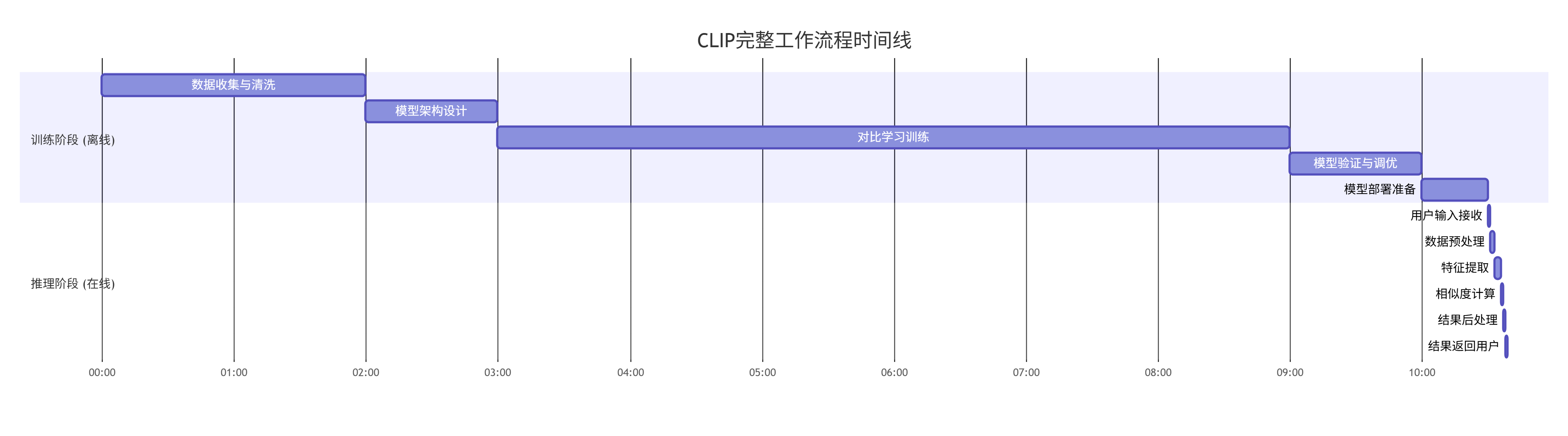
1.4 案例推理
- 输入:一张图片 + 一段描述文字
- → 图像编码器(把图片转成512维的特征向量)
- → 文本编码器(把文字转成512维的特征向量)
- → 计算两个向量的相似度(余弦相似度,值越大越相似)
- → 训练时:调整编码器参数,让相似的图文对相似度更高,不相似的更低(对比损失)
- → 推理时:用文本向量匹配图像向量,实现分类/检索
关键细节:
- 图像编码器:常用 ViT-B/32(平衡速度和性能),把图片切成 32×32 的小块,用 Transformer 提取特征;
- 文本编码器:简化版 Transformer,把文字转成 token 后提取特征;
- 特征归一化:所有特征向量都会做 L2 归一化(模长为 1),这样向量点积就等价于余弦相似度,方便比较。
2. CLIP 的重要性
在 CLIP 出现前,计算机视觉(CV)和自然语言处理(NLP)是两个 “割裂” 的领域:
- CV 模型(如 ResNet、YOLO):只能处理图像,需要大量标注数据(如标注 10 万张猫的图片才能识别猫),换个新类别(如识别 “熊猫”)就要重新标注;
- NLP 模型(如 BERT、GPT):只能处理文本,无法理解图像内容;
- 核心痛点:模态割裂、数据依赖、泛化性差,导致 AI 模型落地成本高、适用场景窄。
CLIP 的核心价值:打破 CV 和 NLP 的模态壁垒,用 “无标注图文对” 训练出通用模型,无需标注即可适配新的视觉任务。
三、CLIP 训练阶段
CLIP的训练过程,可以比喻为在一张白纸上绘制一张精确的“语义地图”。图像和文本是两种不同的语言,CLIP的任务是创建一个“通用翻译坐标系”,让这两种语言可以互相对照。
1. 数据获取
CLIP的数据获取可以抽象的理解为从互联网的混沌中汲取智慧,它吞噬了从互联网上公开收集的约4亿个 (图像, 文本) 对。这些文本不是干净的类别标签,而是网页的alt属性、图片标题、描述文字等。它们是嘈杂的、多样化的、自然产生的。这一点至关重要,因为:
- 真实性:这模拟了人类在真实世界中学习时所接触到的信息环境。
- 广度:涵盖了从具体物体(“一辆红色跑车”)到抽象场景(“宁静的乡村日落”),从简单描述到复杂关系(“厨师在厨房切洋葱”)的近乎无限的视觉概念。
- 噪声的鲁棒性:并非所有文本都精确描述图像(这是互联网的常态)。CLIP必须学会在噪声中捕捉信号,这也是一种强大的正则化。
2. 模型架构
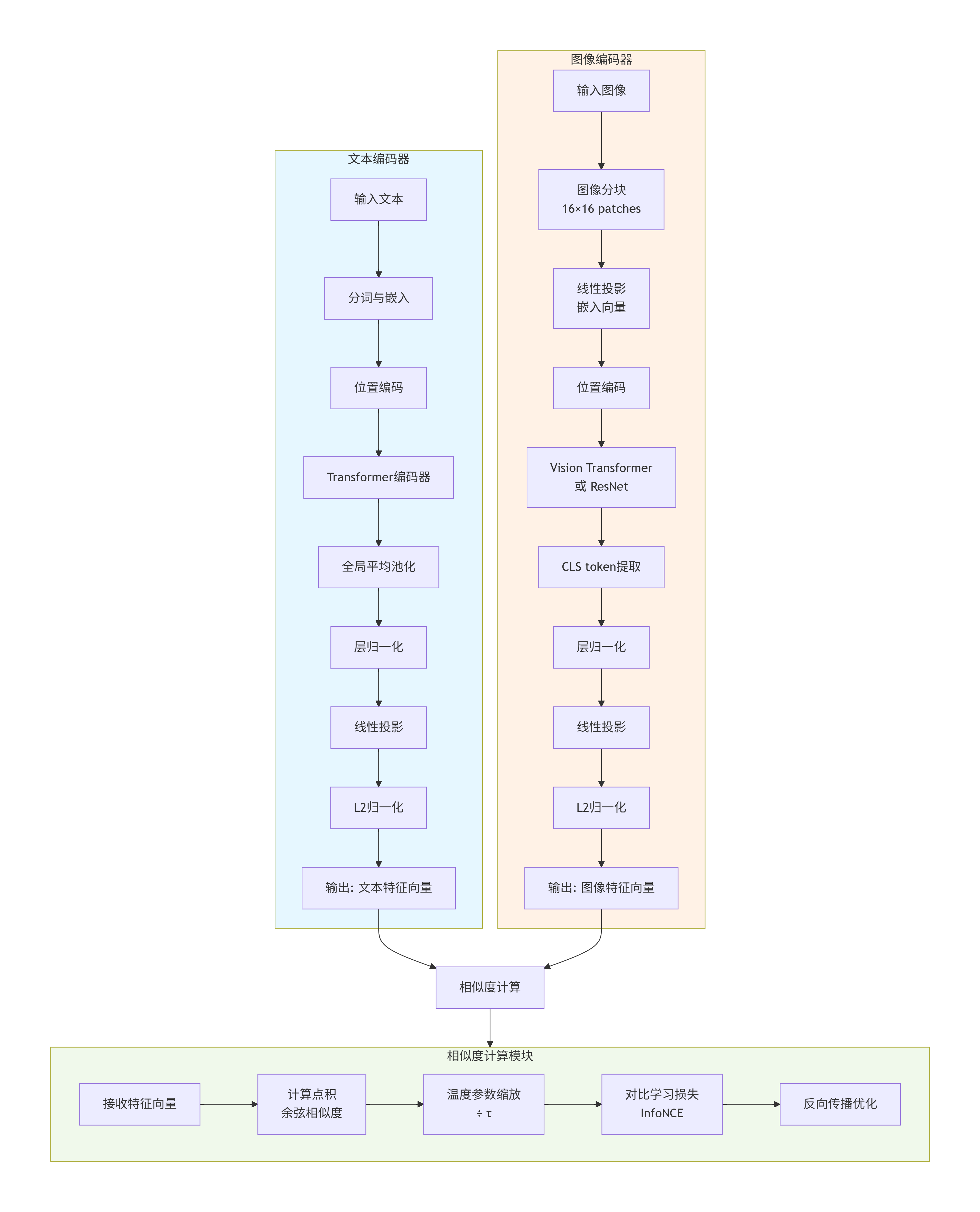
CLIP采用经典的“双塔”架构,即双塔编码器,这是其简洁性和有效性的关键。
- 图像编码塔:通常是一个Vision Transformer (ViT) 或一个经过调整的ResNet。它的任务是将一张图像(例如 3 x 224 x 224 的像素张量)压缩、提炼成一个固定长度的稠密特征向量(例如512维)。这个过程,是丢弃像素级的冗余信息(亮度、纹理细节),保留高级的语义信息(物体、场景、属性)。
- 文本编码塔:通常是一个Transformer编码器。它的任务是将一段可变长度的文本(例如“一只在草地上玩耍的小狗”)通过分词、嵌入、多层注意力机制,也提炼成同样维度的稠密特征向量(同样是512维)。这个过程,是丢弃句法细节和无关词汇,捕获文本的核心语义。
核心设计要求:两个编码器的输出,必须是同维度的向量,并且我们将这些向量的长度归一化为1(即放在一个单位超球面上)。这是为了让图像和文本的特征可以直接进行数学比较。
3. 学习目标
这是CLIP的核心所在。它不要求图像和文本特征完全相等,只要求匹配的对的特征比不匹配的对更相似。
具体操作流程:
- 1. 我们从数据集中随机采样一个 batch,假设里面有 N 对真实的 (图像I_i, 文本T_i)。例如,N=1024。
- 2. 前向传播:
- 图像编码器一口气处理这N张图像,得到N个图像特征向量:[I_1, I_2, ..., I_N],每个都是512维。
- 文本编码器一口气处理这N条文本,得到N个文本特征向量:[T_1, T_2, ..., T_N],每个也是512维。
- 3. 构建相似度矩阵:
- 我们计算所有图像特征和所有文本特征之间的余弦相似度。因为特征向量长度都是1,余弦相似度简化为点积:相似度(I_i, T_j) = I_i · T_j。
- 这会得到一个 N x N 的矩阵 S。矩阵的 (i, j) 元素代表第i张图片和第j段文字的相似度。
- 这个矩阵的对角线元素 S(i,i) 就是那些真正的、匹配的图像-文本对的相似度。非对角线元素 S(i,j) (i≠j) 都是“错误的”配对,它们作为负样本。
- 4. 计算对比损失(InfoNCE):
- 对于第i张图像:它正确的配文是 T_i。我们把第i行所有相似度看作一个分布,希望 S(i,i) 的得分最高。损失函数鼓励模型将较高的概率分配给正确的配对。
- 具体的损失函数是对数似然形式:
- 图像到文本的损失:L_img = - (1/N) * Σ_i [ log( exp(S(i,i) / τ) / Σ_j exp(S(i,j) / τ) ) ]
- 其中 τ 是一个温度参数,它是一个非常重要的超参数,控制着概率分布的尖锐程度。τ 小,分布更尖锐,模型更关注最难的负样本;τ 大,分布更平滑。
- 对称地,我们也可以从文本的角度计算文本到图像的损失 L_txt,即对矩阵的每一列做同样的操作。
- 总损失是两者平均:L = (L_img + L_txt) / 2。这种对称性确保了学习是双向的、平衡的。
这个过程的直观比喻:
- 想象一个舞会,有N位男士(图像)和N位女士(文本),他们原本是N对舞伴。
- CLIP的学习目标就是:训练一位“社交导师”(模型),让他能准确地将每位男士引向他真正的舞伴。
- CLIP学习的方法:
- 每次让所有男士和女士都互相打招呼(计算相似度),
- 然后惩罚那些和不是自己舞伴的人打招呼过于热情的情况(降低负样本相似度),
- 同时奖励和自己舞伴打招呼的热情度(提高正样本相似度)。
- 经过无数次这样的舞会(海量batch迭代),这位“社交导师”就学会了根据内在气质(语义特征)精准匹配舞伴。
4. 特殊参数
- Batch Size:CLIP使用了大批次,因为在一个批次内,每张图片都有N-1个负样本文本,每个文本也有N-1个负样本图片。批次越大,提供的负样本越多样、越有挑战性,模型学到的特征判别力就越强。
- 温度参数τ:τ不是一个固定的数,在CLIP中它是可学习的。模型自己会找到最适合当前特征空间分布的温度。这就像一个自动调节的“难度旋钮”,确保训练过程稳定有效。
经过在海量数据上、以超大批次、进行长时间的优化后,两个编码器内部参数被调整到最佳状态。此时,它们就像两台精密的翻译机,能将任何输入的图像和文本,都翻译成同一种“语义坐标语言”,并且确保“说的是一回事”的两个翻译,其坐标非常接近。
四、CLIP 推理阶段
训练完成后,我们就得到了一张绘制好的、高度结构化的语义地图。推理,就是在这张地图上进行查询和测量。
1. 零样本图像分类
从“这是什么”到“这和哪个描述最配”,这是CLIP最引人注目的能力。其过程极其优雅,完全复用了训练时学到的相关性判断能力。
详细步骤分解:
- 1. 准备查询图像:将待分类的图像输入已经冻结参数的图像编码器,得到其512维的特征向量 v_image。此操作与训练时完全相同。
- 2. 构建候选文本描述:这是提示工程的核心。假设我们要区分“狗”、“猫”、“车”。
- 原始类别标签是孤立的单词,不符合训练时看到的文本分布。我们需要将它们包装成训练时熟悉的句子形式。
- 最经典的模板是:“a photo of a {label}”。于是我们得到:
- T1 = “a photo of a dog”
- T2 = “a photo of a cat”
- T3 = “a photo of a car”
- 我们也可以使用多个模板来集成,以稳定结果,例如再加上 “an image of a {label}”, “a picture of a {label}” 等。最后对所有模板产生的相似度取平均。这本质上是一种集成学习,减少了单一模板可能带来的偏差。
- 3. 编码候选文本:将这一组候选文本(例如3个或3×k个)一次性输入文本编码器,得到一个文本特征矩阵 M_text,其形状为 [候选数量, 512]。
- 4. 计算语义距离:计算图像特征向量 v_image 与文本特征矩阵 M_text 中每一个向量的余弦相似度。得到一组相似度分数 [s1, s2, s3, ...]。这个分数直接衡量了图像与每段文本描述的语义相关性。
- 5. 从相似度到概率:为了得到一个易于解释的概率分布,我们对这些相似度分数应用 softmax 函数(通常会除以一个温度参数,沿用训练学到的或另设一个):
- p_i = exp(s_i / τ) / Σ_j exp(s_j / τ)
- 这里 p_i 就是模型认为图像属于第i个类别的概率。
- 6. 做出决策:选择概率最高的那个类别作为预测结果。
通俗理解:
- 模型从未在训练中见过“这是一张狗的照片”这个明确的指令。但它见过海量的包含狗的图像,以及与之伴随的、各式各样描述狗的文字。
- 当它看到“a photo of a dog”这段文本时,它提取出的文本特征,与训练中所有描述狗的文本特征的平均模式高度相似。
- 而这个文本特征,在语义空间中的位置,恰好与所有狗的图像特征聚集的区域非常接近。
- 所以,当一张狗的新图片出现,它的特征会落到那个区域,从而与“a photo of a dog”的文本特征产生高相似度。
- 模型并不是在识别狗,而是在确认这张图片与狗的典型文字描述高度相关。
2. 图像/文本检索
在语义空间中寻最近邻,这几乎是零样本分类的直接扩展。
- 以文搜图:将查询文本(如“雪山脚下的蓝色湖泊”)编码为特征向量,然后与预计算好的海量图像特征数据库中的每一个向量计算相似度,按相似度从高到低排序,返回最相关的图像。这里的效率关键在于使用近似最近邻搜索算法(如FAISS)来加速在百万甚至亿级向量中的搜索。
- 以图搜文:和以文搜图的过程完全对称。
3. 图像标注/打标签:
- 我们可以准备一个庞大的、开放域的标签候选集(如数千个名词、形容词短语),对于一张输入图片,用CLIP计算它与每个候选标签经过提示工程包装后的相似度。
- 然后设定一个阈值,所有超过该阈值的标签都可以作为这张图片的标注。
- 这实现了多标签、开放词汇的自动标注。
五、高级特性剖析
1. L2归一化
- 消除模长干扰:图像的亮度、文本的长度等无关因素会影响特征向量的模长。归一化后,余弦相似度完全由向量的方向(夹角)决定,这纯粹地反映了语义的相似性。
- 一个很暗的“狗”的图片和一个很亮的“狗”的图片,其向量方向应该接近,但模长可能不同。归一化后,它们就被拉到了同一个语义球面上,距离变得很近。
2. 提示工程的本质
- 因为CLIP的文本编码器是在自然句子上训练的,而不是在孤立单词上。“dog” 这个单词本身可能有多义性(可以指动物,也可以指尾随)。但当它被置于 “a photo of a dog” 这个上下文中时,歧义就消除了,并且这个上下文与训练数据中描述图像的句法模式完全对齐。
- 提示工程,就是将测试时的输入,巧妙地伪装成训练时看到的数据分布的样子,从而唤醒模型在训练中学到的正确处理模式。
单一模板可能有偏见:
- “a photo of a dog” 可能偏向于静态照片,
- “a picture of a dog” 可能涵盖面更广。
- “a blurry photo of a dog” 则可能有助于模型处理低质量图像。
- 多个模板的集成,相当于从多个角度去“询问”模型,综合它的意见,从而得到更稳健、更全面的判断。
3. 温度参数τ
- 在训练中:它是一个可学习的尺度因子。数据中的语义关系复杂度决定了最佳的温度值。它自动调节着正负样本在损失函数中的相对重要性。
- 在推理中:它控制着输出概率分布的置信度程度。高τ会使概率分布更均匀,模型会存在更多不确定,低τ会使概率分布更集中于最高分数,模型会更自信。在零样本分类中,通常沿用训练学到的τ或进行微调。
六、进阶示例
1. 示例:以文搜图
在指定图片库中检索,输入文本,提取文本特征;计算文本特征与所有图片特征的相似度;按相似度排序,返回最匹配的图片。
import torch
import clip
from PIL import Image
import os
import numpy as np
import matplotlib.pyplot as plt
# 解决中文显示
plt.rcParams["font.sans-serif"] = ["SimHei"]
plt.rcParams["axes.unicode_minus"] = False

# 初始化模型
device = "cuda" if torch.cuda.is_available() else "cpu"
model, preprocess = clip.load("ViT-B/32", device=device)

# 1. 构建图片库(初学者先创建image_library文件夹,放入几张测试图片)
image_dir = "test_images/"
if not os.path.exists(image_dir):
    os.makedirs(image_dir)
    print("请在test_images文件夹中放入测试图片后重新运行!")
    exit()

# 获取所有图片路径
image_paths = [os.path.join(image_dir, f) for f in os.listdir(image_dir)
               if f.endswith((".jpg", ".png"))]
if not image_paths:
    print("图片库为空!")
    exit()

# 2. 批量提取图片特征(初学者注意批量处理的效率)
image_features = []
with torch.no_grad():
    for path in image_paths:
        img = preprocess(Image.open(path)).unsqueeze(0).to(device)
        feat = model.encode_image(img)
        feat /= feat.norm(dim=-1, keepdim=True)
        image_features.append(feat.cpu().numpy())
# 转换为数组,方便计算
image_features = np.concatenate(image_features, axis=0)

# 3. 输入文本,提取文本特征
text_query = "a cute cat"  # 初学者可替换成自己的查询文本
text = clip.tokenize([text_query]).to(device)
with torch.no_grad():
    text_feature = model.encode_text(text)
    text_feature /= text_feature.norm(dim=-1, keepdim=True)
    text_feature = text_feature.cpu().numpy()

# 4. 计算相似度并排序
similarities = np.dot(text_feature, image_features.T).squeeze(0)
# 按相似度降序排序
sorted_idx = similarities.argsort()[::-1]

# 5. 输出结果(初学者重点看Top3)
print(f"文本查询:{text_query}")
print("匹配结果(Top3):")
for i, idx in enumerate(sorted_idx[:3]):
    print(f"  Top{i+1}: {image_paths[idx]} → 相似度:{similarities[idx]:.4f} (比例:{similarities[idx]/similarities.max():.2%})")

# 6. 生成结果图片并显示原图和匹配结果

# 创建结果图片
plt.figure(figsize=(15, 10))
plt.subplots_adjust(left=0.05, right=0.95, top=0.95, bottom=0.05, wspace=0.1, hspace=0.1)

# 显示原图
plt.subplot(2, 2, 1)
original_img = Image.open(image_paths[sorted_idx[0]])
plt.imshow(original_img)
plt.title(f"匹配图: {image_paths[sorted_idx[0]]}")
plt.axis('off')

# 显示Top1匹配结果
plt.subplot(2, 2, 2)
top1_img = Image.open(image_paths[sorted_idx[0]])
plt.imshow(top1_img)
plt.title(f"Top1: 相似度 {similarities[sorted_idx[0]]:.4f} (比例: {similarities[sorted_idx[0]]/similarities.max():.2%})")
plt.axis('off')

# 显示Top2匹配结果
plt.subplot(2, 2, 3)
top2_img = Image.open(image_paths[sorted_idx[1]])
plt.imshow(top2_img)
plt.title(f"Top2: 相似度 {similarities[sorted_idx[1]]:.4f} (比例: {similarities[sorted_idx[1]]/similarities.max():.2%})")
plt.axis('off')

# 显示Top3匹配结果
plt.subplot(2, 2, 4)
top3_img = Image.open(image_paths[sorted_idx[2]])
plt.imshow(top3_img)
plt.title(f"Top3: 相似度 {similarities[sorted_idx[2]]:.4f} (比例: {similarities[sorted_idx[2]]/similarities.max():.2%})")
plt.axis('off')

# 保存结果图片
result_path = "result_comparison.png"
plt.savefig(result_path)
plt.close()

# 显示结果图片
result_img = Image.open(result_path)
result_img.show(title="匹配结果对比")
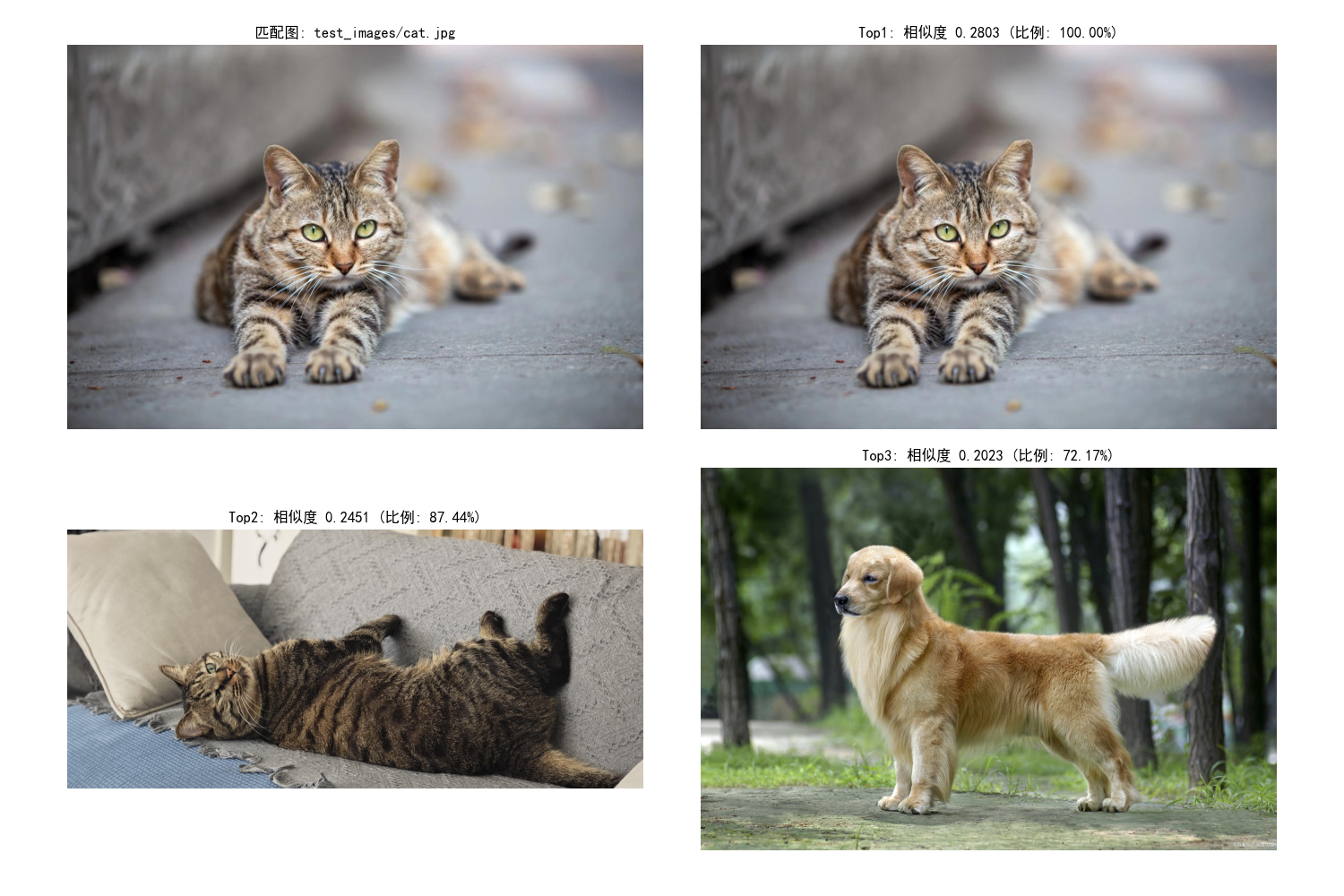
输出结果:
文本查询:a cute cat 匹配结果(Top3): Top1: test_images/cat.jpg → 相似度:0.2803 (比例:100.00%) Top2: test_images/cat2.jpg → 相似度:0.2451 (比例:87.44%) Top3: test_images/dog.jpg → 相似度:0.2023 (比例:72.17%)
2. 示例:多模板零样本分类
import torch
import clip
from PIL import Image
import numpy as np

# 初始化模型(重复代码,初学者可直接复用)
device = "cuda" if torch.cuda.is_available() else "cpu"
model, preprocess = clip.load("ViT-B/32", device=device)

# 1. 自定义分类类别(初学者可替换成自己的类别)
categories = ["cat", "dog", "car", "tree", "book"]

# 2. 基础模板(初学者先掌握)
template = "a photo of a {}"
# 生成文本提示
text_prompts = [template.format(cat) for cat in categories]
text = clip.tokenize(text_prompts).to(device)

# 3. 加载待分类图片
image_path = "street.jpg"
image = preprocess(Image.open(image_path)).unsqueeze(0).to(device)

# 4. 推理
with torch.no_grad():
    image_features = model.encode_image(image)
    text_features = model.encode_text(text)

    image_features /= image_features.norm(dim=-1, keepdim=True)
    text_features /= text_features.norm(dim=-1, keepdim=True)

    # 计算相似度
    similarity = (image_features @ text_features.T).squeeze(0).cpu().numpy()

# 5. 预测结果
pred_idx = np.argmax(similarity)
pred_category = categories[pred_idx]

# 输出(初学者重点看各类别得分)
print("各类别相似度得分:")
for cat, score in zip(categories, similarity):
    print(f"  {cat}: {score:.4f}")
print(f"\n预测类别:{pred_category}")

# 仅修改模板部分,其余代码与基础版一致
categories = ["cat", "dog", "car", "tree", "book"]

# 多模板(初学者可直接复用)
templates = [
    "a photo of a {}",
    "a picture of a {}",
    "an image of a {}",
    "a photo of the {}"
]

# 生成所有模板的文本提示
text_prompts = []
for cat in categories:
    for template in templates:
        text_prompts.append(template.format(cat))

text = clip.tokenize(text_prompts).to(device)

# 推理时按类别聚合(多模板取平均)
with torch.no_grad():
    image_features = model.encode_image(image)
    text_features = model.encode_text(text)

    image_features /= image_features.norm(dim=-1, keepdim=True)
    text_features /= text_features.norm(dim=-1, keepdim=True)

    similarity = (image_features @ text_features.T).squeeze(0).cpu().numpy()

# 聚合相似度(初学者重点理解这一步)
category_scores = []
for i in range(len(categories)):
    # 每个类别对应len(templates)个模板
    start = i * len(templates)
    end = start + len(templates)
    avg_score = similarity[start:end].mean()  # 取平均
    category_scores.append(avg_score)

# 预测
pred_idx = np.argmax(category_scores)
pred_category = categories[pred_idx]
print("多模板聚合后得分:")
for cat, score in zip(categories, category_scores):
    print(f"  {cat}: {score:.4f}")
import matplotlib.pyplot as plt

# 创建子图
plt.figure(figsize=(15, 6))

# 左侧显示原始图片
plt.subplot(1, 2, 1)
img = Image.open(image_path)
plt.imshow(img)
plt.axis('off')
plt.title('Original Image')

# 右侧显示柱状图
plt.subplot(1, 2, 2)
plt.bar(categories, category_scores, color='skyblue')
plt.xlabel('Categories')
plt.ylabel('Similarity Score')
plt.title('Multi-Template Aggregated Scores')
plt.xticks(rotation=45)
plt.tight_layout()

# 保存图片
plt.savefig('similarity_scores.png')
plt.show()

print(f"\n预测类别:{pred_category}")
输出结果:
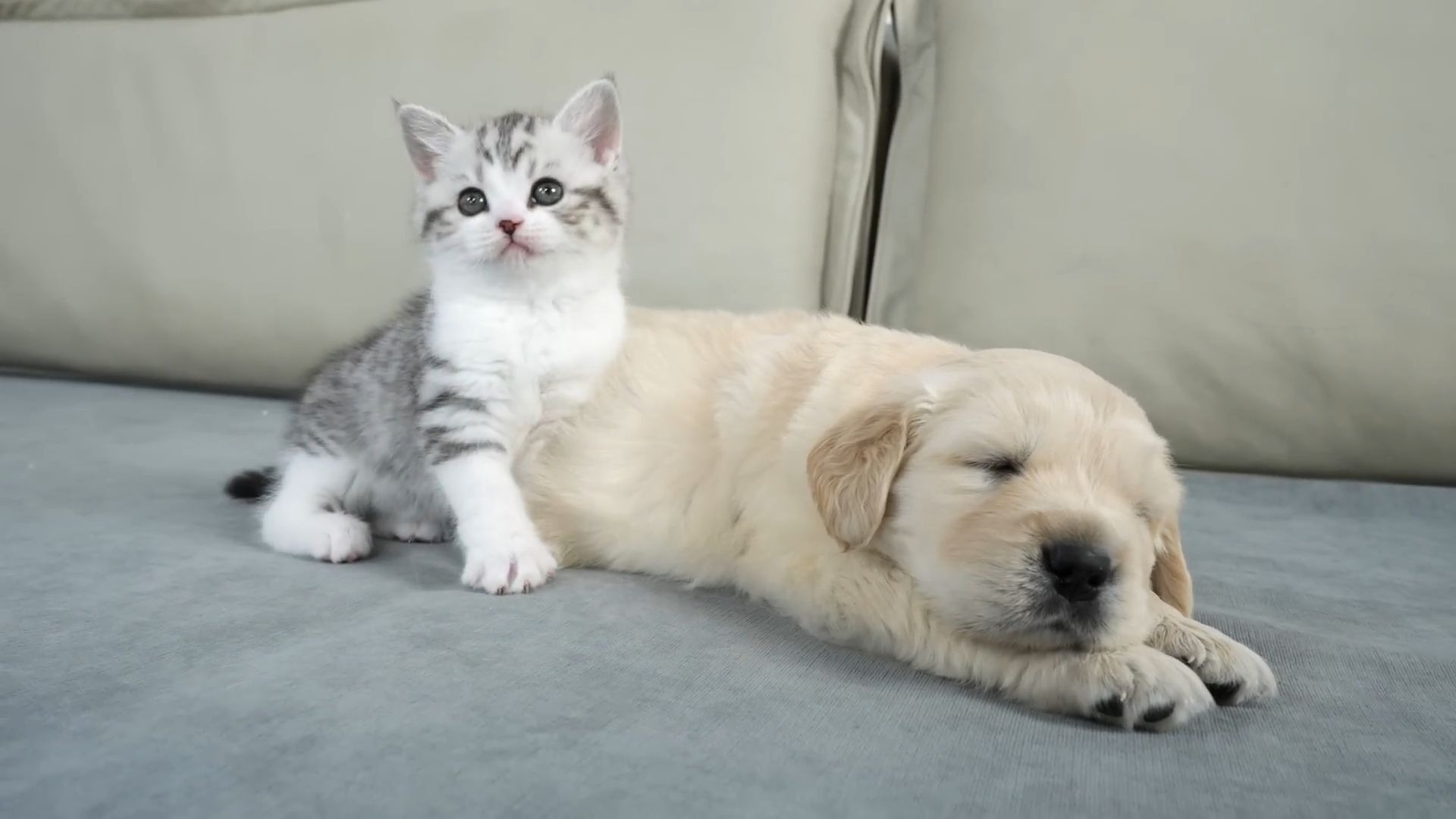
各类别相似度得分: cat: 0.2453 dog: 0.2394 car: 0.1951 tree: 0.1563 book: 0.1933 预测类别:cat 多模板聚合后得分: cat: 0.2461 dog: 0.2416 car: 0.1935 tree: 0.1609 book: 0.1912 预测类别:cat
原图:
结果图:
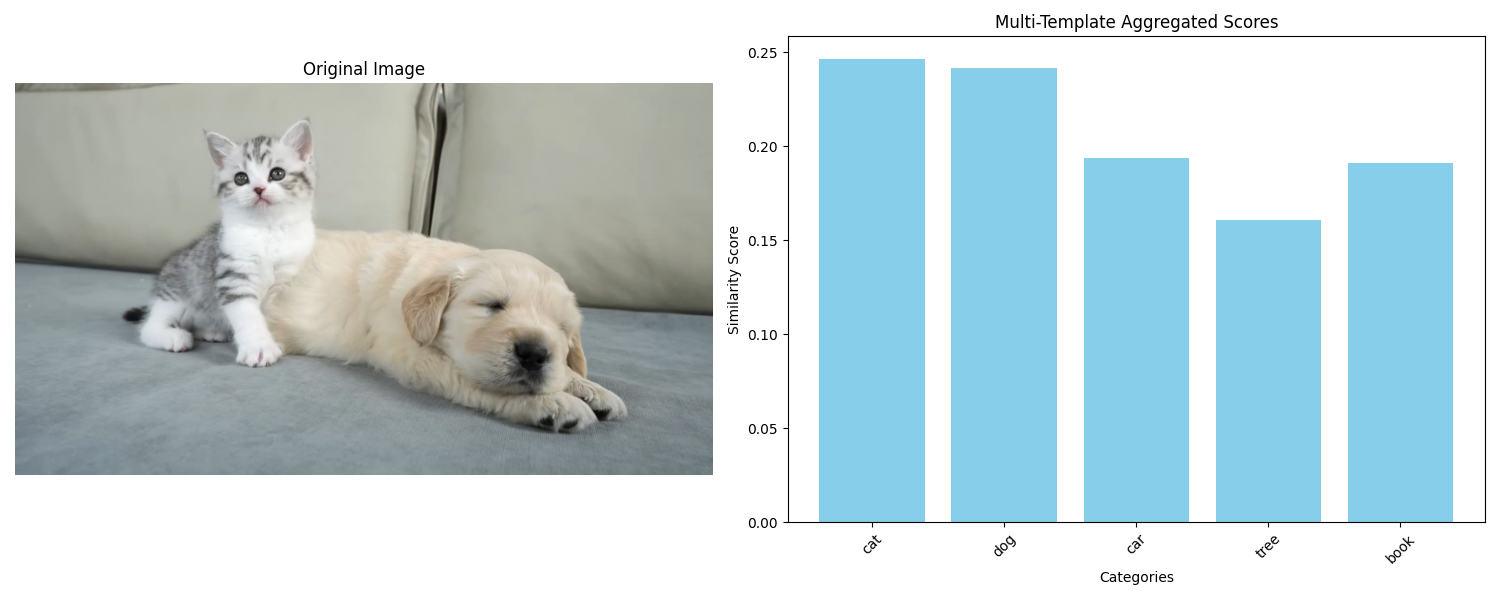
- 单模板的问题:模板描述太简单,可能和图片语义不匹配(比如图片是 “室内的猫”,模板是 “a photo of a cat”,相似度低);
- 多模板的优势:覆盖更多语义场景,取平均后结果更稳定;
- 核心原则:模板越贴近图片的实际场景,准确率越高。
七、总结
CLIP是一个逻辑清晰、目标纯粹、规模化执行的多模态关联引擎。需要通过对比学习,在共享空间中对齐图像和文本的语义,并通过前所未有的大数据、大批次、大模型训练,从而实现将下游任务(分类、检索)巧妙地转化为预训练任务(图文相关性评估)的实例,达到完成准确推理的目的。
我们需要理解CLIP的本质,它是一个大规模模式匹配器,它不理解内容,但能从4亿个例子中学会什么东西通常和什么描述一起出现。用好它的关键在于让我们的使用方式尽量接近它的训练方式。
原创声明:本文系作者授权腾讯云开发者社区发表,未经许可,不得转载。
如有侵权,请联系 cloudcommunity@tencent.com 删除。
目录
腾讯云开发者

Copyright © 2013 - 2026 Tencent Cloud. All Rights Reserved. 腾讯云 版权所有
深圳市腾讯计算机系统有限公司 ICP备案/许可证号:粤B2-20090059  粤公网安备44030502008569号
腾讯云计算(北京)有限责任公司 京ICP证150476号 | 京ICP备11018762号