Flutter for OpenHarmony字典查询 App 全栈解析:从搜索交互到详情展示的完整实

Flutter for OpenHarmony字典查询 App 全栈解析:从搜索交互到详情展示的完整实

晚霞的不甘
发布于 2026-02-09 16:47:38
发布于 2026-02-09 16:47:38
Flutter for OpenHarmony字典查询 App 全栈解析:从搜索交互到详情展示的完整实
在移动应用开发中,工具类应用(如字典、计算器、备忘录)是检验开发者对 UI/UX、状态管理和数据流理解的绝佳练兵场。本文将深入剖析一个基于 Flutter 构建的 中文词语字典查询 App 的完整代码,全面讲解其 搜索交互、历史记录、结果展示和详情页设计 四大核心模块的实现原理与最佳实践。
完整效果展示
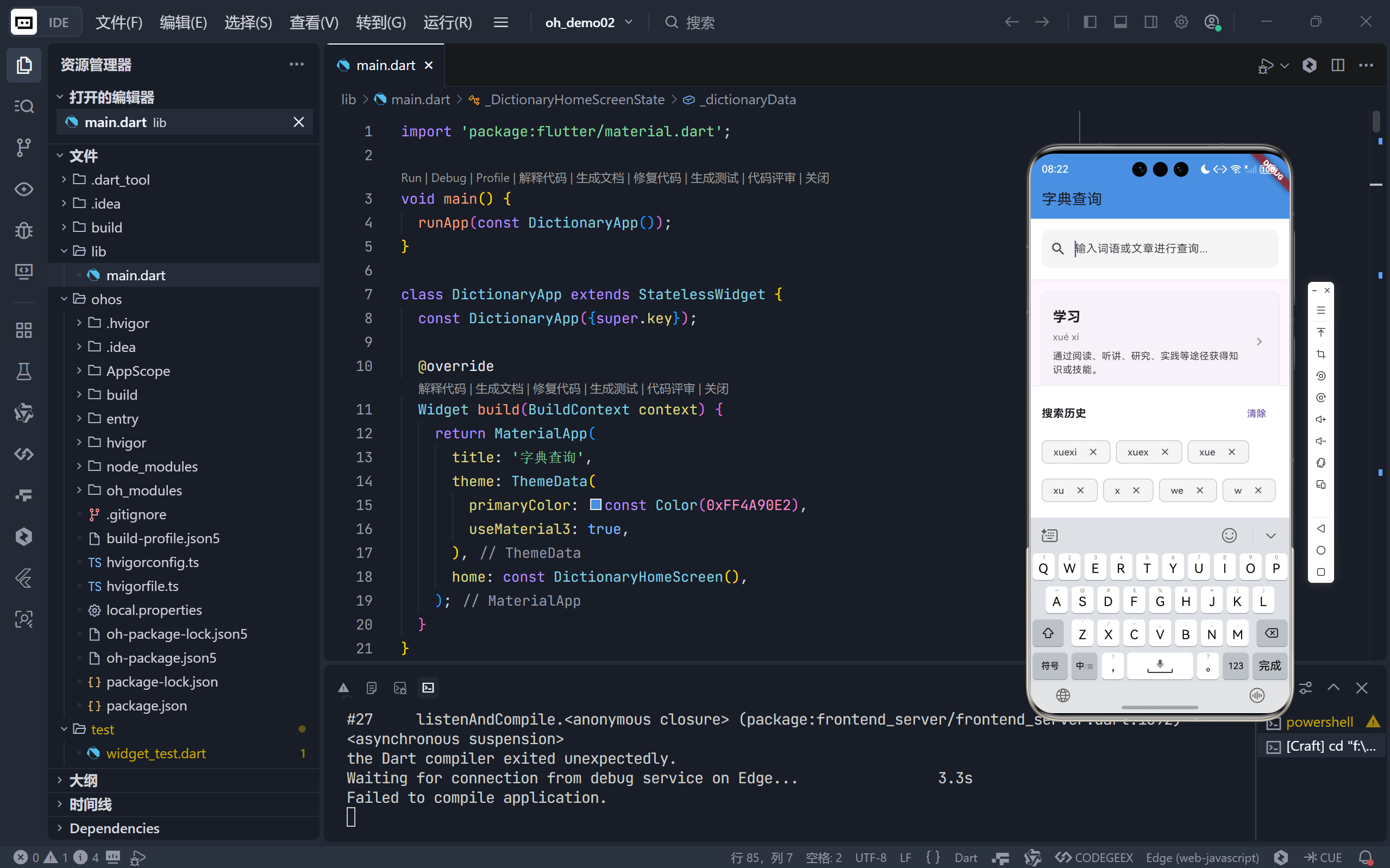
在这里插入图片描述
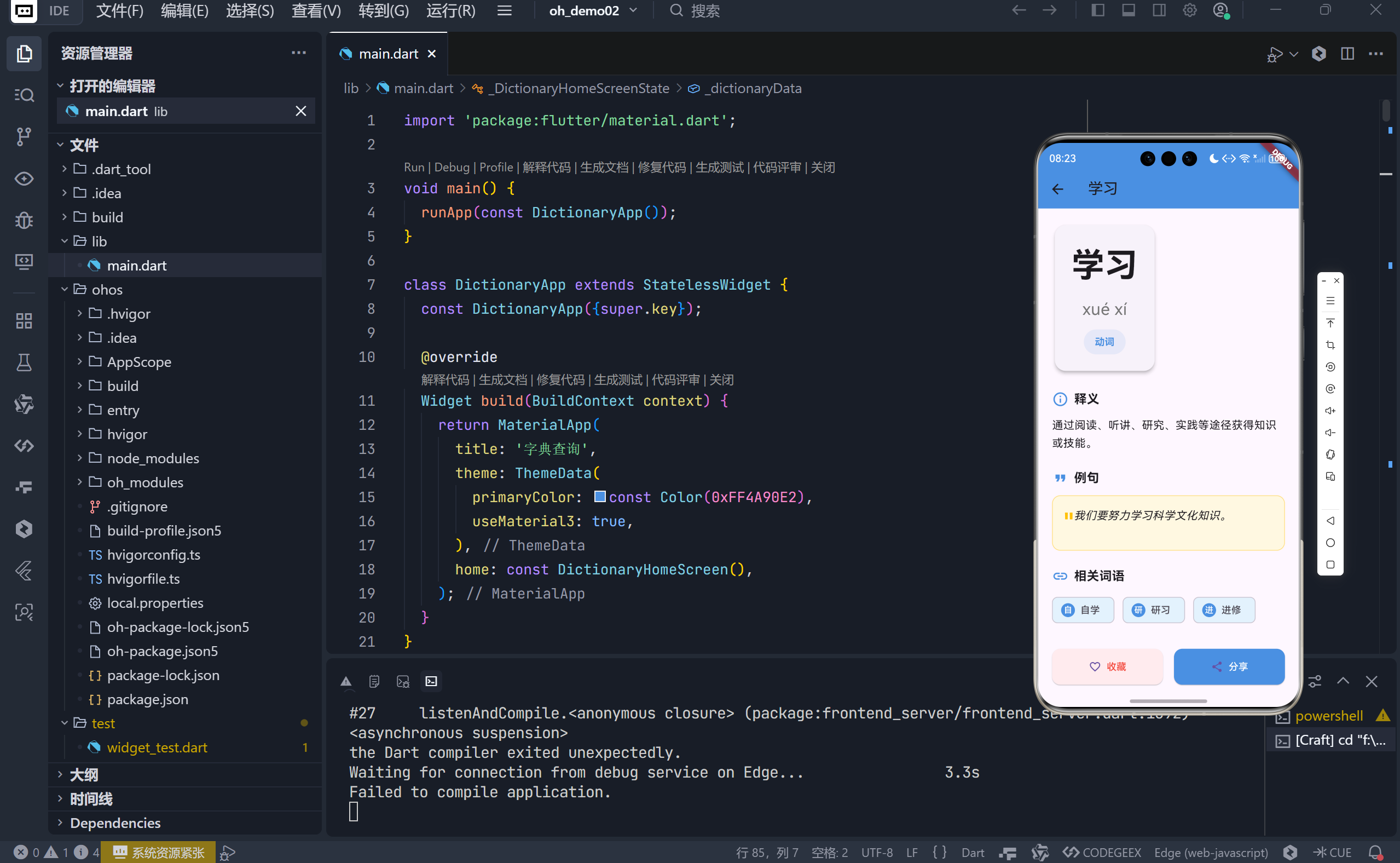
在这里插入图片描述
一、整体架构:简洁而高效的单页面应用 (SPA)
该 App 采用经典的 单页面 + 路由跳转 架构:
DictionaryHomeScreen: 主页,负责搜索、结果显示和历史记录管理。DictionaryDetailScreen: 详情页,展示单个词语的完整信息。
通过 Navigator.push 实现页面间的平滑过渡,符合 Material Design 规范。
// 跳转到详情页的核心代码
Navigator.push(
  context,
  MaterialPageRoute(
    builder: (context) => DictionaryDetailScreen(entry: entry),
  ),
);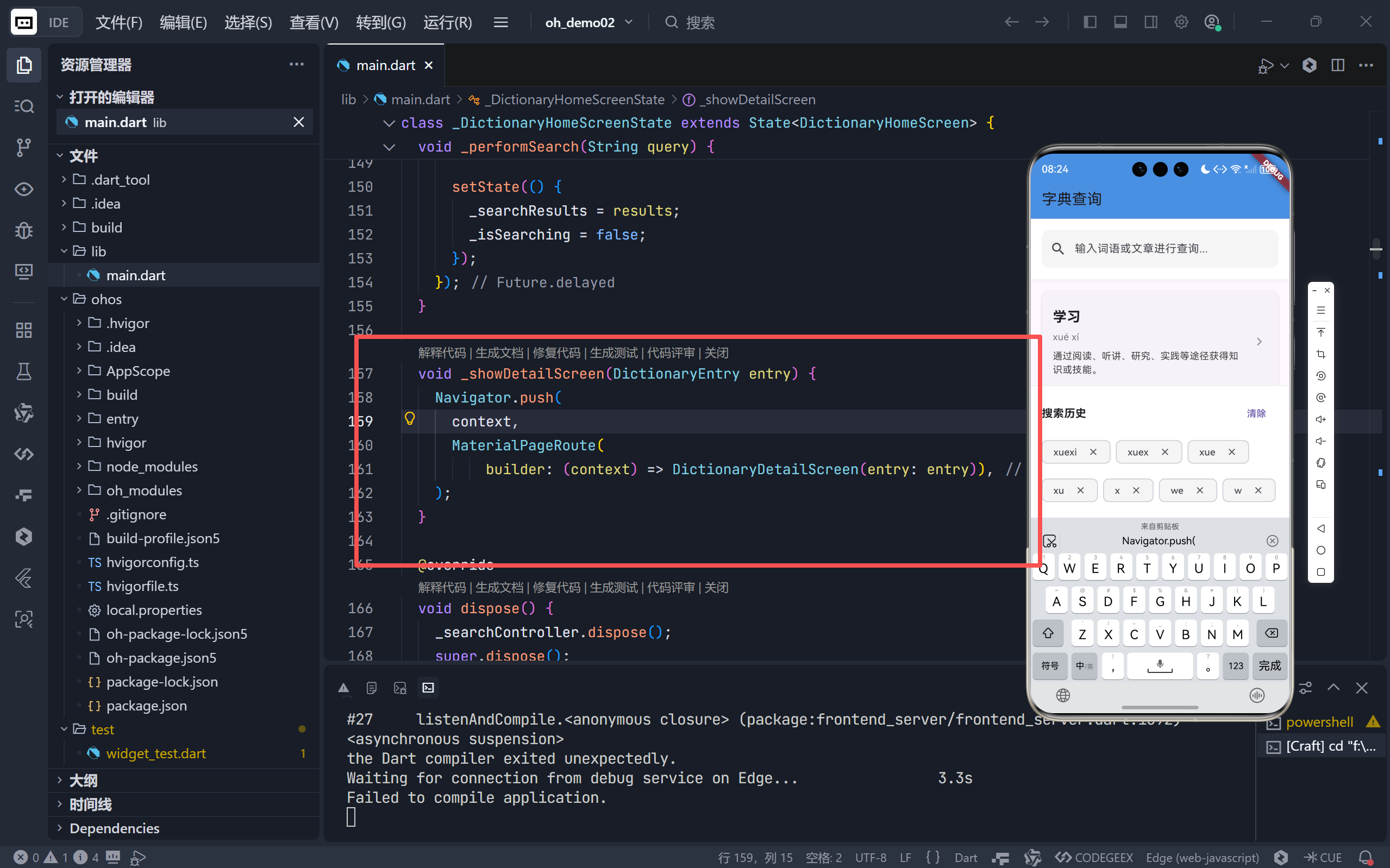
在这里插入图片描述
这种分离关注点的设计,使得主页专注于 “发现”,详情页专注于 “理解”,职责清晰,易于维护。
二、主页 (DictionaryHomeScreen):智能搜索中枢
主页是用户与字典交互的第一入口,其核心功能围绕 搜索 展开。
2.1 状态管理:驱动 UI 变化的引擎
主页使用 StatefulWidget 管理四个关键状态:
状态变量 | 类型 | 作用 |
|---|---|---|
_searchController | TextEditingController | 绑定搜索框的输入内容 |
_searchResults | List<DictionaryEntry> | 存储当前搜索匹配的结果 |
_isSearching | bool | 标记是否处于搜索加载中 |
_searchHistory | List<String> | 记录用户的搜索历史 |
这些状态共同决定了 UI 的四种主要形态:
- 空闲态:显示提示语 “输入词语开始查询”。
- 加载态:显示
CircularProgressIndicator。 - 无结果态:显示 “未找到相关词语”。
- 结果列表态:展示匹配的词语卡片。
2.2 智能搜索逻辑:_performSearch 方法
这是整个 App 的 业务逻辑核心。
void _performSearch(String query) {
  if (query.trim().isEmpty) {
    setState(() { _searchResults = []; });
    return;
  }

  // ... 设置 _isSearching 为 true

  Future.delayed(const Duration(milliseconds: 300), () {
    final results = _dictionaryData.where((entry) {
      return entry.word.contains(query) || // 匹配词语
             entry.pinyin.toLowerCase().contains(query.toLowerCase()) || // 匹配拼音
             entry.definition.contains(query); // 匹配释义
    }).toList();

    // ... 更新搜索历史

    setState(() {
      _searchResults = results;
      _isSearching = false;
    });
  });
}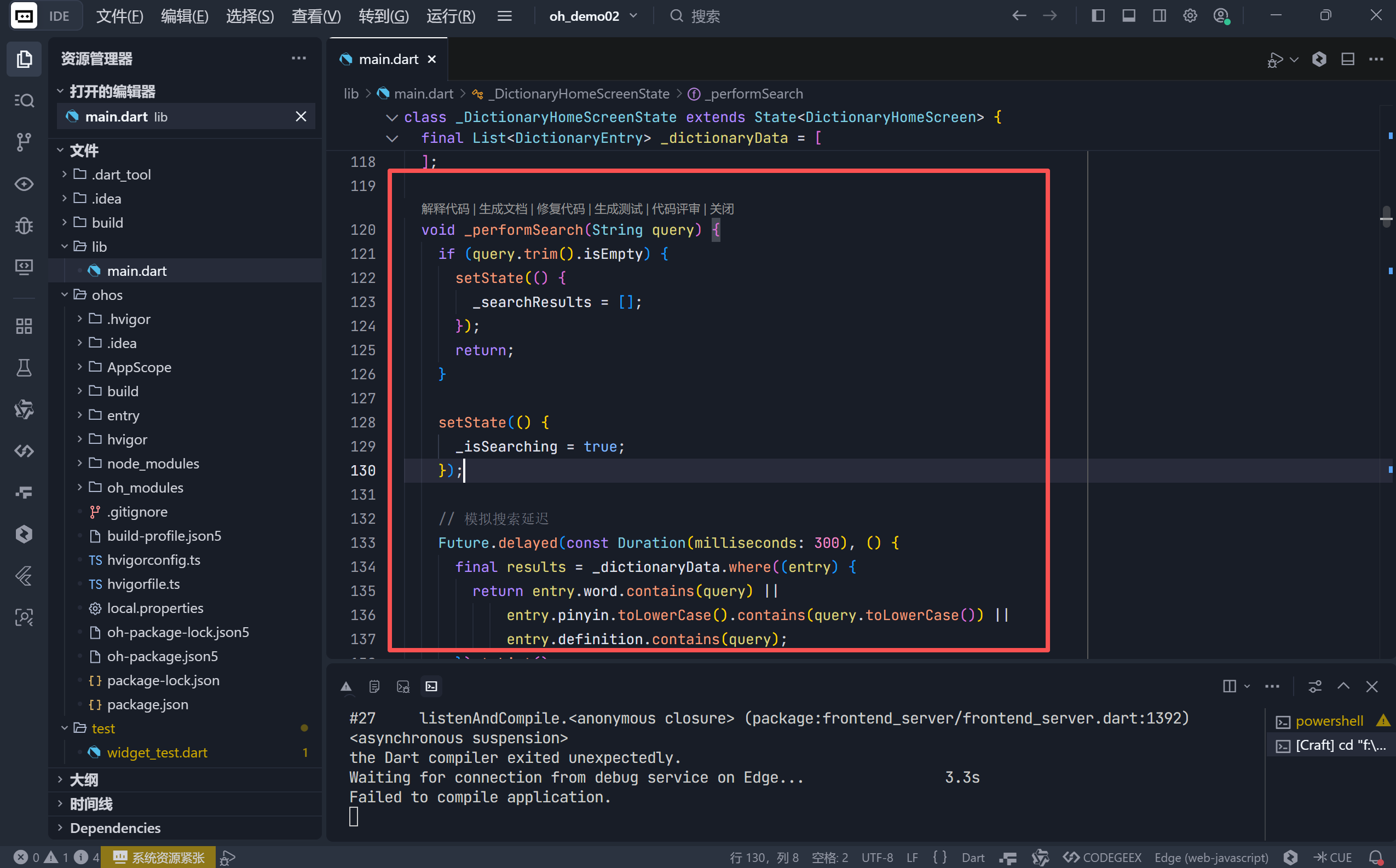
在这里插入图片描述
关键亮点:
- 多维度匹配:同时支持按 词语、拼音、释义 进行模糊搜索,极大提升了查词效率。
- 模拟网络延迟:使用
Future.delayed模拟真实 API 请求的延迟,让 UI 反馈更真实。 - 防抖优化:虽然代码中未显式实现防抖(debounce),但
onChanged直接触发搜索,在简单场景下可接受。对于复杂场景,建议加入防抖以避免频繁请求。
2.3 搜索历史:提升用户体验的贴心设计
搜索历史功能让用户能快速回溯之前的查询,是优秀 UX 的体现。
// 添加到历史
if (query.isNotEmpty && !_searchHistory.contains(query)) {
  _searchHistory.insert(0, query); // 最新查询放在最前面
  if (_searchHistory.length > 10) {
    _searchHistory.removeLast(); // 限制最多10条
  }
}

// 清除历史
_searchHistory.clear();

// 删除单条历史
_searchHistory.remove(term);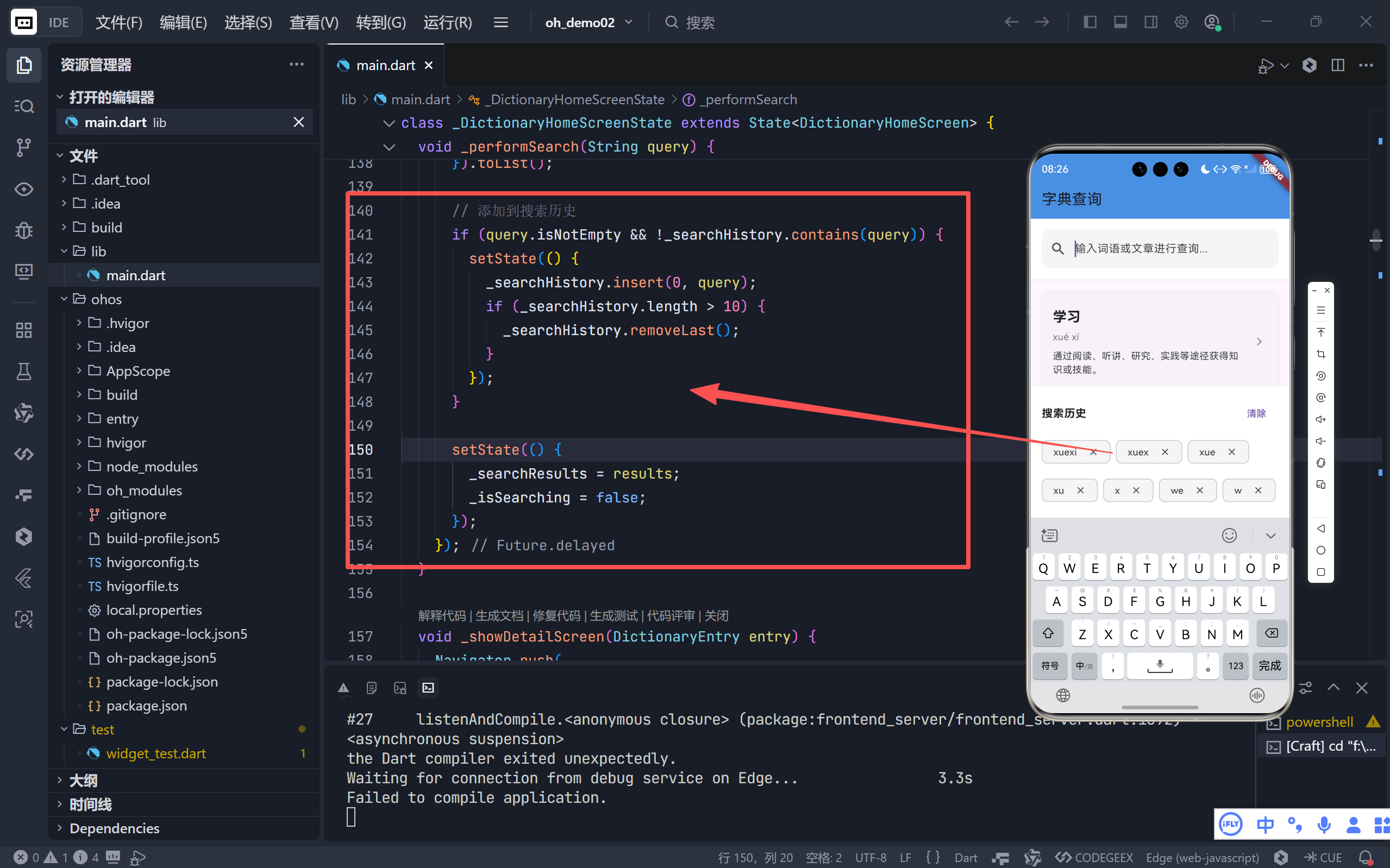
在这里插入图片描述
UI 实现:
- 使用
Wrap布局展示历史词条,自动换行,适应不同屏幕。 - 每个词条用
Chip组件呈现,并带有删除按钮 (onDeleted),操作直观。
💡 条件渲染:历史记录区域仅在
_searchController.text.isEmpty时显示,避免与搜索结果冲突。
2.4 搜索栏与结果列表:精致的 UI 细节
- 搜索栏:
- 圆角设计 (
borderRadius: 12),内填充 (filled: true),视觉上更柔和。 - 动态显示清除按钮 (
suffixIcon),方便用户一键清空。 - 微阴影 (
BoxShadow) 提升层次感。 - 结果列表项 (
ListTile):
- 主标题:词语本身,加粗大号字体。
- 副标题:包含拼音和释义(截断两行),信息密度高。
- 右侧图标:
chevron_right明确指示可点击进入详情。 - 容器:使用
Card组件,带圆角和阴影,形成独立的信息块。
三、详情页 (DictionaryDetailScreen):沉浸式学习体验
当用户点击某个词语后,会进入一个精心设计的详情页,提供全方位的语言学习支持。
3.1 数据传递:安全可靠的参数注入
详情页通过构造函数接收一个完整的 DictionaryEntry 对象。
class DictionaryDetailScreen extends StatelessWidget {
  final DictionaryEntry entry; // 接收的数据

  const DictionaryDetailScreen({super.key, required this.entry});
  // ...
}required关键字:确保调用方必须传入entry,避免空指针异常。final修饰:保证数据在页面生命周期内不可变,符合 Flutter 的声明式编程思想。
3.2 模块化布局:_buildSection 的复用艺术
详情页内容被清晰地划分为 词语信息、释义、例句、相关词语 四个模块。为了减少重复代码,作者巧妙地封装了一个通用的 _buildSection 方法。
Widget _buildSection(String title, IconData icon, Widget content) {
  return Column(
    crossAxisAlignment: CrossAxisAlignment.start,
    children: [
      Row(children: [Icon(icon), Text(title)]), // 统一的标题栏
      const SizedBox(height: 12),
      content, // 各模块自定义的内容
    ],
  );
}优势:
- 一致性:所有模块拥有统一的标题样式和间距。
- 可维护性:修改标题样式只需改动一处。
- 可扩展性:未来新增模块(如“近义词”、“反义词”)变得异常简单。
3.3 各模块设计亮点
- 词语信息区 (顶部 Card):
- 超大字号 (
fontSize: 48) 突出显示词语,营造视觉焦点。 - 拼音 以次级字号展示,辅助发音。
- 词性 (
partOfSpeech) 用彩色标签 (Container) 高亮,信息一目了然。
- 超大字号 (
- 释义区:
- 简洁明了,直接展示
definition字段。
- 简洁明了,直接展示
- 例句区:
- 引用样式:使用引号 (
") 和斜体 (fontStyle: FontStyle.italic) 模拟真实引用。 - 背景色:浅黄色 (
Colors.amber[50]) 背景,与普通文本区分,提升可读性。
- 引用样式:使用引号 (
- 相关词语区:
- 头像式 Chip:每个
Chip带有圆形头像 (CircleAvatar),头像内显示词语首字,设计新颖且节省空间。 - 色彩搭配:蓝色系 (
Colors.blue[50]) 背景,与 App 主色调 (0xFF4A90E2) 呼应。
- 头像式 Chip:每个
- 操作按钮区:
- 双按钮布局:
收藏和分享是字典类 App 的核心操作。 - 视觉区分:
收藏用红色系强调,“分享”用主蓝色系,符合用户心智模型。 - 即时反馈:点击后弹出
SnackBar,告知用户操作成功。
- 双按钮布局:
四、数据模型 (DictionaryEntry):结构化的基石
一个清晰的数据模型是构建健壮应用的前提。
class DictionaryEntry {
  final String word;           // 词语
  final String pinyin;         // 拼音
  final String partOfSpeech;   // 词性
  final String definition;     // 释义
  final String example;        // 例句
  final List<String> relatedWords; // 相关词语
}final字段:保证对象创建后不可变,线程安全,也便于 Flutter 的const构造和性能优化。- 强类型:每个字段都有明确的类型,避免运行时错误。
- 自解释性:字段命名清晰,无需额外注释即可理解其含义。
五、总结:一个教科书级的 Flutter 工具应用
这个字典 App 虽小,却五脏俱全,完美展示了 Flutter 开发的核心思想:
- 声明式 UI:UI 是状态的函数,状态改变,UI 自动更新。
- 组件化:将复杂界面拆解为
Card,Chip,_buildSection等可复用组件。 - 状态管理:合理使用
StatefulWidget管理局部状态,逻辑清晰。 - 用户体验至上:从搜索历史、加载指示器到详情页的精心排版,处处体现对用户的尊重。
- 代码规范:使用
required、final等关键字,保证了代码的健壮性和可读性。
🌐 加入社区
欢迎加入 开源鸿蒙跨平台开发者社区,获取最新资源与技术支持: 👉 开源鸿蒙跨平台开发者社区
技术因分享而进步,生态因共建而繁荣。 —— 晚霞的不甘 · 与您共赴鸿蒙跨平台开发之旅
import 'package:flutter/material.dart';
void main() {
runApp(const DictionaryApp());
}
class DictionaryApp extends StatelessWidget {
const DictionaryApp({super.key});
@override
Widget build(BuildContext context) {
return MaterialApp(
title: '字典查询',
theme: ThemeData(
primaryColor: const Color(0xFF4A90E2),
useMaterial3: true,
),
home: const DictionaryHomeScreen(),
);
}
}
class DictionaryHomeScreen extends StatefulWidget {
const DictionaryHomeScreen({super.key});
@override
State<DictionaryHomeScreen> createState() => _DictionaryHomeScreenState();
}
class _DictionaryHomeScreenState extends State<DictionaryHomeScreen> {
final TextEditingController _searchController = TextEditingController();
List<DictionaryEntry> _searchResults = [];
bool _isSearching = false;
List<String> _searchHistory = [];
// 模拟字典数据
final List<DictionaryEntry> _dictionaryData = [
DictionaryEntry(
word: '学习',
pinyin: 'xué xí',
partOfSpeech: '动词',
definition: '通过阅读、听讲、研究、实践等途径获得知识或技能。',
example: '我们要努力学习科学文化知识。',
relatedWords: ['自学', '研习', '进修'],
),
DictionaryEntry(
word: '努力',
pinyin: 'nǔ lì',
partOfSpeech: '形容词',
definition: '尽最大力量;尽一切可能。',
example: '他工作非常努力。',
relatedWords: ['勤奋', '刻苦', '尽力'],
),
DictionaryEntry(
word: '知识',
pinyin: 'zhī shi',
partOfSpeech: '名词',
definition: '人们在认识世界、改造世界的过程中积累起来的经验。',
example: '知识就是力量。',
relatedWords: ['常识', '学识', '见识'],
),
DictionaryEntry(
word: '文化',
pinyin: 'wén huà',
partOfSpeech: '名词',
definition: '人类在社会实践中所创造的物质财富和精神财富的总和。',
example: '中华文明历史悠久,文化灿烂。',
relatedWords: ['文明', '艺术', '传统'],
),
DictionaryEntry(
word: '创新',
pinyin: 'chuàng xīn',
partOfSpeech: '动词',
definition: '抛开旧的,创造新的。',
example: '科技创新推动了社会进步。',
relatedWords: ['改革', '创造', '发明'],
),
DictionaryEntry(
word: '发展',
pinyin: 'fā zhǎn',
partOfSpeech: '动词',
definition: '事物由小到大、由简到繁、由低级到高级的变化。',
example: '经济持续健康发展。',
relatedWords: ['进步', '增长', '扩展'],
),
DictionaryEntry(
word: '理想',
pinyin: 'lǐ xiǎng',
partOfSpeech: '名词',
definition: '对未来事物的想象或希望。',
example: '每个人都有自己的理想。',
relatedWords: ['梦想', '抱负', '目标'],
),
DictionaryEntry(
word: '坚持',
pinyin: 'jiān chí',
partOfSpeech: '动词',
definition: '坚决保持、维持或进行。',
example: '坚持就是胜利。',
relatedWords: ['坚守', '执着', '持续'],
),
DictionaryEntry(
word: '成功',
pinyin: 'chéng gōng',
partOfSpeech: '名词',
definition: '达到预期的目的或结果。',
example: '经过不懈努力,他终于成功了。',
relatedWords: ['胜利', '成就', '收获'],
),
DictionaryEntry(
word: '友谊',
pinyin: 'yǒu yì',
partOfSpeech: '名词',
definition: '朋友之间的交情。',
example: '友谊是人生最宝贵的财富之一。',
relatedWords: ['友情', '交情', '伙伴'],
),
];
void _performSearch(String query) {
if (query.trim().isEmpty) {
setState(() {
_searchResults = [];
});
return;
}
setState(() {
_isSearching = true;
});
// 模拟搜索延迟
Future.delayed(const Duration(milliseconds: 300), () {
final results = _dictionaryData.where((entry) {
return entry.word.contains(query) ||
entry.pinyin.toLowerCase().contains(query.toLowerCase()) ||
entry.definition.contains(query);
}).toList();
// 添加到搜索历史
if (query.isNotEmpty && !_searchHistory.contains(query)) {
setState(() {
_searchHistory.insert(0, query);
if (_searchHistory.length > 10) {
_searchHistory.removeLast();
}
});
}
setState(() {
_searchResults = results;
_isSearching = false;
});
});
}
void _showDetailScreen(DictionaryEntry entry) {
Navigator.push(
context,
MaterialPageRoute(
builder: (context) => DictionaryDetailScreen(entry: entry)),
);
}
@override
void dispose() {
_searchController.dispose();
super.dispose();
}
@override
Widget build(BuildContext context) {
return Scaffold(
appBar: AppBar(
title: const Text('字典查询'),
backgroundColor: const Color(0xFF4A90E2),
elevation: 0,
),
body: Column(
children: [
// 搜索栏
Container(
padding: const EdgeInsets.all(16),
decoration: BoxDecoration(
color: Colors.white,
boxShadow: [
BoxShadow(
color: Colors.grey.withOpacity(0.1),
blurRadius: 4,
offset: const Offset(0, 2),
),
],
),
child: TextField(
controller: _searchController,
decoration: InputDecoration(
hintText: '输入词语或文章进行查询...',
prefixIcon: const Icon(Icons.search),
suffixIcon: _searchController.text.isNotEmpty
? IconButton(
icon: const Icon(Icons.clear),
onPressed: () {
_searchController.clear();
setState(() {
_searchResults = [];
});
},
)
: null,
border: OutlineInputBorder(
borderRadius: BorderRadius.circular(12),
borderSide: BorderSide.none,
),
filled: true,
fillColor: Colors.grey[100],
),
onChanged: (value) {
_performSearch(value);
},
onSubmitted: (value) {
_performSearch(value);
},
),
),
// 搜索结果
Expanded(
child: _isSearching
? const Center(
child: CircularProgressIndicator(),
)
: _searchResults.isEmpty
? Column(
mainAxisAlignment: MainAxisAlignment.center,
children: [
Icon(
Icons.book_outlined,
size: 100,
color: Colors.grey[300],
),
const SizedBox(height: 20),
Text(
_searchController.text.isEmpty
? '输入词语开始查询'
: '未找到相关词语',
style: TextStyle(
fontSize: 18,
color: Colors.grey[600],
),
),
],
)
: ListView.builder(
padding: const EdgeInsets.all(16),
itemCount: _searchResults.length,
itemBuilder: (context, index) {
final entry = _searchResults[index];
return Card(
elevation: 2,
margin: const EdgeInsets.only(bottom: 12),
shape: RoundedRectangleBorder(
borderRadius: BorderRadius.circular(12),
),
child: ListTile(
contentPadding: const EdgeInsets.all(16),
title: Text(
entry.word,
style: const TextStyle(
fontSize: 20,
fontWeight: FontWeight.bold,
),
),
subtitle: Column(
crossAxisAlignment: CrossAxisAlignment.start,
children: [
const SizedBox(height: 4),
Text(
entry.pinyin,
style: TextStyle(
fontSize: 14,
color: Colors.grey[600],
),
),
const SizedBox(height: 8),
Text(
entry.definition,
maxLines: 2,
overflow: TextOverflow.ellipsis,
style: TextStyle(
fontSize: 14,
color: Colors.grey[800],
),
),
],
),
trailing: const Icon(
Icons.chevron_right,
color: Colors.grey,
),
onTap: () => _showDetailScreen(entry),
),
);
},
),
),
// 搜索历史
if (_searchHistory.isNotEmpty && _searchController.text.isEmpty)
Container(
padding: const EdgeInsets.all(16),
decoration: BoxDecoration(
color: Colors.white,
border: Border(
top: BorderSide(color: Colors.grey[200]!),
),
),
child: Column(
crossAxisAlignment: CrossAxisAlignment.start,
children: [
Row(
mainAxisAlignment: MainAxisAlignment.spaceBetween,
children: [
const Text(
'搜索历史',
style: TextStyle(
fontSize: 16,
fontWeight: FontWeight.bold,
),
),
TextButton(
onPressed: () {
setState(() {
_searchHistory.clear();
});
},
child: const Text('清除'),
),
],
),
const SizedBox(height: 8),
Wrap(
spacing: 8,
runSpacing: 8,
children: _searchHistory.map((term) {
return Chip(
label: Text(term),
onDeleted: () {
setState(() {
_searchHistory.remove(term);
});
},
deleteIcon: const Icon(Icons.close, size: 16),
backgroundColor: Colors.grey[100],
padding: const EdgeInsets.symmetric(horizontal: 8),
);
}).toList(),
),
],
),
),
],
),
);
}
}
// 词语详情页面
class DictionaryDetailScreen extends StatelessWidget {
final DictionaryEntry entry;
const DictionaryDetailScreen({super.key, required this.entry});
@override
Widget build(BuildContext context) {
return Scaffold(
appBar: AppBar(
title: Text(entry.word),
backgroundColor: const Color(0xFF4A90E2),
elevation: 0,
),
body: SingleChildScrollView(
padding: const EdgeInsets.all(20),
child: Column(
crossAxisAlignment: CrossAxisAlignment.start,
children: [
// 词语和拼音
Card(
elevation: 4,
shape: RoundedRectangleBorder(
borderRadius: BorderRadius.circular(16),
),
child: Padding(
padding: const EdgeInsets.all(24),
child: Column(
children: [
Text(
entry.word,
style: const TextStyle(
fontSize: 48,
fontWeight: FontWeight.bold,
),
),
const SizedBox(height: 12),
Text(
entry.pinyin,
style: TextStyle(
fontSize: 24,
color: Colors.grey[600],
),
),
const SizedBox(height: 12),
Container(
padding: const EdgeInsets.symmetric(
horizontal: 16,
vertical: 8,
),
decoration: BoxDecoration(
color: const Color(0xFF4A90E2).withOpacity(0.1),
borderRadius: BorderRadius.circular(20),
),
child: Text(
entry.partOfSpeech,
style: const TextStyle(
color: Color(0xFF4A90E2),
fontWeight: FontWeight.bold,
),
),
),
],
),
),
),
const SizedBox(height: 24),
// 释义
_buildSection(
'释义',
Icons.info_outline,
Text(
entry.definition,
style: const TextStyle(fontSize: 16, height: 1.6),
),
),
const SizedBox(height: 24),
// 例句
_buildSection(
'例句',
Icons.format_quote,
Container(
padding: const EdgeInsets.all(16),
decoration: BoxDecoration(
color: Colors.amber[50],
borderRadius: BorderRadius.circular(12),
border: Border.all(color: Colors.amber[200]!),
),
child: Row(
crossAxisAlignment: CrossAxisAlignment.start,
children: [
const Text(
'"',
style: TextStyle(
fontSize: 32,
color: Colors.amber,
fontWeight: FontWeight.bold,
),
),
Expanded(
child: Text(
entry.example,
style: const TextStyle(
fontSize: 16,
fontStyle: FontStyle.italic,
height: 1.6,
),
),
),
],
),
),
),
const SizedBox(height: 24),
// 相关词语
_buildSection(
'相关词语',
Icons.link,
Wrap(
spacing: 12,
runSpacing: 12,
children: entry.relatedWords.map((word) {
return Chip(
label: Text(word),
avatar: CircleAvatar(
backgroundColor: const Color(0xFF4A90E2),
child: Text(
word[0],
style: const TextStyle(
color: Colors.white,
fontSize: 12,
),
),
),
backgroundColor: Colors.blue[50],
padding:
const EdgeInsets.symmetric(horizontal: 12, vertical: 8),
);
}).toList(),
),
),
const SizedBox(height: 32),
// 操作按钮
Row(
children: [
Expanded(
child: ElevatedButton.icon(
onPressed: () {
ScaffoldMessenger.of(context).showSnackBar(
const SnackBar(
content: Text('已收藏'),
duration: Duration(seconds: 1),
),
);
},
icon: const Icon(Icons.favorite_border),
label: const Text('收藏'),
style: ElevatedButton.styleFrom(
backgroundColor: Colors.red[50],
foregroundColor: Colors.red,
padding: const EdgeInsets.symmetric(vertical: 16),
shape: RoundedRectangleBorder(
borderRadius: BorderRadius.circular(12),
),
),
),
),
const SizedBox(width: 16),
Expanded(
child: ElevatedButton.icon(
onPressed: () {
ScaffoldMessenger.of(context).showSnackBar(
const SnackBar(
content: Text('已分享'),
duration: Duration(seconds: 1),
),
);
},
icon: const Icon(Icons.share),
label: const Text('分享'),
style: ElevatedButton.styleFrom(
backgroundColor: const Color(0xFF4A90E2),
foregroundColor: Colors.white,
padding: const EdgeInsets.symmetric(vertical: 16),
shape: RoundedRectangleBorder(
borderRadius: BorderRadius.circular(12),
),
),
),
),
],
),
],
),
),
);
}
Widget _buildSection(String title, IconData icon, Widget content) {
return Column(
crossAxisAlignment: CrossAxisAlignment.start,
children: [
Row(
children: [
Icon(icon, color: const Color(0xFF4A90E2)),
const SizedBox(width: 8),
Text(
title,
style: const TextStyle(
fontSize: 18,
fontWeight: FontWeight.bold,
),
),
],
),
const SizedBox(height: 12),
content,
],
);
}
}
// 字典条目数据模型
class DictionaryEntry {
final String word;
final String pinyin;
final String partOfSpeech;
final String definition;
final String example;
final List<String> relatedWords;
DictionaryEntry({
required this.word,
required this.pinyin,
required this.partOfSpeech,
required this.definition,
required this.example,
required this.relatedWords,
});
}本文参与 腾讯云自媒体同步曝光计划,分享自作者个人站点/博客。
原始发表:2026-02-09,如有侵权请联系 cloudcommunity@tencent.com 删除
评论
登录后参与评论
推荐阅读
目录
腾讯云开发者

Copyright © 2013 - 2026 Tencent Cloud. All Rights Reserved. 腾讯云 版权所有
深圳市腾讯计算机系统有限公司 ICP备案/许可证号:粤B2-20090059  粤公网安备44030502008569号
腾讯云计算(北京)有限责任公司 京ICP证150476号 | 京ICP备11018762号