【嵌入式Linux应用开发基础】read函数与write函数

【嵌入式Linux应用开发基础】read函数与write函数

byte轻骑兵
发布于 2026-01-21 15:16:04
发布于 2026-01-21 15:16:04
在嵌入式Linux应用开发中,read和write函数是文件I/O操作中最基础、最常用的两个系统调用。它们用于从文件描述符(file descriptor)指向的文件或设备中读取数据和向其中写入数据。
一、read 函数
1.1. 函数原型
#include <unistd.h>

ssize_t read(int fd, void *buf, size_t count);
1.2. 参数说明
fd:文件描述符,由open函数返回的一个非负整数,用于标识要读取数据的文件、设备等。buf:指向用于存储读取数据的缓冲区的指针,数据将被读取到这个缓冲区中。count:期望读取的字节数,即希望从文件描述符对应的文件或设备中读取的最大字节数。
1.3. 返回值
- 大于 0:表示实际成功读取的字节数。
- 等于 0:表示已经到达文件末尾(EOF),没有更多数据可供读取。
- 等于 -1:表示读取操作失败,此时
errno会被设置为相应的错误码,用于指示具体的错误原因。
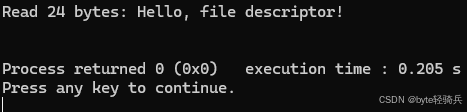
1.4. 示例代码
#include <fcntl.h>
#include <unistd.h>
#include <stdio.h>

int main() {
    int fd = open("example.txt", O_RDONLY);
    if (fd == -1) {
        perror("open");
        return 1;
    }

    char buffer[100];
    ssize_t bytesRead = read(fd, buffer, sizeof(buffer) - 1);
    if (bytesRead == -1) {
        perror("read");
        close(fd);
        return 1;
    }

    buffer[bytesRead] = '\0'; // 确保字符串以NULL结尾
    printf("Read %zd bytes: %s\n", bytesRead, buffer);

    close(fd);
    return 0;
}
二、write 函数
2.1. 函数原型
#include <unistd.h>

ssize_t write(int fd, const void *buf, size_t count);
2.2. 参数说明
fd:文件描述符,标识要写入数据的文件、设备等。buf:指向包含要写入数据的缓冲区的指针。count:要写入的字节数,即希望将缓冲区中多少字节的数据写入到文件描述符对应的文件或设备中。
2.3. 返回值
- 大于 0:表示实际成功写入的字节数。
- 等于 0:通常表示没有写入任何数据,可能是由于某些特殊情况(如文件系统已满但还未返回错误)。
- 等于 -1:表示写入操作失败,
errno会被设置为相应的错误码,用于指示具体的错误原因。
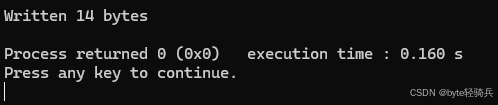
2.4. 示例代码
#include <fcntl.h>
#include <unistd.h>
#include <stdio.h>
#include <string.h>

int main() {
    int fd = open("output.txt", O_WRONLY | O_CREAT | O_TRUNC, 0644);
    if (fd == -1) {
        perror("open");
        return 1;
    }

    const char *message = "Hello, World!\n";
    ssize_t bytesWritten = write(fd, message, strlen(message));
    if (bytesWritten == -1) {
        perror("write");
        close(fd);
        return 1;
    }

    printf("Written %zd bytes\n", bytesWritten);

    close(fd);
    return 0;
}
三、关键注意事项
3.1 部分读写
- 原因:数据未就绪(如网络)、资源限制(如管道缓冲区满)、信号中断等。
- 处理方式:循环调用函数,直至完成全部数据传输。 示例代码(读操作):
ssize_t total_read = 0;
while (total_read < count) {
    ssize_t n = read(fd, buf + total_read, count - total_read);
    if (n == 0) break; // EOF
    if (n < 0 && errno != EINTR) break; // 非中断错误
    if (n > 0) total_read += n;
}
3.2 错误处理
- 常见
errno值:-
EAGAIN/EWOULDBLOCK:非阻塞模式下无数据可读或写缓冲区满。 -
EINTR:操作被信号中断。 -
EBADF:无效文件描述符。
-
- 处理建议:
- 对
EINTR需重试操作。 - 对非阻塞I/O的
EAGAIN需结合select/poll等待就绪。
- 对
3.3 阻塞与非阻塞模式
- 设置非阻塞模式:
int flags = fcntl(fd, F_GETFL, 0);
fcntl(fd, F_SETFL, flags | O_NONBLOCK);
3.4 数据持久化
- 立即同步:调用
fsync(fd)强制将内核缓冲区数据写入存储设备。
3.5 线程安全
- 多线程操作同一文件描述符需加锁(如
pthread_mutex)。
四、嵌入式场景应用
4.1. 文件数据读写
①配置文件读取
- 场景:嵌入式系统中的应用程序常常需要从配置文件中读取参数,以此来初始化系统。例如,网络设备的配置文件包含 IP 地址、子网掩码、网关等信息,应用程序需要读取这些信息来完成网络配置。
- 代码示例
#include <stdio.h>
#include <unistd.h>
#include <fcntl.h>
#define BUFFER_SIZE 1024

int main() {
    int fd = open("config.txt", O_RDONLY);
    if (fd == -1) {
        perror("open");
        return 1;
    }
    char buffer[BUFFER_SIZE];
    ssize_t bytes_read = read(fd, buffer, BUFFER_SIZE);
    if (bytes_read == -1) {
        perror("read");
    } else if (bytes_read > 0) {
        buffer[bytes_read] = '\0';
        // 处理读取到的配置信息
    }
    close(fd);
    return 0;
}
②数据文件写入
- 场景:在数据采集系统中,需要将采集到的数据存储到文件中,以便后续分析和处理。比如,温度传感器每隔一段时间采集一次温度数据,应用程序将这些数据写入到文件中。
- 代码示例
#include <stdio.h>
#include <unistd.h>
#include <fcntl.h>
#include <string.h>

#define DATA "25.5"

int main() {
    int fd = open("data.txt", O_WRONLY | O_CREAT | O_APPEND, 0644);
    if (fd == -1) {
        perror("open");
        return 1;
    }
    ssize_t bytes_written = write(fd, DATA, strlen(DATA));
    if (bytes_written == -1) {
        perror("write");
    }
    close(fd);
    return 0;
}
4.2. 设备驱动交互
①传感器数据读取
- 场景:嵌入式系统通常会连接各种传感器,如加速度计、陀螺仪等。应用程序通过
read函数从相应的设备文件中读取传感器数据。 - 代码示例
#include <stdio.h>
#include <unistd.h>
#include <fcntl.h>

#define SENSOR_DEVICE "/dev/sensor"
#define BUFFER_SIZE 32

int main() {
    int fd = open(SENSOR_DEVICE, O_RDONLY);
    if (fd == -1) {
        perror("open");
        return 1;
    }
    char buffer[BUFFER_SIZE];
    ssize_t bytes_read = read(fd, buffer, BUFFER_SIZE);
    if (bytes_read == -1) {
        perror("read");
    } else if (bytes_read > 0) {
        buffer[bytes_read] = '\0';
        // 处理传感器数据
    }
    close(fd);
    return 0;
}
②设备控制命令写入
- 场景:对于一些可控制的设备,如 LED 灯、电机等,应用程序可以通过
write函数向设备文件写入控制命令,从而实现对设备的控制。 - 代码示例
#include <stdio.h>
#include <unistd.h>
#include <fcntl.h>
#include <string.h>

#define LED_DEVICE "/dev/led"
#define COMMAND "ON"

int main() {
    int fd = open(LED_DEVICE, O_WRONLY);
    if (fd == -1) {
        perror("open");
        return 1;
    }
    ssize_t bytes_written = write(fd, COMMAND, strlen(COMMAND));
    if (bytes_written == -1) {
        perror("write");
    }
    close(fd);
    return 0;
}
③串口/UART通信
串口设备(如/dev/ttyS0)是嵌入式系统中常见的通信接口,read和write用于收发数据:
// 配置串口后...
char tx_data[] = "Hello UART!";
write(uart_fd, tx_data, strlen(tx_data)); // 发送数据

char rx_data[32];
ssize_t len = read(uart_fd, rx_data, sizeof(rx_data)); // 接收数据
4.3. 进程间通信(IPC)
①管道通信
- 场景:在嵌入式系统中,不同进程之间可能需要进行数据交换。管道是一种简单的进程间通信方式,一个进程通过
write函数向管道写入数据,另一个进程通过read函数从管道读取数据。 - 代码示例
#include <stdio.h>
#include <unistd.h>
#include <string.h>

#define BUFFER_SIZE 1024

int main() {
    int pipefd[2];
    if (pipe(pipefd) == -1) {
        perror("pipe");
        return 1;
    }

    pid_t pid = fork();
    if (pid == -1) {
        perror("fork");
        return 1;
    }

    if (pid == 0) {
        // 子进程:读取数据
        close(pipefd[1]);
        char buffer[BUFFER_SIZE];
        ssize_t bytes_read = read(pipefd[0], buffer, BUFFER_SIZE);
        if (bytes_read == -1) {
            perror("read");
        } else if (bytes_read > 0) {
            buffer[bytes_read] = '\0';
            printf("Child process read: %s\n", buffer);
        }
        close(pipefd[0]);
    } else {
        // 父进程:写入数据
        close(pipefd[0]);
        const char *message = "Hello from parent!";
        ssize_t bytes_written = write(pipefd[1], message, strlen(message));
        if (bytes_written == -1) {
            perror("write");
        }
        close(pipefd[1]);
    }

    return 0;
}
4.4. 网络通信
套接字数据读写
- 场景:在嵌入式网络应用中,通过套接字进行网络通信时,使用
read函数接收网络数据,使用write函数发送网络数据。 - 代码示例(简单 TCP 客户端)
#include <stdio.h>
#include <unistd.h>
#include <sys/socket.h>
#include <arpa/inet.h>
#include <string.h>

#define SERVER_IP "127.0.0.1"
#define SERVER_PORT 8080
#define BUFFER_SIZE 1024

int main() {
    int sockfd = socket(AF_INET, SOCK_STREAM, 0);
    if (sockfd == -1) {
        perror("socket");
        return 1;
    }

    struct sockaddr_in server_addr;
    server_addr.sin_family = AF_INET;
    server_addr.sin_port = htons(SERVER_PORT);
    inet_pton(AF_INET, SERVER_IP, &server_addr.sin_addr);

    if (connect(sockfd, (struct sockaddr *)&server_addr, sizeof(server_addr)) == -1) {
        perror("connect");
        close(sockfd);
        return 1;
    }

    const char *message = "Hello, server!";
    ssize_t bytes_written = write(sockfd, message, strlen(message));
    if (bytes_written == -1) {
        perror("write");
    }

    char buffer[BUFFER_SIZE];
    ssize_t bytes_read = read(sockfd, buffer, BUFFER_SIZE);
    if (bytes_read == -1) {
        perror("read");
    } else if (bytes_read > 0) {
        buffer[bytes_read] = '\0';
        printf("Received from server: %s\n", buffer);
    }

    close(sockfd);
    return 0;
}
五、常见问题
5.1. read函数常见问题
①读取到的字节数少于请求数:
- 原因:
- 读普通文件时,在读到请求字节数之前已到达文件尾端。
- 从终端设备读时,通常一次最多读一行。
- 从网络读时,网络中的缓冲机构可能造成返回值小于请求读的字节数。
- 某些面向记录的设备(如磁带),一次最多返回一个记录。
- 解决方案:
- 在读取文件时,需要检查返回值是否小于请求字节数,并处理文件尾端的情况。
- 对于从终端设备或网络读取的数据,需要采用适当的缓冲机制来处理数据。
②读取操作失败:
- 原因:
- 文件描述符无效或没有读权限。
- 提供的缓冲区指针无效。
- 文件已被其他进程锁定或删除。
- 解决方案:
- 确保文件描述符有效且具有读权限。
- 检查缓冲区指针的有效性。
- 使用文件锁或其他同步机制来避免文件被其他进程锁定或删除。
③读取的数据不准确:
- 原因:
- 文件指针未正确设置。
- 文件内容在读取过程中被其他进程修改。
- 解决方案:
- 在读取文件之前,确保文件指针已正确设置到所需的位置。
- 使用文件锁或其他同步机制来避免文件内容在读取过程中被其他进程修改。
5.2. write函数常见问题
①写入操作失败:
- 原因:
- 文件描述符无效或没有写权限。
- 磁盘已满或文件系统已满。
- 提供的缓冲区指针无效。
- 解决方案:
- 确保文件描述符有效且具有写权限。
- 检查磁盘和文件系统的剩余空间。
- 检查缓冲区指针的有效性。
②写入的字节数少于请求数:
- 原因:
- 磁盘已满或文件系统限制导致无法写入更多数据。
- 网络或设备缓冲区已满,导致写入操作被阻塞或提前返回。
- 解决方案:
- 在写入文件之前,检查磁盘和文件系统的剩余空间。
- 对于网络或设备写入操作,需要采用适当的缓冲机制和重试策略来处理写入失败的情况。
③写入的数据未立即生效:
- 原因:数据被写入内核缓冲区,而尚未被刷新到磁盘。
- 解决方案:使用
fsync或fdatasync函数来强制将缓冲区中的数据同步到磁盘。
5.3 通用建议
- 错误处理:
- 在使用
read和write函数时,务必检查返回值,并根据返回值进行相应的错误处理。 - 可以使用
errno变量来获取更详细的错误信息。
- 在使用
- 资源管理:
- 在使用文件描述符时,要确保在不再需要时关闭它们,以释放系统资源。
- 对于网络套接字或其他资源,也需要进行适当的资源管理和释放。
- 同步与并发:
- 在多进程或多线程环境中,需要确保对文件或其他资源的访问是同步的,以避免数据竞争和不一致性。
- 可以使用文件锁、信号量或其他同步机制来实现这一点。
六、总结
read和write函数是嵌入式Linux应用开发中用于文件I/O操作的基础工具。通过这两个函数,可以实现从文件或设备读取数据和向文件或设备写入数据。了解并正确使用这些函数,对于开发稳定、高效的嵌入式应用程序至关重要。
本文参与 腾讯云自媒体同步曝光计划,分享自作者个人站点/博客。
原始发表:2025-02-13,如有侵权请联系 cloudcommunity@tencent.com 删除
评论
登录后参与评论
推荐阅读
目录
腾讯云开发者

Copyright © 2013 - 2026 Tencent Cloud. All Rights Reserved. 腾讯云 版权所有
深圳市腾讯计算机系统有限公司 ICP备案/许可证号:粤B2-20090059  粤公网安备44030502008569号
腾讯云计算(北京)有限责任公司 京ICP证150476号 | 京ICP备11018762号