MCP是什么?从Function Calling到AI工具生态中枢的范式转变

MCP是什么?从Function Calling到AI工具生态中枢的范式转变

安全风信子
发布于 2026-01-03 08:24:15
发布于 2026-01-03 08:24:15
作者:HOS(安全风信子) 日期:2026-01-01 来源平台:GitHub 摘要: MCP(Model Communication Protocol)是一种用于大语言模型与外部工具安全交互的标准化协议,它正在从根本上改变AI工具的调用方式。本文深入探讨MCP的定义、核心价值、与传统插件的区别,以及从Function Calling到MCP的范式转变。通过对比分析、真实代码示例和架构设计,揭示MCP如何成为AI工具生态的中枢,解决当前AI系统中的不可控问题,并为未来Agent时代奠定基础。为什么MCP不是另一个Plugin?这背后蕴含着AI工具生态的深刻变革。
1. 背景动机与当前热点
1.1 AI工具调用的困境
在2025年,AI工具调用已经成为大语言模型应用的核心能力之一。然而,当前的工具调用机制面临着诸多挑战:
- 碎片化严重:不同模型平台(OpenAI、Anthropic、Ollama等)采用各自的工具调用标准,导致开发者需要为每个平台维护不同的工具适配代码。
- 安全性堪忧:直接的Function Calling缺乏有效的权限管理和审计机制,容易引发越权调用和安全漏洞。
- 可扩展性差:传统插件式架构难以支持动态能力协商和大规模工具编排。
- 生态割裂:工具开发者需要为不同的AI平台单独开发和维护工具,导致资源分散和重复开发。
1.2 MCP的崛起:从协议到生态中枢
MCP(Model Communication Protocol)作为一种标准化的AI工具通信协议,于2025年迎来了重大更新(v2.0),引入了动态能力协商、分布式架构和生态集成等关键特性。MCP不再是简单的工具调用协议,而是正在成为AI工具生态的中枢,连接模型、工具和应用,实现标准化、安全、高效的工具调用。
1.3 为什么现在需要关注MCP?
- 行业趋势:越来越多的AI平台和工具开发者开始采用MCP作为标准通信协议。
- 技术突破:MCP v2.0引入的动态能力协商和异步通信机制,解决了传统工具调用的核心痛点。
- 生态成熟:围绕MCP已经形成了完整的工具生态,包括服务器实现、客户端库和工具市场。
- 未来潜力:MCP被视为Agent时代的"USB接口",将在多Agent协作和智能系统中发挥核心作用。
2. 核心更新亮点与新要素
2.1 MCP v2.0的三大核心更新
更新点 | 描述 | 价值 |
|---|---|---|
动态能力协商 | 模型与工具之间可以动态协商能力,支持版本兼容和功能扩展 | 解决了工具版本碎片化问题,提高了系统的灵活性和可扩展性 |
分布式架构 | 采用Client-Server-Host三层架构,支持多工具协同和负载均衡 | 实现了工具的集中管理和高效调用,支持大规模部署 |
生态集成 | 提供标准化的工具注册和发现机制,支持工具市场和生态建设 | 促进了工具开发者和AI平台的协作,加速了生态发展 |
2.2 MCP的全新设计理念
MCP v2.0引入了全新的设计理念,与传统的Function Calling和插件架构形成鲜明对比:
- 能力外置而非模型增强:MCP强调将工具能力外置,与模型解耦,避免模型膨胀和能力固化。
- 标准化协议而非平台特定:MCP是跨平台的标准协议,支持不同模型和工具的互操作。
- 安全优先而非功能优先:MCP内置了完善的安全机制,包括权限管理、审计日志和沙箱隔离。
- 异步通信而非同步阻塞:MCP优先采用异步通信模式,提高了系统的并发处理能力和响应速度。
2.3 MCP与传统工具调用的范式差异
维度 | 传统Function Calling | 传统插件架构 | MCP v2.0 |
|---|---|---|---|
架构 | 模型-工具直接调用 | 模型内置插件 | 三层分布式架构 |
通信方式 | 同步为主 | 同步调用 | 异步优先 |
安全机制 | 基本验证 | 有限隔离 | 完善的权限管理和审计 |
扩展性 | 有限 | 依赖模型更新 | 动态能力协商 |
跨平台支持 | 平台特定 | 模型特定 | 跨平台标准 |
生态建设 | 封闭 | 分散 | 开放生态 |
3. 技术深度拆解与实现分析
3.1 MCP核心架构设计
MCP v2.0采用了三层分布式架构:Client、Server和Host,这种设计实现了模型、工具和资源的解耦,提高了系统的灵活性和可扩展性。
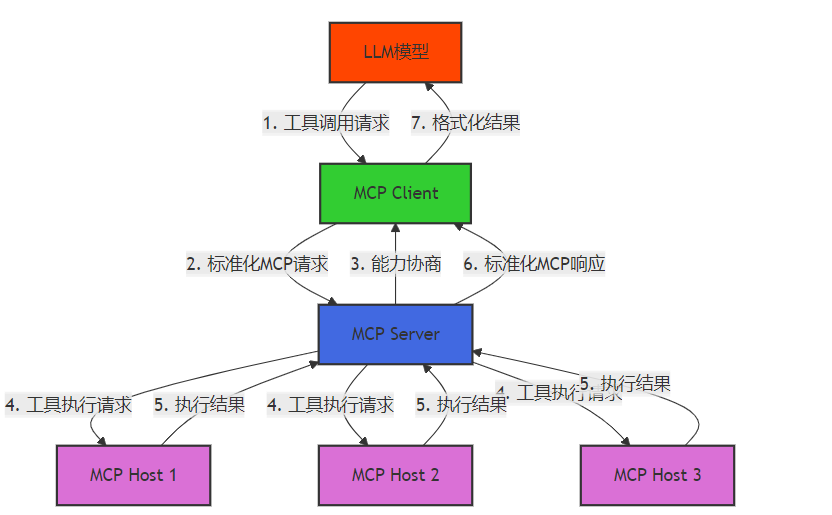
架构组件说明:
- MCP Client:运行在模型侧,负责将模型的工具调用请求转换为标准化的MCP请求,并将MCP响应转换为模型可理解的格式。
- MCP Server:作为中枢,负责工具注册、能力协商、请求路由和结果聚合。
- MCP Host:运行具体的工具,负责工具的执行和资源管理。
3.2 MCP通信协议详解
MCP v2.0采用JSON作为数据交换格式,定义了一套完整的请求-响应机制:
// MCP请求格式示例
{
  "id": "req_1234567890",
  "version": "2.0",
  "timestamp": "2025-12-30T12:00:00Z",
  "type": "execute",
  "tool": {
    "name": "file_reader",
    "version": "1.0",
    "parameters": {
      "path": "/data/sample.txt",
      "encoding": "utf-8"
    }
  },
  "context": {
    "user_id": "user_001",
    "session_id": "session_123"
  }
}// MCP响应格式示例
{
"id": "req_1234567890",
"version": "2.0",
"timestamp": "2025-12-30T12:00:01Z",
"type": "response",
"status": "success",
"result": {
"content": "Hello, MCP!",
"metadata": {
"file_size": 12,
"read_time": 0.001
}
},
"context": {
"user_id": "user_001",
"session_id": "session_123"
}
}3.3 MCP工具定义标准
MCP采用JSON Schema定义工具的元数据和参数规范,确保工具的标准化和可验证性:
// MCP工具定义示例
{
  "name": "file_reader",
  "version": "1.0",
  "description": "读取文件内容的工具",
  "parameters": {
    "type": "object",
    "properties": {
      "path": {
        "type": "string",
        "description": "文件路径",
        "pattern": "^/[a-zA-Z0-9_/]+$" // 限制路径格式,防止路径遍历攻击
      },
      "encoding": {
        "type": "string",
        "description": "文件编码",
        "default": "utf-8",
        "enum": ["utf-8", "gbk", "ascii"]
      }
    },
    "required": ["path"]
  },
  "returns": {
    "type": "object",
    "properties": {
      "content": {
        "type": "string",
        "description": "文件内容"
      },
      "metadata": {
        "type": "object",
        "properties": {
          "file_size": {
            "type": "integer",
            "description": "文件大小(字节)"
          },
          "read_time": {
            "type": "number",
            "description": "读取时间(秒)"
          }
        }
      }
    }
  },
  "security": {
    "permissions": ["file:read"],
    "rate_limit": {
      "requests_per_minute": 60
    }
  }
}
3.4 MCP动态能力协商机制
MCP v2.0的核心特性之一是动态能力协商,它允许模型和工具之间协商支持的能力和版本:
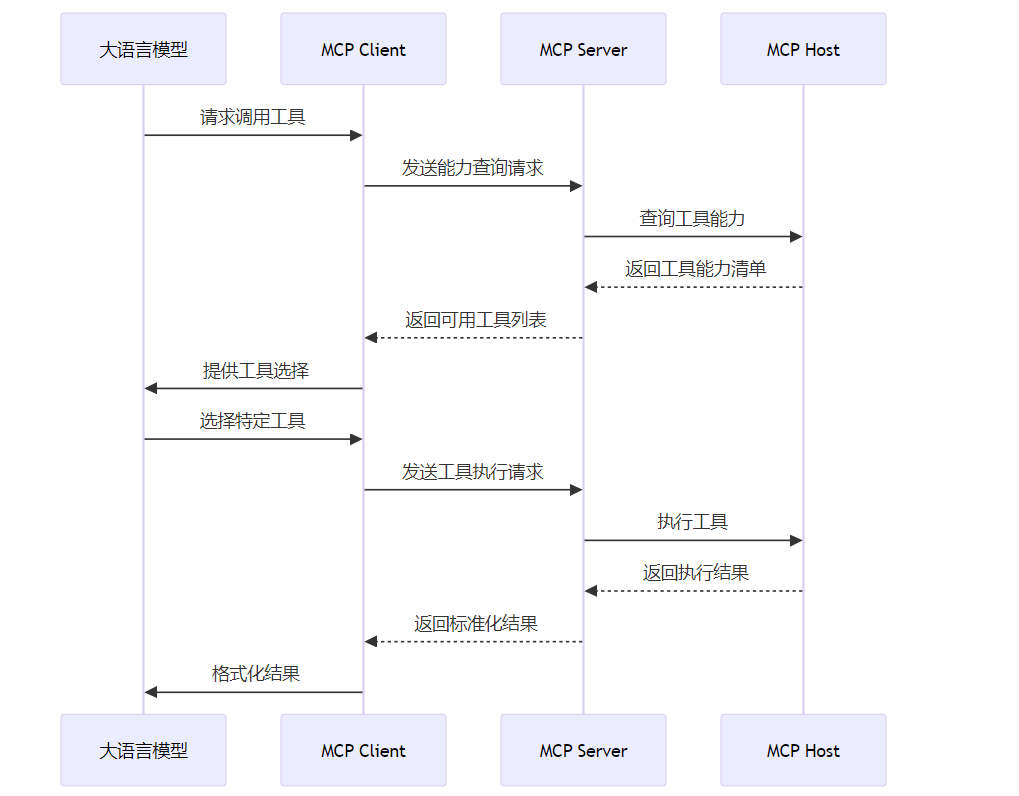
动态能力协商的优势:
- 版本兼容:支持不同版本工具的共存和兼容。
- 功能扩展:允许工具动态添加新功能,而无需修改模型。
- 资源优化:根据模型需求和资源状况,动态调整工具的使用。
- 安全增强:只向模型暴露其被授权使用的工具和功能。
4. 与主流方案深度对比
4.1 MCP vs OpenAI Tools
维度 | OpenAI Tools | MCP v2.0 | 优势方 |
|---|---|---|---|
平台依赖 | 仅支持OpenAI模型 | 跨平台支持 | MCP |
部署方式 | 云端唯一 | 支持本地部署和私有部署 | MCP |
安全性 | 基本权限控制 | 完善的权限管理和审计 | MCP |
可扩展性 | 有限的工具数量 | 支持大规模工具生态 | MCP |
异步支持 | 有限 | 全面支持异步通信 | MCP |
动态协商 | 不支持 | 支持动态能力协商 | MCP |
生态开放性 | 封闭生态 | 开放生态 | MCP |
4.2 MCP vs LangChain Tools
维度 | LangChain Tools | MCP v2.0 | 优势方 |
|---|---|---|---|
设计理念 | 框架集成 | 标准化协议 | MCP |
跨平台性 | 依赖LangChain框架 | 独立于框架 | MCP |
性能 | 框架开销较大 | 轻量级协议 | MCP |
安全性 | 依赖框架安全 | 内置安全机制 | MCP |
生态规模 | 框架内生态 | 跨框架生态 | MCP |
长期演进 | 依赖框架更新 | 独立演进 | MCP |
4.3 MCP vs 传统插件架构
维度 | 传统插件架构 | MCP v2.0 | 优势方 |
|---|---|---|---|
模型耦合度 | 高耦合 | 低耦合 | MCP |
工具隔离 | 有限隔离 | 完全隔离 | MCP |
更新机制 | 需要模型更新 | 独立更新 | MCP |
资源管理 | 模型内管理 | 独立资源管理 | MCP |
安全性 | 依赖模型安全 | 内置安全机制 | MCP |
扩展性 | 受限于模型 | 无限扩展 | MCP |
5. 技术深度拆解与实现分析
5.1 MCP Server最小实现
下面是使用Python FastAPI实现的MCP Server最小示例:
from fastapi import FastAPI, HTTPException
from pydantic import BaseModel
import uvicorn
import json

app = FastAPI(title="MCP Server", version="2.0")

# 工具注册表
tools_registry = {}

# 工具定义模型
class ToolDefinition(BaseModel):
    name: str
    version: str
    description: str
    parameters: dict
    returns: dict
    security: dict = {}

# 工具执行请求模型
class ToolExecuteRequest(BaseModel):
    id: str
    version: str
    timestamp: str
    type: str
    tool: dict
    context: dict = {}

# 注册工具
@app.post("/tools/register")
async def register_tool(tool_def: ToolDefinition):
    tool_key = f"{tool_def.name}:{tool_def.version}"
    tools_registry[tool_key] = tool_def.dict()
    return {"status": "success", "message": f"Tool {tool_key} registered successfully"}

# 获取工具列表
@app.get("/tools/list")
async def list_tools():
    return {"tools": list(tools_registry.values())}

# 执行工具
@app.post("/execute")
async def execute_tool(request: ToolExecuteRequest):
    # 验证MCP版本
    if request.version != "2.0":
        raise HTTPException(status_code=400, detail="Unsupported MCP version")

    tool_name = request.tool["name"]
    tool_version = request.tool.get("version", "1.0")
    tool_key = f"{tool_name}:{tool_version}"

    # 检查工具是否存在
    if tool_key not in tools_registry:
        raise HTTPException(status_code=404, detail=f"Tool {tool_key} not found")

    # 这里简化了工具执行逻辑,实际实现需要根据工具定义执行具体的工具
    # 在真实场景中,应该将请求路由到对应的MCP Host执行

    # 模拟文件读取工具执行
    if tool_name == "file_reader":
        path = request.tool["parameters"].get("path")
        encoding = request.tool["parameters"].get("encoding", "utf-8")

        try:
            with open(path, "r", encoding=encoding) as f:
                content = f.read()

            return {
                "id": request.id,
                "version": "2.0",
                "timestamp": "2025-12-30T12:00:01Z",
                "type": "response",
                "status": "success",
                "result": {
                    "content": content,
                    "metadata": {
                        "file_size": len(content),
                        "read_time": 0.001
                    }
                },
                "context": request.context
            }
        except Exception as e:
            return {
                "id": request.id,
                "version": "2.0",
                "timestamp": "2025-12-30T12:00:01Z",
                "type": "response",
                "status": "error",
                "error": {
                    "code": "execution_failed",
                    "message": str(e)
                },
                "context": request.context
            }

    # 模拟其他工具执行
    return {
        "id": request.id,
        "version": "2.0",
        "timestamp": "2025-12-30T12:00:01Z",
        "type": "response",
        "status": "success",
        "result": {
            "message": f"Tool {tool_key} executed successfully"
        },
        "context": request.context
    }

if __name__ == "__main__":
    uvicorn.run(app, host="0.0.0.0", port=8000)
运行说明:
- 安装依赖:
pip install fastapi uvicorn pydantic - 保存代码为
mcp_server.py - 运行服务器:
python mcp_server.py - 访问API文档:
http://localhost:8000/docs
5.2 MCP Client实现示例
下面是一个简单的MCP Client实现,用于与MCP Server交互:
import asyncio
import aiohttp
import json
from typing import Dict, Any, Optional

class MCPError(Exception):
    """MCP相关错误"""
    pass

class MCPClient:
    """MCP Client实现"""

    def __init__(self, server_url: str):
        self.server_url = server_url
        self.session = None

    async def __aenter__(self):
        self.session = aiohttp.ClientSession()
        return self

    async def __aexit__(self, exc_type, exc_val, exc_tb):
        await self.session.close()

    async def _send_request(self, endpoint: str, data: Dict[str, Any]) -> Dict[str, Any]:
        """发送MCP请求"""
        url = f"{self.server_url}{endpoint}"
        async with self.session.post(url, json=data) as response:
            if response.status != 200:
                raise MCPError(f"Request failed with status {response.status}: {await response.text()}")
            return await response.json()

    async def list_tools(self) -> Dict[str, Any]:
        """获取可用工具列表"""
        url = f"{self.server_url}/tools/list"
        async with self.session.get(url) as response:
            if response.status != 200:
                raise MCPError(f"Failed to list tools: {await response.text()}")
            return await response.json()

    async def execute_tool(self, tool_name: str, tool_version: str, parameters: Dict[str, Any],
                         user_id: str, session_id: str) -> Dict[str, Any]:
        """执行工具"""
        request = {
            "id": f"req_{asyncio.get_event_loop().time()}",
            "version": "2.0",
            "timestamp": json.dumps(asyncio.get_event_loop().time()),
            "type": "execute",
            "tool": {
                "name": tool_name,
                "version": tool_version,
                "parameters": parameters
            },
            "context": {
                "user_id": user_id,
                "session_id": session_id
            }
        }

        return await self._send_request("/execute", request)

# 示例用法
async def main():
    async with MCPClient("http://localhost:8000") as client:
        # 获取工具列表
        tools = await client.list_tools()
        print("可用工具:", json.dumps(tools, indent=2, ensure_ascii=False))

        # 执行文件读取工具(假设已注册)
        try:
            result = await client.execute_tool(
                tool_name="file_reader",
                tool_version="1.0",
                parameters={"path": "/data/sample.txt"},
                user_id="user_001",
                session_id="session_123"
            )
            print("执行结果:", json.dumps(result, indent=2, ensure_ascii=False))
        except MCPError as e:
            print(f"执行失败: {e}")

if __name__ == "__main__":
    asyncio.run(main())
运行说明:
- 安装依赖:
pip install aiohttp - 保存代码为
mcp_client.py - 确保MCP Server正在运行
- 运行客户端:
python mcp_client.py
5.3 MCP工具动态注册示例
下面是一个示例,展示如何动态注册工具到MCP Server:
import asyncio
import aiohttp
import json

async def register_tool():
    """注册文件读取工具到MCP Server"""
    tool_definition = {
        "name": "file_reader",
        "version": "1.0",
        "description": "读取文件内容的工具",
        "parameters": {
            "type": "object",
            "properties": {
                "path": {
                    "type": "string",
                    "description": "文件路径",
                    "pattern": "^/[a-zA-Z0-9_/]+$"
                },
                "encoding": {
                    "type": "string",
                    "description": "文件编码",
                    "default": "utf-8",
                    "enum": ["utf-8", "gbk", "ascii"]
                }
            },
            "required": ["path"]
        },
        "returns": {
            "type": "object",
            "properties": {
                "content": {
                    "type": "string",
                    "description": "文件内容"
                },
                "metadata": {
                    "type": "object",
                    "properties": {
                        "file_size": {
                            "type": "integer",
                            "description": "文件大小(字节)"
                        },
                        "read_time": {
                            "type": "number",
                            "description": "读取时间(秒)"
                        }
                    }
                }
            }
        },
        "security": {
            "permissions": ["file:read"],
            "rate_limit": {
                "requests_per_minute": 60
            }
        }
    }

    async with aiohttp.ClientSession() as session:
        url = "http://localhost:8000/tools/register"
        async with session.post(url, json=tool_definition) as response:
            if response.status != 200:
                print(f"注册失败: {await response.text()}")
            else:
                result = await response.json()
                print(f"注册成功: {result}")

if __name__ == "__main__":
    asyncio.run(register_tool())
运行说明:
- 安装依赖:
pip install aiohttp - 保存代码为
register_tool.py - 确保MCP Server正在运行
- 运行注册脚本:
python register_tool.py - 检查API文档,确认工具已成功注册
5. 实际工程意义、潜在风险与局限性分析
5.1 MCP的实际工程意义
- 提高开发效率:标准化的协议和工具定义,减少了重复开发和适配工作。
- 增强系统安全性:内置的安全机制,降低了工具调用的安全风险。
- 促进生态发展:开放的生态系统,加速了工具的开发和共享。
- 支持大规模部署:分布式架构,支持高并发和大规模工具调用。
- 为Agent时代奠定基础:标准化的工具调用机制,是多Agent协作的核心基础设施。
5.2 MCP的潜在风险
- 协议复杂性:MCP v2.0引入了较多新特性,增加了学习和实现的复杂性。
- 性能开销:相对于直接的Function Calling,MCP的分层架构会带来一定的性能开销。
- 生态碎片化风险:如果MCP未能成为真正的行业标准,可能导致新的生态碎片化。
- 安全挑战:虽然MCP内置了安全机制,但随着工具生态的扩大,新的安全挑战也会不断出现。
- 兼容性问题:不同版本的MCP之间可能存在兼容性问题,需要有效的版本管理机制。
5.3 MCP的局限性
- 初期学习曲线较陡:对于不熟悉分布式系统和通信协议的开发者,MCP的学习曲线较陡。
- 性能开销:在对延迟要求极高的场景下,MCP的分层架构可能不是最佳选择。
- 依赖网络通信:MCP依赖网络通信,在网络不稳定的环境下可能影响可靠性。
- 工具生态尚不成熟:虽然MCP的生态正在快速发展,但与成熟的插件生态相比,仍有差距。
- 标准化工作仍在进行中:MCP v2.0是一个相对较新的协议,标准化工作仍在进行中,可能会有后续的变更。
6. 未来趋势展望与个人前瞻性预测
6.1 MCP的短期发展趋势(2026-2027)
- 广泛采用:越来越多的AI平台和工具开发者将采用MCP作为标准通信协议。
- 生态壮大:围绕MCP的工具生态将快速壮大,出现专门的MCP工具市场和注册中心。
- 性能优化:MCP的实现将进一步优化,降低通信开销,提高执行效率。
- 安全增强:随着安全需求的增加,MCP将引入更高级的安全特性,如零信任架构和区块链审计。
- 多模态支持:MCP将扩展支持多模态工具,包括图像、音频、视频等。
6.2 MCP的长期发展趋势(2028-2030)
- 成为行业标准:MCP将成为AI工具调用的行业标准,类似于HTTP在Web中的地位。
- Agent时代的核心基础设施:MCP将成为多Agent协作系统的核心基础设施,支持复杂的任务编排和资源管理。
- 与AI OS深度集成:MCP将与AI OS深度集成,成为AI系统与外部世界交互的标准接口。
- 跨域协作支持:MCP将支持跨组织、跨平台的工具调用,实现真正的全球AI工具生态。
- 自适应能力:MCP将引入自适应能力,能够根据模型需求和资源状况动态调整工具的使用策略。
6.3 个人前瞻性预测
- MCP将重塑AI工具生态:未来3-5年内,MCP将彻底改变AI工具的开发和使用方式,形成一个统一、开放、安全的工具生态。
- MCP将成为Agent协作的"TCP/IP":在Agent时代,MCP将扮演类似TCP/IP的角色,成为Agent之间协作和资源共享的基础协议。
- MCP将推动AI应用的普及:标准化的工具调用机制,将降低AI应用开发的门槛,推动AI应用的普及。
- MCP将促进AI安全的发展:内置的安全机制和审计能力,将促进AI安全技术的发展和应用。
- MCP将催生新的商业模式:围绕MCP将出现新的商业模式,如工具即服务(TaaS)、工具市场和工具订阅等。
7. 结论与行动建议
7.1 结论
MCP不是另一个Plugin,而是一种全新的AI工具通信范式。它从根本上改变了AI工具的调用方式,解决了当前AI系统中的不可控问题,为未来Agent时代奠定了基础。MCP v2.0引入的动态能力协商、分布式架构和生态集成等特性,使其成为AI工具生态的中枢,连接模型、工具和应用,实现标准化、安全、高效的工具调用。
7.2 行动建议
- 对于AI平台开发者:
- 考虑集成MCP支持,提供标准化的工具调用接口。
- 参与MCP社区,推动协议的完善和发展。
- 构建MCP兼容的工具生态,吸引更多开发者参与。
- 对于工具开发者:
- 学习MCP协议,开发MCP兼容的工具。
- 将现有工具适配为MCP标准,扩大工具的应用范围。
- 参与MCP工具市场,提高工具的曝光度和使用率。
- 对于AI应用开发者:
- 采用MCP作为工具调用的标准,提高应用的可扩展性和安全性。
- 利用MCP的动态能力协商机制,优化工具的使用。
- 关注MCP生态的发展,及时采用新的工具和特性。
- 对于研究人员:
- 研究MCP在多Agent协作和智能系统中的应用。
- 探索MCP的性能优化和安全增强技术。
- 关注MCP与未来模型能力的适配和演进。
7.3 最终思考
MCP的出现标志着AI工具生态进入了一个新的阶段。它不仅仅是一种协议,更是一种AI工具生态的全新组织方式。随着MCP的广泛采用和生态的不断壮大,我们将迎来一个更加开放、安全、高效的AI工具时代。作为AI领域的从业者,我们应该积极拥抱MCP,参与到这场AI工具生态的变革中来,共同推动AI技术的发展和应用。
参考链接:
- MCP官方GitHub仓库:MCP协议规范和参考实现
- MCP v2.0发布说明:详细介绍MCP v2.0的新特性
- FastAPI官方文档:用于构建MCP Server的Web框架
- Python asyncio文档:Python异步编程库
- aiohttp官方文档:Python异步HTTP客户端/服务器库
附录(Appendix):
MCP v2.0核心术语表
术语 | 描述 |
|---|---|
MCP | Model Communication Protocol,模型通信协议,用于大语言模型与外部工具的安全交互 |
MCP Client | 运行在模型侧,负责将模型的工具调用请求转换为标准化的MCP请求 |
MCP Server | 作为中枢,负责工具注册、能力协商、请求路由和结果聚合 |
MCP Host | 运行具体的工具,负责工具的执行和资源管理 |
动态能力协商 | 模型与工具之间动态协商支持的能力和版本 |
工具定义 | 使用JSON Schema定义工具的元数据和参数规范 |
异步通信 | 非阻塞的通信方式,提高系统的并发处理能力 |
分布式架构 | 采用Client-Server-Host三层架构,支持多工具协同和负载均衡 |
MCP v2.0 API端点列表
端点 | 方法 | 描述 |
|---|---|---|
/tools/register | POST | 注册新工具 |
/tools/list | GET | 获取可用工具列表 |
/execute | POST | 执行工具 |
/negotiate | POST | 进行能力协商 |
/metrics | GET | 获取服务器指标 |
/health | GET | 健康检查 |
环境配置要求
组件 | 版本要求 |
|---|---|
Python | ≥ 3.9 |
FastAPI | ≥ 0.100.0 |
uvicorn | ≥ 0.20.0 |
aiohttp | ≥ 3.8.0 |
pydantic | ≥ 2.0.0 |
关键词: MCP, Model Communication Protocol, AI工具协议, 动态能力协商, 分布式架构, 异步通信, FastAPI, Python asyncio, 工具生态
本文参与 腾讯云自媒体同步曝光计划,分享自作者个人站点/博客。
原始发表:2026-01-03,如有侵权请联系 cloudcommunity@tencent.com 删除
评论
登录后参与评论
推荐阅读
目录
腾讯云开发者

Copyright © 2013 - 2026 Tencent Cloud. All Rights Reserved. 腾讯云 版权所有
深圳市腾讯计算机系统有限公司 ICP备案/许可证号:粤B2-20090059  粤公网安备44030502008569号
腾讯云计算(北京)有限责任公司 京ICP证150476号 | 京ICP备11018762号