Langchain4j-01
原创
Langchain4j-01
原创
叶佳骏
发布于 2025-10-16 08:59:28
发布于 2025-10-16 08:59:28
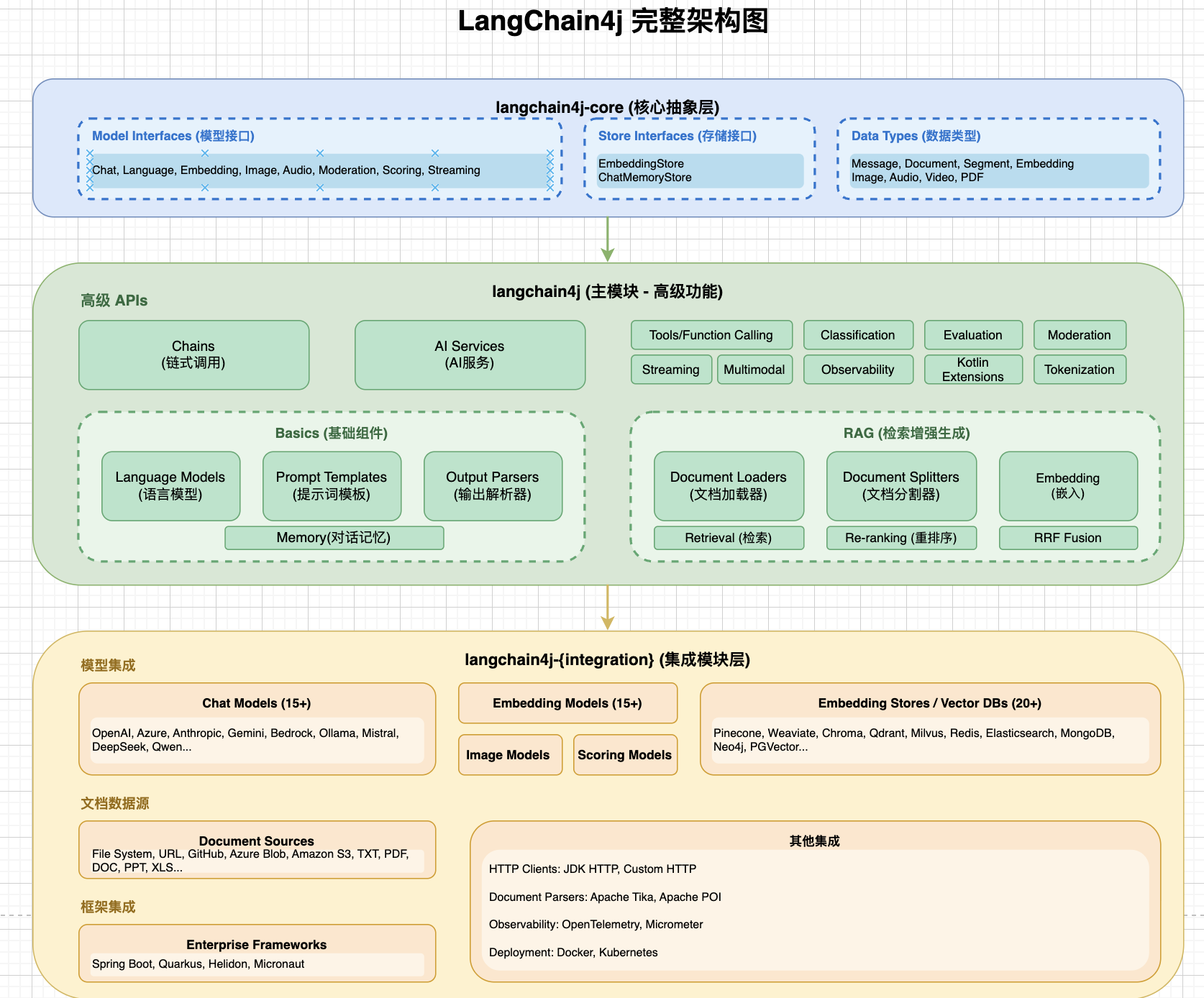
image.png
官网:https://docs.langchain4j.dev/ *本文大部分内容来源于官网*
ChatModel
ChatModel 是 LangChain4j 中与 LLMs 交互的低级 API,提供最强大的灵活性和功能。还有一个高级 API(AI Sercices)。一般建议直接使用AI Sercices。
ChatModel核心方法:
https://docs.langchain4j.dev/apidocs/dev/langchain4j/model/chat/ChatModel.html
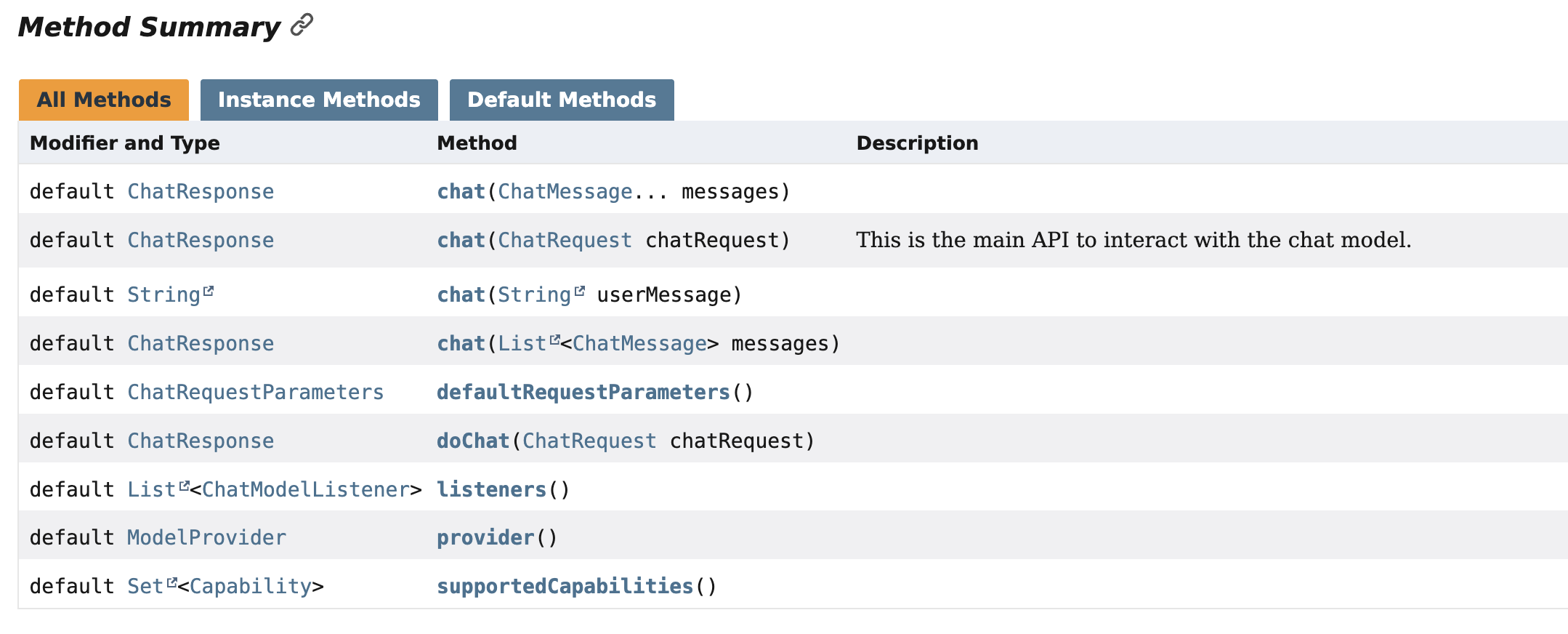
image.png|600
可以看到,ChatModel支持直接传入文本进行对话。如果需要传入多条消息,可以通过传入多个ChatMeassage来实现。
如果想要自定义请求(例如,指定模型名称、温度、工具、JSON 模式等),可以使用 chat(ChatRequest)。例如:
ChatRequest chatRequest = ChatRequest.builder()

    .messages(...)

    .modelName(...)

    .temperature(...)

    .topP(...)

    .topK(...)

    .frequencyPenalty(...)

    .presencePenalty(...)

    .maxOutputTokens(...)

    .stopSequences(...)

    .toolSpecifications(...)

    .toolChoice(...)

    .responseFormat(...)

    .parameters(...) // you can also set common or provider-specific parameters all at once

    .build();


ChatResponse chatResponse = chatModel.chat(chatRequest);
ChatMeassage类型:
1、UserMessage :这是一个来自用户的消息。用户可以是应用程序的最终用户(人类)或应用程序本身。根据 LLM 支持的模态, UserMessage 可以包含纯文本( String) )或其他模态。
2、AiMessage : 这是一条由 AI 生成的消息,作为对发送的消息的回应。它可以包含:
text():文本内容thinking(): 思考/推理内容toolExecutionRequests(): 执行工具的请求。attributes(): 额外属性,通常是供应商特定的
3、SystemMessage : 这是一条来自系统的消息。通常是开发者应该定义这条消息的内容。在这里写明 LLM 在这次对话中的角色,它应该如何表现,以何种风格回答等。LLM 被训练得更关注 SystemMessage 这类消息,而不是其他类型的消息,所以请小心,最好不要让最终用户自由定义或注入一些输入到 SystemMessage 中。通常,它位于对话的开始。
- 一旦添加,
SystemMessage总是被保留。 - 一次只能持有一个
SystemMessage。 - 如果添加了内容相同的新
SystemMessage,则会被忽略。 - 如果添加了内容不同的新
SystemMessage,则替换之前的那个。
4、CustomMessage :这是一条自定义消息,可以包含任意属性。此消息类型只能由支持它的 ChatModel 实现(目前只有 Ollama)使用。
Multiple ChatMessages
为什么需要提供多个 ChatMessage 作为输入,而不是只有一个?这是因为 LLMs 本质上是无状态的,意味着它们不保持对话的状态。所以,如果想支持多轮对话,应该注意管理对话的状态。
使用Multiple ChatMessages可以将多轮对话的信息进行管理
Multimodality多模态
UserMessage 不仅可以包含文本,还可以包含其他类型的内容。 UserMessage 包含一个 List<Content> contents 。 Content 是一个接口,有以下实现:TextContent ImageContent AudioContent VideoContent PdfFileContent
注:使用时需要关注对应的大模型是否支持多模态。在此查看:https://docs.langchain4j.dev/integrations/language-models
使用方式:
UserMessage userMessage = UserMessage.from(

    TextContent.from("Describe the following image"),

    ImageContent.from("https://example.com/cat.jpg")

);

ChatResponse response = model.chat(userMessage);
原创声明:本文系作者授权腾讯云开发者社区发表,未经许可,不得转载。
如有侵权,请联系 cloudcommunity@tencent.com 删除。
原创声明:本文系作者授权腾讯云开发者社区发表,未经许可,不得转载。
如有侵权,请联系 cloudcommunity@tencent.com 删除。
评论
登录后参与评论
推荐阅读
目录
腾讯云开发者

Copyright © 2013 - 2026 Tencent Cloud. All Rights Reserved. 腾讯云 版权所有
深圳市腾讯计算机系统有限公司 ICP备案/许可证号:粤B2-20090059  粤公网安备44030502008569号
腾讯云计算(北京)有限责任公司 京ICP证150476号 | 京ICP备11018762号