[C#]winformYOLO区域检测任意形状区域绘制射线算法实现

[C#]winformYOLO区域检测任意形状区域绘制射线算法实现

git clone firc-dataset
发布于 2025-07-20 14:41:27
发布于 2025-07-20 14:41:27
【简单介绍】
Winform OpenCVSharp YOLO区域检测与任意形状区域射线绘制算法实现
在现代安全监控系统中,区域检测是一项至关重要的功能。通过使用Winform结合OpenCVSharp库,并结合YOLO(You Only Look Once)算法,我们可以实现高效且精确的区域检测。同时,为了更直观地展示情况,我们实现了任意形状区域的射线绘制算法。
该算法可以根据用户的需要,在监控画面上绘制任意形状的区域。这样,监控人员可以更加直观地了解入侵目标的位置和移动轨迹。
【效果展示】
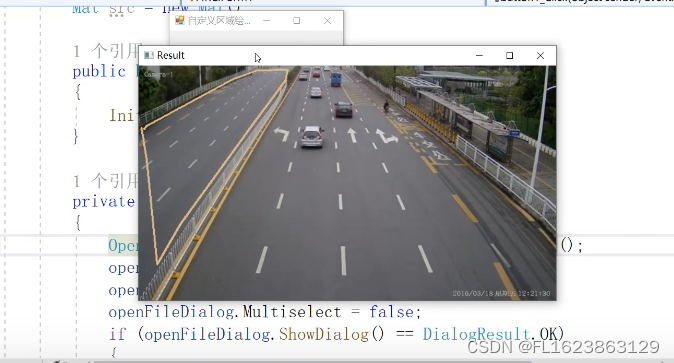
【实现部分代码】
using System;
using System.Collections.Generic;
using System.ComponentModel;
using System.Data;
using System.Diagnostics;
using System.Drawing;
using System.Linq;
using System.Text;
using System.Threading.Tasks;
using System.Windows.Forms;
using OpenCvSharp;

namespace FIRC
{
    public partial class Form1 : Form
    {
        Mat src = new Mat();

        public Form1()
        {
            InitializeComponent();
        }

        private void button1_Click(object sender, EventArgs e)
        {
            OpenFileDialog openFileDialog = new OpenFileDialog();
            openFileDialog.Filter = "视频文件(*.*)|*.mp4";
            openFileDialog.RestoreDirectory = true;
            openFileDialog.Multiselect = false;
            if (openFileDialog.ShowDialog() == DialogResult.OK)
            {

                VideoCapture capture = new VideoCapture(openFileDialog.FileName);
                bool first = true;
                List<OpenCvSharp.Point> points = new List<OpenCvSharp.Point>();
                if (!capture.IsOpened())
                {
                    Console.WriteLine("video not open!");
                    return;
                }
                Mat frame = new Mat();
                while (true)
                {

                    capture.Read(frame);
                    if (frame.Empty())
                    {
                        Console.WriteLine("data is empty!");
                        break;
                    }
                    if(first)
                    {
                        first = false;
                        AreaManager am = new AreaManager(frame);
                        points = am.Points;
                    }
                    frame = AreaManager.DrawArea(frame,points);
                    Cv2.ImShow("Result", frame);
                    int key = Cv2.WaitKey(10);
                    if (key == 27)
                        break;
                }

                capture.Release();

            }


        }


        private void Form1_Load(object sender, EventArgs e)
        {

        }


    }
}
【测试环境】
vs2019,netframework4.7.2,opencvsharp4.7.2
【视频演示】
https://www.bilibili.com/video/BV1z6421F7jx
【代码演示下载】
https://download.csdn.net/download/FL1623863129/89006082
【特别注意】
代码只是实现区域自定义绘制和判断点是否在区域内的功能,代码不包含YOLO检测实现,请认真看视频演示,不要盲目去下载源码。
本文参与 腾讯云自媒体同步曝光计划,分享自作者个人站点/博客。
原始发表:2024-03-21,如有侵权请联系 cloudcommunity@tencent.com 删除
腾讯云开发者

Copyright © 2013 - 2026 Tencent Cloud. All Rights Reserved. 腾讯云 版权所有
深圳市腾讯计算机系统有限公司 ICP备案/许可证号:粤B2-20090059  粤公网安备44030502008569号
腾讯云计算(北京)有限责任公司 京ICP证150476号 | 京ICP备11018762号