故障定位与 AI 结合前后端编码实践


我们的系统想做一个故障定位与 AI 结合的功能,这其实是AIOps的一部分。大概背景就是:前期已经完成在系统里接入ES查询日志并展示,各个微服务将接收上游和请求下游的相关信息(比如模块、接口、错误码等)打印并收集到ES中,我们想给用户直观展示一个从用户端到最终数据端的一个请求调用链路图,并展示有问题的节点,点击问题节点可以将错误日志传给AI大模型分析并给出解决方案。本文从编码角度给出具体过程中的实现和遇到的一些问题。
背景(故障定位的难点)
系统故障定位主要有三大难点(参考网络):
其一是它成因的复杂性。在应对服务故障的时候,需要深入分析以识别问题的本质,是单个服务器或实例的问题,还是网络故障或其他外部因素所致。 如果故障仅出现在少量机器上,通常可以判断为机器本身的问题,而不是上层服务引起的实例异常。如果同一网段的多台机器同时出现故障,这通常指向网络异常,可能是网络配置或者网络设备出现了异常。如果同一型号、同一批次的机器同时出现问题,很可能是这一批次的机器存在共性问题,硬件层面存在缺陷。
其二是调用链路的深度和复杂性。随着云计算和大数据技术的广泛应用,分布式和微服务架构的普及使得业务系统间的交互变得更加复杂。这导致在故障发生时,追踪故障的因果关系变得极为困难,主要的原因体现在两点。 首先是调用层次深的问题,在多层调用的系统中,追踪和定位故障源头变得更加困难,因为一个故障可能在多个服务和组件间传播。其次是故障之间的先后顺序和因果关系如何确定的问题,例如确定是服务 A 的故障导致了服务 B 的问题,还是相反。这种因果关系的确定有时类似于经典的“先有鸡还是先有蛋”问题,凸显了问题的复杂性和解决难度。
其三是导致故障的可能性是多样的。比如在流量出现波动的时候,原因可能相当复杂,比如促销活动、节假日影响,或者是内部系统故障。外部事件,如节假日或特殊活动,往往会对流量产生显著影响,这些因素在故障分析时可能不会立即被考虑到。同时,也必须排查是不是内部系统的问题导致了流量波动,比如服务故障或性能瓶颈。 因此在故障定位领域,场景的探索可以归纳为三个主要方向,每个方向都有针对不同问题的解决策略。 多维定位(下钻定位):这个方向涉及从不同维度深入分析故障,通过细化问题来定位故障的具体位置。它要求能够识别和分析多个相关指标和日志,以便精确地找到问题根源。例如,通过下钻到特定的服务、实例或时间段,逐步缩小故障范围。 因果关系判断:在复杂的系统中,故障可能由一系列事件引起,确定这些事件之间的因果关系是至关重要的。这个方向要求开发智能算法,能够分析时间序列数据,识别先行指标,从而判断哪些事件是故障的直接原因,哪些是间接影响或结果。 重复故障定位:针对系统重复出现的故障,这个方向关注于识别故障模式和规律,以及它们重复出现的原因。通过历史数据分析,可以建立模型预测故障发生的可能性,并采取措施防止故障再次发生或减少其影响。
基于此,我们前期已经完成在系统里接入ES查询日志并展示,各个微服务将接收上游和请求下游的相关信息(比如模块、接口、错误码等)打印并收集到ES中,我们想给用户直观展示一个从用户端到最终数据端的一个请求调用链路图,并展示有问题的节点,点击问题节点可以将错误日志传给AI大模型分析并给出解决方案。
技术方案
前端:Vue2+ElementUI 后端:Go+Gin,涉及Channel的应用 前端调用图绘制框架:使用AntV4.8.21框架渲染,对比了一些,这个还比较好用,由于项目使用Vue2使用4.x版本比较稳定。 前端SSE通信框架:原生EventSource或者@microsoft/fetch-event-source
前后端通信HTTP+SSE,由于我这里前端使用原生EventSource,不支持POST请求发送数据,所以直接需要两次请求来完成SSE流程:
- 第一个请求使用Axios往后端发送请求,将需要传输给大模型的数据传递到后端,后端通过唯一ID将其缓存;
- 第二个请求即是SSE请求,原生EventSource只支持GET,所以我们可以在路径中拼接上一个请求的ID传递给后端,后端通过ID查询上一请求的缓存数据发给大模型接收流式数据;
- 后面对这个流程进行了一次优化,第一次请求就发送数据给大模型,接收大模型第一条消息则成功,此时如果大模型API异常(超时)则可以不用发送第二次请求了,以免第二次请求又没有数据。详细可以看后面具体的代码实现。
实现效果
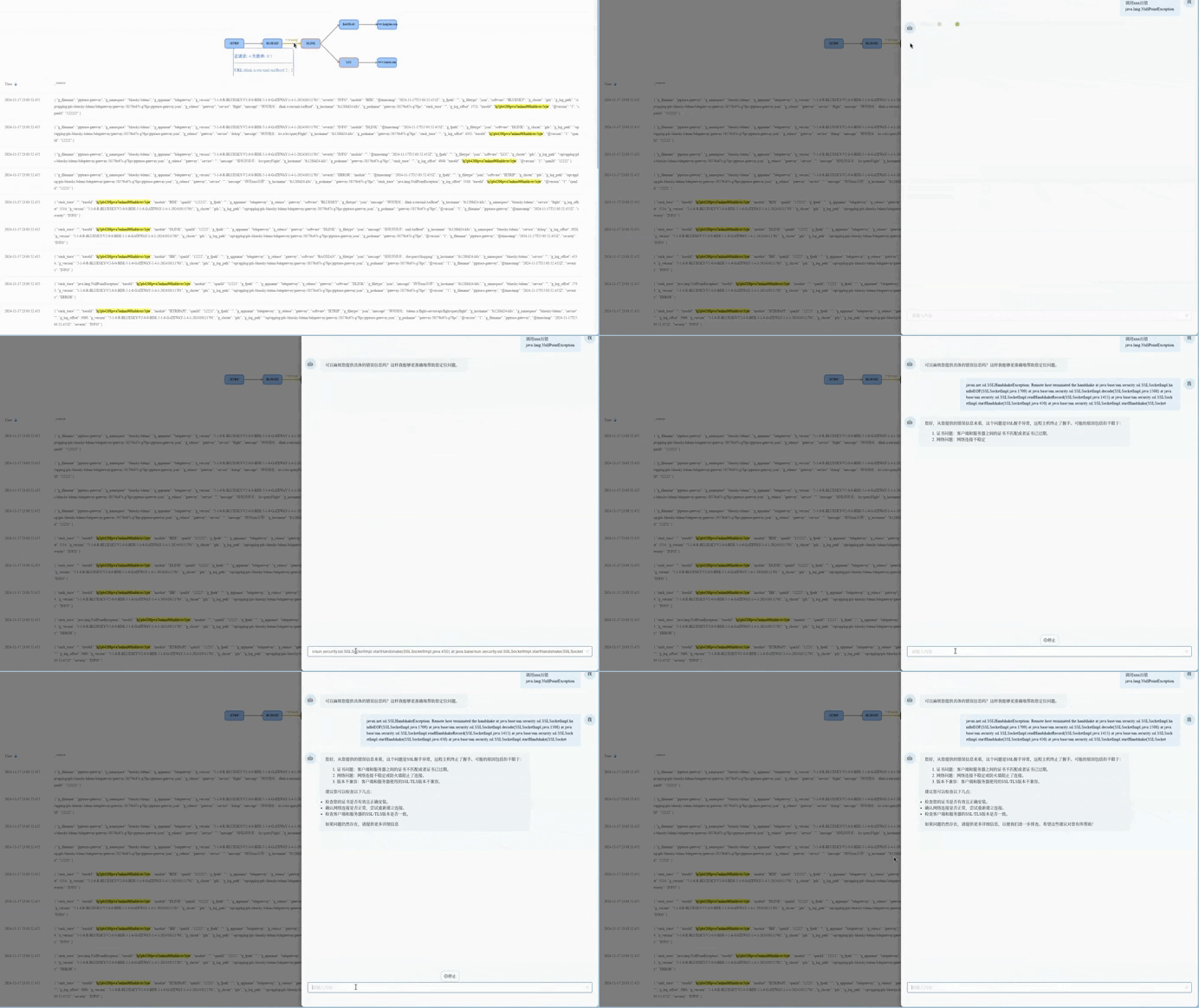
系统能够通过日志中的 TraceID 将多个服务的调用链日志串联起来,生成直观的调用链关系图,用户可以清晰地看到整个系统的请求调用流程。当点击故障节点时,会弹出大模型交互图,将错误信息发送给大模型,大模型会对错误信息进行分析并给出解决方案,用户还可以进一步与大模型进行对话交互,深入探讨故障的原因和解决方法。
功能实现
SSE Demo
为了理解SSE,我最初找了一个Demo,前端使用Node.js直接fetch调用后台SSE接口而不是使用原生EventSource或者@microsoft/fetch-event-source,后端使用python脚本分别写了一个支持GET和POST请求方法的SSE样例
sse-get.py文件sse-post.py文件sse.js文件
sse-get.py文件
from flask import Flask, Response, stream_with_context
import time
import json

app = Flask(__name__)


@app.route('/events/')
def events():
    def generate():
        message = f"Some sample message like ChatGPT would generate. {time.ctime()}"
        for i, char in enumerate(message):
            data_dict = {
                "answer": char
            }
            json_data = json.dumps(data_dict)
            yield f"data: {json_data}\n\n"
            time.sleep(0.1)

        # 全部字符返回完毕后,等待10秒结束此次传输
        time.sleep(10)

    return Response(stream_with_context(generate()), mimetype="text/event-stream")


if __name__ == "__main__":
    app.run(debug=True)
启动:
python3 sse-get.pysse-post.py文件
from flask import Flask, Response, stream_with_context, request
import time
import json

app = Flask(__name__)

@app.route('/events/', methods=['POST'])
def events():
    # 从请求体中获取参数 content
    content = request.json.get('content', '')

    def generate():
        for i, char in enumerate(content):
            data_dict = {
                "answer": char
            }
            json_data = json.dumps(data_dict)
            yield f"data: {json_data}\n\n"
            time.sleep(0.1)

        # 全部字符返回完毕后,等待10秒结束此次传输
        time.sleep(10)

    return Response(stream_with_context(generate()), mimetype="text/event-stream")


if __name__ == "__main__":
    app.run(debug=True)
启动:
python3 sse-post.pysse.js文件
const url = 'http://localhost:5000/events';
async function getResponse(content) {
    const resp = await fetch(url, {
        method: 'POST',
        headers: {
            'Content-Type': 'application/json',
        },
        body: JSON.stringify({ content }),
    });

    // const text = await resp.text();
    // console.log(txt);
    const reader = resp.body.getReader()
    while (1) {
        const textDecoder = new TextDecoder();
        const { done, value } = await reader.read();
        if (done) {
            break;
        }
        const txt = textDecoder.decode(value);
        console.log(done, txt);
    }
}

getResponse('这是消息')
启动:
node sse.js前后端启动后就可以看到流式输出的效果了。
[y@Ubuntu ~$ node sse.js
false data: {"answer": "\u8fd9"}


false data: {"answer": "\u662f"}


false data: {"answer": "\u6d88"}


false data: {"answer": "\u606f"}
前端代码实现
父组件(主页面): 就是查询日志的界面,将GraphImg(调用关系图子组件)和DialogBox(大模型聊天对话框子组件)引入 GraphImg(调用关系图子组件):显示图的子组件 DialogBox(大模型聊天对话框子组件):显示对话框与大模型对话的子组件
调用关系图
后端核心使用DFS或BFS算法来生成调用图需要的数据即可,这里只记录前端代码; 使用AntV4.8.21框架渲染,这里将调用图写为组件,父组件负责边和节点的数据即可。
聊天交互对话框
聊天对话框也写成组件,在组件内会发送两次请求:
第一次请求log_chat_send将数据发送给后端,后端去连接大模型接收数据,并将数据放到Channel中,如果连接大模型失败了就不需要出发SSE请求了;如果请求大模型成功了就把本次请求的ID和对应的Channel缓存起来,以便第二次请求能够取到数据。
第二次请求就是将第一次请求返回的ID请求后端开始监听EventSource事件请求,后端循环取第一次请求放到Channel中的数据,直到取完为止。
这里有个疑问就是第一次缓存的数据如何清理?
我这里使用的是一个定时任务来清理Channel,定时任务使用双重机制RefCount和LastActivity来判断是否还有活跃的请求。
但是感觉这里不是很好,各位大佬有什么好建议吗?
开始没有使用定时任务,而是监听连接断开(<-gctx.Request.Context().Done())就清理一次,但是由于网络原因断开连接后SSE的自动重试机制会造成误清理导致消息发送一半就停止了(因为重试的SSE请求无法再次从缓存中取到数据)
父组件(主页面)GraphImg(调用关系图子组件)DialogBox(大模型聊天对话框子组件)
父组件(主页面)
<template>
<div>
<!--其它内容省略-->
  <!--调用关系图-->
  <div v-if="showGraph" v-loading="graphLoading">
    <GraphImg :graphData="this.graphData" @trigger-modal="showAIModal"/>
  </div>
<!--其它内容省略--->
  <!--模型对话框drawer-->
  <el-drawer :visible.sync="showAiDrawer" :wrapperClosable="false" custom-class="br-10" size="40%"
               title="ChatOps-AI引擎">
      <DialogBox :error="aiDialogData" :message="aiDialogMsg" :show="showAiDrawer"></DialogBox>
  </el-drawer>
</div>
</template>
<script>
import {log_searchGraph} from "@/api";
import GraphImg from '@/components/Log/GraphImg.vue';
import DialogBox from '@/components/Log/AIMessageBox.vue';

export default {
  components:{
    GraphImg,
    DialogBox
  },
  data(){
    return {
      aiDialogData: '',
      aiDialogMsg: '',
      showAiDrawer: false,
      graphLoading: false,
      showGraph: false,
      graphData: {
        nodes: [],
        edges: [],
      },
    }
  },
  methods: {
    showAIModal({id, msg, error}) {
      this.aiDialogMsg = msg + '  \n'
      this.aiDialogData = this.convertToMarkdown(error)
      this.showAiDrawer = true
    },
    // 请求数据, 具体如何触发去请求图表数据就和需求相关了,这里就省略
    graphSearch(query) {
      this.graphLoading = true
      log_searchGraph({
        index: this.selectIndex,
        query: JSON.stringify(query)
      }).then(res => {
        if (res && !res.error) {
          // 处理 edges,添加样式
          const processedEdges = res.edges.map(edge => {
            if (edge.hasFailures && edge.failureRatio >= 1) {
              return {
                source: edge.source,
                target: edge.target,
                style: {
                  stroke: '#F56C6C',
                  endArrow: true,
                  startArrow: false,
                },
                totalRequestCount: edge.totalRequestCount,
                failureRatio: edge.failureRatio,
                reqUrlList: edge.reqUrlList,
                label: 'error',
                labelCfg: {
                  refY: 20,
                  style: {
                    fontSize: 20,
                    fill: '#F56C6C'
                  }
                }
              };
            } else if (edge.hasFailures && edge.failureRatio > 0 && edge.failureRatio < 1) {
              return {
                source: edge.source,
                target: edge.target,
                style: {
                  stroke: '#E6A23C',
                  endArrow: true,
                  startArrow: false,
                },
                totalRequestCount: edge.totalRequestCount,
                failureRatio: edge.failureRatio,
                reqUrlList: edge.reqUrlList,
                label: 'warning',
                labelCfg: {
                  refY: 20,
                  style: {
                    fontSize: 20,
                    fill: '#E6A23C'
                  }
                }
              };
            }

            return {
              source: edge.source,
              target: edge.target,
              totalRequestCount: edge.totalRequestCount,
              failureRatio: edge.failureRatio,
              reqUrlList: edge.reqUrlList,
            };
          });
          // 有失败节点边框变色
          const processedNodes = res.nodes.map(node => {
            if (node.error !== '' || node.msg !== '') {
              return {
                id: node.id,
                label: node.label,
                error: node.error,
                msg: node.msg,
                color: '#F56C6C',
                style: {
                  stroke: '#F56C6C'
                },
              }
            }
            return node
          })

          // 使用set方法,而不是直接赋值,这样才能触发视图更新
          this.$set(this.graphData, 'nodes', processedNodes);
          this.$set(this.graphData, 'edges', processedEdges);
        } else {
          this.showGraph = false
        }
      }).catch(e => {
        this.$message.error('请求链路数据失败')
        this.showGraph = false
        console.error(e)
      }).finally(() => {
        this.graphLoading = false
      })
    },
  }
}
</script>
<style lang="scss" scoped>

::v-deep .el-drawer.br-10 {
  border-radius: 10px;
}

</style>
GraphImg(调用关系图子组件)
<template>
  <div ref="container" style="width: 100%; height: 200px;position: relative"></div>
</template>

<script>
import G6 from '@antv/g6';

export default {
  name: 'GraphImg',
  props: ['graphData'],
  data() {
    return {
      graph: null,
    };
  },
  mounted() {
    this.initGraph();
  },
  watch: {
    graphData: {
      deep: true,
      handler(newData) {
        if (this.graph) {
          this.updateGraph(newData);
        }
      },
    },
  },
  methods: {
    notifyParent(id, msg, error) {
      this.$emit('trigger-modal', {id, msg, error});
    },
    initGraph() {
      // 创建 G6 图实例
      this.graph = new G6.Graph({
        animate: true, // Boolean,可选,全局变化时否使用动画过渡
        fitView: false, // 默认:'false'。图是否自适应画布。
        fitViewPadding: [20, 40, 50, 20], //默认:0。图自适应画布时的四周留白像素值。fitView 为 true 时生效。
        fitCenter: true, // 默认:'false'。是否平移图使其中心对齐到画布中心。v3.5.1 后支持。
        container: this.$refs.container, // 指定图画布的容器 id,与第 9 行的容器对应
        // 画布宽高
        width: this.$refs.container.clientWidth,
        height: this.$refs.container.clientHeight,
        layout: {
          // Object,可选,布局的方法及其配置项,默认为 random 布局。
          type: 'dagre', // 指定为层次布局
          rankdir: 'LR', // 布局的方向。T:top(上);B:bottom(下);L:left(左);R:right(右)。可选,默认为图的中心.
          preventOverlap: true, // 防止节点重叠
          controlPoints: true,
          // nodeSize: 30        // 节点大小,用于算法中防止节点重叠时的碰撞检测。由于已经在上一节的元素配置中设置了每个节点的 size 属性,则不需要在此设置 nodeSize。
        },
        // 节点不同状态下的样式集合
        nodeStateStyles: {
          // 鼠标 hover 上节点,即 hover 状态为 true 时的样式
          hover: {
            fill: 'lightsteelblue',
          },
          // 鼠标点击节点,即 click 状态为 true 时的样式
          click: {
            stroke: '#000',
            lineWidth: 3,
          },
        },
        // 边不同状态下的样式集合
        edgeStateStyles: {
          // 鼠标点击边,即 click 状态为 true 时的样式
          click: {
            stroke: 'steelblue',
          },
        },
        modes: {
          default: ['drag-canvas', 'zoom-canvas', 'drag-node',
            {
            type: 'tooltip',
            formatText(model) {
              return `<div class="custom-tooltip">
                    <p><strong>Software:</strong> ${model.label}</p>
                  </div>`;
            },
              offset: 0,
            },
            {
              type: 'edge-tooltip',
              formatText(model) {
                let reqListContent = '';

                if (model.reqUrlList && Array.isArray(model.reqUrlList)) {
                  reqListContent = model.reqUrlList.map(req => {
                    if (req.failedCount > 0) {
                      return `
                    <p><strong>URL:</strong>${req.url}<span style="color: #67C23A"> ${req.successCount}</span> | <span style="color: #F56C6C">${req.failedCount}</span></p>`;
                    }
                    return `
                    <p><strong>URL:</strong>${req.url}<span style="color: #67C23A"> ${req.successCount}</span></p>`;
                  }).join('');
                }

                return `<div class="custom-tooltip-edge">
                        <p><strong>总请求:</strong> ${model.totalRequestCount}<strong> 失败率:</strong> ${model.failureRatio}</p>
                        <hr/>
                        ${reqListContent}
                        </div>`;
              },
              offset: 20,
            },
          ],
        },
        defaultNode: {
          type: 'rect',
          size: 50,
          color: '#5B8FF9',
          style: {
            fill: '#9EC9FF',
            width: 100,
            lineWidth: 3,
            fontSize: 14,
            radius: 10
          },
          labelCfg: {
            style: {
              fontSize: 14,
            },
            position: 'center',
            offset: 0
          },
        },
        defaultEdge: {
          type: 'line-with-arrow',
          style: {
            lineWidth: 4,// 边宽度
            lineAppendWidth: 10,//边响应鼠标事件时的检测宽度,当 lineWidth 太小而不易选中时,可以通过该参数提升击中范围
            stroke: '#a19f9f',
            endArrow: true,
            startArrow: false
          },
        },
      });
      // 鼠标进入节点
      this.graph.on('node:mouseenter', (e) => {
        const nodeItem = e.item; // 获取鼠标进入的节点元素对象
        this.graph.setItemState(nodeItem, 'hover', true); // 设置当前节点的 hover 状态为 true
      });

      // 鼠标离开节点
      this.graph.on('node:mouseleave', (e) => {
        const nodeItem = e.item; // 获取鼠标离开的节点元素对象
        this.graph.setItemState(nodeItem, 'hover', false); // 设置当前节点的 hover 状态为 false
      });

      // 点击节点
      this.graph.on('node:click', (e) => {
        // 先将所有当前是 click 状态的节点置为非 click 状态
        const clickNodes = this.graph.findAllByState('node', 'click');
        clickNodes.forEach((cn) => {
          this.graph.setItemState(cn, 'click', false);
        });
        const nodeItem = e.item; // 获取被点击的节点元素对象
        this.graph.setItemState(nodeItem, 'click', true); // 设置当前节点的 click 状态为 true

        if (nodeItem._cfg.model.msg || nodeItem._cfg.model.error) {
          this.notifyParent(nodeItem._cfg.model.id, nodeItem._cfg.model.msg, nodeItem._cfg.model.error)
        }
      });

      // 点击边
      this.graph.on('edge:click', (e) => {
        // 先将所有当前是 click 状态的边置为非 click 状态
        const clickEdges = this.graph.findAllByState('edge', 'click');
        clickEdges.forEach((ce) => {
          this.graph.setItemState(ce, 'click', false);
        });
        const edgeItem = e.item; // 获取被点击的边元素对象
        this.graph.setItemState(edgeItem, 'click', true); // 设置当前边的 click 状态为 true
      });
      // 读取数据
      this.graph.data(this.graphData);
      // 渲染图
      this.graph.render();
      // 将图表居中
      this.graph.fitCenter();
    },
    updateGraph(newData) {
      // 使用深拷贝,避免直接修改graphData导致 ERROR:You may have an infinite update loop in watcher with expression "graphData"
      const updatedData = JSON.parse(JSON.stringify(newData));
      this.graph.changeData(updatedData);
      // 渲染图 (不重新渲染样式有点问题)
      this.graph.render();
      // 将图表居中
      this.graph.fitCenter();
    },
  }
}
</script>

<style lang="scss" scoped>
:deep(.g6-tooltip) {
  .custom-tooltip {
    padding: 12px;
    color: #4d7bea;
    background-color: rgba(255, 255, 255, 0.9);
    border: 1px solid #4d7bea;
    border-radius: 8px;
    box-shadow: 0 4px 8px rgba(0, 0, 0, 0.1);
    font-family: 'Arial, sans-serif';
    font-size: 14px;
  }

  .custom-tooltip-edge {
    padding: 2px;
    color: #6a91ef;
    background-color: rgba(255, 255, 255, 0.9);
    border: 1px solid #4d7bea;
    border-radius: 8px;
    box-shadow: 0 4px 8px rgba(0, 0, 0, 0.1);
    font-family: 'Arial, sans-serif';
    font-size: 14px;
  }
}
</style>
DialogBox(大模型聊天对话框子组件)
<template>
  <div class="talkContent bg-gray-50 flex flex-column a-center">
    <div ref="talkContainer" class="talkShow">
      <div style="display: flex;flex-direction: column;">
        <div v-for="(item,index) in talkList" :key="index">
          <div v-if="item.person === 'mechanical'" class="flex  justify-start mechanicalTalk  pr-10">
            <div class="w-40 h-40">
              <div
                  class="flex items-center justify-center w-full h-full rounded-full bg-[#d5f5f6] border-[0.5px] border-black/5 text-xl">
                🤖
              </div>
            </div>
            <div class="flex flex-column  ml-4 mw-80">
              <div class="flex px-8 bg-gray-100 lf-chat-msg md-body a-center">
                <div v-if="preReceiving && item.id === lastMessageId" class="lf-chat-msg bg-gray-100 loader-43">
                </div>
                <span v-html="parseMarkdown(item.say)"></span>
              </div>

              <i v-if="!isReceiving && isError && item.id === lastMessageId" class="el-icon-refresh-right"
                 style="font-size: 10px;cursor: pointer" @click="retryGetQuestion">重试</i>
            </div>
          </div>
          <div v-else class="flex justify-end mineTalk pl-10">
            <div class="mr-4 mw-80">
              <div class="px-8 ri-chat-msg md-body" v-html="parseMarkdown(item.say)"></div>
            </div>
            <div class="w-40 h-40">
              <div
                  class="flex items-center justify-center w-full h-full rounded-full bg-[#d5f5f6] border-[0.5px] border-black/5 text-xl">
                我
              </div>
            </div>
          </div>
        </div>


      </div>
    </div>
    <div class="stopBtnContainer">
      <div v-if="isReceiving" class="stopBtn" @click="stop">
        <i class="el-icon-video-pause">停止</i>
      </div>
    </div>
    <div class="talkInput px-8">
      <form class="userSearch" @submit.prevent="commitQuestion">
        <el-input
            v-model="inputQuestion"
            :autosize="{ minRows: 1, maxRows: 10}"
            placeholder="请输入内容"
            size="medium">
          <i slot="suffix" class="el-input__icon el-icon-position" style="cursor: pointer;"></i>
        </el-input>
      </form>
    </div>
  </div>
</template>

<script>
import {log_chat_send} from "@/api";
import {uuid} from "@jiaminghi/data-view/lib/util";
import {marked} from 'marked';
import {mapGetters} from "vuex";

export default {
  props: {
    error: {
      type: String,
      default: '',
      required: true
    },
    message: {
      type: String,
      default: '',
      required: true
    },
    show: {
      type: Boolean,
      default: false,
      required: true
    }
  },
  data() {
    return {
      talkList: [
        {
          id: 1,
          person: 'mechanical',
          say: '你好,有什么可以帮到你呢?'
        },
      ],
      query: '',
      stack_strace: '',
      isMine: 1,
      inputQuestion: '',
      currentQuestion: '',
      currentAnswer: "", // 临时存储拼接的消息
      isReceiving: false, // 用于判断当前是否在接收流数据
      preReceiving: false,
      isError: false,
      lastMessageId: 1,
      eventSource: undefined,
    };
  },
  computed: {
    ...mapGetters("web", [
      "user"
    ])
  },
  watch: {
    error: {
      deep: true,
      handler() {
        if (this.error) {
          this.currentQuestion = this.message + this.error
          this.query = this.message
          this.stack_strace = this.error
          this.getQuestion();
        }
      },
    },
    message: {
      deep: true,
      handler() {
        if (this.message) {
          this.currentQuestion = this.message + this.error
          this.query = this.message
          this.stack_strace = this.error
          this.getQuestion();
        }
      },
    },
    show: {
      handler() {
        if (this.show) {
          this.currentQuestion = this.message + this.error
          this.query = this.message
          this.stack_strace = this.error
          this.getQuestion()
        } else {
          // 关闭时清空数据
          this.cleanData()
        }
      },
    },
    talkList: {
      handler() {
        this.$nextTick(() => {
          this.scrollToBottom();
        });
      },
      deep: true,
    },
  },
  mounted() {
    this.currentQuestion = this.message + this.error
    this.query = this.message
    this.stack_strace = this.error
    this.getQuestion();
  },
  // 关闭时清空数据
  beforeDestroy() {
    this.cleanData()
  },
  methods: {
    getQuestion() {
      // admin提问数据push()
      if (!this.preReceiving) {
        this.preReceiving = true;
        this.talkList.push({id: this.generateId(), person: 'admin', say: this.currentQuestion});
        // 准备开始接收消息,添加初始项到 `talkList`
        this.lastMessageId = this.generateId();
        this.talkList.push({id: this.lastMessageId, person: 'mechanical', say: this.currentAnswer});
        this.loadData()
      }
    },
    loadData() {
      this.currentAnswer = "";
      log_chat_send({query: this.query, stack_trace: this.stack_strace}).then(data => {
        const uniqueID = data.id;
        if (uniqueID) {
          // 开始流式接收数据
          this.startStreaming(uniqueID);
        }
      }).catch(err => {
        console.error(err)
        this.preReceiving = false;
        this.isError = true
      })
    },
    retryGetQuestion() {
      this.currentQuestion = this.query + this.stack_strace
      this.loadData()
    },
    commitQuestion() {
      if (this.inputQuestion === '') {
        this.$notify({
          title: '警告',
          message: '请输入内容',
          type: 'warning'
        });
        return;
      }
      if (this.isReceiving) {
        this.$notify({
          title: '警告',
          message: '请先等待上次会话完成',
          type: 'warning'
        });
        return;
      }
      this.currentQuestion = this.inputQuestion
      this.query = this.inputQuestion
      this.inputQuestion = ''
      this.stack_strace = ''
      this.currentAnswer = ''
      this.getQuestion()
    },
    stop() {
      if (this.eventSource) {
        console.log('stop')
        this.preReceiving = false;
        this.isReceiving = false;
        this.isError = true
        this.eventSource.close();
      }
    },
    parseMarkdown(md) {
      return marked(md);
    },
    cleanData() {
      this.talkList = [
        {id: 1, person: 'mechanical', say: '你好,有什么可以帮到你呢?'},
      ];
      this.currentAnswer = "";
      this.currentQuestion = '';
      this.lastMessageId = 1
      this.stop()
      this.isError = false
    },
    generateId() {
      return uuid() + Date.now()
    },
    startStreaming(uniqueID) {
      // 创建一个EventSource对象,连接到后端的SSE端点
      this.eventSource = new EventSource(process.env.VUE_APP_BASE_API + '/log/chat/' + uniqueID);
      // 已经建立连接
      this.eventSource.onopen = (event) => {
        console.log("The connection has been established.");
        this.isReceiving = true;
        this.preReceiving = false;
      };
      // 监听'sse'事件,获取流式数据
      this.eventSource.onmessage = (event) => {
        // 把接收到的消息追加到output中,实时显示
        try {
          if (event.data) {
            const data = JSON.parse(event.data);
            // 提取并添加 `answer` 字段到 messages 列表
            if (data.answer) {
              this.currentAnswer += data.answer
              // 如果已经在接收消息,则更新 `talkList` 中最新的项
              this.talkList[this.talkList.length - 1].say = this.currentAnswer;
            }

            if (data.event && data.event === 'message_end') {
              console.log("message_end")
              this.isReceiving = false;
              this.currentAnswer = "";
              this.eventSource.close();
            }
          }

        } catch (error) {
          console.error("Failed to parse message:", error);
        }
      };

      // 处理连接错误(如后端SSE连接中断)
      this.eventSource.onerror = (error) => {
        console.error("Error in SSE connection: ", error);
      };
    },
    scrollToBottom() {
      const container = this.$refs.talkContainer;
      if (container) {
        container.scrollTop = container.scrollHeight;
      }
    },
  },
};
</script>

<style scoped>
.text-xl {
  font-size: 16px;
  line-height: 16px;
}

.bg-\[\#d5f5f6\] {
  --tw-bg-opacity: 1;
  background-color: rgb(213 245 246 / var(--tw-bg-opacity));
}

.border-black\/5 {
  border-color: rgba(0, 0, 0, .05);
}

.border-\[0\.5px\] {
  border-width: .5px;
}

.rounded-full {
  border-radius: 9999px;
}

.a-center {
  align-items: center;
}

.justify-start {
  justify-content: flex-start;
}

.justify-center {
  justify-content: center;
}

.justify-end {
  justify-content: flex-end;
}

.items-center {
  align-items: center;
}

.w-full {
  width: 100%;
}

.w-80 {
  width: 80%;
}

.mw-80 {
  max-width: 80%;
}

.h-full {
  height: 100%;
}

.w-100 {
  width: 100%;
}

.w-40 {
  width: 40px;
}

.h-40 {
  height: 40px;
}

.ml-4 {
  margin-left: 0.1rem;
}

.mr-4 {
  margin-right: 0.1rem;
}

.px-8 {
  padding-left: 0.2rem;
  padding-right: 0.2rem;
}

.pl-10 {
  padding-left: 0.5rem;
}

.pr-10 {
  padding-right: 0.5rem;
}

.flex {
  display: flex;
}

.flex-column {
  flex-direction: column;
}


.talkContent {
  height: 100%;
  font-size: 14px;
}

.talkShow {
  width: 100%;
  height: 90%;
  margin: 0px auto 0;
  overflow: auto;
  font-size: 14px;
  scroll-behavior: smooth;
}

.stopBtnContainer {
  height: 30px;
}

.stopBtn {
  cursor: pointer;
  border: 1px solid #ccc; /* 边框颜色和样式 */
  border-radius: 12px; /* 圆角半径 */
  padding: 10px; /* 内边距 */
}

.talkInput {
  width: 100%;
  margin: 10px auto 0;
  display: flex;
}

.md-body {
  display: inline-block;
  -ms-text-size-adjust: 100%;
  -webkit-text-size-adjust: 100%;
  margin: 0;
  color: #101828;
  font-size: 14px;
  font-weight: 400;
  line-height: 1.5;
  word-wrap: break-word;
  word-break: break-all;
  -webkit-user-select: text;
  -moz-user-select: text;
  user-select: text;
  text-align: left;
}

.mechanicalTalk {
  margin: 10px;
}

.mineTalk {
  margin: 10px;
}

.lf-chat-msg {
  border-radius: 0 10px 10px 10px;
}

.ri-chat-msg {
  border-radius: 10px 0 10px 10px;
}

.mineTalk .md-body {
  background-color: rgba(209, 233, 255, .5);
}


.bg-gray-50 {
  --tw-bg-opacity: 1;
  background-color: rgb(249 250 251 / var(--tw-bg-opacity));
}

.bg-gray-100 {
  --tw-bg-opacity: 1;
  background-color: rgb(242 244 247 / var(--tw-bg-opacity));
}

.userSearch {
  width: 100%;
  height: 20%;
}

.blinking-cursor {
  display: inline-block;
  width: 1px;
  margin-left: 1px;
  animation: blink 1s steps(2, start) infinite;
}

@keyframes blink {
  50% {
    opacity: 0;
  }
}


@keyframes shadowRolling {
  0% {
    box-shadow: 0px 0 rgba(255, 255, 255, 0), 0px 0 rgba(255, 255, 255, 0), 0px 0 rgba(255, 255, 255, 0), 0px 0 rgba(255, 255, 255, 0);
  }
  12% {
    box-shadow: 100px 0 #90cf5b, 0px 0 rgba(255, 255, 255, 0), 0px 0 rgba(255, 255, 255, 0), 0px 0 rgba(255, 255, 255, 0);
  }
  25% {
    box-shadow: 110px 0 #90cf5b, 100px 0 #90cf5b, 0px 0 rgba(255, 255, 255, 0), 0px 0 rgba(255, 255, 255, 0);
  }
  36% {
    box-shadow: 120px 0 #90cf5b, 110px 0 #90cf5b, 100px 0 #90cf5b, 0px 0 rgba(255, 255, 255, 0);
  }
  50% {
    box-shadow: 130px 0 #90cf5b, 120px 0 #90cf5b, 110px 0 #90cf5b, 100px 0 #90cf5b;
  }
  62% {
    box-shadow: 200px 0 rgba(255, 255, 255, 0), 130px 0 #90cf5b, 120px 0 #90cf5b, 110px 0 #90cf5b;
  }
  75% {
    box-shadow: 200px 0 rgba(255, 255, 255, 0), 200px 0 rgba(255, 255, 255, 0), 130px 0 #90cf5b, 120px 0 #90cf5b;
  }
  87% {
    box-shadow: 200px 0 rgba(255, 255, 255, 0), 200px 0 rgba(255, 255, 255, 0), 200px 0 rgba(255, 255, 255, 0), 130px 0 #90cf5b;
  }
  100% {
    box-shadow: 200px 0 rgba(255, 255, 255, 0), 200px 0 rgba(255, 255, 255, 0), 200px 0 rgba(255, 255, 255, 0), 200px 0 rgba(255, 255, 255, 0);
  }
}

.loader-43 {
  width: 15px;
  height: 15px;
  border-radius: 50%;
  color: #90cf5b;
  left: -100px;
  -webkit-animation: shadowRolling 2s linear infinite;
  animation: shadowRolling 2s linear infinite;
}

</style>
后端核心代码实现
后端在生成图那块的代码这里就不分享了,比较简单,丢给大模型分分钟写出来。 这里主要聚焦于与大模型的交互部分以及和前端的 SSE 交互实现,也就是在Golang中实现SSE,这其实在Java SpringBoot框架中已经很成熟,有现成的框架。 另外,我们这里还有一个特殊点,我们使用了Dify开源的大语言模型(LLM) 应用开发平台,我们使用JAVA来调用Dify,最后Golang调用Java的接口,所以我们的链路变成【前端】-->【GO后端】--> 【Java后端】-->【Dify】-->【大模型】,搜索了一圈发现在Go中这块只能手撸。主要就是流式从Java端中获取结果缓存到Channel中,然后再流式提供给前端展示。 同样,这里不提供Java部分代码,网上很多实现了。对于如果改成直接调用Dify可以看看dify-sdk-go或直接调用大模型go-easy-llm开源SDK。
ai.go负责与Java端的大模型对话,流式获取数据 sse.go负责与前端交互,流式发送数据
ai.gosse.go
ai.go
package intelligent

import (
	"bufio"
	"bytes"
	"crypto/tls"
	"encoding/json"
	"fmt"
	"github.com/gin-gonic/gin"
	"io"
	"log"
	"net/http"
	"time"
)

// Data to be broadcasted to a client.
type Data struct {
	Message string `json:"message"`
	From    int    `json:"sender"`
	To      int    `json:"receiver"`
}

// Uniquely defines an incoming client.
type Client struct {
	ID      int         // Unique Client ID
	Channel chan string // Client channel to send data
}

// Event structure to track clients and broadcast messages.
type Event struct {
	Message      chan *map[string]interface{} // Channel for incoming messages
	FirstMessage chan *map[string]interface{}
	RefCount     int       // 引用计数,用于管理连接的引用计数
	LastActivity time.Time // 记录最后活跃时间
}

type Request struct {
	Query      string `json:"query"`
	StackTrace string `json:"stack_trace"`
}

// Initializes Event and starts the event listener
func NewEvent() (event *Event) {
	event = &Event{
		Message:      make(chan *map[string]interface{}, 1000),
		FirstMessage: make(chan *map[string]interface{}),
		RefCount:     0,
		LastActivity: time.Now(),
	}
	return
}

func (stream *Event) BroadMessage(data *map[string]interface{}) {
	stream.Message <- data
	stream.LastActivity = time.Now()
}

func (stream *Event) BroadFirstMessage(data *map[string]interface{}) {
	stream.FirstMessage <- data
	stream.LastActivity = time.Now()
}

func (stream *Event) Close() {
	close(stream.Message)
	close(stream.FirstMessage)
}

// Middleware to set required headers for SSE
func HeadersMiddleware() gin.HandlerFunc {
	return func(c *gin.Context) {
		c.Writer.Header().Set("Content-Type", "text/event-stream")
		c.Writer.Header().Set("Cache-Control", "no-cache")
		c.Writer.Header().Set("Connection", "keep-alive")
		c.Next()
	}
}

// Connect to the upstream SSE stream and broadcast messages to clients
func (stream *Event) ConnectToAiChat(url string, reqData Request) {
	log.Println("Start ConnectToAiChat....")
	// 创建上游接口的请求
	headers := map[string]string{
		"Authorization": "xxx",
		"Content-Type":  "application/json",
		"Cache-Control": "no-cache",
		"Accept":        "text/event-stream",
		"Connection":    "keep-alive",
	}
	data, err := json.Marshal(reqData)
	if err != nil {
		return
	}
	resp, err := sendHttpRequest(http.MethodPost, url, headers, bytes.NewBuffer(data), true)
	if err != nil {
		log.Printf("Failed to connect to upstream: %v", err)
		return
	}
	defer resp.Body.Close()

	if resp.StatusCode != http.StatusOK {
		log.Printf("AiChat returned an error: %v", resp.Status)
		return
	}

	// Read SSE stream from downstream and send it to clients
	reader := bufio.NewReader(resp.Body)
	log.Println("Ready to Read AiChat....")
	firstMessageSent := false

	for {
		line, err := reader.ReadString('\n')
		if err != nil {
			if err == io.EOF {
				break
			}
			log.Printf("Error reading downstream: %v", err)
			break
		}

		if line != "\n" {
			// 去除行开始的'data:'
			line = line[5:]
			log.Println("Received message:", line)

			var result map[string]interface{}
			err := json.Unmarshal([]byte(line), &result)
			if err != nil {
				log.Printf("Error unmarshalling JSON: %v", err)
				continue
			}

			if !firstMessageSent {
				stream.BroadFirstMessage(&result)
				firstMessageSent = true
			}

			stream.BroadMessage(&result)
			// 提取 "event" 字段
			if event, ok := result["event"].(string); ok {
				if event == "message_end" {
					break
				}
			}
		}
	}
	log.Println("AiChat closed")
}

func sendHttpRequest(httpMethod, apiUrl string, headers map[string]string, body io.Reader,
	insecureSkipVerify bool) (*http.Response, error) {
	req, err := http.NewRequest(httpMethod, apiUrl, body)
	if err != nil {
		return nil, fmt.Errorf("http %s NewRequest error:%w", httpMethod, err)
	}
	for k, v := range headers {
		req.Header.Set(k, v)
	}
	tr := &http.Transport{
		TLSClientConfig:       &tls.Config{InsecureSkipVerify: insecureSkipVerify},
		ResponseHeaderTimeout: 5 * 60 * 1000 * time.Second,
	}
	client := &http.Client{Transport: tr, Timeout: 5 * 60 * 1000 * time.Second}
	resp, err := client.Do(req)
	if err != nil {
		return nil, fmt.Errorf("http %s Do error:%w", httpMethod, err)
	}
	return resp, nil
}
sse.go
package intelligent

import (
	"fmt"
	"github.com/gin-gonic/gin"
	"my/internal/pkg/config"
	"my/internal/pkg/intelligent"
	"io"
	"log"
	"net/http"
	"time"
)

const timeout = 90 * time.Second

func init() {
	E := gin.New()
	E.Use(gin.Recovery())
	api := E.Group("/api")
	// 创建一个用于传递事件的通道
	ch := make(map[string]*intelligent.Event)
	// 在初始化时启动
	go cleanUpExpiredTasks(ch, 30*time.Minute)
	api.GET("/log/chat/:id", intelligent.HeadersMiddleware(), streamHandler(ch))
	// 定义处理接收数据和流式输出的路由
	api.POST("/log/send-query", func(c *gin.Context) {
		sendQueryHandler(c, ch)
	})
	// TODO 前端主动停止需要新增一个接口来显式清理chmap并停止接收消息
}

func cleanUpExpiredTasks(chmap map[string]*intelligent.Event, timeout time.Duration) {
	for {
		time.Sleep(timeout)
		for id, event := range chmap {
			if time.Since(event.LastActivity) > timeout && event.RefCount <= 0 {
				clean(chmap, id)
				log.Printf("Cleaning up expired task: %s", id)
			}
		}
	}
}

func clean(chmap map[string]*intelligent.Event, taskID string) {
	if event, ok := chmap[taskID]; ok {
		// 关闭所有相关通道
		event.Close()
		delete(chmap, taskID)
	}
}

func decrementRefCount(chmap map[string]*intelligent.Event, taskID string) {
	if event, ok := chmap[taskID]; ok {
		event.RefCount -= 1
		event.LastActivity = time.Now()
	}
}

func incrementRefCount(chmap map[string]*intelligent.Event, taskID string) {
	if event, ok := chmap[taskID]; ok {
		event.RefCount += 1
		event.LastActivity = time.Now()
	}
}

func getMessageChannel(chmap map[string]*intelligent.Event, taskID string) chan *map[string]interface{} {
	if event, ok := chmap[taskID]; ok {
		return event.Message
	}
	return nil
}

func sendQueryHandler(c *gin.Context, chmap map[string]*intelligent.Event) {
	var requestData intelligent.Request
	if err := c.ShouldBindJSON(&requestData); err != nil {
		c.JSON(http.StatusBadRequest, gin.H{"error": "Invalid input"})
		return
	}
	// 创建一个通道用于流式传输
	stream := intelligent.NewEvent()
	go stream.ConnectToAiChat(fmt.Sprintf("%s/api/chat-messages", config.GlobalConfig.AI.Host), requestData)
	// 从 firstMessage channel 中读取第一条消息,超时90秒返回
	timeout := time.After(timeout)
	var firstMsg *map[string]interface{}

	select {
	case firstMsg = <-stream.FirstMessage:
		// 提取 task_id
		if taskIDInterface, ok := (*firstMsg)["task_id"]; ok {
			taskID := taskIDInterface.(string)
			chmap[taskID] = stream
			// 返回唯一 ID
			c.JSON(http.StatusOK, gin.H{"id": taskID})
		} else {
			log.Println("Failed to extract task_id from the first message")
			c.JSON(http.StatusInternalServerError, gin.H{"error": "Failed to extract task_id"})
			return
		}
	case <-timeout:
		log.Println("Timeout waiting for the first message")
		c.JSON(http.StatusGatewayTimeout, gin.H{"error": "Timeout waiting for the first message"})
		return
	}
}

func streamHandler(chmap map[string]*intelligent.Event) gin.HandlerFunc {
	return func(gctx *gin.Context) {
		log.Println("SSE Request coming")
		id := gctx.Param("id")
		log.Println("chmap:", len(chmap))
		incrementRefCount(chmap, id)
		defer decrementRefCount(chmap, id)
		c := getMessageChannel(chmap, id)
		if c == nil {
			log.Println("Channel Not Found")
			gctx.JSON(http.StatusNotFound, gin.H{"error": "Channel Not Found"})
		}
		gctx.Stream(func(w io.Writer) bool {
			for {
				select {
				case <-gctx.Request.Context().Done():
					log.Println("Client disconnected for ID:", id)
					return false
				case msg, ok := <-c:
					if !ok {
						log.Println("读取Channel失败")
						clean(chmap, id)
						return false
					}
					// 在每次发送消息前检查客户端是否已断开连接
					select {
					case <-gctx.Request.Context().Done():
						log.Println("Client disconnected during message processing for ID:", id)
						return false
					default:
					}
					//log.Println("Send to Front message:", msg)
					gctx.SSEvent("message", msg)
					//flusher, ok := w.(http.Flusher)
					//if !ok {
					//	// 如果不支持Flush,返回错误
					//	log.Println("Streaming not supported")
					//	return false
					//}
					//flusher.Flush()
					// 检查并读取 key="event"
					if event, ok := (*msg)["event"]; ok {
						eventStr, isString := event.(string)
						if isString && eventStr == "message_end" {
							log.Println("消息推送结束")
							clean(chmap, id)
							return false
						}
					}
					return true
				case <-time.After(timeout):
					log.Println("Server timeout, disconnected")
					clean(chmap, id)
					return false
				}
			}
		})
		log.Println("SSE Request end")
	}
}
总结
在本次故障定位与 AI 结合的前后端编码实践中,我们成功构建了一套功能完备的系统。通过整合前端 Vue2+ElementUI 与后端 Go+Gin 的技术架构,并借助 AntV4.8.21 框架实现调用链路图的可视化展示,以及运用 SSE 技术实现前后端与大模型间的高效通信,达成了从用户端到数据端的全链路故障定位与智能分析。
从背景层面来看,系统故障定位的复杂性、调用链路的深度与复杂性以及故障成因的多样性,促使我们探索 AIOps 解决方案。前期完成的 ES 日志接入与收集工作为本次功能实现奠定了坚实基础,使得我们能够基于此构建直观的请求调用链路图,并针对问题节点借助 AI 大模型进行深度分析与解决方案生成。
在技术方案实施过程中,前端代码精心设计了父组件、调用关系图子组件以及聊天交互对话框子组件,各组件间协同工作,实现了数据的有效传递与交互展示。后端则聚焦于与大模型的交互逻辑以及 SSE 功能的实现,通过 Channel 的巧妙运用,实现了数据的流式处理与缓存管理,尽管在数据清理机制上仍有可优化空间,但整体功能得以有效保障。
通过本次实践,不仅解决了实际业务中的故障定位难题,提升了系统的可维护性与智能性,同时也为未来 AIOps 领域的进一步探索积累了宝贵经验。AI 大模型在故障诊断与解决中的应用,无疑将成为未来技术发展的重要趋势,为更多复杂系统的运维与优化提供强大助力,我们也将持续关注并探索相关技术的深度融合与创新应用,以应对不断变化的业务需求与技术挑战。
本文参与 腾讯云自媒体同步曝光计划,分享自作者个人站点/博客。
原始发表:2024-11-25,如有侵权请联系 cloudcommunity@tencent.com 删除
目录
腾讯云开发者

Copyright © 2013 - 2026 Tencent Cloud. All Rights Reserved. 腾讯云 版权所有
深圳市腾讯计算机系统有限公司 ICP备案/许可证号:粤B2-20090059  粤公网安备44030502008569号
腾讯云计算(北京)有限责任公司 京ICP证150476号 | 京ICP备11018762号