证书3月一换很麻烦?一行命令让你解放双手

证书3月一换很麻烦?一行命令让你解放双手

一只牛博
发布于 2025-05-31 10:27:35
发布于 2025-05-31 10:27:35
证书3月一换很麻烦?一行命令让你解放双手
问题
目前证书的大部分有效期都是3个月(免费),对于我们就需要每次在各大运营商平台进行重新申请,替换秘钥,虽然快到期的时候会提醒,但是还是很麻烦。
建议
如果你的nginx配置文件有多个,比如一个二级域名一个配置文件,我建议使用Certbot的手动模式,这样更好自己去管理
Certbot简介
CertbotCertbot 是一个由 Electronic Frontier Foundation(电子前线基金会,简称 EFF)开发的开源工具,主要用于自动获取和更新 Let’s Encrypt 颁发的 SSL/TLS 证书。它能够帮助网站管理员轻松地为其网站配置 HTTPS,提供更安全的数据传输。
Certbot 的主要功能
- 自动化获取证书:Certbot 能够自动与 Let’s Encrypt 交互,验证域名所有权并获取 SSL/TLS 证书。
- 自动配置 HTTPS:Certbot 可以自动配置 Web 服务器(如 Apache、Nginx),使其使用新获得的证书提供 HTTPS 服务。
- 自动续期:Let’s Encrypt 证书的有效期为 90 天,Certbot 会自动在证书到期前更新它们,确保 HTTPS 服务的持续性。
- 支持多种操作系统和 Web 服务器:Certbot 支持多种操作系统(如 Ubuntu、Debian、CentOS 等)和多种 Web 服务器(如 Apache、Nginx)。
使用 Certbot 的基本步骤
- 安装 Certbot:根据操作系统和 Web 服务器的类型,使用包管理器或直接下载方式安装 Certbot。
- 获取证书:通过 Certbot 命令行工具,指定域名并获取 SSL/TLS 证书。
- 配置 Web 服务器:Certbot 可以自动配置 Web 服务器,也可以手动配置。
- 测试和验证:确保 Web 服务器正确启用了 HTTPS,并验证证书的有效性。
- 自动续期:Certbot 会定期运行并检查证书的有效期,自动续期证书。
适用场景
- 个人或小型网站:不需要购买商业证书,使用 Let’s Encrypt 提供的免费证书即可。
- 希望自动管理证书的用户:Certbot 自动化的流程可以节省手动管理证书的时间和精力。
总的来说,Certbot 是一个强大且易于使用的工具,能够帮助网站管理员轻松地为其网站配置和管理 SSL/TLS 证书,提高网站的安全性。
自动配置(可忽略)
在CentOS上使用Certbot为Nginx配置SSL证书并设置自动续签的步骤如下:
1. 安装Certbot
首先,确保系统已更新:
sudo yum update -y然后,安装EPEL(Extra Packages for Enterprise Linux)存储库:
sudo yum install epel-release -y接下来,安装Certbot和Nginx插件:
sudo yum install certbot python2-certbot-nginx -y2. 获取SSL证书
使用Certbot获取SSL证书。这里假设你的域名是example.com,请替换成你的实际域名:
sudo certbot --nginx -d example.com -d www.example.com在运行此命令时,Certbot会自动配置Nginx以使用生成的SSL证书。按照提示完成域名验证。
3. 验证Nginx配置
Certbot成功生成证书后,它会自动更新Nginx的配置文件。你可以通过以下命令测试Nginx配置是否正确:
sudo nginx -t如果配置正确,重启Nginx以应用更改:
sudo systemctl restart nginx4. 设置自动续签
Certbot安装时通常会创建一个定时任务(cron job)来自动续签证书。你可以通过以下命令查看已存在的续签任务:
systemctl list-timers | grep certbot如果没有自动续签任务,可以手动创建一个:
sudo crontab -e然后添加以下内容,每天早上3:30自动续签证书:
30 3 * * * /usr/bin/certbot renew --quiet --nginx5. 测试自动续签
可以手动测试自动续签是否有效:
sudo certbot renew --dry-run如果没有错误提示,则自动续签配置成功。
6. 检查和更新证书
Certbot会在证书到期前自动更新证书。你可以通过以下命令查看证书的状态:
sudo certbot certificates7. 监控和维护
定期检查Nginx和Certbot的日志,以确保证书续签正常运行。如果发现问题,可以手动更新证书或调整自动续签脚本。
这样,CentOS系统上的Nginx服务器就可以使用Let’s Encrypt的免费SSL证书,并且能够自动续签,确保网站的安全性和连续性。
手动配置(重点)
前提:新建挑战文件目录,默认是在/var/www/html/
# 创建挑战文件目录
mkdir -p /var/www/html/.well-known/acme-challenge/
# 赋予权限
chmod -R 755 /var/www/html/.well-known
manual 方式(不推荐)
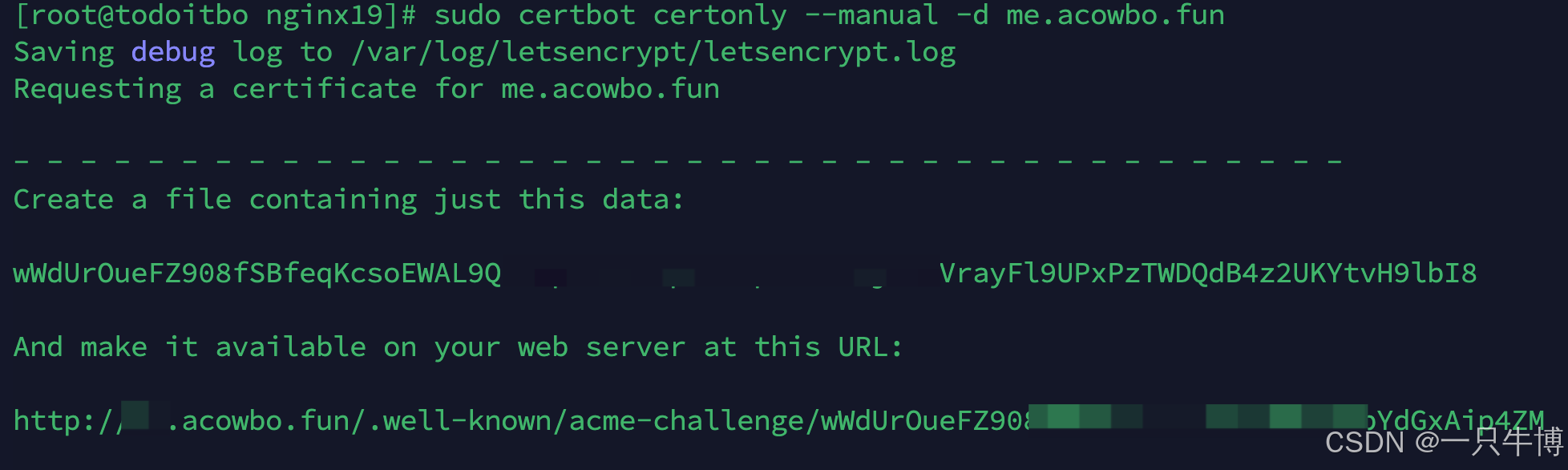
命令:sudo certbot certonly --manual -d me.acowbo.fun
- 工作原理:
- 使用
--manual方式时,Certbot 会要求你手动执行一些操作来验证域名所有权。 - Certbot 会给出一个需要创建的文件名称和内容,你需要手动将这个文件放置到你的 Web 服务器上指定的位置,或者通过 DNS 方式添加 TXT 记录。
- 在完成这些手动步骤后,Certbot 将继续进行验证,验证通过后你将获得证书。
- 使用
- 适用场景:
- 如果你没有直接访问服务器的权限,或者没有正在运行的 Web 服务器(例如静态网站托管在第三方平台上),
--manual方式可能会更适合。 - 适合临时获取证书,或者当自动化的验证方式无法使用时。
- 如果你没有直接访问服务器的权限,或者没有正在运行的 Web 服务器(例如静态网站托管在第三方平台上),
sudo certbot certonly --manual -d me.acowbo.fun会出现如下图所示:
在这里插入图片描述
到了这一步你不可以点击回车,要现在
/var/www/html/.well-known/acme-challenge/目录下新建截图的文件,然后再输入截图中的内容,试一下可以访问吗。可以访问就回车
如果出现问题,请看最下面的问题解决
webroot 方式
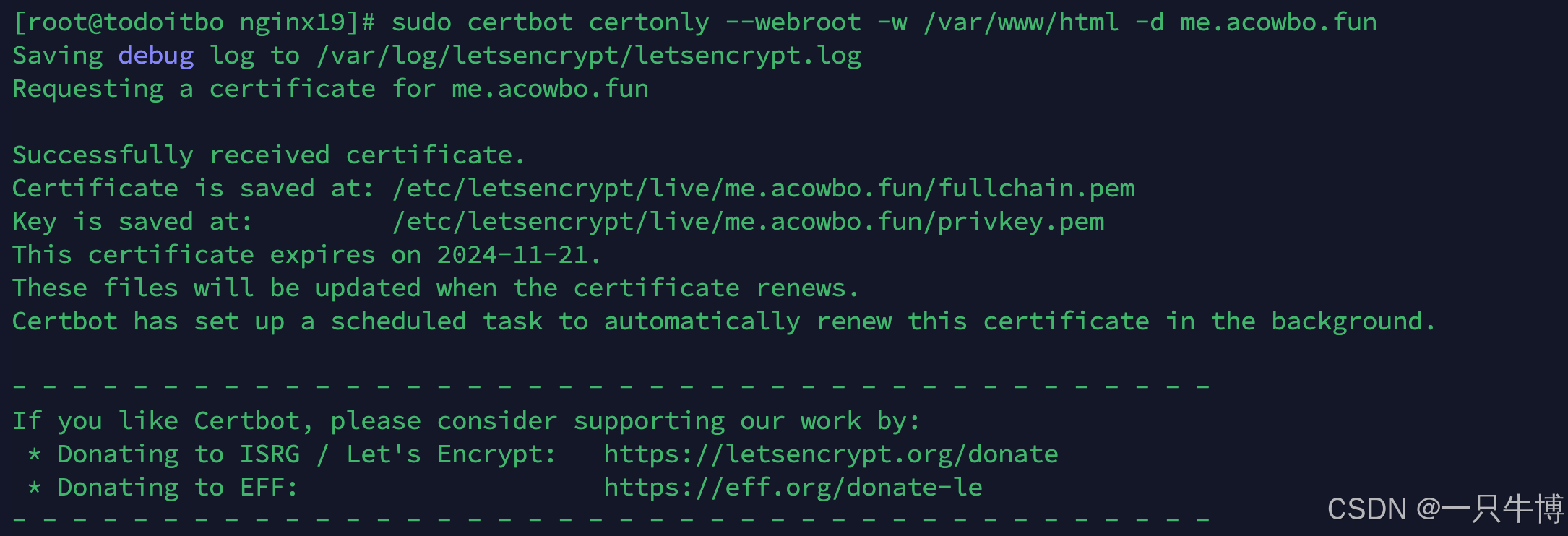
命令:sudo certbot certonly --webroot -w /var/www/html -d me.acowbo.fun
- 工作原理:
- 使用
--webroot方式时,Certbot 会在指定的-w参数后面的路径(例如/var/www/html)下创建一个.well-known/acme-challenge/文件夹,并在其中放置一个临时文件。 - Let’s Encrypt 服务器随后会访问
http://me.acowbo.fun/.well-known/acme-challenge/下的临时文件来验证域名的所有权。 - 验证通过后,Certbot 将获得证书并保存到本地。
- 使用
- 适用场景:
- 如果你的服务器已经有一个正在运行的 Web 服务器(如 Apache 或 Nginx),并且你能够将 Web 服务器的根目录路径指定为
-w参数,那么--webroot方式会更自动化且方便。 - 适合已经部署好并能够直接访问的域名。
- 如果你的服务器已经有一个正在运行的 Web 服务器(如 Apache 或 Nginx),并且你能够将 Web 服务器的根目录路径指定为
结果如下
在这里插入图片描述
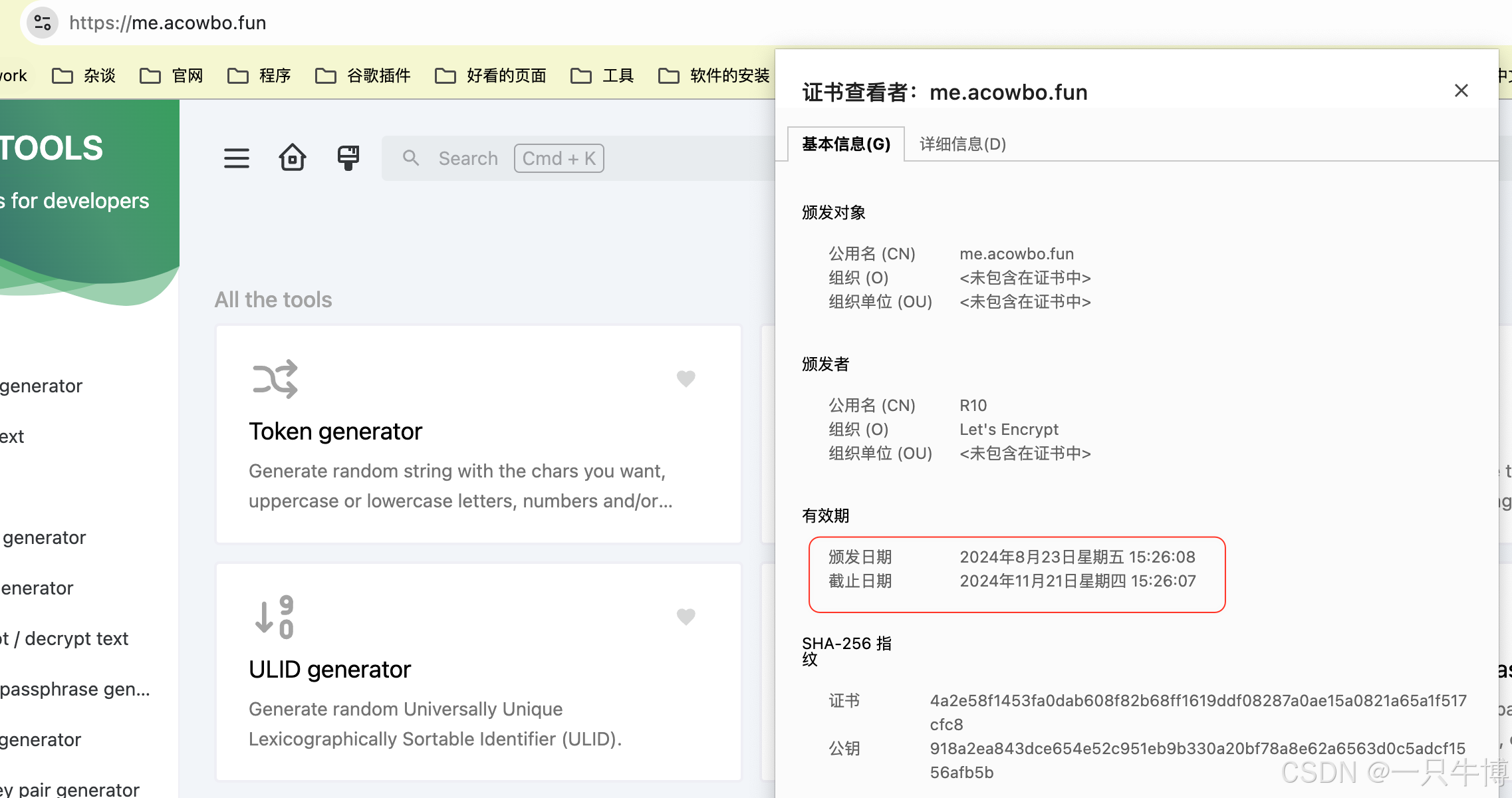
显示已经成功,并且到期为2024-11-21
配置nginx并重启
ssl_certificate /etc/letsencrypt/live/me.acowbo.fun/fullchain.pem;
ssl_certificate_key /etc/letsencrypt/live/me.acowbo.fun/privkey.pem;
访问网站如下结果
在这里插入图片描述
问题解决
问题一:nginx找不到
The nginx plugin is not working; there may be problems with your existing configuration.
The error was: NoInstallationError("Could not find a usable 'nginx' binary. Ensure nginx exists, the binary is executable, and your PATH is set correctly.",)
出现这个错误通常意味着Certbot未能找到Nginx的可执行文件。这可能是由于Nginx未正确安装、未在系统路径中,或者其他配置问题引起的。以下是一些可能的解决方案:
1. 确认Nginx已安装
2. 检查Nginx可执行文件路径
确认Nginx可执行文件存在且可执行。通常情况下,Nginx可执行文件应位于/usr/sbin/nginx或/usr/local/nginx/sbin/nginx。
你可以使用以下命令查找Nginx可执行文件:
which nginx如果找不到Nginx的路径,可以尝试查找:
sudo find / -name nginx3. 更新系统路径
如果Nginx已安装但Certbot找不到它,你可能需要更新系统路径。
编辑你的~/.bashrc或~/.bash_profile文件,添加Nginx的路径,例如:
export PATH=$PATH:/usr/local/nginx/sbin然后重新加载文件:
source ~/.bashrc问题二:nginx配置文件找不到
Saving debug log to /var/log/letsencrypt/letsencrypt.log
Error while running nginx -c /etc/nginx/nginx.conf -t.

nginx: [emerg] open() "/etc/nginx/nginx.conf" failed (2: No such file or directory)
nginx: configuration file /etc/nginx/nginx.conf test failed

The nginx plugin is not working; there may be problems with your existing configuration.
The error was: MisconfigurationError('Error while running nginx -c /etc/nginx/nginx.conf -t.\n\nnginx: [emerg] open() "/etc/nginx/nginx.conf" failed (2: No such file or directory)\nnginx: configuration file /etc/nginx/nginx.conf test failed\n',)
这里我建议你直接看手动续签部分
彩蛋之自动续签
这里你可以使用python或者说Linux自带的
crontab,我这里只展示提供的脚本实现
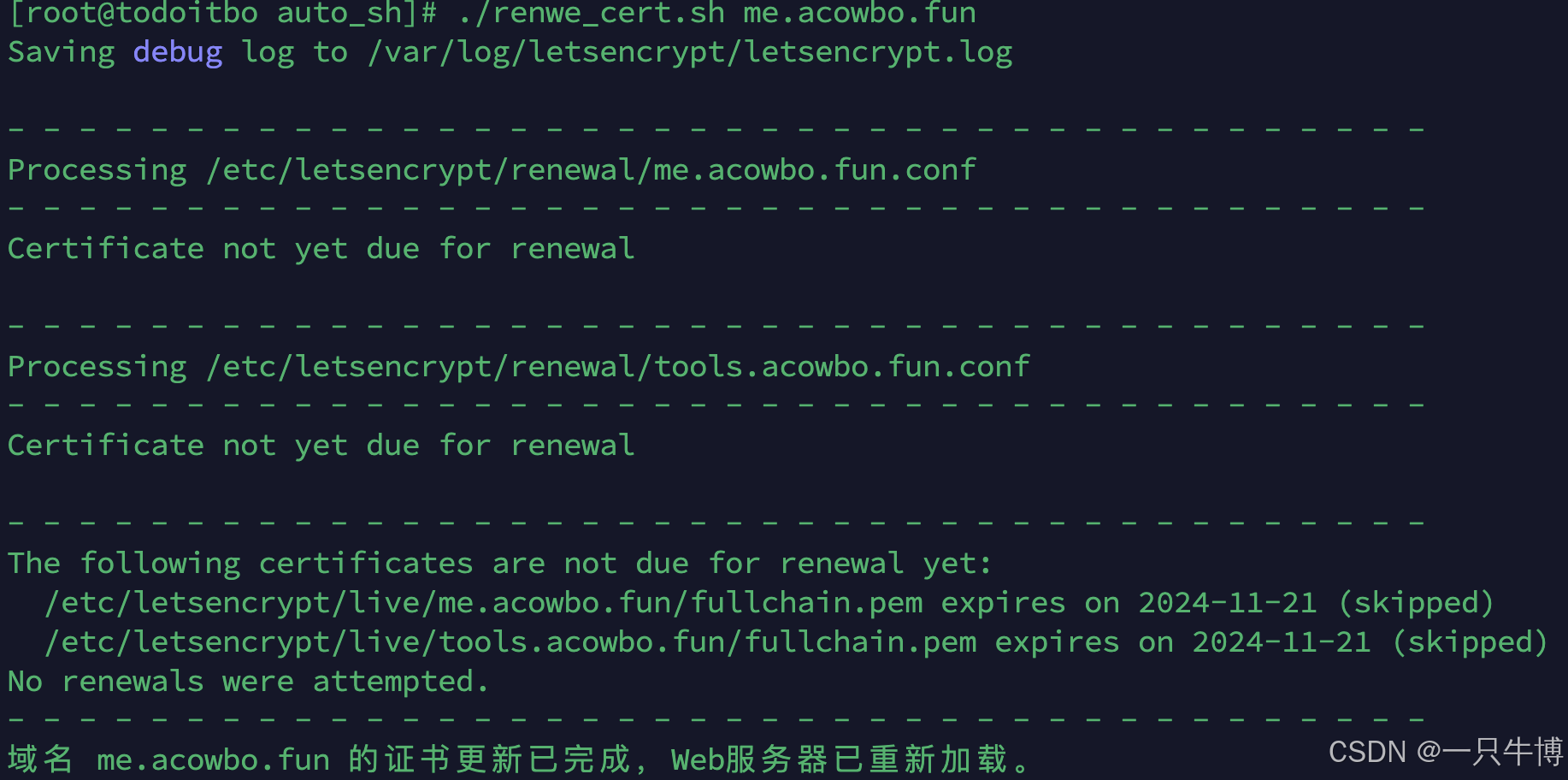
如有需要可以关注下方公众号回复自动续签获取

本文参与 腾讯云自媒体同步曝光计划,分享自作者个人站点/博客。
原始发表:2025-05-30,如有侵权请联系 cloudcommunity@tencent.com 删除
目录
腾讯云开发者

Copyright © 2013 - 2026 Tencent Cloud. All Rights Reserved. 腾讯云 版权所有
深圳市腾讯计算机系统有限公司 ICP备案/许可证号:粤B2-20090059  粤公网安备44030502008569号
腾讯云计算(北京)有限责任公司 京ICP证150476号 | 京ICP备11018762号