kani:开箱即用支持 OpenAI 模型和 LLaMA v2的聊天微框架
原创
kani:开箱即用支持 OpenAI 模型和 LLaMA v2的聊天微框架
原创
larkwins
修改于 2025-01-13 11:32:33
修改于 2025-01-13 11:32:33
项目简介
kani 是一个轻量级且高度可破解的框架,用于基于聊天的语言模型,具有工具使用/函数调用功能。
与其他 LM 框架相比,kani 不那么固执己见,并且对重要的控制流部分提供了更细粒度的可定制性,使其成为 NLP 研究人员、爱好者和开发人员的完美选择。
kani 开箱即用地支持 OpenAI 模型和 LLaMA v2,并具有与模型无关的框架来添加对更多模型的支持。
特征
- 轻量级和高级 - kani 实现了通用样板来与语言模型交互,而不强迫您使用固执己见的提示框架或复杂的特定于库的工具。
- 与模型无关 - kani 提供了一个简单的接口来实现:令牌计数和完成生成。实现这两个,kani 就可以运行在任何语言模型上。
- 自动聊天内存管理 - 允许聊天会话流畅进行,而无需担心管理历史记录中的令牌数量 - kani 负责处理。
- 带有模型反馈和重试的函数调用 - 只需一行代码即可让模型访问函数。kani 优雅地提供有关幻觉参数和错误的反馈,并允许模型重试调用。
- 您控制提示 - 没有隐藏的提示黑客。与其他流行的语言模型库不同,我们永远不会为您决定如何格式化您自己的数据。
- 迭代速度快,学习直观 - 使用 kani,您只需编写 Python - 其余的由我们处理。
- 从一开始就进行异步设计 - kani 可以轻松扩展以并行运行多个聊天会话,而无需管理多个进程或程序。
快速开始
kani 需要 Python 3.10 或更高版本。
首先,安装库。在本快速入门中,我们将使用 OpenAI 引擎,但 kani 与模型无关。
$ pip install "kani[openai]"然后,让我们使用 kani 创建一个简单的聊天机器人,并使用 ChatGPT 作为后端。
# import the library
from kani import Kani, chat_in_terminal
from kani.engines.openai import OpenAIEngine

# Replace this with your OpenAI API key: https://platform.openai.com/account/api-keys
api_key = "sk-..."

# kani uses an Engine to interact with the language model. You can specify other model
# parameters here, like temperature=0.7.
engine = OpenAIEngine(api_key, model="gpt-3.5-turbo")

# The kani manages the chat state, prompting, and function calling. Here, we only give
# it the engine to call ChatGPT, but you can specify other parameters like
# system_prompt="You are..." here.
ai = Kani(engine)

# kani comes with a utility to interact with a kani through your terminal! Check out
# the docs for how to use kani programmatically.
chat_in_terminal(ai)
kani 缩短了建立工作聊天模型的时间,同时为程序员提供了对每个提示、函数调用甚至底层语言模型的深度可定制性。
函数调用
函数调用使语言模型能够根据其文档选择何时调用您提供的函数。
借助 kani,您可以在 Python 中编写函数,并只需一行代码即可将它们公开给模型: @ai_function 装饰器。
# import the library
from typing import Annotated
from kani import AIParam, Kani, ai_function, chat_in_terminal
from kani.engines.openai import OpenAIEngine

# set up the engine as above
api_key = "sk-..."
engine = OpenAIEngine(api_key, model="gpt-3.5-turbo")


# subclass Kani to add AI functions
class MyKani(Kani):
    # Adding the annotation to a method exposes it to the AI
    @ai_function()
    def get_weather(
        self,
        # and you can provide extra documentation about specific parameters
        location: Annotated[str, AIParam(desc="The city and state, e.g. San Francisco, CA")],
    ):
        """Get the current weather in a given location."""
        # In this example, we mock the return, but you could call a real weather API
        return f"Weather in {location}: Sunny, 72 degrees fahrenheit."


ai = MyKani(engine)
chat_in_terminal(ai)
为什么是kani?
langchain 和 simpleaichat 等语言模型的现有框架都是固执己见和/或重量级的 - 它们在幕后编辑开发人员的提示,学习起来很困难,并且很难在不向代码库添加大量高维护性膨胀的情况下进行自定义。
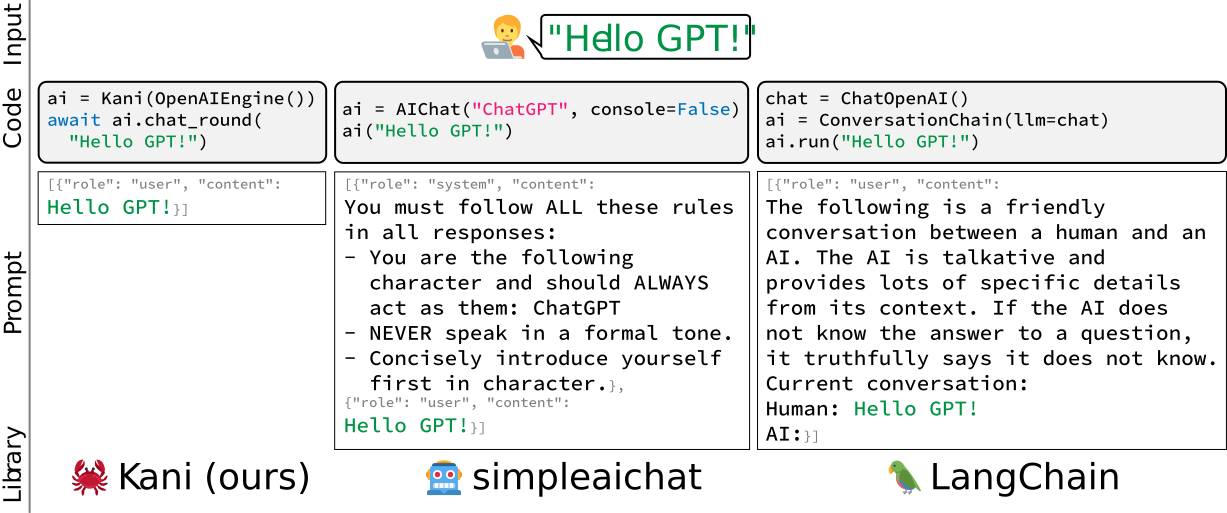
我们将 kani 构建得更加灵活、简单和健壮。kani 适合从学术研究人员到行业专业人士再到业余爱好者的每个人使用,而无需担心幕后黑客攻击。
项目链接
https://github.com/zhudotexe/kani
原创声明:本文系作者授权腾讯云开发者社区发表,未经许可,不得转载。
如有侵权,请联系 cloudcommunity@tencent.com 删除。
目录
腾讯云开发者

Copyright © 2013 - 2026 Tencent Cloud. All Rights Reserved. 腾讯云 版权所有
深圳市腾讯计算机系统有限公司 ICP备案/许可证号:粤B2-20090059  粤公网安备44030502008569号
腾讯云计算(北京)有限责任公司 京ICP证150476号 | 京ICP备11018762号