Spring Boot 同时接受文件和实体及 Postman 测试实战

Spring Boot 同时接受文件和实体及 Postman 测试实战

九转成圣
发布于 2024-11-26 10:38:21
发布于 2024-11-26 10:38:21
Spring Boot 文件上传及 Postman 测试指南
在本文中,我们将介绍如何使用 Spring Boot 上传文件并通过 Postman 测试接口。我们会基于以下接口作为示例:
Boolean importDevicePushConfig(@RequestParam("file") MultipartFile file,DevicePushConfig devicePushConfig);该接口用于接收一个文件(file)和一个实体对象(devicePushConfig)的参数,其中文件通过请求体中的 form-data 方式上传,实体对象通过 URL 的查询参数传递。
一、Spring Boot 实现文件上传接口
1.1 接口解析
-
@RequestParam("file") MultipartFile fileSpring 提供的MultipartFile是用于接收上传文件的接口。 通过@RequestParam注解指定参数名为file,映射 HTTP 请求中form-data的对应字段。 -
DevicePushConfig devicePushConfig这是一个普通的 Java 对象,接收通过 URL 参数传递的值。Spring Boot 会根据参数名和对象的字段名自动进行绑定。
1.2 完整代码示例
1.2.1 DevicePushConfig 实体类
public class DevicePushConfig {
    @ApiModelProperty("推送系统")
    private String systemCode;
    @ApiModelProperty("设备编码")
    private String deviceCode;
    @ApiModelProperty("设备类型")
    private String deviceType;
    @ApiModelProperty("开始日期")
    @JSONField(format = "yyyy-MM-dd")
    private LocalDate startDate;
    @ApiModelProperty("结束日期")
    @JSONField(format = "yyyy-MM-dd")
    private LocalDate endDate;
}
1.2.2 接口实现
import org.springframework.web.bind.annotation.*;
import org.springframework.web.multipart.MultipartFile;

@RestController
@RequestMapping("/api")
public class FileUploadController {

    @PostMapping("/importDevicePushConfig")
    public Boolean importDevicePushConfig(@RequestParam("file") MultipartFile file,DevicePushConfig devicePushConfig) {
        // 打印文件信息
        System.out.println("上传的文件名称:" + file.getOriginalFilename());
        System.out.println("文件大小:" + file.getSize() + " 字节");
        // 打印 devicePushConfig 信息
        System.out.println("DevicePushConfig 参数:" + devicePushConfig);
        // 假设文件处理和配置更新成功
        return true;
    }
}
二、Postman 测试接口
2.1 设置请求方法和 URL
- 请求方法:POST
- 请求 URL:例如
http://localhost:8080/importDevicePushConfig - 请求头:添加
Content-Type为multipart/form-data
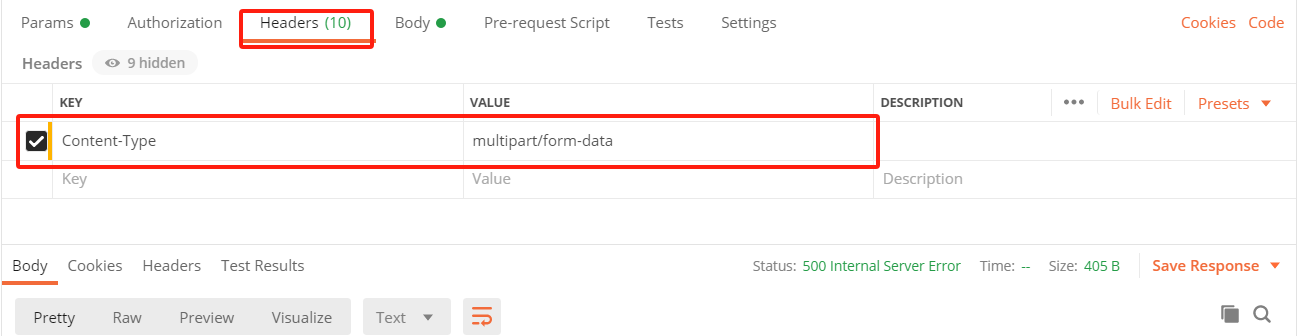
2.2 配置 Body(文件)
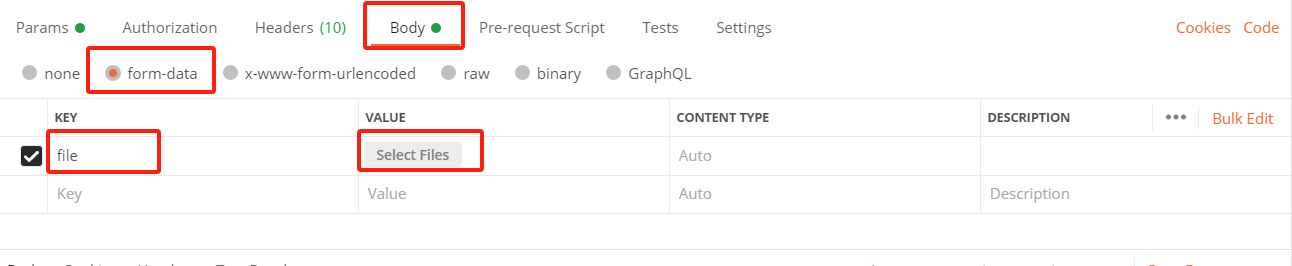
- 在 Postman 中选择 Body 选项卡。
- 选择 form-data 方式。
- 添加字段:
- Key:
file(对应@RequestParam("file")中的名称) - Type:选择 File。
- Value:选择本地文件。
- Key:
2.3 配置 URL 参数(实体)

2.4 测试结果
点击 Send 发送请求,接口会:
- 接收并解析上传的文件,输出文件的名称和大小。
- 接收并解析 URL 参数,绑定到
DevicePushConfig对象。 - 返回
true,表示处理成功。
三、接受参数的原理解析
3.1 文件接收:MultipartFile
Spring Boot 使用 MultipartResolver(多部分解析器)处理上传的文件。
MultipartFile 是 Spring 提供的接口,允许我们读取文件的内容和元数据。
工作流程:
- 前端通过
multipart/form-data格式上传文件。 - Spring 根据
Content-Type头部识别请求为多部分请求。 - 使用 MultipartResolver 解析请求,将文件数据封装为
MultipartFile对象。
3.2 URL 参数绑定:实体对象
核心机制:Spring MVC 的数据绑定
- Spring 通过反射机制,根据实体类
DevicePushConfig的字段名匹配查询参数。 - 若 URL 中的参数名与实体类字段名一致,Spring 自动调用
setter方法赋值。 - 缺失的参数字段将保留为默认值(通常为
null或基本类型的默认值)。
3.3 多部分数据的解析
Spring Boot 在接收 multipart/form-data 格式的请求时,会自动识别表单中的字段:
- 普通字段:绑定到方法的其他参数或实体对象中。
- 文件字段:绑定到
MultipartFile对象。
四、总结
通过以上步骤,我们实现了一个文件上传和参数绑定的接口,并使用 Postman 进行了测试。 在实践中,确保以下几点:
- 文件字段与
@RequestParam名称保持一致。 - URL 参数名与实体类字段名一致,才能正确绑定。
- url数组传参可用

本文参与 腾讯云自媒体同步曝光计划,分享自作者个人站点/博客。
原始发表:2024-11-25,如有侵权请联系 cloudcommunity@tencent.com 删除
评论
登录后参与评论
推荐阅读
目录
腾讯云开发者

Copyright © 2013 - 2026 Tencent Cloud. All Rights Reserved. 腾讯云 版权所有
深圳市腾讯计算机系统有限公司 ICP备案/许可证号:粤B2-20090059  粤公网安备44030502008569号
腾讯云计算(北京)有限责任公司 京ICP证150476号 | 京ICP备11018762号