elasticsearch[四]-数据聚合排序查询、搜索框自动补全、数据同步、集群

elasticsearch[四]-数据聚合排序查询、搜索框自动补全、数据同步、集群

汀丶人工智能
发布于 2024-01-17 09:23:23
发布于 2024-01-17 09:23:23
elasticsearch[四]-数据聚合排序查询、搜索框自动补全、数据同步、集群
1. 数据聚合
**聚合(aggregations)**可以让我们极其方便的实现对数据的统计、分析、运算。例如:
- 什么品牌的手机最受欢迎?
- 这些手机的平均价格、最高价格、最低价格?
- 这些手机每月的销售情况如何?
实现这些统计功能的比数据库的 sql 要方便的多,而且查询速度非常快,可以实现近实时搜索效果。
1.1. 聚合的种类
聚合常见的有三类:
- **桶(Bucket)**聚合:用来对文档做分组
- TermAggregation:按照文档字段值分组,例如按照品牌值分组、按照国家分组
- Date Histogram:按照日期阶梯分组,例如一周为一组,或者一月为一组
- **度量(Metric)**聚合:用以计算一些值,比如:最大值、最小值、平均值等
- Avg:求平均值
- Max:求最大值
- Min:求最小值
- Stats:同时求 max、min、avg、sum 等
- **管道(pipeline)**聚合:其它聚合的结果为基础做聚合
**注意:**参加聚合的字段必须是 keyword、日期、数值、布尔类型
1.2.DSL 实现聚合
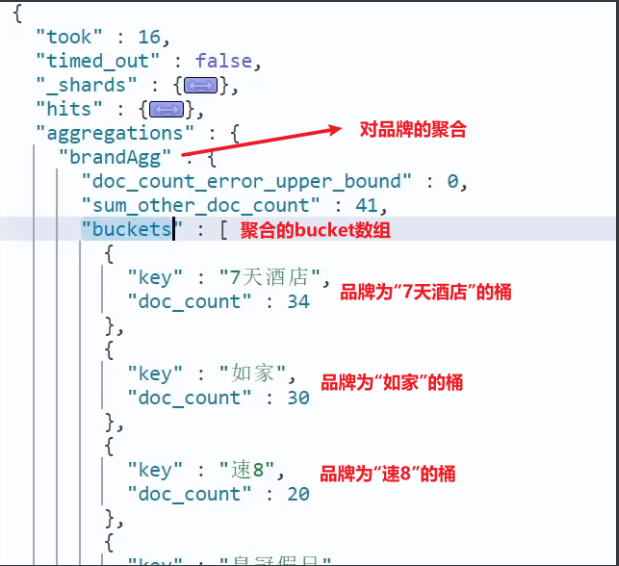
现在,我们要统计所有数据中的酒店品牌有几种,其实就是按照品牌对数据分组。此时可以根据酒店品牌的名称做聚合,也就是 Bucket 聚合。
1.2.1.Bucket 聚合语法
语法如下:
GET /hotel/_search
{
  "size": 0,  // 设置size为0,结果中不包含文档,只包含聚合结果
  "aggs": { // 定义聚合
    "brandAgg": { //给聚合起个名字
      "terms": { // 聚合的类型,按照品牌值聚合,所以选择term
        "field": "brand", // 参与聚合的字段
        "size": 20 // 希望获取的聚合结果数量
      }
    }
  }
}
结果如图:
1.2.2. 聚合结果排序
默认情况下,Bucket 聚合会统计 Bucket 内的文档数量,记为_count,并且按照_count 降序排序。
我们可以指定 order 属性,自定义聚合的排序方式:
GET /hotel/_search
{
  "size": 0,
  "aggs": {
    "brandAgg": {
      "terms": {
        "field": "brand",
        "order": {
          "_count": "asc" // 按照_count升序排列
        },
        "size": 20
      }
    }
  }
}
1.2.3. 限定聚合范围
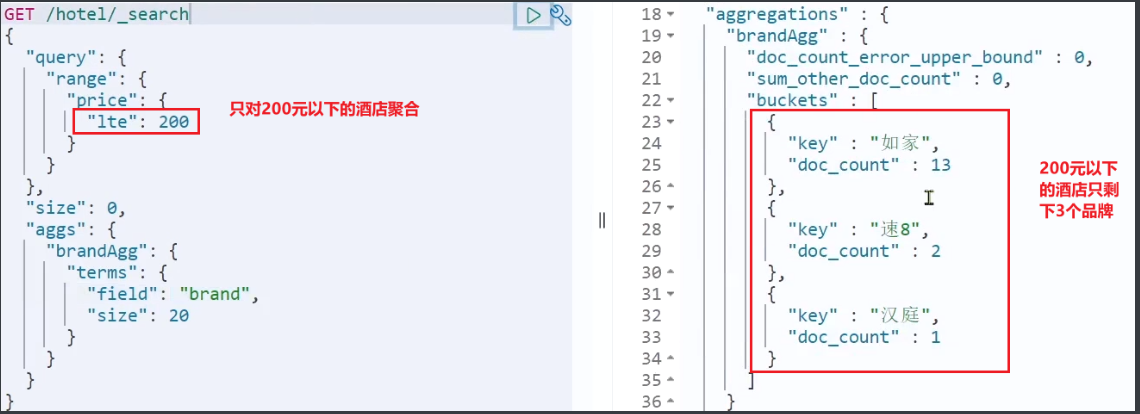
默认情况下,Bucket 聚合是对索引库的所有文档做聚合,但真实场景下,用户会输入搜索条件,因此聚合必须是对搜索结果聚合。那么聚合必须添加限定条件。
我们可以限定要聚合的文档范围,只要添加 query 条件即可:
GET /hotel/_search
{
  "query": {
    "range": {
      "price": {
        "lte": 200 // 只对200元以下的文档聚合
      }
    }
  },
  "size": 0,
  "aggs": {
    "brandAgg": {
      "terms": {
        "field": "brand",
        "size": 20
      }
    }
  }
}
这次,聚合得到的品牌明显变少了:
1.2.4.Metric 聚合语法
上节课,我们对酒店按照品牌分组,形成了一个个桶。现在我们需要对桶内的酒店做运算,获取每个品牌的用户评分的 min、max、avg 等值。
这就要用到 Metric 聚合了,例如 stat 聚合:就可以获取 min、max、avg 等结果。
语法如下:
GET /hotel/_search
{
  "size": 0,
  "aggs": {
    "brandAgg": {
      "terms": {
        "field": "brand",
        "size": 20
      },
      "aggs": { // 是brands聚合的子聚合,也就是分组后对每组分别计算
        "score_stats": { // 聚合名称
          "stats": { // 聚合类型,这里stats可以计算min、max、avg等
            "field": "score" // 聚合字段,这里是score
          }
        }
      }
    }
  }
}
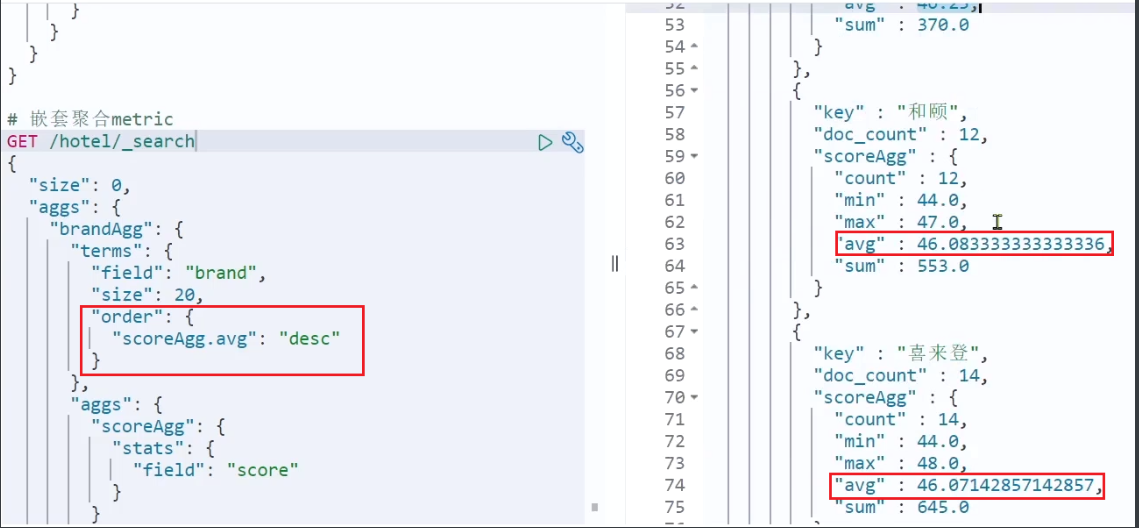
这次的 score_stats 聚合是在 brandAgg 的聚合内部嵌套的子聚合。因为我们需要在每个桶分别计算。
另外,我们还可以给聚合结果做个排序,例如按照每个桶的酒店平均分做排序:
1.2.5. 小结
aggs 代表聚合,与 query 同级,此时 query 的作用是?
- 限定聚合的的文档范围
聚合必须的三要素:
- 聚合名称
- 聚合类型
- 聚合字段
聚合可配置属性有:
- size:指定聚合结果数量
- order:指定聚合结果排序方式
- field:指定聚合字段
1.3.RestAPI 实现聚合
1.3.1.API 语法
聚合条件与 query 条件同级别,因此需要使用 request.source() 来指定聚合条件。
聚合条件的语法:
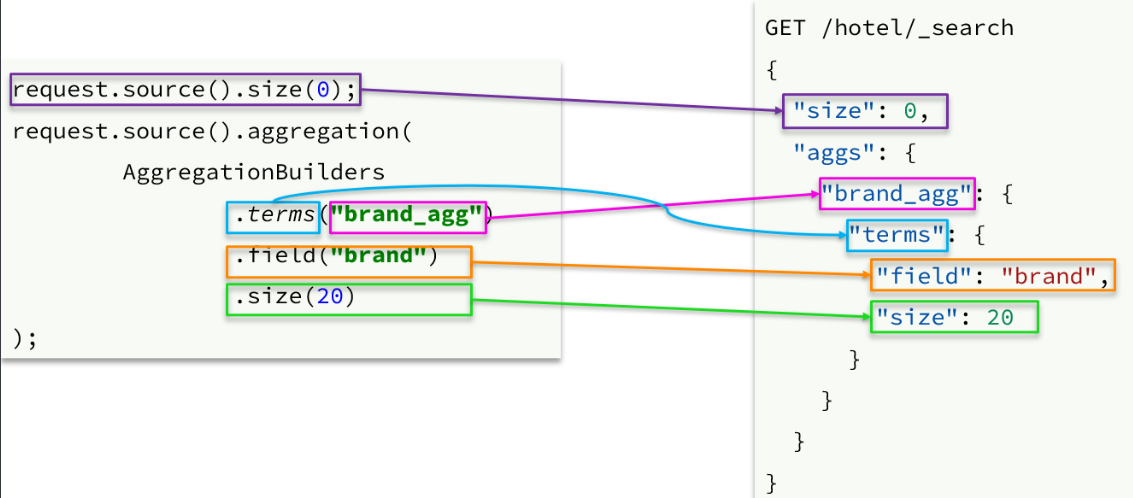
聚合的结果也与查询结果不同,API 也比较特殊。不过同样是 JSON 逐层解析:
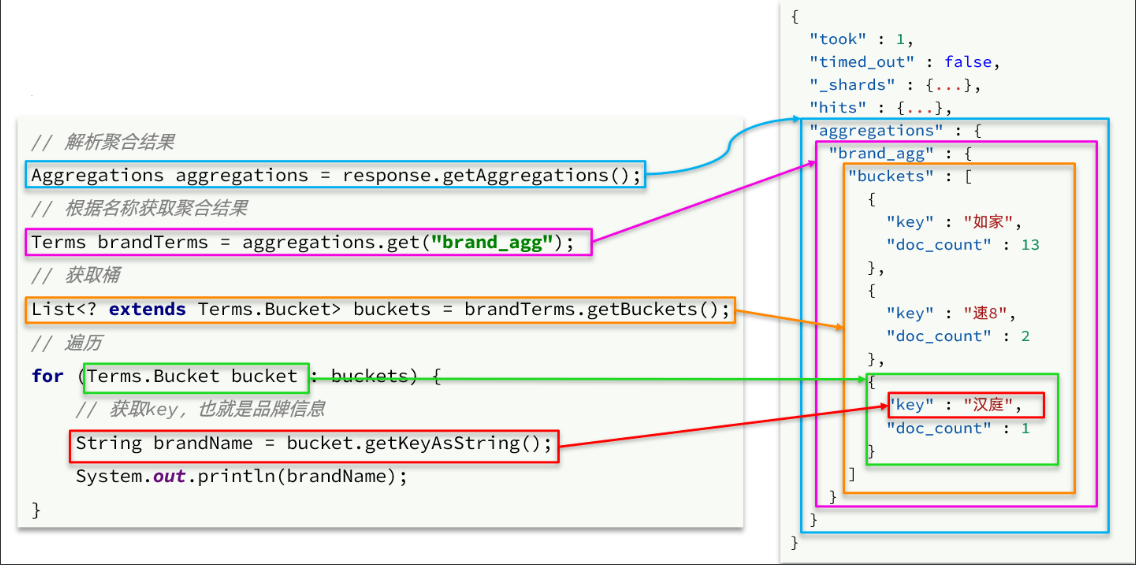
private List<String> getAggByName(SearchResponse response, String name){
        List<String> list = new ArrayList<>();
        Aggregations aggregations = response.getAggregations();
        Terms terms = aggregations.get(name);
        List<? extends Terms.Bucket> buckets = terms.getBuckets();
        for (Terms.Bucket bucket : buckets) {
            list.add(bucket.getKeyAsString());
        }
        return list;
    }
对于 Metric 聚合,JavaApi 如下
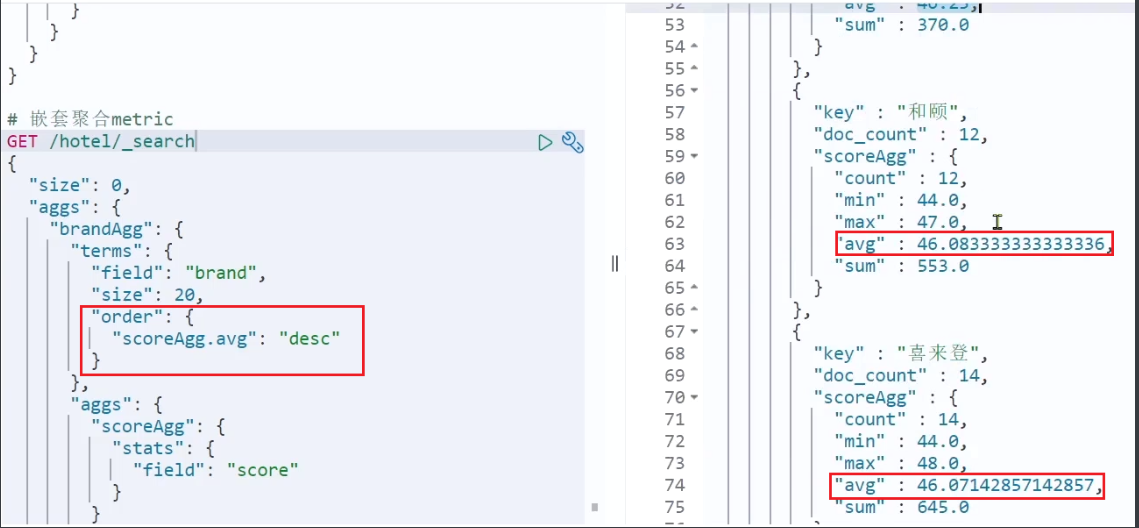
    @Test
    public void TestAgg() throws IOException {
        // 1、创建request
        SearchRequest request = new SearchRequest("hotel");
        // 2、准备DSL

        request.source().size(0);
        request.source().aggregation(AggregationBuilders
                .terms("brandAgg")
                .field("brand")
                .size(30)
                .order(BucketOrder.aggregation("scoreAgg.avg", true))
                .subAggregation(AggregationBuilders.stats("scoreAgg").field("score")));
        SearchResponse response = client.search(request, RequestOptions.DEFAULT);
        System.out.println(response);
    }
1.3.2. 业务需求
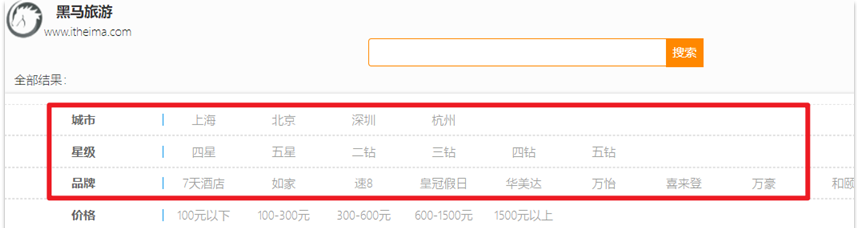
需求:搜索页面的品牌、城市等信息不应该是在页面写死,而是通过聚合索引库中的酒店数据得来的:
分析:
目前,页面的城市列表、星级列表、品牌列表都是写死的,并不会随着搜索结果的变化而变化。但是用户搜索条件改变时,搜索结果会跟着变化。
例如:用户搜索 “东方明珠”,那搜索的酒店肯定是在上海东方明珠附近,因此,城市只能是上海,此时城市列表中就不应该显示北京、深圳、杭州这些信息了。
也就是说,搜索结果中包含哪些城市,页面就应该列出哪些城市;搜索结果中包含哪些品牌,页面就应该列出哪些品牌。
如何得知搜索结果中包含哪些品牌?如何得知搜索结果中包含哪些城市?
使用聚合功能,利用 Bucket 聚合,对搜索结果中的文档基于品牌分组、基于城市分组,就能得知包含哪些品牌、哪些城市了。
因为是对搜索结果聚合,因此聚合是限定范围的聚合,也就是说聚合的限定条件跟搜索文档的条件一致。
查看浏览器可以发现,前端其实已经发出了这样的一个请求:
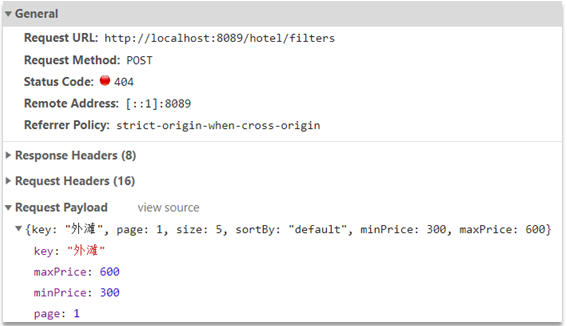
请求参数与搜索文档的参数完全一致。
返回值类型就是页面要展示的最终结果:
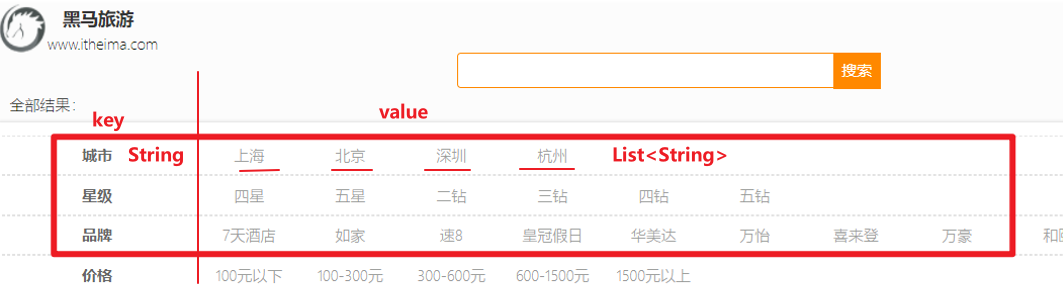
结果是一个 Map 结构:
- key 是字符串,城市、星级、品牌、价格
- value 是集合,例如多个城市的名称
1.3.3. 业务实现
在cn.itcast.hotel.web包的HotelController中添加一个方法,遵循下面的要求:
- 请求方式:
POST - 请求路径:
/hotel/filters - 请求参数:
RequestParams,与搜索文档的参数一致 - 返回值类型:
Map<String, List<String>>
代码:
@PostMapping("/filters")
    public Map<String, List<String>> getFilters(@RequestBody RequestParams params){
        return hotelService.filter(params);
    }
这里调用了 IHotelService 中的 getFilters 方法,尚未实现。
在cn.itcast.hotel.service.IHotelService中定义新方法:
Map<String, List<String>> filter(RequestParams params);在cn.itcast.hotel.service.impl.HotelService中实现该方法:
package cn.itcast.hotel.service.impl;

import cn.itcast.hotel.mapper.HotelMapper;
import cn.itcast.hotel.pojo.Hotel;
import cn.itcast.hotel.pojo.HotelDoc;
import cn.itcast.hotel.pojo.PageResult;
import cn.itcast.hotel.pojo.RequestParams;
import cn.itcast.hotel.service.IHotelService;
import com.alibaba.fastjson.JSON;
import com.baomidou.mybatisplus.extension.service.impl.ServiceImpl;
import org.elasticsearch.action.search.SearchRequest;
import org.elasticsearch.action.search.SearchResponse;
import org.elasticsearch.client.RequestOptions;
import org.elasticsearch.client.RestHighLevelClient;
import org.elasticsearch.index.query.BoolQueryBuilder;
import org.elasticsearch.index.query.QueryBuilders;
import org.elasticsearch.search.SearchHit;
import org.elasticsearch.search.SearchHits;
import org.elasticsearch.search.aggregations.Aggregation;
import org.elasticsearch.search.aggregations.AggregationBuilders;
import org.elasticsearch.search.aggregations.Aggregations;
import org.elasticsearch.search.aggregations.bucket.terms.Terms;
import org.springframework.beans.factory.annotation.Autowired;
import org.springframework.stereotype.Service;

import java.io.IOException;
import java.util.ArrayList;
import java.util.HashMap;
import java.util.List;
import java.util.Map;

@Service
public class HotelService extends ServiceImpl<HotelMapper, Hotel> implements IHotelService {
    @Autowired
    private RestHighLevelClient client;

    @Override
    public PageResult search(RequestParams params) {
        try {
            // 1、创建request
            SearchRequest request = new SearchRequest("hotel");

            // 2、准备DSL语句
            buildBasicQuery(params, request);
            request.source().from((params.getPage()-1)*params.getSize()).size(params.getSize());
            // 3、发送请求
            SearchResponse response = client.search(request, RequestOptions.DEFAULT);
            return handlerResponse(response);
        } catch (IOException e) {
            e.printStackTrace();
            return new PageResult();
        }
    }

    @Override
    public Map<String, List<String>> filter(RequestParams params) {
        try{
            // 1、创建request
            SearchRequest request = new SearchRequest("hotel");
            // 2、准备DSL
            buildBasicQuery(params, request);
            request.source().aggregation(AggregationBuilders.terms("brandAgg").field("brand").size(30));
            request.source().aggregation(AggregationBuilders.terms("cityAgg").field("city").size(30));
            request.source().aggregation(AggregationBuilders.terms("starNameAgg").field("starName").size(10));
            // 3、发送请求
            request.source().size(0);
            SearchResponse response = client.search(request, RequestOptions.DEFAULT);
            // 4、处理结果
            List<String> brandList = getAggByName(response, "brandAgg");
            List<String> cityList = getAggByName(response, "cityAgg");
            List<String> starNameList = getAggByName(response, "starNameAgg");
            HashMap<String, List<String>> hashMap = new HashMap<>();
            hashMap.put("brand", brandList);
            hashMap.put("city", cityList);
            hashMap.put("starName", starNameList);
            return hashMap;
        }catch (Exception e){
            e.printStackTrace();
            return new HashMap<String, List<String >>();
        }
    }

    private List<String> getAggByName(SearchResponse response, String name){
        List<String> list = new ArrayList<>();
        Aggregations aggregations = response.getAggregations();
        Terms terms = aggregations.get(name);
        List<? extends Terms.Bucket> buckets = terms.getBuckets();
        for (Terms.Bucket bucket : buckets) {
            list.add(bucket.getKeyAsString());
        }
        return list;
    }

    private void buildBasicQuery(RequestParams params, SearchRequest request){
        BoolQueryBuilder boolQuery = QueryBuilders.boolQuery();

        // 1、关键字搜索
        if (params.getKey() == null || params.getKey().equals("")){
            boolQuery.must(QueryBuilders.matchAllQuery());
        }else {
            boolQuery.must(QueryBuilders.matchQuery("all", params.getKey()));
        }
        // 2、城市搜索
        if (params.getCity() != null && !params.getCity().equals("")){
            boolQuery.filter(QueryBuilders.matchQuery("city", params.getCity()));
        }

        // 3、品牌搜索
        if (params.getBrand() != null && !params.getBrand().equals("")){
            boolQuery.filter(QueryBuilders.matchQuery("brand", params.getBrand()));
        }

        // 4、星级搜索
        if (params.getStarName() != null && !params.getStarName().equals("")){
            boolQuery.filter(QueryBuilders.matchQuery("starName", params.getStarName()));
        }

        // 5、价格搜索
        if (params.getMinPrice() != null && params.getMaxPrice() != null){
            boolQuery.filter(QueryBuilders.rangeQuery("price").gte(params.getMinPrice()).lte(params.getMaxPrice()));
        }

        request.source().query(boolQuery);

    }

    private PageResult handlerResponse(SearchResponse response){
        List<HotelDoc> hotelDocList = new ArrayList<>();
        SearchHits searchHits = response.getHits();
        long total = searchHits.getTotalHits().value;
        SearchHit[] hits = searchHits.getHits();
        for (SearchHit hit : hits) {
            HotelDoc hotelDoc = JSON.parseObject(hit.getSourceAsString(), HotelDoc.class);
            hotelDocList.add(hotelDoc);
        }
        PageResult pageResult = new PageResult();
        pageResult.setTotal(total);
        pageResult.setHotels(hotelDocList);
        return  pageResult;
    }
}
2. 自动补全
当用户在搜索框输入字符时,我们应该提示出与该字符有关的搜索项,如图:
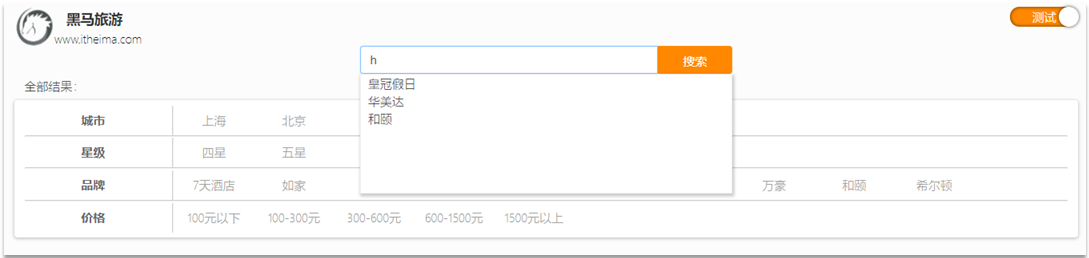
这种根据用户输入的字母,提示完整词条的功能,就是自动补全了。
因为需要根据拼音字母来推断,因此要用到拼音分词功能。
2.1. 拼音分词器
要实现根据字母做补全,就必须对文档按照拼音分词。在 GitHub 上恰好有 elasticsearch 的拼音分词插件。地址:https://github.com/medcl/elasticsearch-analysis-pinyin
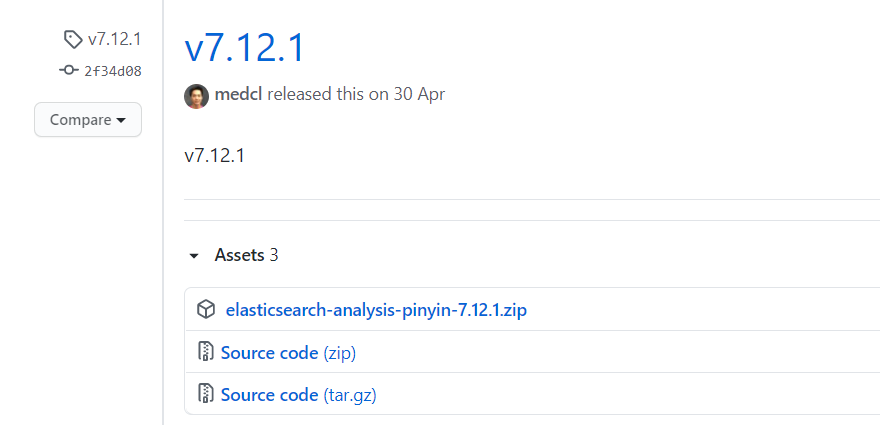
课前资料中也提供了拼音分词器的安装包:
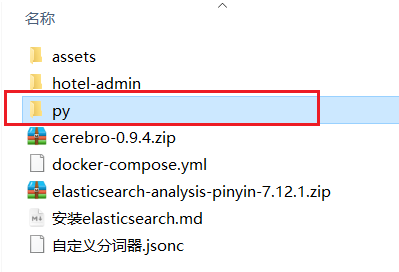
安装方式与 IK 分词器一样,分三步:
①解压
②上传到虚拟机中,elasticsearch 的 plugin 目录
③重启 elasticsearch
④测试
详细安装步骤可以参考 IK 分词器的安装过程。
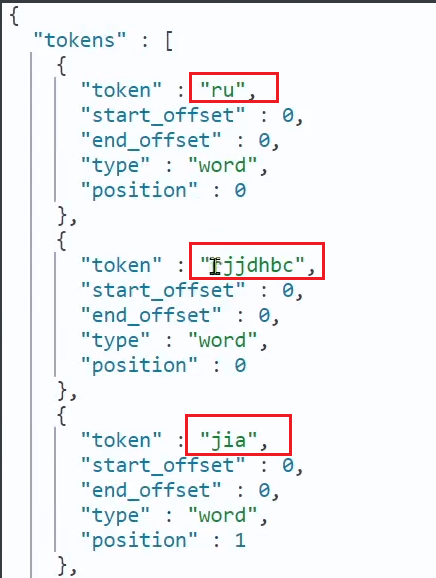
测试用法如下:
POST /_analyze
{
  "text": "如家酒店还不错",
  "analyzer": "pinyin"
}
结果:
2.2. 自定义分词器
默认的拼音分词器会将每个汉字单独分为拼音,而我们希望的是每个词条形成一组拼音,需要对拼音分词器做个性化定制,形成自定义分词器。
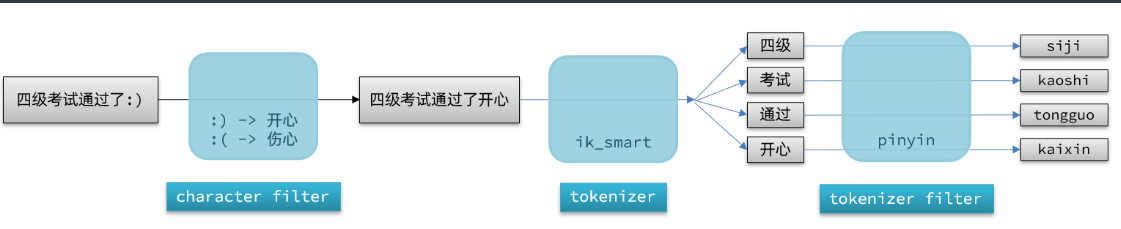
elasticsearch 中分词器(analyzer)的组成包含三部分:
- character filters:在 tokenizer 之前对文本进行处理。例如删除字符、替换字符
- tokenizer:将文本按照一定的规则切割成词条(term)。例如 keyword,就是不分词;还有 ik_smart
- tokenizer filter:将 tokenizer 输出的词条做进一步处理。例如大小写转换、同义词处理、拼音处理等
文档分词时会依次由这三部分来处理文档:
声明自定义分词器的语法如下:
PUT /test
{
  "settings": {
    "analysis": {
      "analyzer": { // 自定义分词器
        "my_analyzer": {  // 分词器名称
          "tokenizer": "ik_max_word",
          "filter": "py"
        }
      },
      "filter": { // 自定义tokenizer filter
        "py": { // 过滤器名称
          "type": "pinyin", // 过滤器类型,这里是pinyin
		  "keep_full_pinyin": false,
          "keep_joined_full_pinyin": true,
          "keep_original": true,
          "limit_first_letter_length": 16,
          "remove_duplicated_term": true,
          "none_chinese_pinyin_tokenize": false
        }
      }
    }
  },
  "mappings": {
    "properties": {
      "name": {
        "type": "text",
        "analyzer": "my_analyzer",
        "search_analyzer": "ik_smart"
      }
    }
  }
}
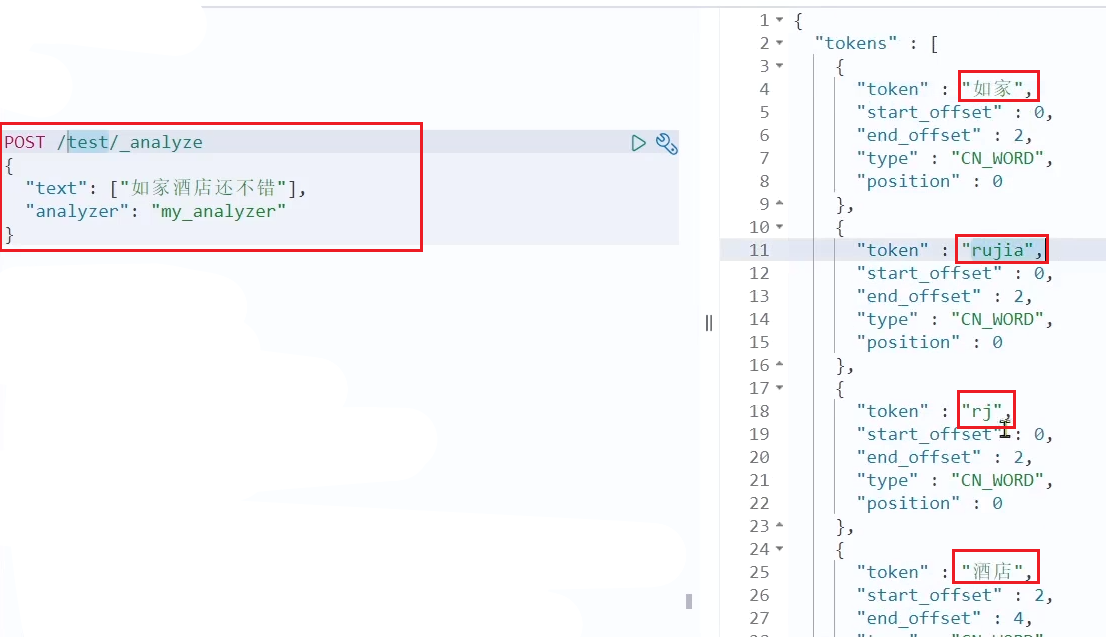
测试:
总结:
如何使用拼音分词器?
- ①下载 pinyin 分词器
- ②解压并放到 elasticsearch 的 plugin 目录
- ③重启即可
如何自定义分词器?
- ①创建索引库时,在 settings 中配置,可以包含三部分
- ②character filter
- ③tokenizer
- ④filter
拼音分词器注意事项?
- 为了避免搜索到同音字,搜索时不要使用拼音分词器
2.3. 自动补全查询
elasticsearch 提供了 Completion Suggester 查询来实现自动补全功能。这个查询会匹配以用户输入内容开头的词条并返回。为了提高补全查询的效率,对于文档中字段的类型有一些约束:
- 参与补全查询的字段必须是 completion 类型。
- 字段的内容一般是用来补全的多个词条形成的数组。
比如,一个这样的索引库:
// 创建索引库
PUT test
{
  "mappings": {
    "properties": {
      "title":{
        "type": "completion"
      }
    }
  }
}
然后插入下面的数据:
// 示例数据
POST test/_doc
{
  "title": ["Sony", "WH-1000XM3"]
}
POST test/_doc
{
  "title": ["SK-II", "PITERA"]
}
POST test/_doc
{
  "title": ["Nintendo", "switch"]
}
查询的 DSL 语句如下:
// 自动补全查询
GET /test/_search
{
  "suggest": {
    "title_suggest": {
      "text": "s", // 关键字
      "completion": {
        "field": "title", // 补全查询的字段
        "skip_duplicates": true, // 跳过重复的
        "size": 10 // 获取前10条结果
      }
    }
  }
}
2.4. 实现酒店搜索框自动补全
现在,我们的 hotel 索引库还没有设置拼音分词器,需要修改索引库中的配置。但是我们知道索引库是无法修改的,只能删除然后重新创建。
另外,我们需要添加一个字段,用来做自动补全,将 brand、suggestion、city 等都放进去,作为自动补全的提示。
因此,总结一下,我们需要做的事情包括:
- 修改 hotel 索引库结构,设置自定义拼音分词器
- 修改索引库的 name、all 字段,使用自定义分词器
- 索引库添加一个新字段 suggestion,类型为 completion 类型,使用自定义的分词器
- 给 HotelDoc 类添加 suggestion 字段,内容包含 brand、business
- 重新导入数据到 hotel 库
2.4.1. 修改酒店映射结构
代码如下:
// 酒店数据索引库
PUT /hotel
{
  "settings": {
    "analysis": {
      "analyzer": {
        "text_anlyzer": {
          "tokenizer": "ik_max_word",
          "filter": "py"
        },
        "completion_analyzer": {
          "tokenizer": "keyword",
          "filter": "py"
        }
      },
      "filter": {
        "py": {
          "type": "pinyin",
          "keep_full_pinyin": false,
          "keep_joined_full_pinyin": true,
          "keep_original": true,
          "limit_first_letter_length": 16,
          "remove_duplicated_term": true,
          "none_chinese_pinyin_tokenize": false
        }
      }
    }
  },
  "mappings": {
    "properties": {
      "id":{
        "type": "keyword"
      },
      "name":{
        "type": "text",
        "analyzer": "text_anlyzer",
        "search_analyzer": "ik_smart",
        "copy_to": "all"
      },
      "address":{
        "type": "keyword",
        "index": false
      },
      "price":{
        "type": "integer"
      },
      "score":{
        "type": "integer"
      },
      "brand":{
        "type": "keyword",
        "copy_to": "all"
      },
      "city":{
        "type": "keyword"
      },
      "starName":{
        "type": "keyword"
      },
      "business":{
        "type": "keyword",
        "copy_to": "all"
      },
      "location":{
        "type": "geo_point"
      },
      "pic":{
        "type": "keyword",
        "index": false
      },
      "all":{
        "type": "text",
        "analyzer": "text_anlyzer",
        "search_analyzer": "ik_smart"
      },
      "suggestion":{
          "type": "completion",
          "analyzer": "completion_analyzer"
      }
    }
  }
}
2.4.2. 修改 HotelDoc 实体
HotelDoc 中要添加一个字段,用来做自动补全,内容可以是酒店品牌、城市、商圈等信息。按照自动补全字段的要求,最好是这些字段的数组。
因此我们在 HotelDoc 中添加一个 suggestion 字段,类型为List<String>,然后将 brand、city、business 等信息放到里面。
代码如下:
package cn.itcast.hotel.pojo;

import lombok.Data;
import lombok.NoArgsConstructor;

import java.util.ArrayList;
import java.util.Arrays;
import java.util.Collections;
import java.util.List;

@Data
@NoArgsConstructor
public class HotelDoc {
    private Long id;
    private String name;
    private String address;
    private Integer price;
    private Integer score;
    private String brand;
    private String city;
    private String starName;
    private String business;
    private String location;
    private String pic;
    private Object distance;
    private Boolean isAD;
    private List<String> suggestion;

    public HotelDoc(Hotel hotel) {
        this.id = hotel.getId();
        this.name = hotel.getName();
        this.address = hotel.getAddress();
        this.price = hotel.getPrice();
        this.score = hotel.getScore();
        this.brand = hotel.getBrand();
        this.city = hotel.getCity();
        this.starName = hotel.getStarName();
        this.business = hotel.getBusiness();
        this.location = hotel.getLatitude() + ", " + hotel.getLongitude();
        this.pic = hotel.getPic();
        // 组装suggestion
        if(this.business.contains("/")){
            // business有多个值,需要切割
            String[] arr = this.business.split("/");
            // 添加元素
            this.suggestion = new ArrayList<>();
            this.suggestion.add(this.brand);
            Collections.addAll(this.suggestion, arr);
        }else {
            this.suggestion = Arrays.asList(this.brand, this.business);
        }
    }
}
2.4.3. 重新导入
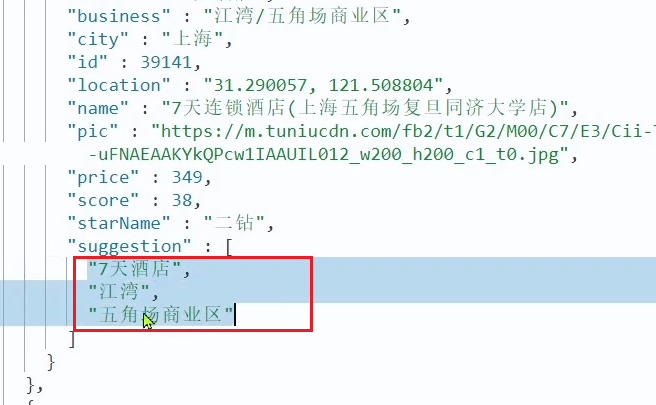
重新执行之前编写的导入数据功能,可以看到新的酒店数据中包含了 suggestion:
2.4.4. 自动补全查询的 JavaAPI
之前我们学习了自动补全查询的 DSL,而没有学习对应的 JavaAPI,这里给出一个示例:
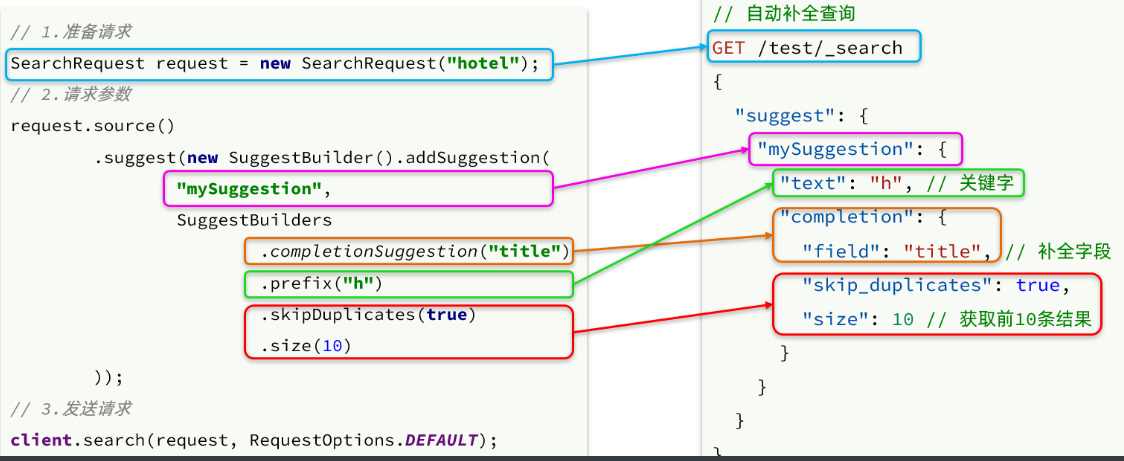
而自动补全的结果也比较特殊,解析的代码如下:
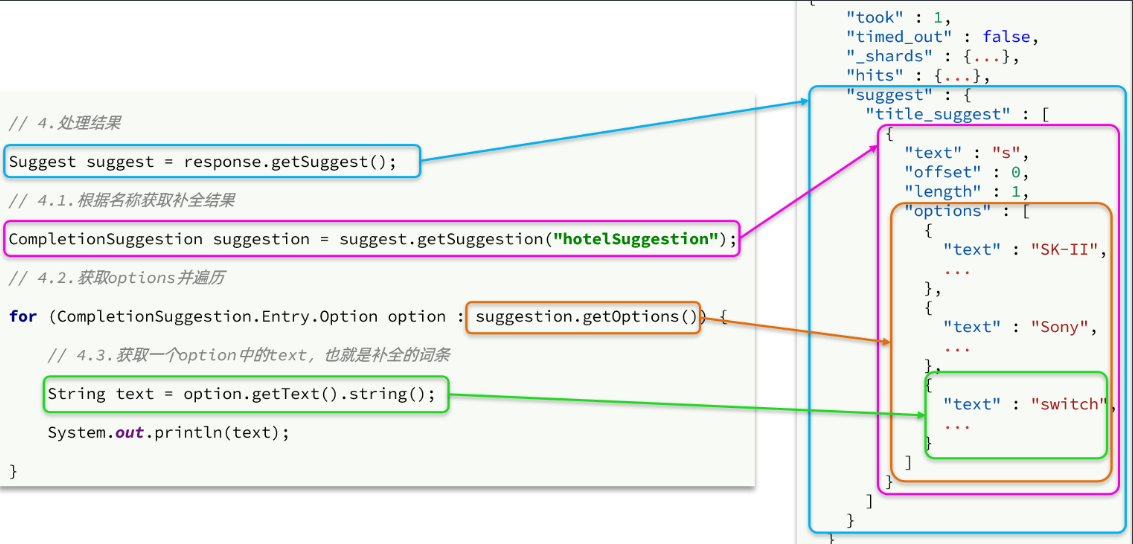
2.4.5. 实现搜索框自动补全
查看前端页面,可以发现当我们在输入框键入时,前端会发起 ajax 请求:
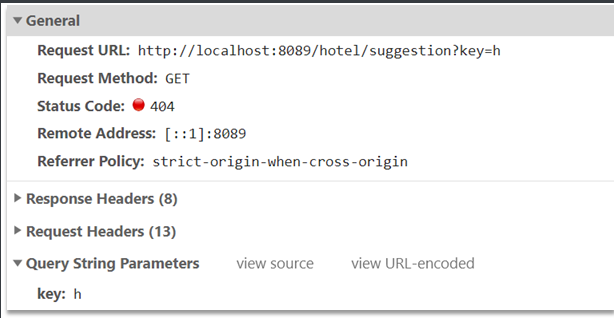
返回值是补全词条的集合,类型为List<String>
1)在cn.itcast.hotel.web包下的HotelController中添加新接口,接收新的请求:
@GetMapping("suggestion")
public List<String> getSuggestions(@RequestParam("key") String prefix) {
    return hotelService.getSuggestions(prefix);
}2)在cn.itcast.hotel.service包下的IhotelService中添加方法:
List<String> getSuggestions(String prefix);3)在cn.itcast.hotel.service.impl.HotelService中实现该方法:
@Override
public List<String> getSuggestions(String prefix) {
    try {
        // 1.准备Request
        SearchRequest request = new SearchRequest("hotel");
        // 2.准备DSL
        request.source().suggest(new SuggestBuilder().addSuggestion(
            "suggestions",
            SuggestBuilders.completionSuggestion("suggestion")
            .prefix(prefix)
            .skipDuplicates(true)
            .size(10)
        ));
        // 3.发起请求
        SearchResponse response = client.search(request, RequestOptions.DEFAULT);
        // 4.解析结果
        Suggest suggest = response.getSuggest();
        // 4.1.根据补全查询名称,获取补全结果
        CompletionSuggestion suggestions = suggest.getSuggestion("suggestions");
        // 4.2.获取options
        List<CompletionSuggestion.Entry.Option> options = suggestions.getOptions();
        // 4.3.遍历
        List<String> list = new ArrayList<>(options.size());
        for (CompletionSuggestion.Entry.Option option : options) {
            String text = option.getText().toString();
            list.add(text);
        }
        return list;
    } catch (IOException e) {
        throw new RuntimeException(e);
    }
}
3. 数据同步
elasticsearch 中的酒店数据来自于 mysql 数据库,因此 mysql 数据发生改变时,elasticsearch 也必须跟着改变,这个就是 elasticsearch 与 mysql 之间的数据同步。
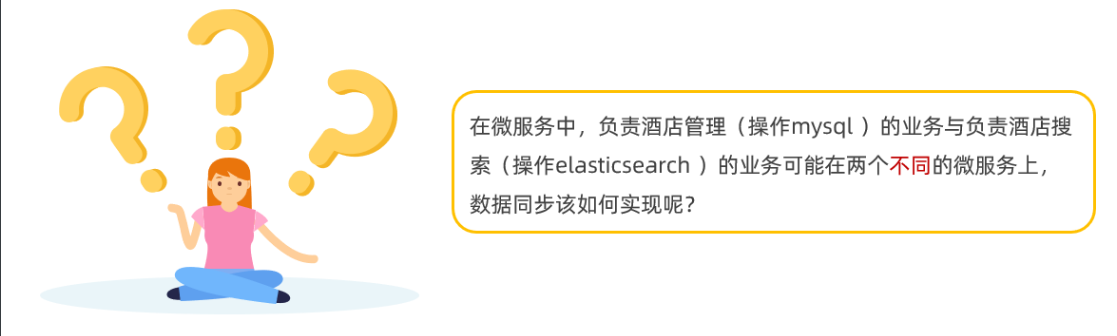
3.1. 思路分析
常见的数据同步方案有三种:
- 同步调用
- 异步通知
- 监听 binlog
3.1.1. 同步调用
方案一:同步调用
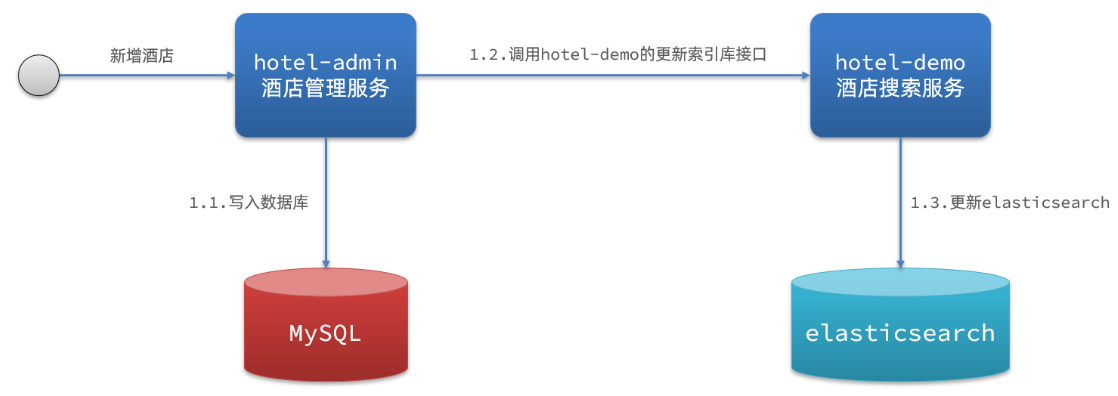
基本步骤如下:
- hotel-demo 对外提供接口,用来修改 elasticsearch 中的数据
- 酒店管理服务在完成数据库操作后,直接调用 hotel-demo 提供的接口,
3.1.2. 异步通知
方案二:异步通知
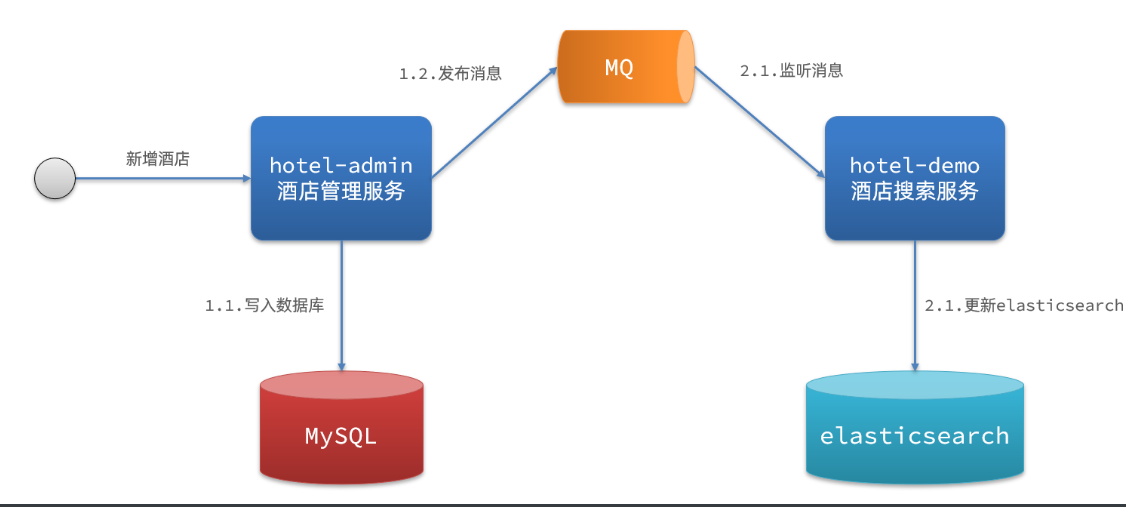
流程如下:
- hotel-admin 对 mysql 数据库数据完成增、删、改后,发送 MQ 消息
- hotel-demo 监听 MQ,接收到消息后完成 elasticsearch 数据修改
3.1.3. 监听 binlog
方案三:监听 binlog
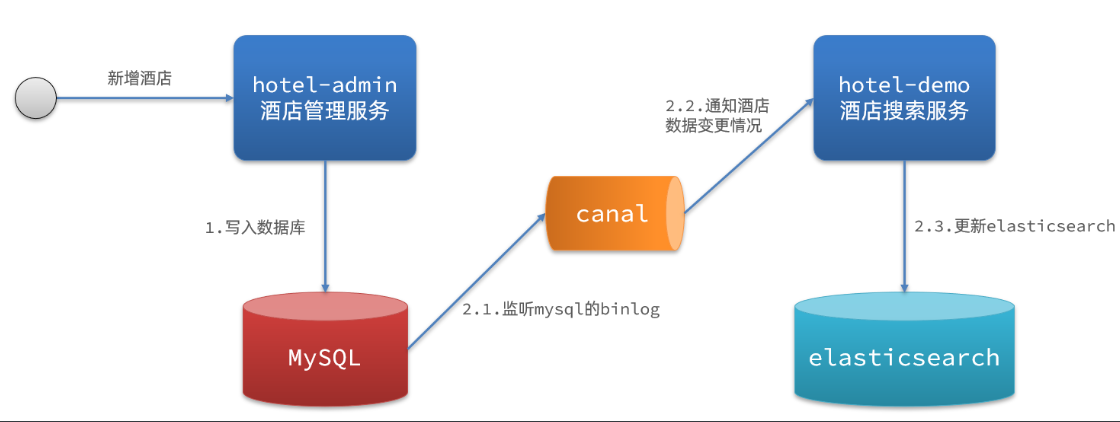
流程如下:
- 给 mysql 开启 binlog 功能
- mysql 完成增、删、改操作都会记录在 binlog 中
- hotel-demo 基于 canal 监听 binlog 变化,实时更新 elasticsearch 中的内容
3.1.4. 选择
方式一:同步调用
- 优点:实现简单,粗暴
- 缺点:业务耦合度高
方式二:异步通知
- 优点:低耦合,实现难度一般
- 缺点:依赖 mq 的可靠性
方式三:监听 binlog
- 优点:完全解除服务间耦合
- 缺点:开启 binlog 增加数据库负担、实现复杂度高
3.2. 实现数据同步
3.2.1. 思路
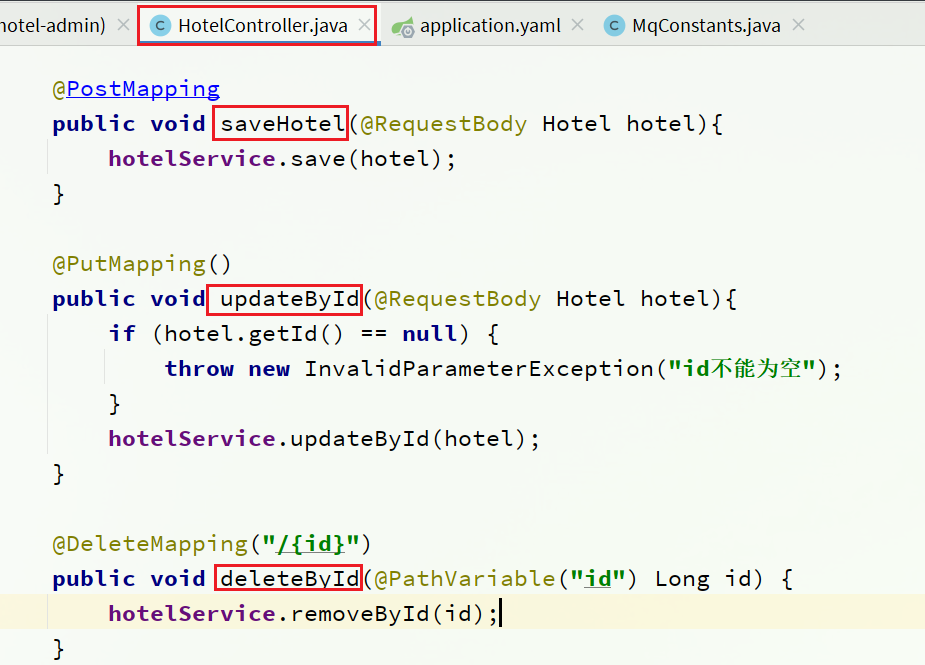
利用课前资料提供的 hotel-admin 项目作为酒店管理的微服务。当酒店数据发生增、删、改时,要求对 elasticsearch 中数据也要完成相同操作。
步骤:
- 导入课前资料提供的 hotel-admin 项目,启动并测试酒店数据的 CRUD
- 声明 exchange、queue、RoutingKey
- 在 hotel-admin 中的增、删、改业务中完成消息发送
- 在 hotel-demo 中完成消息监听,并更新 elasticsearch 中数据
- 启动并测试数据同步功能
3.2.2. 导入 demo
导入课前资料提供的 hotel-admin 项目:
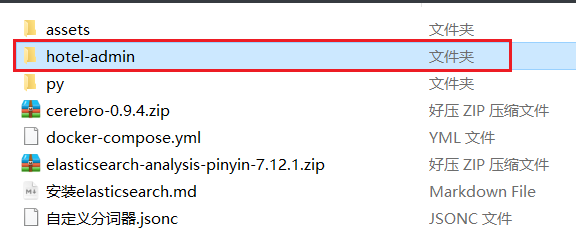
运行后,访问 http://localhost:8099
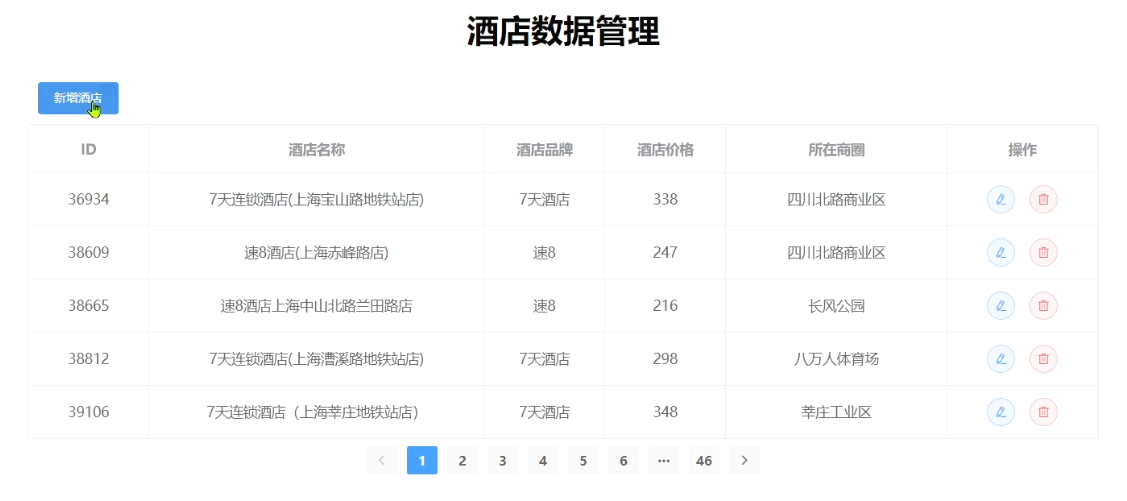
其中包含了酒店的 CRUD 功能:
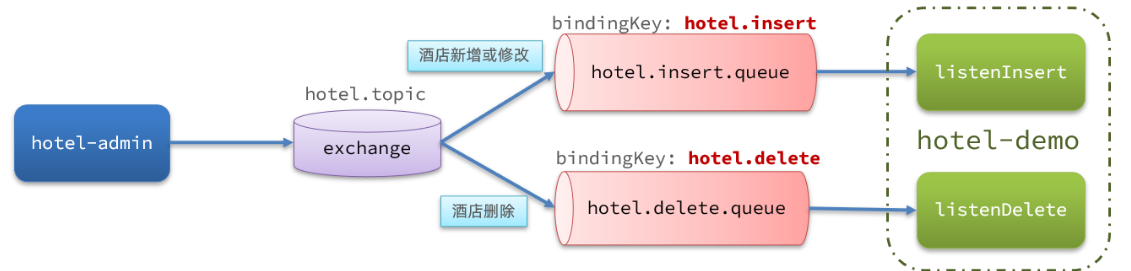
3.2.3. 声明交换机、队列
MQ 结构如图:
1)引入依赖
在 hotel-admin、hotel-demo 中引入 rabbitmq 的依赖:
<!--amqp-->
<dependency>
    <groupId>org.springframework.boot</groupId>
    <artifactId>spring-boot-starter-amqp</artifactId>
</dependency>
2)声明队列交换机名称
在 hotel-admin 和 hotel-demo 中的cn.itcast.hotel.constatnts包下新建一个类MqConstants:
package cn.itcast.hotel.constatnts;

    public class MqConstants {
    /**
     * 交换机
     */
    public final static String HOTEL_EXCHANGE = "hotel.topic";
    /**
     * 监听新增和修改的队列
     */
    public final static String HOTEL_INSERT_QUEUE = "hotel.insert.queue";
    /**
     * 监听删除的队列
     */
    public final static String HOTEL_DELETE_QUEUE = "hotel.delete.queue";
    /**
     * 新增或修改的RoutingKey
     */
    public final static String HOTEL_INSERT_KEY = "hotel.insert";
    /**
     * 删除的RoutingKey
     */
    public final static String HOTEL_DELETE_KEY = "hotel.delete";
}
3)声明队列交换机
在 hotel-demo 中,定义配置类,声明队列、交换机:
package cn.itcast.hotel.config;

import cn.itcast.hotel.constants.MqConstants;
import org.springframework.amqp.core.Binding;
import org.springframework.amqp.core.BindingBuilder;
import org.springframework.amqp.core.Queue;
import org.springframework.amqp.core.TopicExchange;
import org.springframework.context.annotation.Bean;
import org.springframework.context.annotation.Configuration;

@Configuration
public class MqConfig {
    @Bean
    public TopicExchange topicExchange(){
        return new TopicExchange(MqConstants.HOTEL_EXCHANGE, true, false);
    }

    @Bean
    public Queue insertQueue(){
        return new Queue(MqConstants.HOTEL_INSERT_QUEUE, true);
    }

    @Bean
    public Queue deleteQueue(){
        return new Queue(MqConstants.HOTEL_DELETE_QUEUE, true);
    }

    @Bean
    public Binding insertQueueBinding(){
        return BindingBuilder.bind(insertQueue()).to(topicExchange()).with(MqConstants.HOTEL_INSERT_KEY);
    }

    @Bean
    public Binding deleteQueueBinding(){
        return BindingBuilder.bind(deleteQueue()).to(topicExchange()).with(MqConstants.HOTEL_DELETE_KEY);
    }
}
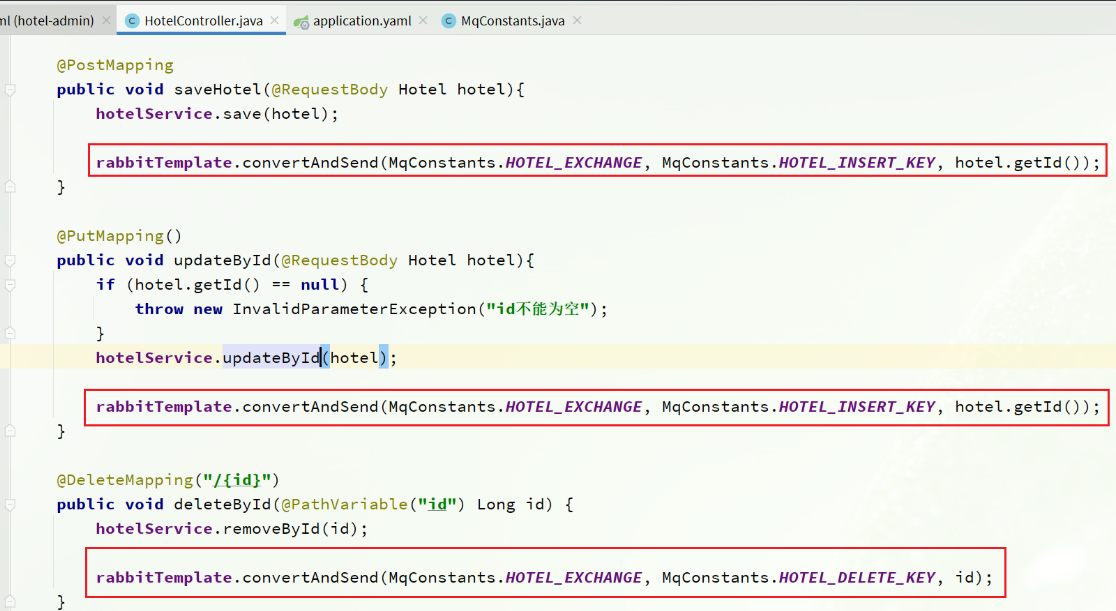
3.2.4. 发送 MQ 消息
在 hotel-admin 中的增、删、改业务中分别发送 MQ 消息:
3.2.5. 接收 MQ 消息
hotel-demo 接收到 MQ 消息要做的事情包括:
- 新增消息:根据传递的 hotel 的 id 查询 hotel 信息,然后新增一条数据到索引库
- 删除消息:根据传递的 hotel 的 id 删除索引库中的一条数据
1)首先在 hotel-demo 的cn.itcast.hotel.service包下的IHotelService中新增新增、删除业务
void deleteById(Long id);

void insertById(Long id);
2)给 hotel-demo 中的cn.itcast.hotel.service.impl包下的 HotelService 中实现业务:
@Override
public void deleteById(Long id) {
    try {
        // 1.准备Request
        DeleteRequest request = new DeleteRequest("hotel", id.toString());
        // 2.发送请求
        client.delete(request, RequestOptions.DEFAULT);
    } catch (IOException e) {
        throw new RuntimeException(e);
    }
}

@Override
public void insertById(Long id) {
    try {
        // 0.根据id查询酒店数据
        Hotel hotel = getById(id);
        // 转换为文档类型
        HotelDoc hotelDoc = new HotelDoc(hotel);

        // 1.准备Request对象
        IndexRequest request = new IndexRequest("hotel").id(hotel.getId().toString());
        // 2.准备Json文档
        request.source(JSON.toJSONString(hotelDoc), XContentType.JSON);
        // 3.发送请求
        client.index(request, RequestOptions.DEFAULT);
    } catch (IOException e) {
        throw new RuntimeException(e);
    }
}
3)编写监听器
在 hotel-demo 中的cn.itcast.hotel.mq包新增一个类:
package cn.itcast.hotel.mq;

import cn.itcast.hotel.constants.MqConstants;
import cn.itcast.hotel.service.IHotelService;
import org.springframework.amqp.rabbit.annotation.RabbitListener;
import org.springframework.beans.factory.annotation.Autowired;
import org.springframework.stereotype.Component;

@Component
public class HotelListener {

    @Autowired
    private IHotelService hotelService;

    /**
     * 监听酒店新增或修改的业务
     * @param id 酒店id
     */
    @RabbitListener(queues = MqConstants.HOTEL_INSERT_QUEUE)
    public void listenHotelInsertOrUpdate(Long id){
        hotelService.insertById(id);
    }

    /**
     * 监听酒店删除的业务
     * @param id 酒店id
     */
    @RabbitListener(queues = MqConstants.HOTEL_DELETE_QUEUE)
    public void listenHotelDelete(Long id){
        hotelService.deleteById(id);
    }
}
4. 集群
单机的 elasticsearch 做数据存储,必然面临两个问题:海量数据存储问题、单点故障问题。
- 海量数据存储问题:将索引库从逻辑上拆分为 N 个分片(shard),存储到多个节点
- 单点故障问题:将分片数据在不同节点备份(replica )
ES 集群相关概念:
- 集群(cluster):一组拥有共同的 cluster name 的 节点。
- 节点(node) :集群中的一个 Elasticearch 实例
- 分片(shard):索引可以被拆分为不同的部分进行存储,称为分片。在集群环境下,一个索引的不同分片可以拆分到不同的节点中 解决问题:数据量太大,单点存储量有限的问题。
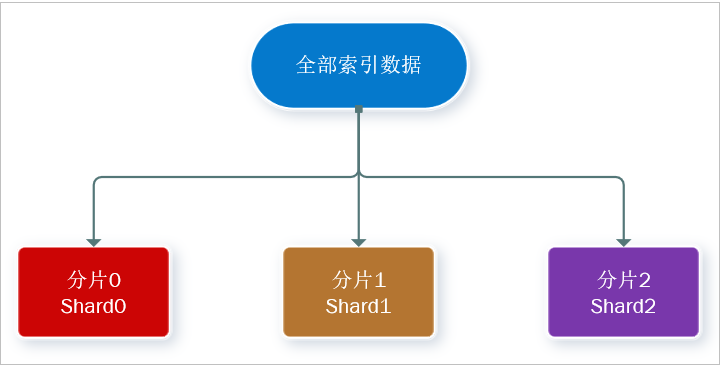
- 此处,我们把数据分成 3 片:shard0、shard1、shard2
- 主分片(Primary shard):相对于副本分片的定义。
- 副本分片(Replica shard)每个主分片可以有一个或者多个副本,数据和主分片一样。
数据备份可以保证高可用,但是每个分片备份一份,所需要的节点数量就会翻一倍,成本实在是太高了!
为了在高可用和成本间寻求平衡,我们可以这样做:
- 首先对数据分片,存储到不同节点
- 然后对每个分片进行备份,放到对方节点,完成互相备份
这样可以大大减少所需要的服务节点数量,如图,我们以 3 分片,每个分片备份一份为例:
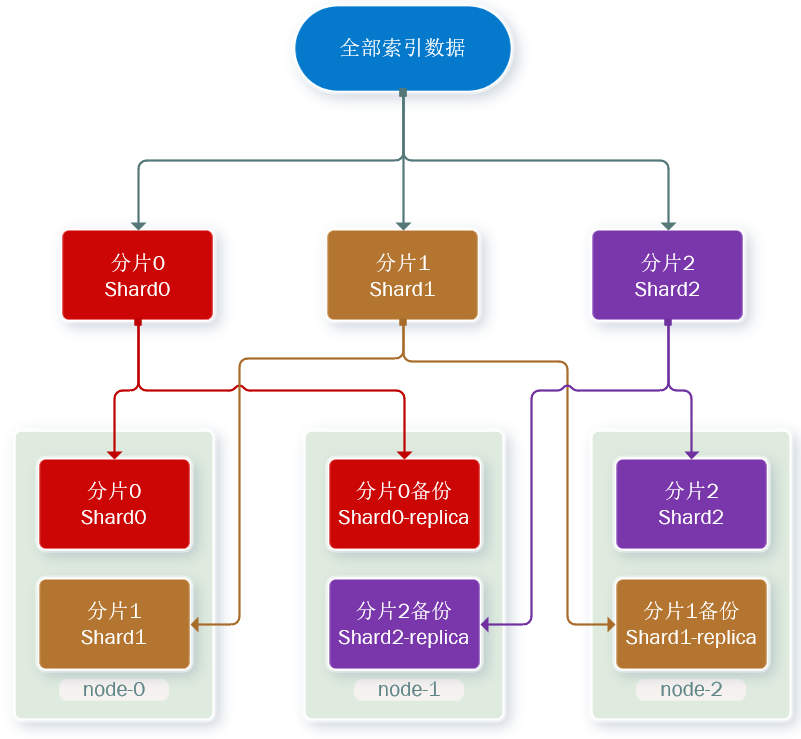
现在,每个分片都有 1 个备份,存储在 3 个节点:
- node0:保存了分片 0 和 1
- node1:保存了分片 0 和 2
- node2:保存了分片 1 和 2
本文参与 腾讯云自媒体同步曝光计划,分享自作者个人站点/博客。
原始发表:2024-01-16,如有侵权请联系 cloudcommunity@tencent.com 删除
目录
腾讯云开发者

Copyright © 2013 - 2026 Tencent Cloud. All Rights Reserved. 腾讯云 版权所有
深圳市腾讯计算机系统有限公司 ICP备案/许可证号:粤B2-20090059  粤公网安备44030502008569号
腾讯云计算(北京)有限责任公司 京ICP证150476号 | 京ICP备11018762号