PG 13新特性汇总


概述
PostgreSQL 13 典型变化如下:
- 逻辑复制支持分区表
- Btree索引优化(引入
Deduplication技术) - 增量排序
(Incremental Sorting) - 并行
VACUUM索引 - 并行
Reindexdb - 手册新增术语(
Glossary)附录
PostgreSQL 13: 逻辑复制支持分区表
PostgreSQL 10 版本开始支持逻辑复制,在12版本之前逻辑复制仅支持普通表,不支持分区表,如果需要对分区表进行逻辑复制,需单独对所有分区进行逻辑复制。
PostgreSQL 13 版本的逻辑复制新增了对分区表的支持,如下:
- 可以显式地发布分区表,自动发布所有分区。
- 从分区表中添加/删除分区将自动从发布中添加/删除。
在PostgreSQL13中,分区的主表可以在源PostgreSQL13中直接publish,这样会将该主表下的所有分区自动的进行publish在PostgreSQL12中,主表无法被create publication。
环境规划
环境规划,如下:
节点 | 数据库版本 | IP | 端口 |
|---|---|---|---|
源库 | PostgreSQL 13.8 | 172.72.6.2 | 5432 |
目标库 | PostgreSQL 13.8 | 172.72.6.3 | 5432 |
docker network create --subnet=172.72.0.0/16 lhrnw

docker rm -f lhrpg1362
docker run --name lhrpg1362 -h lhrpg1362 -d -p 53322:5432   --net=lhrnw --ip 172.72.6.2 -e POSTGRES_PASSWORD=lhr -e TZ=Asia/Shanghai postgres:13.8

docker rm -f lhrpg1363
docker run --name lhrpg1363 -h lhrpg1363 -d -p 53323:5432   --net=lhrnw --ip 172.72.6.3 -e POSTGRES_PASSWORD=lhr -e TZ=Asia/Shanghai postgres:13.8
部署lhrdb数据库
在源库和目标库上均部署lhrdb数据库,如下:
-- 创建数据库
CREATE DATABASE lhrdb ;
创建分区表
在源库和目标库上创建分区表,如下:
\c lhrdb

-- 创建父表
CREATE TABLE tbl_log ( id serial ,  user_id int4,  create_time timestamp(0) without time zone) PARTITION BY RANGE(create_time);

-- 创建子表
CREATE TABLE tbl_log_his PARTITION OF tbl_log FOR VALUES FROM (minvalue) TO ('2020-01-01');
CREATE TABLE tbl_log_202001 PARTITION OF tbl_log FOR VALUES FROM ('2020-01-01') TO ('2020-02-01');
CREATE TABLE tbl_log_202002 PARTITION OF tbl_log FOR VALUES FROM ('2020-02-01') TO ('2020-03-01');
CREATE TABLE tbl_log_202003 PARTITION OF tbl_log FOR VALUES FROM ('2020-03-01') TO ('2020-04-01');
CREATE TABLE tbl_log_202004 PARTITION OF tbl_log FOR VALUES FROM ('2020-04-01') TO ('2020-05-01');
CREATE TABLE tbl_log_202005 PARTITION OF tbl_log FOR VALUES FROM ('2020-05-01') TO ('2020-06-01');
CREATE TABLE tbl_log_202006 PARTITION OF tbl_log FOR VALUES FROM ('2020-06-01') TO ('2020-07-01');
CREATE TABLE tbl_log_202007 PARTITION OF tbl_log FOR VALUES FROM ('2020-07-01') TO ('2020-08-01');
-- 创建索引
CREATE INDEX idx_tbl_log_ctime ON tbl_log USING BTREE (create_time);


lhrdb=# \dt
                   List of relations
 Schema |      Name      |       Type        |  Owner
--------+----------------+-------------------+----------
 public | tbl_log        | partitioned table | postgres
 public | tbl_log_202001 | table             | postgres
 public | tbl_log_202002 | table             | postgres
 public | tbl_log_202003 | table             | postgres
 public | tbl_log_202004 | table             | postgres
 public | tbl_log_202005 | table             | postgres
 public | tbl_log_202006 | table             | postgres
 public | tbl_log_202007 | table             | postgres
 public | tbl_log_his    | table             | postgres
(9 rows)
部署逻辑复制
源库配置:
alter system set wal_level='logical';
SELECT pg_reload_conf();

docker restart lhrpg1362

show wal_level;
源库执行以下操作,如下:
-- 创建发布
CREATE PUBLICATION pub1 FOR TABLE tbl_log;
目标库创建订阅,如下:
CREATE SUBSCRIPTION sub1 CONNECTION 'host=172.72.6.2 port=5432 dbname=lhrdb user=postgres password=lhr' PUBLICATION pub1;
数据验证
源库批量插入数据,如下:
INSERT INTO tbl_log(user_id,create_time)
SELECT round(100000000*random()),generate_series('2019-10-01'::date, '2020-06-20'::date, '1 day');
源库查看数据,如下:
lhrdb=> INSERT INTO tbl_log(user_id,create_time)
lhrdb-> SELECT round(100000000*random()),generate_series('2019-10-01'::date, '2020-06-20'::date, '1 day');
INSERT 0 264
lhrdb=> SELECT count(*) FROM tbl_log;
 count
-------
   264
(1 row)


lhrdb=> SELECT count(*) FROM tbl_log_202001;
 count
-------
    31
(1 row)


lhrdb=> SELECT count(*) FROM tbl_log_his;
 count
-------
    92
(1 row)
目标库验证数据,如下:
lhrdb=# \conninfo
You are connected to database "lhrdb" as user "postgres" on host "172.18.0.14" at port "53323".
lhrdb=#

lhrdb=#  SELECT count(*) FROM tbl_log;
 count
-------
   264
(1 row)


lhrdb=> SELECT count(*) FROM tbl_log_202001;
 count
-------
    31
(1 row)


lhrdb=> SELECT count(*) FROM tbl_log_his;
 count
-------
    92
(1 row)
可见分区表的数据已从源库同步到目标库。
参考
https://www.xmmup.com/pgzhongdeluojifuzhilogical-replication.html
PostgreSQL 13: CREATE SUBSCRIPTION新增publish_via_partition_root选项支持异构分区表间的数据逻辑复制
PostgreSQL 13 版本CREATE SUBSCRIPTION命令新增 publish_via_partition_root 选项支持异构分区表的数据同步,具体为:
- 分区表数据逻辑复制到普通表。
- 分区表数据逻辑复制到异构分区表。
第2点所说的异构分区表是指目标库和源库同一张分区表的分区策略可以不一样,比如源库分区表的分区策略是按月分区,目标库分区表的分区策略可以是按年分区。这一功能对于分区表具有重要意义,当需要从多个源库汇总数据到同一个目标库的分区表时,目标库的分区策略可以设置成和源库不一致,便于数据汇总统计。
关于 publish_via_partition_root选项,如下:
- 该选项设置发布中包含的分区表中的更改(或分区上的更改)是否使用分区表父表的标识和模式发布,而不是使用各个分区的标识和模式发布。
- 默认使用分区进行标识和模式发布。
- 设置为true,可以将分区表的数据逻辑复制到普通表和异构分区表。
- 如果设置为true,分区上的
TRUNCATE操作不会进行逻辑复制。
本文对分区表在上述两种场景下的逻辑复制进行验证,如下:
- 场景一: 分区表数据逻辑复制到普通表。
- 场景二: 分区表数据逻辑复制到异构分区表。
源库上的tbl_log是分区表,计划在源库上创建一张非分区表tbl_log并配置逻辑复制,验证数据是否能正常同步。
源库创建发布
源库上创建发布,如下:
drop table tbl_log;

CREATE TABLE tbl_log ( id serial ,  user_id int4,  create_time timestamp(0) without time zone) PARTITION BY RANGE(create_time);

CREATE TABLE tbl_log_his PARTITION OF tbl_log FOR VALUES FROM (minvalue) TO ('2020-01-01');
CREATE TABLE tbl_log_202001 PARTITION OF tbl_log FOR VALUES FROM ('2020-01-01') TO ('2020-02-01');
CREATE TABLE tbl_log_202002 PARTITION OF tbl_log FOR VALUES FROM ('2020-02-01') TO ('2020-03-01');
CREATE TABLE tbl_log_202003 PARTITION OF tbl_log FOR VALUES FROM ('2020-03-01') TO ('2020-04-01');
CREATE TABLE tbl_log_202004 PARTITION OF tbl_log FOR VALUES FROM ('2020-04-01') TO ('2020-05-01');
CREATE TABLE tbl_log_202005 PARTITION OF tbl_log FOR VALUES FROM ('2020-05-01') TO ('2020-06-01');
CREATE TABLE tbl_log_202006 PARTITION OF tbl_log FOR VALUES FROM ('2020-06-01') TO ('2020-07-01');
CREATE TABLE tbl_log_202007 PARTITION OF tbl_log FOR VALUES FROM ('2020-07-01') TO ('2020-08-01');

CREATE INDEX idx_tbl_log_ctime ON tbl_log USING BTREE (create_time);

INSERT INTO tbl_log(user_id,create_time)SELECT round(100000000*random()),generate_series('2019-10-01'::date, '2020-06-20'::date, '1 day');


lhrdb=# SELECT COUNT(*) FROM tbl_log;
 count
-------
   264
(1 row)


CREATE PUBLICATION pub2 FOR TABLE tbl_log WITH (publish_via_partition_root=true);
创建发布时使用了 publish_via_partition_root选项。
场景一: 分区表逻辑复制到普通表
目标库上创建普通表,如下:
drop table tbl_log;
CREATE TABLE tbl_log ( id serial, user_id int4, create_time timestamp(0) without time zone);
创建订阅,如下:
CREATE SUBSCRIPTION sub2 CONNECTION 'host=172.72.6.2 port=5432 dbname=lhrdb user=postgres password=lhr' PUBLICATION pub2;
验证目标库数据,如下:
lhrdb=#  SELECT count(*) FROM tbl_log;
 count
-------
   264
(1 row)


lhrdb=# \dt
          List of relations
 Schema |  Name   | Type  |  Owner
--------+---------+-------+----------
 public | tbl_log | table | postgres
(1 row)
数据已从源库同步。
场景二: 分区表逻辑复制到异构分区表
源库的tbl_log是按月分区表,计划在目标库上创建一张按年分区表tbl_log并配置逻辑复制,验证数据是否能正常同步。
目标库上删除表 tbl_log ,如下:
DROP TABLE tbl_log;
目标库上创建按年分区表,如下:
--创建父表
CREATE TABLE tbl_log ( id serial, user_id int4, create_time timestamp(0) without time zone) PARTITION BY RANGE(create_time);
--创建子表
CREATE TABLE tbl_log_his PARTITION OF tbl_log FOR VALUES FROM (minvalue) TO ('2020-01-01');
CREATE TABLE tbl_log_2020 PARTITION OF tbl_log FOR VALUES FROM ('2020-01-01') TO ('2021-01-01');
CREATE TABLE tbl_log_2021 PARTITION OF tbl_log FOR VALUES FROM ('2021-01-01') TO ('2022-01-01');
--创建索引
CREATE INDEX idx_tbl_log_ctime ON tbl_log USING BTREE (create_time);
源库数据,如下:
lhrdb=# select count(*) from tbl_log;
 count
-------
   172
(1 row)
观察目标库数据,如下:
lhrdb=# select count(*) from tbl_log;
 count
-------
     0
(1 row)
发现目标库数据还没有同步过来。
目标库刷新订阅,再次在目标库上验证数据,发现数据已同步,如下:
lhrdb=# ALTER SUBSCRIPTION sub2 REFRESH PUBLICATION;
ALTER SUBSCRIPTION
lhrdb=# select count(*) from tbl_log;
 count
-------
   172
(1 row)

lhrdb=# \dt
                  List of relations
 Schema |     Name     |       Type        |  Owner
--------+--------------+-------------------+----------
 public | tbl_log      | partitioned table | postgres
 public | tbl_log_2020 | table             | postgres
 public | tbl_log_2021 | table             | postgres
 public | tbl_log_his  | table             | postgres
(4 rows)
PG 13关于分区表的其它改进功能
因为有更多情况可以裁剪分区或直接join分区,带有分区表的查询性能也得到了提高。
1) 查询优化器能更智能去做分区裁剪,需要打开“enable_partition_pruning”参数(默认是on)。
2) 能在更多的场景下使用分区表之间的join,需要打开“enable_partitionwise_join”参数(默认是off),但是这个参数打开之后,在执行计划生成期间,会占用更多的CPU和内存。
3) 支持行级别before触发器
4) 对分区表做lock table,不再检查子表的权限。 5) 支持在逻辑复制通过父表中发布/订阅。以前是需要每个分区子表单独发布/订阅,现在可以通过父表自动发布。
PostgreSQL 13: 新增内置函数Gen_random_uuid()生成UUID数据
PostgreSQL 13版本前不提供生成UUID数据的内置函数,如果需要使用UUID数据,可通过创建外部扩展 uuid-ossp或 pgcrypto生成 UUID数据。
PostgreSQL 13 新增gen_random_uuid()内置函数,可生成UUID数据。
关于gen_random_uuid()函数
gen_random_uuid()函数生成 version 4 UUID(基于随机数生成,使用最广泛)。
一个示例,如下:
postgres=# \df gen_random_uuid
                              List of functions
   Schema   |      Name       | Result data type | Argument data types | Type
------------+-----------------+------------------+---------------------+------
 pg_catalog | gen_random_uuid | uuid             |                     | func
(1 row)

postgres=# SELECT gen_random_uuid();
           gen_random_uuid
--------------------------------------
 bbd8c468-9c8b-477e-852f-c6ccaa27ea7a
(1 row)

postgres=# SELECT gen_random_uuid();
           gen_random_uuid
--------------------------------------
 cc44a6e7-280c-498b-89a3-d04e18ef6978
(1 row)

postgres=#
生成一张包含UUID数据的表
PostgreSQL 提供 UUID数据类型,在UUID数据上可创建btree索引,下面演示下。
创建测试表并生成UUID数据,之后创建索引,如下:
DROP TABLE uuid_01;
CREATE TABLE uuid_01(id_int int4, id_uuid uuid,ctime timestamp(6) without time zone);
INSERT INTO uuid_01(id_int,id_uuid,ctime) SELECT n,gen_random_uuid(),clock_timestamp() FROM generate_series(1,100000) n;
CREATE UNIQUE INDEX idx_uuid_01_uuid ON uuid_01 USING BTREE (id_uuid);
查看UUID数据和执行计划,如下:
lhrdb=# SELECT * FROM uuid_01 LIMIT 1;
 id_int |               id_uuid                |          ctime
--------+--------------------------------------+--------------------------
      1 | c61ad9ff-b1df-4572-b248-d91978ac0ab3 | 2023-04-17 14:32:38.8002
(1 row)


lhrdb=# explain SELECT * FROM uuid_01 LIMIT 1;
                              QUERY PLAN
----------------------------------------------------------------------
 Limit  (cost=0.00..0.02 rows=1 width=28)
   ->  Seq Scan on uuid_01  (cost=0.00..1736.00 rows=100000 width=28)
(2 rows)


lhrdb=# explain SELECT * FROM uuid_01 where id_uuid='5687e60e-096e-4743-b82a-2f4d42e4340e';
                                   QUERY PLAN
---------------------------------------------------------------------------------
 Index Scan using idx_uuid_01_uuid on uuid_01  (cost=0.42..8.44 rows=1 width=28)
   Index Cond: (id_uuid = '5687e60e-096e-4743-b82a-2f4d42e4340e'::uuid)
(2 rows)
PostgreSQL 13: Btree索引优化(引入Deduplication技术)
PostgreSQL 13 版本的Btree索引在存储层面引入了一个重要的技术,名为Deduplication,是指索引项去重技术。
Deduplication技术的引入能够减少索引的存储空间和维护开销,同时提升查询效率。
索引的Deduplication选项默认是开启的,如果想关闭指定索引的Deduplication,设置存储参数deduplicate_items为off即可。
Deduplication介绍
PostgreSQL 13 版本前 Btree 索引会存储表的所有索引键,从而产生很多重复的索引项,13 版本引入的 deduplication 技术,可以大幅度减少重复索引项。
Deduplication 会定期的将重复的索引项合并,为每组形成一个发布列表元组,重复的索引项在此列表中仅出现一次,当表的索引键重复项很多时,能显著减少索引的存储空间。
Deduplication的优点
Deduplication技术的引入具有以下优点:
- 减少存储空间: 重复的索引项被合并,能显著减少索引的存储空间。
- 减少索引维护开销: 重建索引速度更快,vacuum索引的开销更低。
- 提升查询效率: 更小的索引能够减少查询的时延,并提升吞吐量。
环境准备
计划在PostgreSQL 12 和 13 版本分别创建unique索引和重复项很多的索引,比较索引的大小。
创建测试表的脚本如下:
CREATE TABLE user_info (userid int4, username character varying(32),regtime timestamp without time zone);
INSERT INTO user_info (userid,username,regtime) SELECT n, 'user_info' || n, '2020-06-29 21:00:00' FROM generate_series(1,5000000) n;
CREATE UNIQUE INDEX idx_user_info_usename ON user_info USING BTREE(username);
CREATE INDEX idx_user_info_regtime ON user_info USING BTREE(regtime);
分别在PostgreSQL 12.12和 PostgreSQL 13 创建两个索引
- idx_user_info_usename为unique索引,存储的索引项唯一。
- idx_user_info_regtime为deduplicated 索引,存储的索引项都相同。
测试索引大小
PostgreSQL 12.2 查看索引大小,如下:
postgres=#  \di+ idx_user_info_usename
                                                 List of relations
 Schema |         Name          | Type  |  Owner   |   Table   | Persistence | Access method |  Size  | Description
--------+-----------------------+-------+----------+-----------+-------------+---------------+--------+-------------
 public | idx_user_info_usename | index | postgres | user_info | permanent   | btree         | 185 MB |
(1 row)

postgres=# \di+ idx_user_info_regtime
                                                 List of relations
 Schema |         Name          | Type  |  Owner   |   Table   | Persistence | Access method |  Size  | Description
--------+-----------------------+-------+----------+-----------+-------------+---------------+--------+-------------
 public | idx_user_info_regtime | index | postgres | user_info | permanent   | btree         | 107 MB |
(1 row)

postgres=#
PostgreSQL 13 查看索引大小,如下:
lhrdb=#  \di+ idx_user_info_usename
                                                 List of relations
 Schema |         Name          | Type  |  Owner   |   Table   | Persistence | Access method |  Size  | Description
--------+-----------------------+-------+----------+-----------+-------------+---------------+--------+-------------
 public | idx_user_info_usename | index | postgres | user_info | permanent   | btree         | 185 MB |
(1 row)


lhrdb=# \di+ idx_user_info_regtime
                                                 List of relations
 Schema |         Name          | Type  |  Owner   |   Table   | Persistence | Access method | Size  | Description
--------+-----------------------+-------+----------+-----------+-------------+---------------+-------+-------------
 public | idx_user_info_regtime | index | postgres | user_info | permanent   | btree         | 33 MB |
(1 row)
根据以上看出,创建索引后,unique索引在12版本13版本大小一致,deduplicated索引差异较大,13版本的deduplicated索引大小约为12版本的三分之一。
唯一索引是否受Deduplication影响?
手册上提到: 即使是unique索引也可以使用Deduplication技术控制重复数据的膨胀,因为索引项的TIDs指向同一行数据的不同版本。
换句话说,当表的数据被update时,依据PostgreSQL的MVCC机制,老的tuple依然保留在原有PAGE上,并新增一条tuple,索引将同时存储新版本和老版本表数据的索引键。
如何关闭索引的Deduplication?
可通过存储参数deduplicate_items控制索引是否启用Deduplication,这个参数默认为开启。
关闭索引的Deduplication,如下:
postgres=# ALTER INDEX idx_user_info_regtime SET (deduplicate_items=off);
PostgreSQL 13: 支持增量排序(Incremental Sorting)
PostgreSQL 13 版本的一个重要特性是支持增量排序(Incremental Sorting),加速数据排序,配置参数为show enable_incremental_sort ;,默认为on,表示开启该功能。
例如以下SQL:
SELECT * FROM t ORDER BY a,b LIMIT 10;
如果在字段a上建立了索引,由于索引是排序的,查询结果集的a字段是已排序的,这种场景下,PostgreSQL 13 的增量排序可以发挥重要作用,大幅加速查询,因为ORDER BY a,b中的字段a是已排序好的,只需要在此基础上对字段b进行批量排序即可。
测试准备
计划在PostgreSQL 13 演示增量排序,创建测试表,并插入测试数据,如下:
CREATE TABLE t_is(a int4,b int4,ctime timestamp(6) without time zone);
INSERT INTO t_is(a,b,ctime) SELECT n,round(random()*100000000), clock_timestamp() FROM generate_series(1,1000000) n;
INSERT INTO t_is(a,b,ctime) SELECT n,round(random()*100000000), clock_timestamp() FROM generate_series(1,1000000) n;
CREATE INDEX idx_t_is_a ON t_is USING BTREE(a);
查看测试数据,如下:
lhrdb=#  SELECT * FROM t_is ORDER BY a,b LIMIT 10;
 a |    b     |           ctime
---+----------+----------------------------
 1 | 42097380 | 2023-03-28 14:16:16.52355
 1 | 52241840 | 2023-03-28 14:16:14.49067
 2 | 10251698 | 2023-03-28 14:16:16.523593
 2 | 85511688 | 2023-03-28 14:16:14.490788
 3 | 15266391 | 2023-03-28 14:16:14.490792
 3 | 92482108 | 2023-03-28 14:16:16.523595
 4 | 23794104 | 2023-03-28 14:16:16.523597
 4 | 76439249 | 2023-03-28 14:16:14.490794
 5 | 46565589 | 2023-03-28 14:16:14.490795
 5 | 47895754 | 2023-03-28 14:16:16.523598
(10 rows)
PostgreSQL 13 测试
当开启enable_incremental_sort时(默认开启),执行以下SQL,如下:
lhrdb=# show enable_incremental_sort ;
 enable_incremental_sort
-------------------------
 on
(1 row)


lhrdb=# EXPLAIN ANALYZE SELECT * FROM t_is ORDER BY a,b LIMIT 10;
                                                               QUERY PLAN
-----------------------------------------------------------------------------------------------------------------------------------------
 Limit  (cost=0.54..1.32 rows=10 width=16) (actual time=0.259..0.399 rows=10 loops=1)
   ->  Incremental Sort  (cost=0.54..156380.51 rows=2000000 width=16) (actual time=0.249..0.296 rows=10 loops=1)
         Sort Key: a, b
         Presorted Key: a
         Full-sort Groups: 1  Sort Method: quicksort  Average Memory: 25kB  Peak Memory: 25kB
         ->  Index Scan using idx_t_is_a on t_is  (cost=0.43..85030.96 rows=2000000 width=16) (actual time=0.073..0.123 rows=11 loops=1)
 Planning Time: 1.375 ms
 Execution Time: 0.544 ms
(8 rows)


lhrdb=# set  enable_incremental_sort = off;
SET
lhrdb=# EXPLAIN ANALYZE SELECT * FROM t_is ORDER BY a,b LIMIT 10;
                                                                QUERY PLAN
-------------------------------------------------------------------------------------------------------------------------------------------
 Limit  (cost=38152.38..38153.55 rows=10 width=16) (actual time=5130.759..5134.245 rows=10 loops=1)
   ->  Gather Merge  (cost=38152.38..232610.33 rows=1666666 width=16) (actual time=5130.750..5134.153 rows=10 loops=1)
         Workers Planned: 2
         Workers Launched: 2
         ->  Sort  (cost=37152.36..39235.69 rows=833333 width=16) (actual time=5124.799..5124.844 rows=10 loops=3)
               Sort Key: a, b
               Sort Method: top-N heapsort  Memory: 25kB
               Worker 0:  Sort Method: top-N heapsort  Memory: 25kB
               Worker 1:  Sort Method: top-N heapsort  Memory: 25kB
               ->  Parallel Seq Scan on t_is  (cost=0.00..19144.33 rows=833333 width=16) (actual time=0.017..2553.825 rows=666667 loops=3)
 Planning Time: 0.085 ms
 Execution Time: 5134.361 ms
(12 rows)
执行计划中重点关注Presorted Key: a和 Incremental Sort两行,SQL执行时间为0.544 ms。
当关闭enable_incremental_sort时,执行SQL,执行计划中没有Incremental Sort相关信息,SQL执行时间上升为 5134.361 ms,性能相比开启增量排序时差了好几个数量级。
PostgreSQL 13: EXPLAIN、Auto_explain、autovacuum、pg_stat_statements跟踪WAL使用信息
PostgreSQL 13版本的EXPLAIN、auto_explain、autovacuum、pg_stat_statements可以跟踪WAL使用信息。
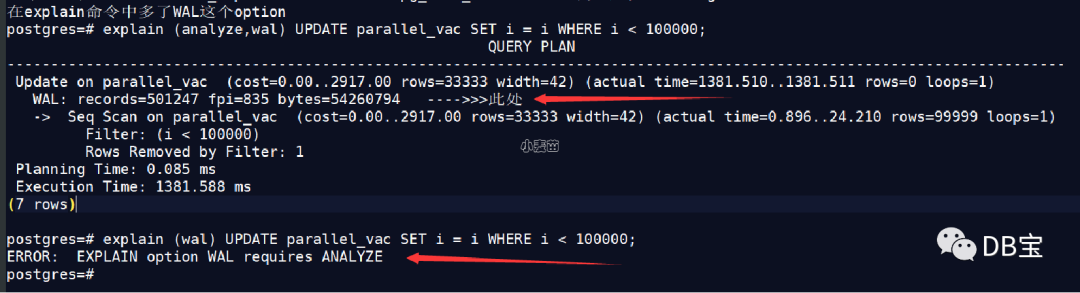
EXPLAIN跟踪WAL使用信息
13版本的EXPLAIN命令新增WAL选项,启用后可以跟踪WAL使用信息,此选项的说明如下:
WAL Include information on WAL record generation. Specifically, include the number of records, number of full page images (fpi) and amount of WAL bytes generated. In text format, only non-zero values are printed. This parameter may only be used when ANALYZE is also enabled. It defaults to FALSE.
跟踪WAL信息的前提条件是启用ANALYZE选项,WAL信息包括以下三部分:
- WAL record: WAL记录条目数。
- (Fpi): Full page images。
- WAL bytes: WAL日志大小,单位为字节。
Auto_explain跟踪WAL使用信息
同理,auto_explain外部模块新增了是否跟踪WAL使用信息的选项,通过参数auto_explain.log_wal控制
Autovacuum跟踪WAL使用信息
autovacuum同样支持是否跟踪WAL信息,下面演示下:
设置log_autovacuum_min_duration参数为0
pg_stat_statements跟踪WAL使用信息
pg_stat_statements视图同样新增wal_records、wal_fpi、wal_bytes三个字段,可以跟踪WAL的使用信息,如下:
- wal_records: Total number of WAL records generated by the statement
- wal_fpi: Total number of WAL full page images generated by the statement
- wal_bytes: Total amount of WAL bytes generated by the statement
总结
WAL日志膨胀是PostgreSQL数据库运维过程中的常见问题,13版本的这一新特性使得对WAL的膨胀分析带来帮助。
PostgreSQL 13: 新增log_min_duration_sample参数控制日志记录的慢SQL百分比
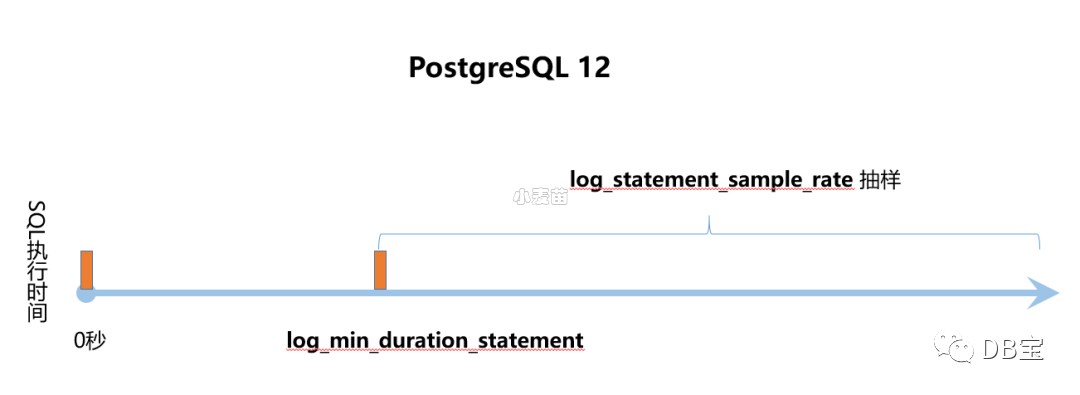
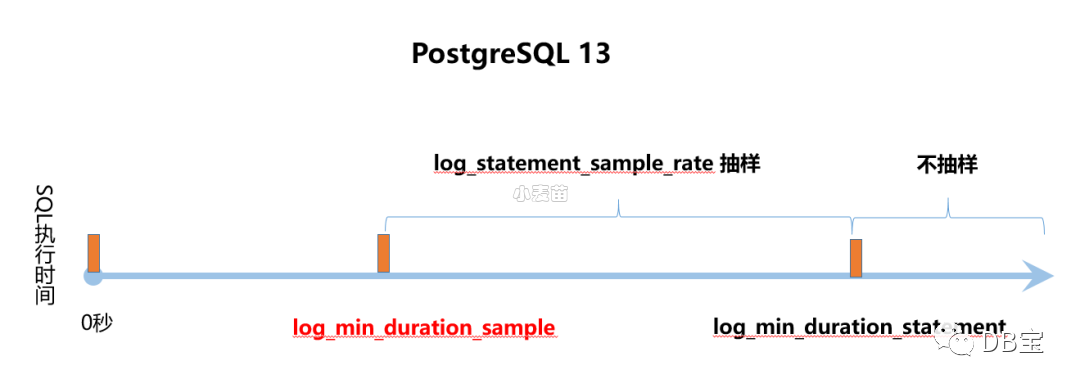
PostgreSQL 新增log_min_duration_sample参数用来控制日志记录的慢SQL百分比。PostgreSQL 12 已提供了log_statement_sample_rate 参数控制日志记录的慢SQL百分比。
但 PostgreSQL 13版本这个参数的定义与12版本有差异,使得对慢查询的抽样记录策略有变化,先来看看手册中这几个参数的说明。
13版本与12版本慢查询抽样策略差异
PostgreSQL 12日志中慢查询抽样策略,如下:
图片
PostgreSQL 13日志中慢查询抽样策略,如下:
图片
通过上图说明应该很容易理解12版本与13版本在抽样策略的差异。
PostgreSQL 13: Reindexdb命令新增-j选项,支持全库并行索引重建
reindexdb命令用于重建一个或多个库中表的索引,可以是schema级索引重建,也可以是database级索引重建。
reindexdb是REINDEX INDEX命令的的封装,两者在本质上没有区别。
13版本前reindexdb不支持并行选项,13版本此命令新增-j选项,支持全库并行索引重建。
PostgreSQL 13: 新增ignore_invalid_pages参数
PostgreSQL 13 新增ignore_invalid_pages参数用于控制数据库恢复过程中遇到坏块时是否绕过这个坏块继续进行数据库恢复,此参数默认值为off。
早在 PostgreSQL 13 版本前 Developer Options已提供了zero_damaged_pages参数,用于控制PostgreSQL数据库运行过程中遇到坏块数据时是否绕过这个坏块。
关于zero_damaged_pages
PostgreSQL当检测到受损的页面首部时会报错,并中止当前事务。将参数zero_damaged_pages设置为on,数据库将报WARNING错误,并将内存中的页面抹为零。然而该操作会带来数据丢失,也就是说受损页上的所有数据全都丢失。不过,这样做确实能绕过错误并从未损坏的页面中获取表中未受损的行。当出现软件或硬件故障导致数据损坏时,该选项可用于恢复数据。通常情况下只有当放弃从受损的页面中恢复数据时,才应当使用该选项。本选项默认是关闭的,且只有超级用户才能修改。
关于ignore_invalid_pages
如果设置为off,当在恢复过程中发现WAL记录引用了无效页面时,PostgreSQL引发严重错误,中止恢复。
如果设置为on,当在恢复过程中发现WAL记录引用了无效页面时,PostgreSQL忽略这个严重错误(但仍然告警),并继续进行恢复,这种行为可能会导致崩溃、数据丢失、隐藏损坏或其他严重问题。当遇到这种情况时,应首先尽量尝试恢复已损坏的数据文件。
两个参数的异同
zero_damaged_pages和ignore_invalid_pages参数共同之处为以下:
- 都属于Developer Options参数,这种类型的参数是用来处理PostgreSQL源代码的,在postgresql.conf文件中已剔除,并且在某些情况下可以用于恢复严重受损的数据库,生产库原则上不应该使用这些参数,除非是紧急情况。
- 都是用于控制数据库遇到坏块场景时的处理方式。
两个参数的不同点为以下:
ignore_invalid_pages参数用于数据库恢复过程中遇到坏块的场景,zero_damaged_pages参数用于当数据库运行过程中遇到数据坏块的场景。- 只有当数据库处于
recovery mode或standby mode时,ignore_invalid_pages参数才有效。
有关流复制新增功能
新增参数max_slot_wal_keep_size
max_slot_wal_keep_size (integer)
PG 13新增max_slot_wal_keep_size参数,控制复制槽最多保留多少WAL。如果超过这个阈值,复制槽会失效。
指定replication slots 所允许的在检查点时保留在 pg_wal 目录中的 WAL 文件的最大尺寸。 如果max_slot_wal_keep_size 为 -1(默认值),复制槽可能会保留无限数量的 WAL 文件。 否则,如果复制槽的restart_lsn比当前LSN滞后超过给定的大小,由于删除了所需的WAL文件,使用插槽的备用服务器可能无法继续复制。 你可以在pg_replication_slots中查看复制槽有效的WAL。
总结:
- 默认值是-1,-1表示表示禁用本功能。单位是MB。
- 设置该参数之后如果超过该参数值,PostgreSQL将开始删除最早的WAL文件。
- 允许replication slot 保留的wal文件的最大大小
- 用于防止wal无限增大导致主库的文件系统空间被撑爆
参考:http://www.postgres.cn/docs/13/runtime-config-replication.html#GUC-MAX-SLOT-WAL-KEEP-SIZE
其它
- primary_conninfo和primary_slot_name参数,可以通过reload的方式更改,不再需要重启。
- 如果没有指定永久复制槽,PG会使用临时复制槽,需要设置wal_receiver_create_temp_slot参数,该参数默认值是off。作用:当未配置要使用的永久复制插槽时(使用primary_slot_name),WAL receiver process 是否应在远程实例上创建一个临时复制插槽。此参数只能在postgresql.conf文件或服务器命令行中设置。如果在WAL receiver process正在运行时更改了此参数,则该进程将发出关闭信号,并有望使用新设置重新启动。
- 追加max_slot_wal_keep_size参数,控制复制槽最多保留多少WAL。如果超过这个阈值,复制槽会失效。
- 备库提升为主的时候如果未到预期的目标点,会报错,以前是会恢复到WAL的最新点就结束(有多少WAL就恢复多少)。
PG 13有关wal管理的改进功能
- wal_keep_segments 更名为 wal_keep_size,决定了为备库保留的WAL量。版本13采用按MB为单位设置大小,不再是按照之前的WAL文件个数来设置。
- 复制槽相关参数max_slot_wal_keep_size 可进行调整,以指定要保留的WAL文件的最大尺寸,有助于避免磁盘空间不足错误。
- pg_stat_statements视图新增了wal_records、wal_fpi、wal_bytes三个字段,可以跟踪WAL的使用信息
PG 13有关索引优化的改进功能
- Btree索引在存储层面引入了Deduplication技术,有效的处理标准数据库索引B-tree中的重复数据,不仅降低了B-tree索引所需的总体使用空间,而且可以提升整体查询性能。
- 允许VACUUM并行处理表的索引,需要设置合适的MAX_PARALLEL_MAINTENANCE_WORKERS参数值。
- vacuumdb的
-P或--parallel选项可以并行的处理index。 - reindexdb命令新增
-j或--jobs选项,支持全库并行索引重建。
PostgreSQL 13: 日期格式新增对FF1-FF6的支持
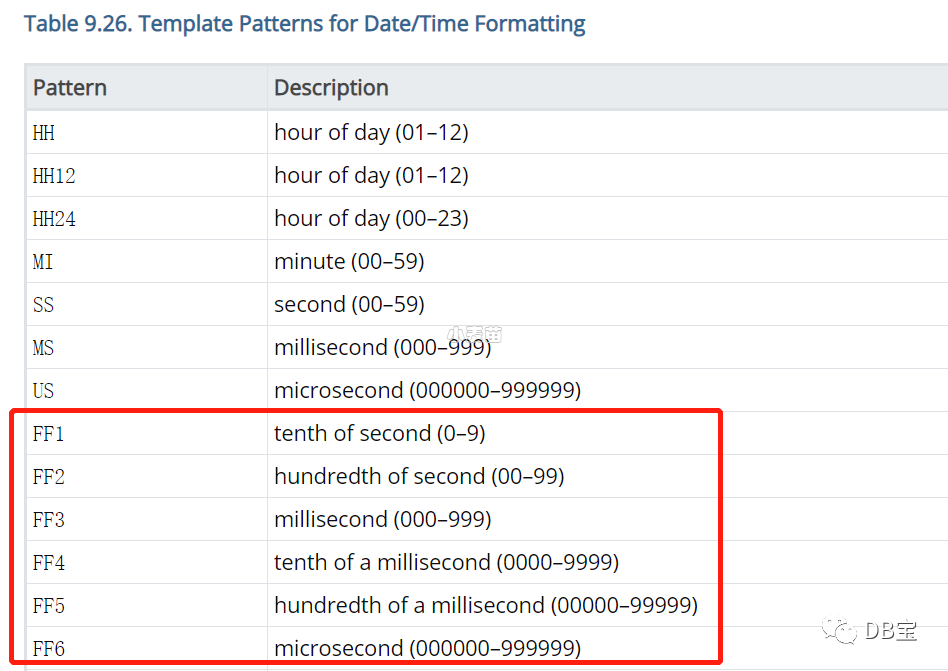
2016 SQL标准定义了FF1-FF6时间格式,PostgreSQL 13 版本的日期格式中新增了对FF1-FF6格式的支持,手册说明如下。
FF1-FF6表示时间数据类型秒后的第一位到第六位,手册说明如下:
图片
- FF1: 秒的1/10
- FF2: 秒的1/100
- FF3: 秒的1/1000,毫秒
- FF4: 毫秒的1/10
- FF5: 毫秒的1/100
- FF6: 毫秒的1/1000,微妙
下面通过示例说明。
举例说明
PostgreSQL 13 执行以下SQL,如下:
lhrdb=# SELECT now(),       to_char(now(),'HH24:MI:SS.FF1'),       to_char(now(),'HH24:MI:SS.FF2'),       to_char(now(),'HH24:MI:SS.FF3'),       to_char(now(),'HH24:MI:SS.FF4'),       to_char(now(),'HH24:MI:SS.FF5'),       to_char(now(),'HH24:MI:SS.FF6');
              now              |  to_char   |   to_char   |   to_char    |    to_char    |    to_char     |     to_char
-------------------------------+------------+-------------+--------------+---------------+----------------+-----------------
 2023-03-28 14:53:32.342461+08 | 14:53:32.3 | 14:53:32.34 | 14:53:32.342 | 14:53:32.3424 | 14:53:32.34246 | 14:53:32.342461
(1 row)
从以上看出FF1-FF6分别返回了秒后的第一位到第六位。
PG 13新特性之pg_verifybackup
PG13版本引入两个特性来增强备份的验证:backup manifests (备份清单)和 pg_verifybackup
- backup manifests:使用 pg_basebackup 列出物理备份获取的内容。
- pg_verifybackup:根据备份清单检查备份的完整性。
参考:https://www.xmmup.com/pg-13xintexingzhipg_verifybackup.html
PG 13新特性之索引并行vacuum(index parallel vacuum)
前提条件:
- 需要设置合适的MAX_PARALLEL_MAINTENANCE_WORKERS参数值
- 需要该表上有多个index(即:一个parallel worker对应一个索引)
- 需要该表的index的大小大于min_parallel_index_scan_size参数值
vacuum的parallel 选项与full选项不能同时使用
参考:https://www.xmmup.com/pg-13xintexingzhisuoyinbingxingvacuum.html
SQL特性
similar
-- 12
postgres=# select 'abc' similar to 'ab_' escape null  as result;
 result
--------
 t
(1 row)

-- 13
lhrdb=# select 'abc' similar to 'ab_' escape null  as result;
 result
--------

(1 row)
PostgreSQL 13 新增 trim_scale() 函数和min_scale()函数
trim_scale是返回去掉小数点最后面的零之后的值。min_scale是返回去掉小数点最后面的零之后的值,在小数部分共有多少位
postgres=#  SELECT trim_scale(8.000001::numeric),min_scale(8.67895610::numeric),min_scale(8.0000090::numeric);
 trim_scale | min_scale | min_scale
------------+-----------+-----------
   8.000001 |         7 |         6
(1 row)

postgres=# select version();
                                                 version
---------------------------------------------------------------------------------------------------------
 PostgreSQL 13.0 on x86_64-pc-linux-gnu, compiled by gcc (GCC) 4.8.5 20150623 (Red Hat 4.8.5-39), 64-bit
(1 row)

postgres=#
PostgreSQL 13 支持FETCH FIRST WITH TIES语法
FETCH FIRST 子句增加了 WITH TIES 选项,可以用于返回更多排名相同的数据行
CREATE TABLE students(
    id serial NOT NULL,
    score int NULL
);
INSERT INTO students (score) VALUES (100);
INSERT INTO students (score) VALUES (100);
INSERT INTO students (score) VALUES (100);
INSERT INTO students (score) VALUES (90);
INSERT INTO students (score) VALUES (90);
INSERT INTO students (score) VALUES (85);
INSERT INTO students (score) VALUES (84);
INSERT INTO students (score) VALUES (80);
INSERT INTO students (score) VALUES (80);
INSERT INTO students (score) VALUES (75);
INSERT INTO students (score) VALUES (74);
INSERT INTO students (score) VALUES (70);


lhrdb=# select * from students order by score desc fetch first 8 row only;
 id | score
----+-------
  1 |   100
  2 |   100
  3 |   100
  4 |    90
  5 |    90
  6 |    85
  7 |    84
  8 |    80
(8 rows)


lhrdb=# select * from students order by score desc fetch first 8 row with ties;
 id | score
----+-------
  1 |   100
  2 |   100
  3 |   100
  4 |    90
  5 |    90
  6 |    85
  7 |    84
  8 |    80
  9 |    80
(9 rows)


lhrdb=#
PostgreSQL 13 在pg_stat_ssl 和 pg_stat_gssapi 视图中不显示background process
lhrdb=# select * from pg_stat_ssl;
 pid | ssl | version | cipher | bits | compression | client_dn | client_serial | issuer_dn
-----+-----+---------+--------+------+-------------+-----------+---------------+-----------
  33 | f   |         |        |      |             |           |               |
  34 | f   |         |        |      |             |           |               |
  35 | f   |         |        |      |             |           |               |
(3 rows)


lhrdb=# select * from pg_stat_gssapi;
 pid | gss_authenticated | principal | encrypted
-----+-------------------+-----------+-----------
  33 | f                 |           | f
  34 | f                 |           | f
  35 | f                 |           | f
(3 rows)
PG 13中的alter新特性
alter table可以将生成列变为普通列;
alter view语法可以修改视图的列名,以前是通过alter table rename column的方式修改。
ALTER STATISTICS statistic_name SET STATISTICS new_target
ALTER TABLE table_name ALTER COLUMN column_name DROP EXPRESSION [IF EXISTS]
ALTER TYPE type_name SET (attribute = value)
ALTER VIEW view_name RENAME COLUMN old_name TO new_name ##这是修改view的列名
PostgreSQL 13 新增了pg_stat_reset_slru函数
pg_stat_reset_slru函数用于重置pg_stat_slru系统视图中的各种计数器(counter),该视图是PostgreSQL 13新增的一个系统视图,该视图的作用是跟踪SLRU Cache,显示访问cached pages的统计信息。我们来看看该视图保存有哪些SLRU Cache
lhrdb=# select * from pg_stat_slru;
      name       | blks_zeroed | blks_hit | blks_read | blks_written | blks_exists | flushes | truncates |          stats_reset
-----------------+-------------+----------+-----------+--------------+-------------+---------+-----------+-------------------------------
 CommitTs        |           0 |        0 |         0 |            0 |           0 |       0 |         0 | 2023-04-17 14:19:36.157509+08
 MultiXactMember |           0 |        0 |         0 |            0 |           0 |       0 |         0 | 2023-04-17 14:19:36.157509+08
 MultiXactOffset |           0 |        0 |         0 |            0 |           0 |       0 |         0 | 2023-04-17 14:19:36.157509+08
 Notify          |           0 |        0 |         0 |            0 |           0 |       0 |         0 | 2023-04-17 14:19:36.157509+08
 Serial          |           0 |        0 |         0 |            0 |           0 |       0 |         0 | 2023-04-17 14:19:36.157509+08
 Subtrans        |           0 |        0 |         0 |            0 |           0 |       0 |         0 | 2023-04-17 14:19:36.157509+08
 Xact            |           0 |      221 |         0 |            0 |           0 |       0 |         0 | 2023-04-17 14:19:36.157509+08
 other           |           0 |        0 |         0 |            0 |           0 |       0 |         0 | 2023-04-17 14:19:36.157509+08
(8 rows)


lhrdb=# select pg_stat_reset_slru('Subtrans');
 pg_stat_reset_slru
--------------------

(1 row)


lhrdb=# select * from pg_stat_slru;
      name       | blks_zeroed | blks_hit | blks_read | blks_written | blks_exists | flushes | truncates |          stats_reset
-----------------+-------------+----------+-----------+--------------+-------------+---------+-----------+-------------------------------
 CommitTs        |           0 |        0 |         0 |            0 |           0 |       0 |         0 | 2023-04-17 14:19:36.157509+08
 MultiXactMember |           0 |        0 |         0 |            0 |           0 |       0 |         0 | 2023-04-17 14:19:36.157509+08
 MultiXactOffset |           0 |        0 |         0 |            0 |           0 |       0 |         0 | 2023-04-17 14:19:36.157509+08
 Notify          |           0 |        0 |         0 |            0 |           0 |       0 |         0 | 2023-04-17 14:19:36.157509+08
 Serial          |           0 |        0 |         0 |            0 |           0 |       0 |         0 | 2023-04-17 14:19:36.157509+08
 Subtrans        |           0 |        0 |         0 |            0 |           0 |       0 |         0 | 2023-04-17 15:12:46.81811+08
 Xact            |           0 |      221 |         0 |            0 |           0 |       0 |         0 | 2023-04-17 14:19:36.157509+08
 other           |           0 |        0 |         0 |            0 |           0 |       0 |         0 | 2023-04-17 14:19:36.157509+08
(8 rows)


lhrdb=#
普通用户可以建立extensions
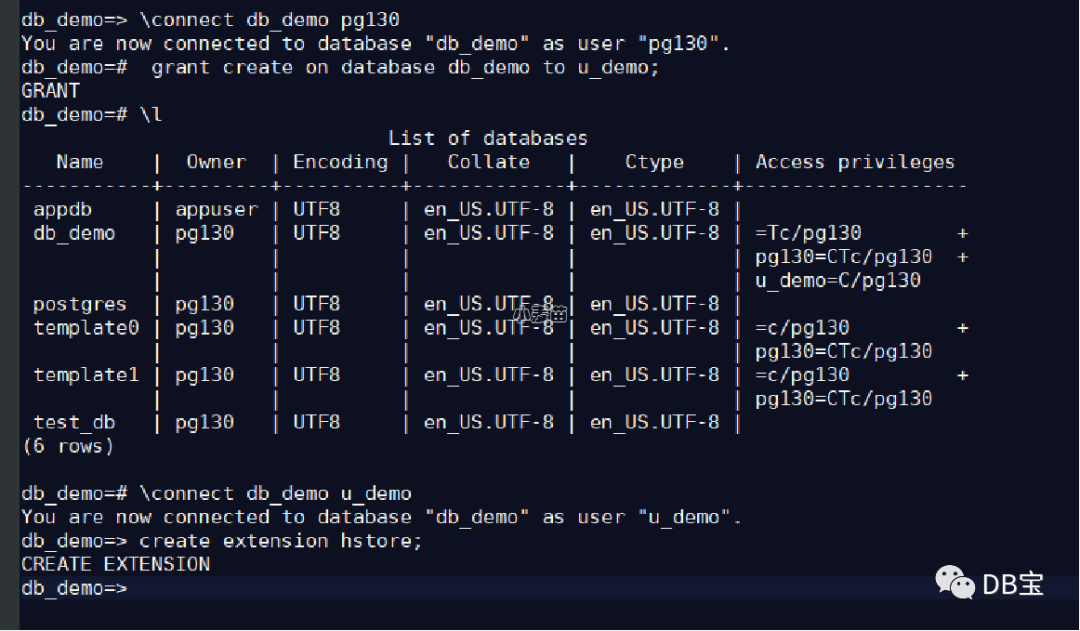
Allow extensions to be specified as trusted (Tom Lane)Such extensions can be installed in a database by users with database-level CREATE privileges, even if they are not superusers. This change also removes the pg_pltemplate system catalog.
在 PostgreSQL 13 中,extension的control文件加入了trusted = true,表示该extension可以由非超级用户进行create extension,普通用户必须要有database-level CREATE privileges,才能建立extension成功。
对于那些control文件中没有trusted = true的extension,只能是用superuser去建立。
聚合查询优化:基于disk的hash aggregation
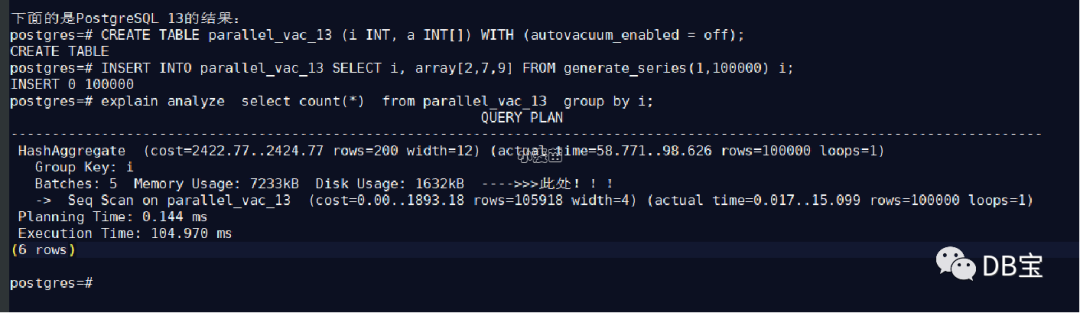
具有大聚合的查询不需要完全放在内存中,更多类型的聚合和分组因此受益于PostgreSQL的高效哈希聚合功能。追加了一个“hash_mem_multiplier”参数,当有一个大的聚合查询的时候,允许hash聚合的结果集落盘。
对于大的aggregation结果集,允许hash aggregation使用disk空间。
当hash table的大小超过work_mem * hash_mem_multiplier乘积的大小之后,hash table会被spill到disk。该行为要优于之前的行为,在之前的版本中,一旦选择了hash aggregation,无论hash table有多大,hash table都将保留在内存中--如果planner估计错误,它可能会很大。如果需要,可以通过增加hash_mem_multiplier参数值来获得与之相似的行为。
lhrdb=# explain analyze  select count(*) from t1 group by a;
                                                                   QUERY PLAN
-------------------------------------------------------------------------------------------------------------------------------------------------
 Finalize GroupAggregate  (cost=128443.92..157005.04 rows=112734 width=12) (actual time=16099.482..50222.876 rows=2400001 loops=1)
   Group Key: a
   ->  Gather Merge  (cost=128443.92..154750.36 rows=225468 width=12) (actual time=16099.400..31732.755 rows=2400003 loops=1)
         Workers Planned: 2
         Workers Launched: 2
         ->  Sort  (cost=127443.90..127725.73 rows=112734 width=12) (actual time=15874.063..19250.235 rows=800001 loops=3)
               Sort Key: a
               Sort Method: external merge  Disk: 20568kB
               Worker 0:  Sort Method: external merge  Disk: 20096kB
               Worker 1:  Sort Method: external merge  Disk: 20560kB
               ->  Partial HashAggregate  (cost=105162.70..116055.57 rows=112734 width=12) (actual time=8530.111..12398.594 rows=800001 loops=3)
                     Group Key: a
                     Planned Partitions: 4  Batches: 45  Memory Usage: 4249kB  Disk Usage: 26112kB
                     Worker 0:  Batches: 53  Memory Usage: 4249kB  Disk Usage: 25272kB
                     Worker 1:  Batches: 37  Memory Usage: 4185kB  Disk Usage: 25944kB
                     ->  Parallel Seq Scan on t1  (cost=0.00..34850.88 rows=1249988 width=4) (actual time=0.045..3986.238 rows=1000000 loops=3)
 Planning Time: 0.124 ms
 JIT:
   Functions: 27
   Options: Inlining false, Optimization false, Expressions true, Deforming true
   Timing: Generation 4.902 ms, Inlining 0.000 ms, Optimization 130.031 ms, Emission 337.610 ms, Total 472.544 ms
 Execution Time: 59321.102 ms
(22 rows)
可监视性提升
PG 13新增视图pg_stat_progress_basebackup来追踪查询流式备份的进度; 查询pg_stat_progress_basebackup视图可以获取流式基础备份的进度信息
select * from pg_stat_progress_basebackup;
这将返回一个结果集,显示当前正在进行的流式基础备份的进度。
PG 13新增视图pg_stat_progress_analyze来获取ANALYZE命令的进度信息:
SELECT * FROM pg_stat_progress_analyze;
这将返回一个结果集,显示当前正在进行的ANALYZE命令的进度。
可使用新pg_verifybackup命令去检查pg_basebackup输出的完整性。
新增log_min_duration_sample参数,允许对最少运行了指定时间的已完成语句的持续时间进行抽样。 这将生成与log_min_duration_statement 相同的日志条目,但仅适用于已执行语句的子集,采样率由 log_statement_sample_rate 控制。此设置的优先级低于 log_min_duration_statement。如果指定此值时没有单位,则以毫秒为单位。 设置为零将采样所有语句持续时间。-1(默认值)禁用采样语句持续时间。只有超级用户可以更改此设置。
追加pg_shmem_allocations来查看share buffer的使用情况
lhrdb=# select * from pg_shmem_allocations;
                name                 |    off    |   size    | allocated_size
-------------------------------------+-----------+-----------+----------------
 Buffer IO Locks                     | 140660608 |    524288 |         524288
 Buffer Descriptors                  |   5394304 |   1048576 |        1048576
 Backend SSL Status Buffer           | 146585600 |     42312 |          42368
 Async Queue Control                 | 147128448 |      2492 |           2560
 Wal Sender Ctl                      | 147122048 |      1040 |           1152
 AutoVacuum Data                     | 147113472 |      5368 |           5376
 PROCLOCK hash                       | 143136512 |      2904 |           2944
 FinishedSerializableTransactions    | 146098176 |        16 |            128
 XLOG Ctl                            |     54016 |   4208272 |        4208384
 Shared MultiXact State              |   5393152 |      1028 |           1152
 Proc Header                         | 146232064 |       104 |            128
 Backend Client Host Name Buffer     | 146445184 |      8256 |           8320
 ReplicationSlot Ctl                 | 147118848 |      2480 |           2560
 CommitTs                            |   4791936 |    133568 |         133632
 KnownAssignedXids                   | 146342400 |     31720 |          31744
 Prepared Transaction Table          | 146636544 |        16 |            128
 BTree Vacuum State                  | 147126144 |      1476 |           1536
 Checkpoint BufferIds                | 141184896 |    327680 |         327680
 Wal Receiver Ctl                    | 147123200 |      2248 |           2304
 PREDICATELOCKTARGET hash            | 143835904 |      2904 |           2944
 Backend Status Array                | 146382080 |     54696 |          54784
 KnownAssignedXidsValid              | 146374144 |      7930 |           7936
 Backend GSS Status Buffer           | 146627968 |      8514 |           8576
 Shared Buffer Lookup Table          | 141512576 |      2904 |           2944
 CommitTs shared                     |   4925568 |        32 |            128
 Backend Application Name Buffer     | 146436864 |      8256 |           8320
 ProcSignal                          | 146711808 |      8264 |           8320
 Logical Replication Launcher Data   | 147125504 |       424 |            512
 MultiXactMember                     |   5259520 |    133568 |         133632
 Buffer Blocks                       |   6442880 | 134217728 |      134217728
 Proc Array                          | 146341760 |       528 |            640
 OldSnapshotControlData              | 147126016 |        68 |            128
 PMSignalState                       | 146710784 |      1020 |           1024
 PREDICATELOCK hash                  | 144281216 |      2904 |           2944
 PredXactList                        | 145541632 |        88 |            128
 Notify                              | 147131008 |     66816 |          66816
 Fast Path Strong Relation Lock Data | 143831680 |      4100 |           4224
 pg_stat_statements hash             | 147197952 |      2904 |           2944
 RWConflictPool                      | 145805184 |        24 |            128
 Xact                                |   4262784 |    529152 |         529152
 Buffer Strategy Status              | 142441216 |        28 |            128
 Serial                              | 146098304 |    133568 |         133632
 SerialControlData                   | 146231936 |        12 |            128
 shmInvalBuffer                      | 146641280 |     69464 |          69504
 Subtrans                            |   4925696 |    267008 |         267008
 Sync Scan Locations List            | 147127680 |       656 |            768
 pg_stat_statements                  | 147197824 |        48 |            128
 Control File                        |   4262400 |       296 |            384
 ReplicationOriginState              | 147121408 |       568 |            640
 SERIALIZABLEXID hash                | 145746816 |      2904 |           2944
 Backend Activity Buffer             | 146453504 |    132096 |         132096
 Background Worker Data              | 146636672 |      4496 |           4608
 MultiXactOffset                     |   5192704 |     66816 |          66816
 LOCK hash                           | 142441344 |      2904 |           2944
 Checkpointer Data                   | 146720128 |    393280 |         393344
 <anonymous>                         |           |   6232448 |        6232448
                                     | 148706432 |   1928064 |        1928064
(57 rows)
其它
1、PG 13 允许非superuser不提供密码连接到postgres_fdw的foreign servers。
2、新增求最大公约数/最小公倍数的函数
[pg130@iZm5ehqfjhnsbtxrzrnh2zZ ~]$ psql -d postgres
psql (13.0)
Type "help" for help.

postgres=#  select gcd(12,18),lcm(12,18);
 gcd | lcm
-----+-----
   6 |  36
(1 row)

postgres=#
----->>>>> gcd是求最大公约数(Greatest Common Divisor),lcm最小公倍数(Least Common Multiple)
3、在PostgreSQL 13的autovacuum中,允许insert操作触发vacuum动作。
在之前的版本中, insert-only activity 会触发auto-analyze,不会触发auto-vacuum,该行为可以通过autovacuum_vacuum_insert_threshold 参数和autovacuum_vacuum_insert_scale_factor进行调整。
4、新增了logical_decoding_work_mem参数,该参数默认值是64MB,最小值是64KB。该参数限制了被logical streaming replication connections使用的内存的数量。这个内存的大小是spill to disk之前用到的内存的最大值
5、 PostgreSQL现在可以使用扩展的统计系统(可通过访CREATE STATISTICS)来为带有OR子句和IN/ANY查找列表的查询创建改进的计划。
6、追加xid8的SQL数据类型,用于表达完整的事务号,即64位事务号。
7、单纯的insert行为可以触发autovacuum,以前只会触发autoanalyze,目的是尽快的去更新行的可见性标志位(infomask),实施freeze的行为
8、 提升了超大表的truncate性能
9、int转text性能提升
10、支持将extension内的一些对象(函数,物化视图,索引和触发器)和extension本身之间的依赖关系解除,通过执行ALTER .. NO DEPENDS ON。
11、datetime()函数功能添加到其SQL/JSON路径支持中,将有效的时间格式(例如ISO 8601字符串)转换为PostgreSQL本地类型。
参考
https://mp.weixin.qq.com/s/Sey6leswV--h_uMQxgY-vw
https://www.postgresql.org/docs/13/release-13.html https://www.percona.com/blog/2020/07/28/migrating-to-postgresql-version-13-incompatibilities-you-should-be-aware-of/ https://www.percona.com/blog/2020/10/01/postgresql-13-new-feature-dropdb-force/ https://www.percona.com/blog/2020/09/30/postgresql_fdw-authentication-changes-in-postgresql-13/ https://h50146.www5.hpe.com/products/software/oe/linux/mainstream/support/lcc/pdf/PostgreSQL_13_GA_New_Features_en_20200927-1.pdf
本文参与 腾讯云自媒体同步曝光计划,分享自微信公众号。
原始发表:2023-06-25,如有侵权请联系 cloudcommunity@tencent.com 删除
目录
腾讯云开发者

Copyright © 2013 - 2026 Tencent Cloud. All Rights Reserved. 腾讯云 版权所有
深圳市腾讯计算机系统有限公司 ICP备案/许可证号:粤B2-20090059  粤公网安备44030502008569号
腾讯云计算(北京)有限责任公司 京ICP证150476号 | 京ICP备11018762号