
如何从边角移除部分边框?
如何从边角移除部分边框?
提问于 2016-11-25 18:46:16
我想去掉边框的边角,就像这张图片。
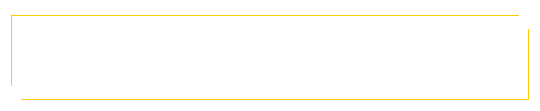
回答 4
Stack Overflow用户
回答已采纳
发布于 2016-11-25 18:53:23
您可以使用::before和::after伪元素来覆盖(从而“隐藏”)部分边框:
.bordery {
  border: 1px solid teal;
  padding: 20px;
  position: relative;
}
.bordery::after,
.bordery::before {
  background-color: white;
  content: "";
  display: block;
  height: 10px;
  position: absolute;
  width: 10px;
}
.bordery::after {
  bottom: -1px;
  right: -1px;
}
.bordery::before {
  top: -1px;
  left: -1px;
}<div class="bordery">This is just some sample content.</div>
Stack Overflow用户
发布于 2016-11-25 18:51:21
您可以使用:before和:after伪元素来创建它。
.el {
  position: relative;
  width: 200px;
  height: 50px;
  margin: 50px;
}
.el:after,
.el:before {
  content: '';
  position: absolute;
  height: 90%;
  width: 100%;
}
.el:before {
  top: -5px;
  left: -5px;
  border-top: 1px solid orange;
  border-left: 1px solid orange;
}
.el:after {
  bottom: -5px;
  right: -5px;
  border-bottom: 1px solid orange;
  border-right: 1px solid orange;
}<div class="el"></div>
Stack Overflow用户
发布于 2016-11-25 19:19:06
您可以通过以下方式完成此操作:
        #rectangle{
        width:400px;
        height: 200px;
        border-style: solid;
        color:orange;
        position: absolute;
    }
    #eraser1{
    position: absolute;
        width: 50px;
        height: 50px;
        background-color:white;
        margin: -10px 0px 0px 374px;
    }
    #eraser2{
    position: absolute;
        width: 50px;
        height: 50px;
        background-color:white;
        margin: 175px 0px 0px -13px;
}页面原文内容由Stack Overflow提供。腾讯云小微IT领域专用引擎提供翻译支持
原文链接:
https://stackoverflow.com/questions/40803132
复制相关文章
相似问题
腾讯云开发者

Copyright © 2013 - 2026 Tencent Cloud. All Rights Reserved. 腾讯云 版权所有
深圳市腾讯计算机系统有限公司 ICP备案/许可证号:粤B2-20090059  粤公网安备44030502008569号
腾讯云计算(北京)有限责任公司 京ICP证150476号 | 京ICP备11018762号