
如何突出当前屏幕(或窗口)?
我在工作中使用两个屏幕设置,虽然它通常帮助大于它的伤害,但我有一些问题。
其中之一是后置焦点的问题--有时我在错误的屏幕上输入错误(焦点在跟踪我的光标,但在匆忙中做事情时,并不总是容易注意到光标在另一个屏幕上)。这是非常恼人的,当我没有键入,我造成了大量的不同的行动(在雷鸟单键快捷键)。
是否有一种更好地突出显示活动屏幕或窗口的方法(例如,使用容易看到的边框--即使是最大化的窗口)?
编辑:
我认为很好的解决方案是,当窗口收到焦点时,会有一些简短的动画。
回答 2
Ask Ubuntu用户
发布于 2015-08-24 20:59:04
突出显示焦点屏幕(或焦点上的昏暗闪光灯,请参阅下面的编辑)
。
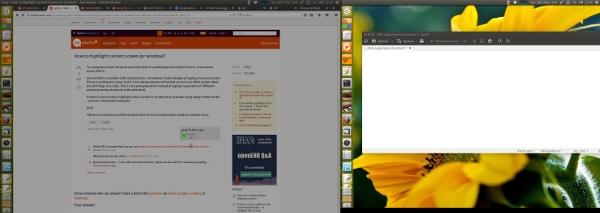
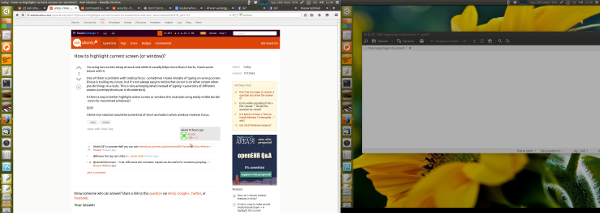
在一个并排双显示器设置(左-右),下面的脚本将设置显示器的亮度与聚焦窗口为“正常”(100%),而另一个是暗淡到60%。
如果焦点发生变化,亮度将跟随焦点:
聚焦在(窗口)右边的屏幕上
聚焦在(窗口)左边的屏幕上
脚本
#!/usr/bin/env python3
"""
In a side-by-side dual monitor setup (left-right), the script below will set
the brightness of the monitor with the focussed window to "normal" (100%),
while other one is dimmed to 60%. If the focus changes, the brightness will
follow the focus
"""
import subprocess
import time

def get_wposition():
    # get the position of the currently frontmost window
    try:
        w_data = subprocess.check_output(["wmctrl", "-lG"]).decode("utf-8").splitlines()
        frontmost = subprocess.check_output(["xprop", "-root", "_NET_ACTIVE_WINDOW"]).decode("utf-8").split()[-1].strip()
        z = 10-len(frontmost); frontmost = frontmost[:2]+z*"0"+frontmost[2:]
        return [int(l.split()[2]) for l in w_data if frontmost in l][0]
    except subprocess.CalledProcessError:
        pass

def get_onscreen():
    # get the size of the desktop, the names of both screens and the x-resolution of the left screen
    resdata = subprocess.check_output(["xrandr"]).decode("utf-8")
    if resdata.count(" connected") == 2:
        resdata = resdata.splitlines()
        r = resdata[0].split(); span = int(r[r.index("current")+1])
        screens = [l for l in resdata if " connected" in l]
        lr = [[(l.split()[0], int([s.split("x")[0] for s in l.split() if "+0+0" in s][0])) for l in screens if "+0+0" in l][0],
               [l.split()[0] for l in screens if not "+0+0" in l][0]]
        return [span, lr]
    else:
        print("no second screen seems to be connected")

def scr_position(span, limit, pos):
    # determine if the frontmost window is on the left- or right screen
    if limit < pos < span:
        return [right_scr, left_scr]
    else:
        return [left_scr, right_scr]

def highlight(scr1, scr2):
    # highlight the "active" window, dim the other one
    action1 = "xrandr", "--output", scr1, "--brightness", "1.0"
    action2 = "xrandr", "--output", scr2, "--brightness", "0.6"
    for action in [action1, action2]:
        subprocess.Popen(action)

# determine the screen setup
screendata = get_onscreen()
left_scr = screendata[1][0][0]; right_scr = screendata[1][1]
limit = screendata[1][0][1]; span = screendata[0]

# set initial highlight
oncurrent1 = scr_position(span, limit, get_wposition())
highlight(oncurrent1[0], oncurrent1[1])

while True:
    time.sleep(0.5)
    pos = get_wposition()
    # bypass possible incidental failures of the wmctrl command
    if pos != None:
        oncurrent2 = scr_position(span, limit, pos)
        # only set highlight if there is a change in active window
        if oncurrent2 != oncurrent1:
            highlight(oncurrent1[1], oncurrent1[0])
        oncurrent1 = oncurrent2
如何使用
- 脚本需要
wmctrl:sudo apt安装wmctrl - 将脚本复制到一个空文件中,保存为
highlight_focus.py - 测试-通过命令python3 /path/to/花亮_Focus.py运行它,并连接第二个监视器,测试脚本是否正常工作。
- 如果一切正常,将其添加到启动应用程序中:破折号>启动应用程序>添加命令: /bin/bash -c“睡眠15 & python3 /path/ to /突显_Focus.py”
Notes
- 这个脚本的资源非常少。为了“节省燃料”,屏幕设置;分辨率、跨度等只读取一次,即在脚本启动期间(不包括在循环中)。这意味着,如果连接/断开第二个监视器,则必须重新启动脚本。
- 如果将其添加到启动应用程序中,则意味着您必须在监视器配置更改后退出/登录。
- 如果您希望为暗屏选择另一个亮度百分比,请更改行中的值: action2 = "xrandr“、”-输出“、scr2、”-亮度“、"0.6”
该值可以介于0,0 (黑屏幕)和1.0 (100%)之间。
解释
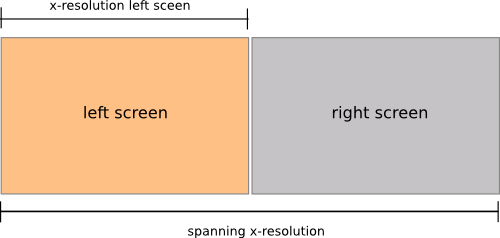
在启动脚本时,它确定:
- 两个屏幕的跨越分辨率
- 左屏幕的x分辨率
- 两个屏幕的名称
然后,在循环中(每秒一次),它:
- 使用命令:检查活动窗口的位置
wmctrl -lG(获取窗口及其位置的列表)xprop -root _NET_ACTIVE_WINDOW(获取最前端窗口的id )
如果窗口的(x-)位置大于左屏幕的x分辨率,则该窗口显然位于右侧屏幕上,除非它大于两个屏幕的跨越大小(然后它将位于右侧的工作区上)。因此:
if limit < pos < span:确定窗口是否位于右侧屏幕上(其中limit是左侧屏幕的x-res,pos是窗口的x-位置,span是两个屏幕的组合x-res )。
如果最前端窗口的位置发生变化(在左屏幕或右屏幕上),则脚本使用xrandr命令设置两个屏幕的亮度:
xrandr --output <screen_name> --brightness <value>编辑
Dim-闪存焦点屏幕,而不是永久调暗的“非聚焦”屏幕
。
正如评论和聊天中所要求的那样,下面是脚本的一个版本,它在新聚焦的屏幕上提供一个短暂的昏暗闪光灯:
#!/usr/bin/env python3
"""
In a side-by-side dual monitor setup (left-right), the script below will give
a short dim- flash on the newly focussed screen if the focussed screen changes
"""

import subprocess
import time

def get_wposition():
    # get the position of the currently frontmost window
    try:
        w_data = subprocess.check_output(["wmctrl", "-lG"]).decode("utf-8").splitlines()
        frontmost = subprocess.check_output(["xprop", "-root", "_NET_ACTIVE_WINDOW"]).decode("utf-8").split()[-1].strip()
        z = 10-len(frontmost); frontmost = frontmost[:2]+z*"0"+frontmost[2:]
        return [int(l.split()[2]) for l in w_data if frontmost in l][0]
    except subprocess.CalledProcessError:
        pass

def get_onscreen():
    # get the size of the desktop, the names of both screens and the x-resolution of the left screen
    resdata = subprocess.check_output(["xrandr"]).decode("utf-8")
    if resdata.count(" connected") == 2:
        resdata = resdata.splitlines()
        r = resdata[0].split(); span = int(r[r.index("current")+1])
        screens = [l for l in resdata if " connected" in l]
        lr = [[(l.split()[0], int([s.split("x")[0] for s in l.split() if "+0+0" in s][0])) for l in screens if "+0+0" in l][0],
               [l.split()[0] for l in screens if not "+0+0" in l][0]]
        return [span, lr]
    else:
        print("no second screen seems to be connected")

def scr_position(span, limit, pos):
    # determine if the frontmost window is on the left- or right screen
    if limit < pos < span:
        return [right_scr, left_scr]
    else:
        return [left_scr, right_scr]

def highlight(scr1):
    # highlight the "active" window, dim the other one
    subprocess.Popen([ "xrandr", "--output", scr1, "--brightness", "0.3"])
    time.sleep(0.1)
    subprocess.Popen([ "xrandr", "--output", scr1, "--brightness", "1.0"])

# determine the screen setup
screendata = get_onscreen()
left_scr = screendata[1][0][0]; right_scr = screendata[1][1]
limit = screendata[1][0][1]; span = screendata[0]

# set initial highlight
oncurrent1 = []

while True:
    time.sleep(0.5)
    pos = get_wposition()
    # bypass possible incidental failures of the wmctrl command
    if pos != None:
        oncurrent2 = scr_position(span, limit, pos)
        # only set highlight if there is a change in active window
        if oncurrent2 != oncurrent1:
            highlight(oncurrent2[0])
oncurrent1 = oncurrent2Ask Ubuntu用户
发布于 2015-08-27 12:37:59
我还找到了另一个解决方案,这与我最初想要的略有不同,但效果也很好。
- 安装
compizconfig-settings-manager compiz-plugins - 运行ccsm
- 在
Effects部分中启用Animations插件 - 在
Focus Animation中编辑并选择所需的动画。
只有波效应起作用..。所以如果你不喜欢的话,你的脸会和我的一样悲伤。
https://askubuntu.com/questions/665155
复制相似问题
腾讯云开发者

Copyright © 2013 - 2026 Tencent Cloud. All Rights Reserved. 腾讯云 版权所有
深圳市腾讯计算机系统有限公司 ICP备案/许可证号:粤B2-20090059  粤公网安备44030502008569号
腾讯云计算(北京)有限责任公司 京ICP证150476号 | 京ICP备11018762号