
在Linux上,git有可用的gui前端吗?
我以前是windows用户,刚刚开始使用ubuntu。在windows上,我们有两个很棒的软件:TortoiseSVN和TortoiseGit。这两个程序都是非常好的程序,它们允许我们在不知道一个cli命令的情况下完成所有事情,比如提交、回滚、合并、查看历史记录、浏览repos等等。
现在在linux上,我发现很难记住所有的git命令。git push和git remote add很好。但是合并是乏味的,尤其是冲突的解决。在TortoiseGit中,这仅仅是几次右键点击的问题!
我发现了一些垃圾,如git,等等,但这些特性与TortoiseGit毫无可比性。为什么linux系统上没有任何成熟的TortoiseGit端口?
回答 8
Unix & Linux用户
发布于 2016-01-26 00:30:21
tl;dr: GitEye =最直观的UI,最快的工作流,高度可定制的
我是TortoiseHg工作台的实施者,我很喜欢它,所以很自然,我完全固执己见的标准主要是基于它的:
* full history visible in main window
* beautiful tree (DAG), branches CLEARLY separated
* current branch clearly visible in history
* superclear list of changed/added files (list + diff detail)
* each changed/added file can be committed separately (or in groups)
* current branch clearly visible while committing
* clear push/pull etc buttons
* shelve = stash {not to be confused with patches}
* revert
* graft = cherry pick
* max git features
* HiDPI support
* all changes become visible on refresh
* refresh shortcut
我测试了以下应用程序:
- 吉特可乐
- GitEye
- GITK
- 吉特
- QGit
- 咯咯笑
- 破伤风免疫球蛋白
- SmartGit
- 吉格
- RabbitVCS
- GitKraken
- GitX
- 吉达
- Bazaar Explorer +bzr
- TortoiseHg + hggit (最佳UI,hggit不工作)
结果
大多数经过测试的git GUI客户端都是完整的*,下面是最好的两个,还有一个与其他客户机不同。
传奇
- = feature missing or so **** it doesn't count
~ = feature somewhat matches my requirements
+ = feature works like I want :)
第一名: GitEye
最直观的UI,最快的工作流,高度可定制
~ full history visible in main window [in a separate tab, same UI pattern facilitates looking at the history of separate files]
+ beautiful tree (DAG), branches CLEARLY separated
+ current branch clearly visible in history
+ superclear list of changed/added files (list + diff detail)
+ each changed/added file can be committed separately
+ current branch clearly visible while committing
+ clear push/pull etc buttons
+ shelve = stash [Stashes clearly visible in sidepane]
+ revert
+ graft = cherry pick
+ max git features
~ HiDPI support
+ all changes become visible on refresh
- refresh shortcut [you can set one, but it wont work. bug?]
注意:如果Git Files视图停止对您工作,那么使用类似的Git暂存视图。
第二名: SmartGit
漂亮的集成文件差异。犯罪不明确,历史隐藏,需要许可证。
~ full history visible in main window [separate window, I found myself constantly confusing both windows]
- beautiful tree (DAG), branches CLEARLY separated
- current branch clearly visible in history
+ superclear list of changed/added files (list + diff detail)
~ each changed/added file can be committed separately [UI not clear enough]
- current branch clearly visible while committing
+ clear push/pull etc buttons
+ shelve = stash
+ revert
+ graft = cherry pick
+ max git features
+ HiDPI support
+ all changes become visible on refresh [refreshes automatically]
+ refresh shortcut [refreshes automatically]
第三名: QGit
漂亮清晰的历史,提交UX凌乱,轻量级,自定义命令可以添加。
+ full history visible in main window
+ beautiful tree (DAG), branches CLEARLY separated
+ current branch clearly visible in history
~ superclear list of changed/added files (list + diff detail) [doesn't show new files in main window]
- each changed/added file can be committed separately
- current branch clearly visible while committing
~ clear push/pull etc buttons [could be added via custom commands]
- shelve = stash
- revert
- graft = cherry pick
- max git features
+ HiDPI support
~ all changes become visible on refresh [except for new files]
+ refresh shortcut
荣誉奖: GitKraken
它仍然处于开发阶段(1.5.1仍然缺少HiDPI支持),但是已经完成了基本的工作。这很容易与GitEye和SmartGit竞争。这肯定比QGit好。
所有其他的:
我对作为git客户传递的*类型感到失望。我猜他们的作者认为在命令行上做日常简单的事情会更有效,而且他们已经将客户端建立在效率低下的工作流之上。
Unix & Linux用户
发布于 2014-07-12 01:40:29
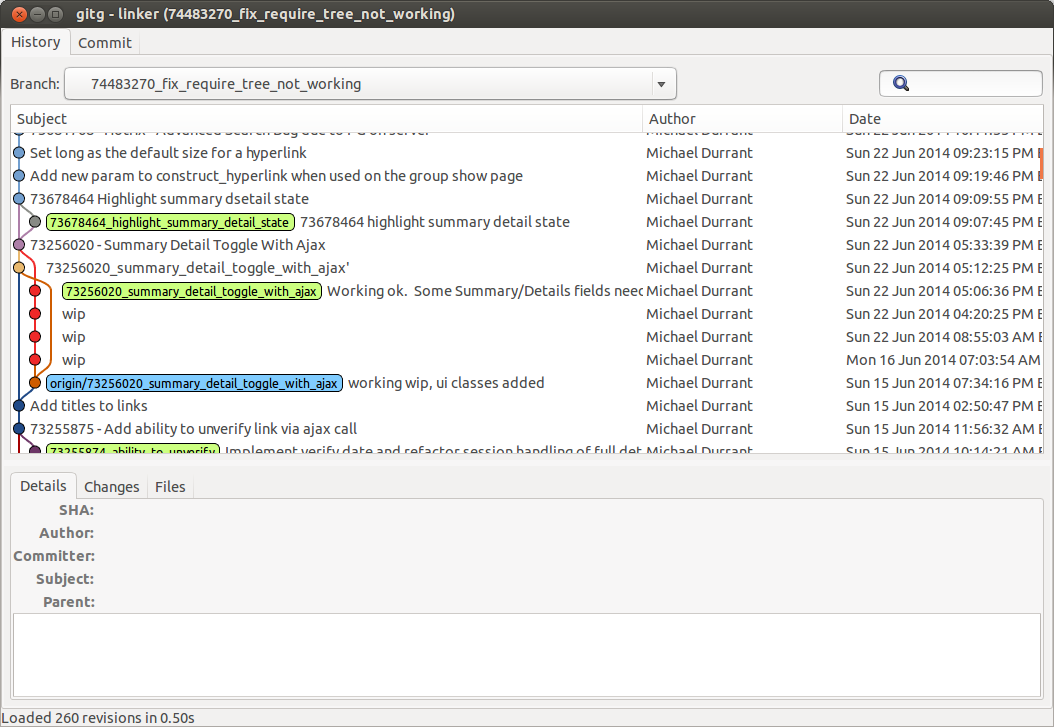
Unix & Linux用户
发布于 2015-12-14 18:02:55
我是开发GitKraken的团队成员,所以我有点偏见,但我强烈建议您检查一下。它不仅适用于Linux,也适用于Windows和Mac,它还附带了其他一些独特的特性,包括撤销/重做、索引搜索以及响应性强、直观的设计。
https://unix.stackexchange.com/questions/144100
复制相似问题
腾讯云开发者

Copyright © 2013 - 2026 Tencent Cloud. All Rights Reserved. 腾讯云 版权所有
深圳市腾讯计算机系统有限公司 ICP备案/许可证号:粤B2-20090059  粤公网安备44030502008569号
腾讯云计算(北京)有限责任公司 京ICP证150476号 | 京ICP备11018762号