
更改/etc/主机文件中的IP
更改/etc/主机文件中的IP
提问于 2012-02-02 04:48:38
我是一个初学者,我有以下疑问:
- 目前,我正在通过DHCP地址分配连接到互联网。我正在跟踪来自这里的apache设置教程,他们要求我将IP 192.168.0.x分配给主从。
这个地址的意义是什么?如何在主机文件中更新与更新网络接口文件不同的内容?
主人和奴隶已经有A.B.C.D和A.B.E.F格式的IP了。
回答 1
Ask Ubuntu用户
回答已采纳
发布于 2012-02-02 06:49:50
Ubuntu和其他操作系统中的“主机”文件用于将主机名与IP地址相关联。
# /etc/hosts (for master AND slave)
192.168.0.1    master
192.168.0.2 slave如果你在主服务器上你可以ping slave,你就不用把192.168.0.2
它怎麽工作
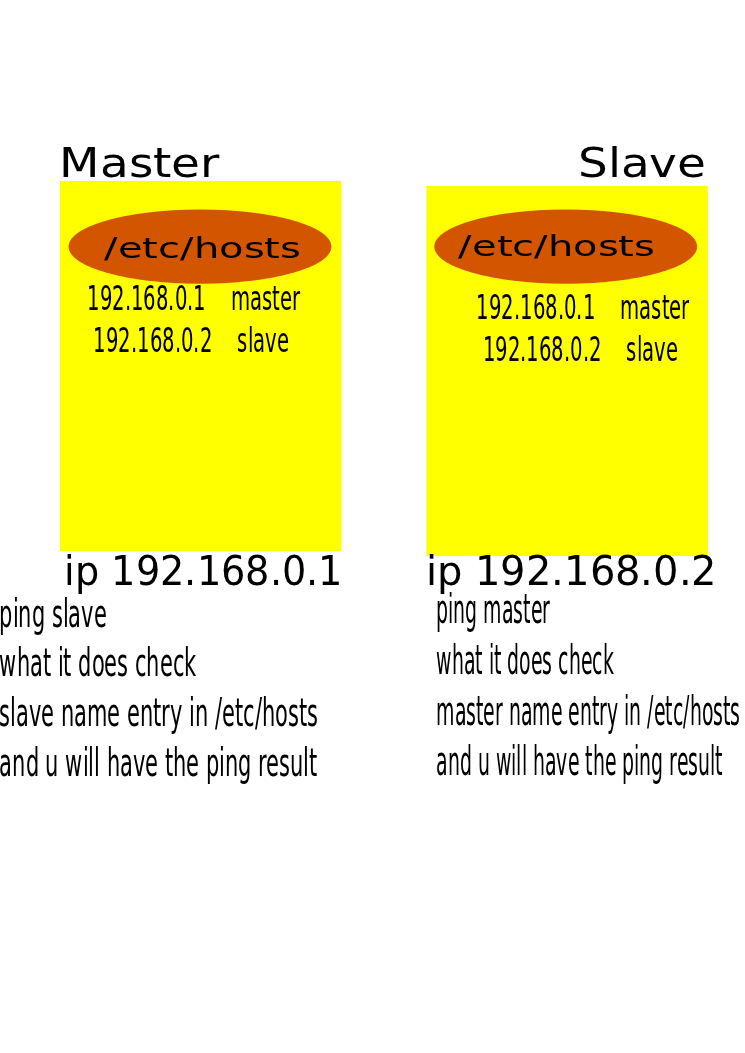
通过ping从主u不需要记住从服务器的ip地址,只要ping从/etc/host文件将解决与ip自动
可以编辑网络配置
/etc/network/interfaces。
(船长)
auto eth0
iface eth0 inet static
        address 192.168.0.1  (or any ip u want )
        netmask 255.255.255.0
        network 192.168.0.0
        broadcast 192.168.0.255
        gateway 192.168.0.1 ( Your gateway , Your router ip )
(奴隶)
auto eth0
iface eth0 inet static
        address 192.168.0.2 ( or any ip u want )
        netmask 255.255.255.0
        network 192.168.0.0
        broadcast 192.168.0.255
        gateway 192.168.0.1 ( Your gateway , Your router ip )
现在,在编辑/etc/host文件中添加主从条目
现在如何找到网关
在做任何事情之前,请输入# route
route
Kernel IP routing table
Destination     Gateway         Genmask         Flags Metric Ref    Use Iface
default       **192.168.0.1**     0.0.0.0         UG    0      0        0 eth0
或
  route -n

    Kernel IP routing table
    Destination     Gateway         Genmask         Flags Metric Ref    Use Iface
    192.168.0.0     0.0.0.0         255.255.255.0   U     0      0        0 eth0
    0.0.0.0      **192.168.0.1**     0.0.0.0         UG    0      0        0 eth0
希望这能帮到你
页面原文内容由Ask Ubuntu提供。腾讯云小微IT领域专用引擎提供翻译支持
原文链接:
https://askubuntu.com/questions/100676
复制相关文章
相似问题
腾讯云开发者

Copyright © 2013 - 2026 Tencent Cloud. All Rights Reserved. 腾讯云 版权所有
深圳市腾讯计算机系统有限公司 ICP备案/许可证号:粤B2-20090059  粤公网安备44030502008569号
腾讯云计算(北京)有限责任公司 京ICP证150476号 | 京ICP备11018762号