
Ubuntu20.04- Gnome调整-已安装的shell主题没有显示在下拉列表中
Ubuntu20.04- Gnome调整-已安装的shell主题没有显示在下拉列表中
提问于 2021-07-24 16:49:07
我正在学习Linux关于安装Orchis主题的教程,我能够为应用程序、游标和图标安装和选择主题,但我无法在Shell下拉菜单中选择"Orchis“。
我遵循了与Linux相同的步骤,我还将主题复制到Home/.themes,也复制了usr/share/themes。我试着重新启动我的电脑,但它仍然没有出现。我做错了什么?
这是我遵循的教程:https://youtu.be/qC0mnGprbeM?t=480
回答 1
Ask Ubuntu用户
发布于 2021-07-25 05:43:26
当您从解压缩下载的zip文件运行install.sh脚本时,Orchis-theme-master.zip
如果没有安装包sassc,您将注意到这一点。“第74行: sassc:命令找不到”
~/Downloads/Orchis-theme-master$ ./install.sh
sassc needs to be installed to generate the css.
/home/pratap/Downloads/Orchis-theme-master/core.sh: line 166: has_command: command not found
/home/pratap/Downloads/Orchis-theme-master/core.sh: line 168: has_command: command not found
/home/pratap/Downloads/Orchis-theme-master/core.sh: line 170: has_command: command not found
/home/pratap/Downloads/Orchis-theme-master/core.sh: line 172: has_command: command not found
/home/pratap/Downloads/Orchis-theme-master/core.sh: line 174: has_command: command not found
Installing '/home/pratap/.themes/Orchis'...
/home/pratap/Downloads/Orchis-theme-master/core.sh: line 74: sassc: command not found
Installing '/home/pratap/.themes/Orchis-compact'...
/home/pratap/Downloads/Orchis-theme-master/core.sh: line 74: sassc: command not found
Installing '/home/pratap/.themes/Orchis-light'...
/home/pratap/Downloads/Orchis-theme-master/core.sh: line 74: sassc: command not found
Installing '/home/pratap/.themes/Orchis-light-compact'...
/home/pratap/Downloads/Orchis-theme-master/core.sh: line 74: sassc: command not found
Installing '/home/pratap/.themes/Orchis-dark'...
/home/pratap/Downloads/Orchis-theme-master/core.sh: line 74: sassc: command not found
Installing '/home/pratap/.themes/Orchis-dark-compact'...
/home/pratap/Downloads/Orchis-theme-master/core.sh: line 74: sassc: command not found

Done.
当包sassc不可用时,脚本无法生成gnome. the文件。
您应该首先使用下面的命令安装该软件包
sudo apt install sassc然后再运行脚本。
~/Downloads/Orchis-theme-master$ sudo apt install sassc
[sudo] password for pratap:
Reading package lists... Done
Building dependency tree
Reading state information... Done
The following additional packages will be installed:
  libsass1
The following NEW packages will be installed:
  libsass1 sassc
0 upgraded, 2 newly installed, 0 to remove and 27 not upgraded.
Need to get 695 kB of archives.
After this operation, 2,801 kB of additional disk space will be used.
Do you want to continue? [Y/n]
Get:1 http://in.archive.ubuntu.com/ubuntu focal/universe amd64 libsass1 amd64 3.6.3-1ubuntu1 [684 kB]
Get:2 http://in.archive.ubuntu.com/ubuntu focal/universe amd64 sassc amd64 3.6.1-2 [10.4 kB]
Fetched 695 kB in 10s (66.7 kB/s)
Selecting previously unselected package libsass1:amd64.
(Reading database ... 164042 files and directories currently installed.)
Preparing to unpack .../libsass1_3.6.3-1ubuntu1_amd64.deb ...
Unpacking libsass1:amd64 (3.6.3-1ubuntu1) ...
Selecting previously unselected package sassc.
Preparing to unpack .../sassc_3.6.1-2_amd64.deb ...
Unpacking sassc (3.6.1-2) ...
Setting up libsass1:amd64 (3.6.3-1ubuntu1) ...
Setting up sassc (3.6.1-2) ...
Processing triggers for man-db (2.9.1-1) ...
Processing triggers for libc-bin (2.31-0ubuntu9.2) ...
pratap@antarctica:~/Downloads/Orchis-theme-master$ ./install.sh
Installing '/home/pratap/.themes/Orchis'...
Installing '/home/pratap/.themes/Orchis-compact'...
Installing '/home/pratap/.themes/Orchis-light'...
Installing '/home/pratap/.themes/Orchis-light-compact'...
Installing '/home/pratap/.themes/Orchis-dark'...
Installing '/home/pratap/.themes/Orchis-dark-compact'...

Done.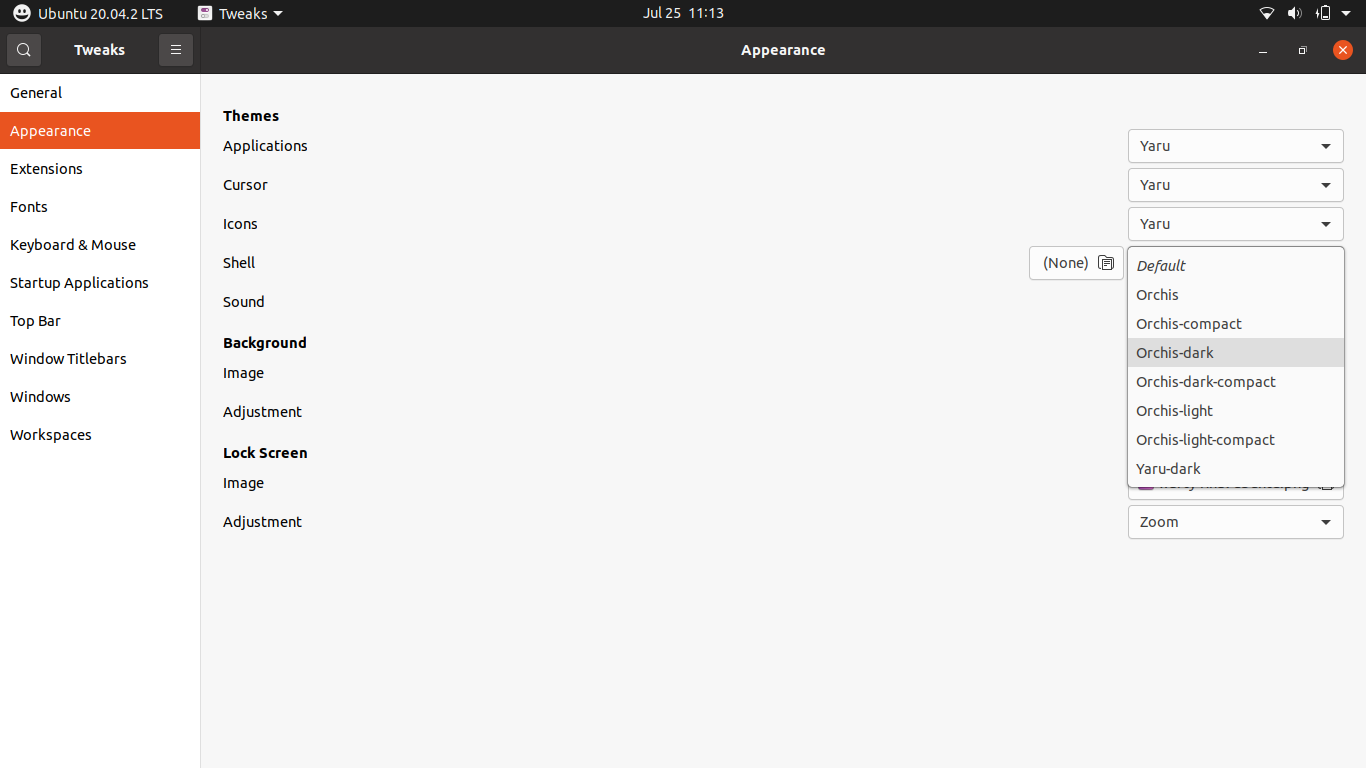
页面原文内容由Ask Ubuntu提供。腾讯云小微IT领域专用引擎提供翻译支持
原文链接:
https://askubuntu.com/questions/1353849
复制相关文章
相似问题
腾讯云开发者

Copyright © 2013 - 2026 Tencent Cloud. All Rights Reserved. 腾讯云 版权所有
深圳市腾讯计算机系统有限公司 ICP备案/许可证号:粤B2-20090059  粤公网安备44030502008569号
腾讯云计算(北京)有限责任公司 京ICP证150476号 | 京ICP备11018762号