
如何安装Cisco-AnyConnect-64 bit.tar.gz?
我读过如何安装.tar.gz (或.tar.bz2)文件?这个问题,但据说提取后,我应该有像install、install.txt或README这样的文件。
Make sure you read a file called INSTALL, INSTALL.txt, README, or something similar if one was extracted. You can check if such a file exists from the terminal by using the ls command. The file can be opened and read with the command:
xdg-open INSTALL
Where INSTALL is the name of your file. This file will contain the right steps to follow to continue the installation process.
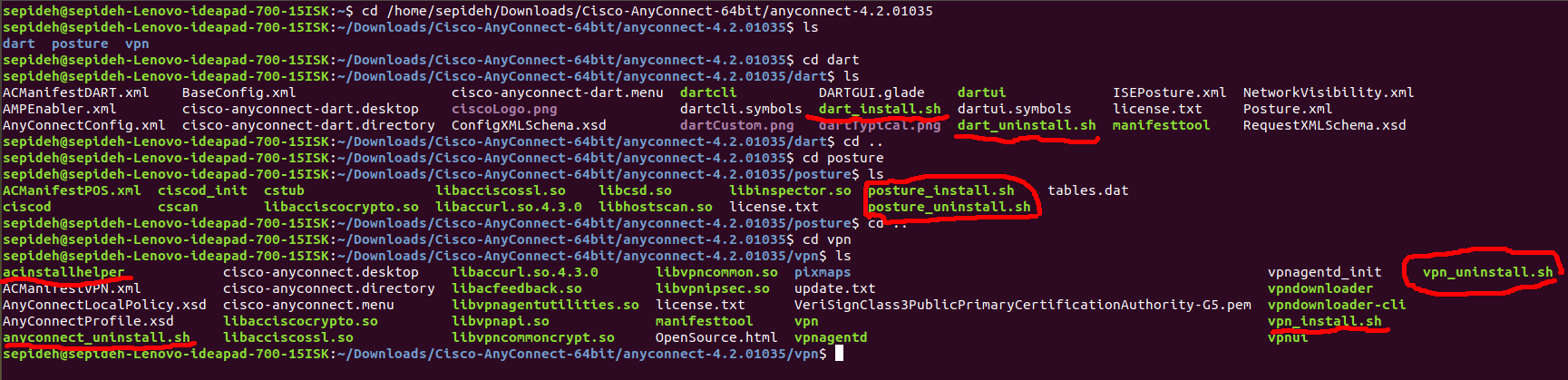
但没有这样的档案。在包含单词install的文件中,有7个文件的扩展名为.sh。文件acinstallhelper是程序的类型。没有名为README的文件
回答 2
Ask Ubuntu用户
发布于 2018-09-04 13:03:06
这些是泛型.tgz包的泛型指令。
我找到了一个关于如何在Debian/Ubuntu系统上具体安装Cisco AnyConnet的非常简单的指南这里。
Ask Ubuntu用户
发布于 2021-01-28 17:27:12
思科AnyConnect如何- Linux
- 将
.gz安装存档从https://anyconnect.springernature.com下载到桌面anyconnect-linux64-4.9.01095-predeploy-k9.tar.gz - 将存档解压缩到以下文件夹
anyconnect-linux64- 4.8.03052-predeploy-k9.tar.gz中的桌面 - 打开终端窗口并导航到终端中的解压缩文件夹--例如,当提示输入
cd ~/Desktop/ anyconnect-linux64-4.9.0.1095/vpn类型sudo ./vpn_install.sh和cd ~/Desktop/ anyconnect-linux64-4.9.0.1095/postureTypesudo ./posture_install.sh时,请输入root密码。同意许可协议。安装现在应该开始并引导您完成设置。 - 在某些Linux版本中,可能需要安装
libgtk2.0-0。 - 安装后,如果无法启动AnyConnect客户机,则需要重新启动您的Linux。安装成功后,启动Cisco AnnyConnect安全移动客户端,并在“就绪连接”行中键入
vpn.springernature.com(见图)。1)并单击Connect。然后从下拉菜单(pic.2)中选择“SpringerNature”,并使用您的AD凭据登录。在成功登录所有连接条目后,将自动下载。下一次,当您想要登录时,根据您所在的位置选择SpringerNature或其他VPN连接条目。
https://askubuntu.com/questions/1072007
复制相似问题
腾讯云开发者

Copyright © 2013 - 2026 Tencent Cloud. All Rights Reserved. 腾讯云 版权所有
深圳市腾讯计算机系统有限公司 ICP备案/许可证号:粤B2-20090059  粤公网安备44030502008569号
腾讯云计算(北京)有限责任公司 京ICP证150476号 | 京ICP备11018762号